
 By Bogdan Rancea
Choosing the right platform for your ecommerce site isn’t just about picking the one with the most features. It’s about choosing the one that fits your business, your team’s skill level, and your vision for how the brand looks and performs online. For creatives, designers, and ecommerce founders who care deeply about visuals, Showit and Squarespace often end up on the shortlist.
While both platforms allow you to build beautiful websites, they approach design and ecommerce in radically different ways. This guide compares Showit vs Squarespace, with a focus on ecommerce design — from pricing and design flexibility to SEO, blogging, and selling products.
Showit vs Squarespace: Quick Verdict
Squarespace – Best for ecommerce-first stores that want simplicity, all-in-one features, and native selling tools
Showit – Best for design-led businesses that want layout freedom and WordPress blogging flexibility
After reviewing every major feature, including pricing, ecommerce setup, SEO, design control, and integrations, Squarespace clearly leads for straightforward ecommerce execution. Showit excels if you’re running a highly visual brand and don’t mind assembling your tech stack manually.
This comparison was updated on 02/12/2026. Here’s what’s changed:
💡 Key Takeaways:
- Squarespace offers native ecommerce tools across all paid plans, with lower fees on higher tiers.
- Showit doesn’t include built-in ecommerce and instead relies on third-party tools like Shopify or WooCommerce.
- Showit offers complete layout freedom and advanced SEO when paired with WordPress.
- Squarespace supports digital and physical product sales with features like gift cards, subscriptions, and a native POS (US only).
- Showit offers greater creative control but comes with a steeper learning curve and additional integration costs.
A Quick Comparison of Squarespace vs Showit
| Feature | Squarespace | Showit |
|---|---|---|
| Starting Price | $16/mo | $22/mo |
| Ecommerce Features | Built-in store, digital sales, subscriptions | Via Shopify embeds or WooCommerce |
| Design Control | Grid-based Fluid Engine | Freeform, pixel-level layout canvas |
| Blogging | Built-in | WordPress integration (Blog plans only) |
| SEO Tools | Native SEO features | WordPress SEO plugins (Advanced Blog) |
| Performance | Platform-optimized | Dependent on design and plugins |
| Free Trial | 14 days | 14 days (limited) |
What Kind of Business is Squarespace or Showit Best For?
| Business Type | Best Platform |
|---|---|
| Visual brand (photographers, designers) | Showit |
| Selling digital downloads or memberships | Squarespace |
| Content-first or SEO-heavy business | Showit (Advanced Blog) |
| Small business with basic ecommerce needs | Squarespace |
| Scaling store with custom checkout or logic | Showit + WordPress plugins |
| Selling in-person and online (US only) | Squarespace (POS) |
1. Best for Pricing: Squarespace
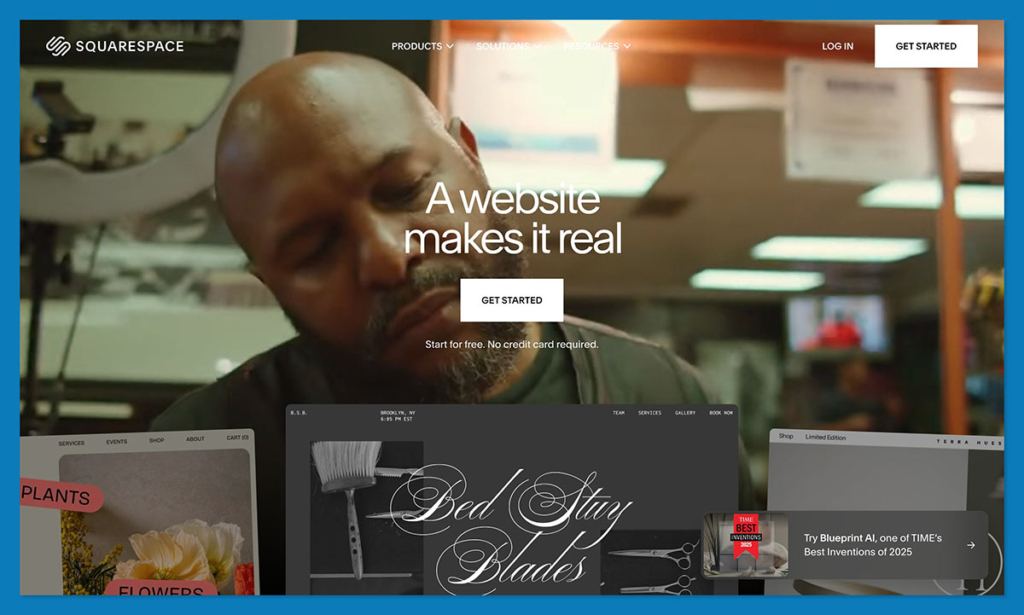
While Showit’s base plans look competitive at first glance, the real cost of running an ecommerce store tells a different story. Squarespace includes native ecommerce functionality directly inside its plans, whereas Showit requires third‑party tools such as Shopify Starter, ThriveCart, or WooCommerce to begin selling products.
Once you factor in transaction fees, plugin limitations, and integration costs, Squarespace delivers a more predictable and consolidated pricing structure for ecommerce businesses.
If you’re comparing purely on subscription cost, Showit and Squarespace appear similar. But if your goal is to sell products efficiently without stacking additional services, Squarespace provides stronger value at every level.
How Much Do Squarespace and Showit Cost?
Squarespace’s pricing ranges from $16 to $99 per month (billed annually), while Showit’s pricing ranges from $22 to $39 per month (billed annually). However, Showit’s lower sticker price does not include native ecommerce tools, which means additional services must be layered in.
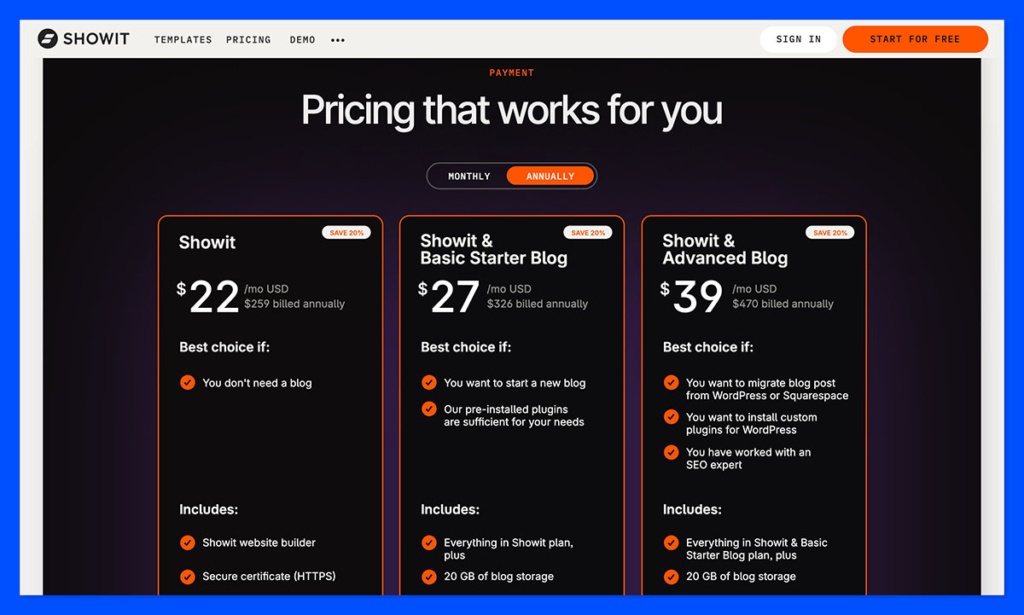
You can quickly compare the pricing below:
| Squarespace Plan (billed annually) | Key Squarespace Features Per Plan | Showit Plan (billed annually) | Key Showit Features Per Plan |
|---|---|---|---|
| Basic – $16/mo | • Website builder with Fluid Engine • Basic ecommerce capabilities • 2.9% + $0.30 processing fee (Squarespace Payments) • 7% digital product fee • SSL and hosting included • 14-day free trial | Showit (No Blog) – $22/mo | • Design canvas builder • Hosting included • No WordPress blog • No native ecommerce • Requires embedded checkout tools |
| Core – $23/mo | Everything in Basic, plus: • Reduced digital product fee (5%) • More advanced site features • Integrated blogging | Basic Blog – $27/mo | Everything in No Blog, plus: • WordPress blog included • Pre-installed plugins only • No additional plugin installations allowed |
| Plus – $39/mo | Everything in Core, plus: • Advanced ecommerce tools • 1% digital product fee • Lower processing rate (2.7% + $0.30) • More marketing features | Advanced Blog – $39/mo | Everything in Basic Blog, plus: • Full WordPress access • Custom plugin installations allowed • WooCommerce compatibility • Greater SEO flexibility |
| Advanced – $99/mo | Everything in Plus, plus: • 0% digital product fee • Lowest processing rate (2.5% + $0.30) • Advanced commerce features • Subscription selling tools | N/A | N/A |
What About Transaction Fees?
One of the biggest pricing differences appears when you look beyond monthly subscription costs.
Squarespace processing fees (Squarespace Payments, US domestic cards):
- Basic & Core: 2.9% + $0.30
- Plus: 2.7% + $0.30
- Advanced: 2.5% + $0.30
Digital product transaction fees:
- Basic: 7%
- Core: 5%
- Plus: 1%
- Advanced: 0%
This means that if you are selling digital downloads, memberships, or courses at scale, upgrading your Squarespace plan can significantly reduce your overhead. The Advanced plan completely eliminates digital product transaction fees, which can offset the higher monthly subscription for high-volume sellers.
Showit itself does not charge ecommerce transaction fees because it does not provide native ecommerce functionality. Instead, you pay the fees associated with whichever external platform you integrate, such as Shopify Starter or WooCommerce payment gateways.
This creates less transparency in total monthly costs and requires careful budgeting across multiple services.
Real Cost Comparison: Native vs Assembled Ecommerce
Squarespace includes:
- Product management
- Checkout
- Inventory tracking
- Discount codes
- Subscriptions
- Hosting
- Security
- SEO foundations
All inside one dashboard.
Showit requires:
- Ecommerce embed (Shopify Starter or similar)
- Separate payment processor account
- WordPress plugin management (Advanced Blog)
- Potential developer assistance for WooCommerce setup
- Ongoing plugin maintenance
While Showit’s entry-level pricing appears lower, the need to assemble your ecommerce stack typically results in higher total monthly operational costs, especially when factoring in third-party subscription fees and potential technical support.
Do Squarespace and Showit Offer Free Trials?
Both builders offer a 14-day free trial.
Squarespace’s trial gives full access to design tools and ecommerce features, allowing you to test product setup and checkout workflows before committing.
Showit also offers a 14-day trial, but with limitations. You cannot connect a custom domain during the trial period, and access to WordPress admin features is restricted until you upgrade to a paid plan.
Pricing Verdict
If you are evaluating pricing strictly based on monthly subscription cost, Showit’s plans appear competitive. However, once ecommerce functionality is factored in, Squarespace offers a more comprehensive and cost-effective solution for businesses that want to sell products without relying on multiple external services.
For ecommerce-focused brands seeking predictable costs and integrated selling tools, Squarespace provides better pricing value overall.
2. Best for Design Control: Showit
editors choice icon
The Winner
Showit offers unmatched creative freedom for highly visual ecommerce brands
When it comes to design freedom, Showit wins hands down. It gives users complete control over every layout element on both desktop and mobile. If you’ve worked with graphic design tools like Adobe InDesign or Canva, you’ll find Showit’s drag-and-drop interface intuitive and flexible.
This level of design freedom is especially useful for businesses whose brands are deeply rooted in visual identity. You can layer images, move buttons exactly where you want them, and design a truly one-of-a-kind homepage without the restrictions of a rigid grid system.
In contrast, Squarespace uses a structured editor called Fluid Engine, which provides a much more controlled design experience. It still offers drag-and-drop tools, but it operates within defined rows and columns to prevent layout breakage. The advantage here is consistency across devices, especially mobile.
Here’s how the two platforms compare:
| Design Tool | Showit | Squarespace |
|---|---|---|
| Editor Type | Freeform drag-and-drop canvas | Grid-based layout builder (Fluid Engine) |
| Mobile Design | Separate mobile layout per page | Grid-based mobile editor |
| Template Use | Optional; start from scratch or use a theme | Required to start with a layout |
| Visual Freedom | Total control of every element | Moderate — with structure enforced |
| Ideal For | Designers, photographers, stylists | Small businesses, simple stores, service providers |
Key Takeaways
- Showit allows pixel-perfect design across devices but requires more manual work.
- Squarespace balances creative freedom with built-in responsiveness.
- For visually bold ecommerce sites, Showit offers a more tailored creative experience.
3. Best for Ecommerce Features: Squarespace
editors choice icon
The Winner
Squarespace offers fully integrated ecommerce, no plugins required
When it comes to out-of-the-box ecommerce, Squarespace is the clear winner. It provides a fully integrated suite of ecommerce tools that are tightly woven into the platform’s backend. From product management to payment processing and subscriptions, it’s all there.
You can sell physical products, digital downloads, and services without needing to embed third-party software or plugins. Squarespace also includes basic inventory tracking, checkout customization, and built-in tools for creating discount codes, running sales, and managing shipping rules.
Showit, on the other hand, does not include ecommerce functionality. To sell anything, you must embed tools like Shopify Buy Buttons or ThriveCart, or set up WooCommerce via a paid WordPress blog plan. This approach gives you flexibility but adds significant complexity.
| Feature | Squarespace | Showit |
|---|---|---|
| Built-in ecommerce | ✅ Yes | ❌ No |
| Sell digital products | ✅ Yes | ✅ Via external tools |
| Subscription support | ✅ Advanced plan | ✅ Via plugins (e.g., WooCommerce) |
| Payment options | Squarespace Payments, Stripe, PayPal | External only (Shopify, Woo) |
| Point of Sale (POS) | ✅ Yes (US only) | ❌ No native POS |
| Checkout Customization | Limited but easy | Customizable via plugin (Advanced only) |
Summary
- Squarespace offers a true “all-in-one” ecommerce system — ideal for businesses that want simplicity and speed to launch.
- Showit is more like a design shell where ecommerce must be manually embedded from other services.
- If you plan to run a store with real-time orders and inventory, Squarespace provides a more stable and streamlined ecommerce stack.
4. Best for SEO and Blogging: Showit (Advanced Blog)
editors choice icon
The Winner
Showit offers superior SEO flexibility when paired with WordPress
Blogging and SEO are key parts of driving long-term traffic to your ecommerce store. If your marketing strategy includes regular content, Showit’s integration with WordPress is hard to beat—but only on the Advanced Blog plan.
With this setup, you can install powerful SEO plugins like Yoast SEO, Rank Math, and Schema Pro. You gain access to structured data, custom meta fields, XML sitemaps, and deeper SEO customization than Squarespace offers. This flexibility is especially valuable if your content strategy includes local SEO, content silos, or schema-rich posts.
Squarespace, in contrast, keeps things simple. It includes SEO tools like alt text fields, meta descriptions, and a built-in sitemap. These are fine for most small businesses but won’t support advanced optimization workflows. You also won’t get access to structured data or custom SEO plugins.
| SEO Feature | Squarespace | Showit (Advanced Blog) |
|---|---|---|
| Meta title/description | ✅ Built-in | ✅ Plugin controlled |
| Alt text for images | ✅ Manual entry | ✅ Manual entry |
| Sitemap | ✅ Auto-generated | ✅ Auto-generated (via WP) |
| Plugin Support | ❌ None | ✅ Full WordPress plugin access |
| Schema Markup | ❌ Limited | ✅ Via SEO plugins |
| Advanced Blogging | Basic editor | Full WordPress CMS |
Summary
- Showit + WordPress gives you a real SEO advantage if you’re willing to manage plugins and blog structure.
- Squarespace is good enough for basic SEO and blog content but has a lower performance ceiling.
- Choose Showit if content is a major traffic driver; choose Squarespace if content is more of a bonus.
5. Best for Integrations and Extensibility: Showit
editors choice icon
The Winner
Showit provides more extensibility through WordPress plugins and embed options
If your ecommerce tech stack includes multiple tools, email platforms, CRM systems, popup builders, or analytics suites, Showit gives you more room to customize. With the Advanced Blog plan, you can install any WordPress plugin and integrate with nearly any third-party platform.
You can embed custom HTML, insert scripts, and style your site with more advanced elements. Many businesses use Showit as the visual front-end and WordPress as the logic-rich backend. This model supports more advanced marketing automation, event tracking, membership areas, and lead gen systems.
Squarespace, in comparison, offers fewer integrations and restricts customization to select embed areas. It does support basic marketing tools like Acuity Scheduling and Mailchimp, and you can inject code into the site header or page blocks. But you won’t be able to build deeply customized user flows or access the variety of plugins that WordPress provides.
| Platform Feature | Squarespace | Showit |
|---|---|---|
| HTML Embed | ✅ Limited blocks | ✅ Full access |
| JavaScript Support | ✅ Header/footer only | ✅ Full WordPress control |
| Plugin Marketplace | ❌ None | ✅ WordPress plugins (Advanced) |
| Ecommerce Embeds | ⚠️ Limited support | ✅ Shopify, ThriveCart, etc. |
| CRM and Email Integrations | ✅ Mailchimp, Acuity | ✅ ConvertKit, HubSpot, WP plugins |
Summary
- Showit is ideal if your business uses multiple tools and needs full control of third-party integrations.
- Squarespace is better for businesses that want fewer moving parts and rely on native features.
- If growth means adding new tools and marketing automations, Showit gives you the flexibility to scale.
6. Best for Performance and Hosting: Squarespace
editors choice icon
The Winner
Squarespace provides faster setup, fewer performance risks, and less maintenance
Squarespace is a fully managed platform, meaning you don’t need to worry about hosting, server speed, SSL, caching, or plugin conflicts. Everything is optimized to run reliably from day one. The builder includes CDN support, responsive templates, and automatic updates, reducing the number of technical issues that might affect performance.
Showit is more of a hybrid solution. It hosts your visual site on its own servers and hosts the WordPress blog separately. This introduces complexity. Performance can vary depending on how well your images are optimized, which WordPress plugins you use, and whether you implement caching tools or not.
Heavy layouts or uncompressed images on Showit can slow down your site, especially on mobile. And if you add WooCommerce or membership plugins, you’ll need to monitor site speed regularly.
| Hosting & Speed | Squarespace | Showit |
|---|---|---|
| Hosting Type | Fully managed | Managed (Showit) + WP hosting |
| SSL | ✅ Included | ✅ Included |
| CDN | ✅ Yes | ✅ Yes (with WP caching plugin) |
| Speed Optimization | Platform-managed | User-managed |
| Maintenance | Minimal | Requires plugin upkeep |
Summary
- Squarespace offers low-maintenance reliability, especially for first-time store owners.
- Showit requires hands-on management for performance tuning and security updates.
- If you want peace of mind with hosting and uptime, Squarespace is the safer option.
Final Verdict: Which Platform Is Right for Your Store?
If you want a fast, all-in-one ecommerce solution with native selling tools, built-in SEO, and minimal setup, Squarespace is the better choice, it’s ideal for small businesses and creators who want everything under one roof without technical maintenance.
On the other hand, Showit is best for design-led brands that prioritize visual freedom, advanced SEO through WordPress, and are comfortable assembling their ecommerce stack with tools like Shopify or WooCommerce.
The right platform comes down to how much control you want versus how much complexity you’re willing to manage.
| Scenario | Best Platform |
|---|---|
| You want to launch an online store fast | Squarespace |
| You’re a designer who wants pixel-level control | Showit |
| You plan to blog weekly and scale SEO traffic | Showit (Advanced) |
| You’re selling digital products or memberships | Squarespace (Plus or Advanced) |
| You prefer all-in-one simplicity with fewer integrations | Squarespace |
| You use a complex marketing stack and WordPress tools | Showit (Advanced Blog) |


