
 By Bogdan Rancea
Atlas AI Store Builder is one of the fastest ways to launch a one-product Shopify store, turning a single pasted product link into a complete storefront with AI copy, product images, bundles, and cart upsells in about two minutes.
In this review, I’ll take a closer look at Atlas’s pricing, features, and the Bolt theme, so you can see exactly who this builder is right for and who is better off elsewhere.
Key Takeaways 🔍
- Atlas builds a full one-product store from a single link in roughly two minutes, with no code needed to get live
- Atlas runs on one All-in-One plan at $39/month with a 7-day free trial, and the Atlas Bolt theme is a separate $249 one-time purchase
- Bundles and cart upsells are built in, replacing apps that usually cost $10 to $30 per month each
- Every Atlas store uses the same Bolt theme, which is a real differentiation risk if brand identity sells your product
- The most common 1-star complaint is billing after cancellation, so cancel well before renewal and check your next Shopify invoice
📢 How I tested Atlas
I built a store with Atlas myself rather than assembling this from other people’s write-ups. I installed it from the Shopify App Store, ran it on the free trial, pasted a product link, and pushed the generated store through the parts that decide whether a tool like this is worth paying for: how fast it really builds, how the Bolt theme holds up once you look closely, how much editing the AI copy needs before it can face paid traffic, and how far customization goes before you are writing CSS. Where Atlas makes a claim I could not confirm inside the product, I say so.
Atlas is a fast, legitimately polished way to spin up a one-product Shopify store from a pasted product link. It suits dropshippers and solo founders who value speed and built-in bundles plus upsells over a unique brand look. I score it 3.9 out of 5: strong ratings and a real product, weighed against a billing-complaint pattern, design sameness, and AI copy that needs editing.
| Category | Rating | Note |
|---|---|---|
| Ease of use | 4.5/5 | Paste a link, get a store in minutes |
| Design and theme | 4.0/5 | Premium Bolt theme, but every store looks the same |
| Features | 3.8/5 | Strong bundles and upsells, no editor, research, CSV, or analytics |
| Value | 3.7/5 | $39/mo all-in is fair, theme is $249 extra |
| Support | 4.0/5 | Praised in reviews, billing handling drags it down |
| Overall | 3.9/5 | Fast one-product builder with a billing caveat |
As of mid-2026, Atlas runs on a single All-in-One plan at $39/month with a 7-day free trial, and the Atlas Bolt theme is sold separately for $249 one-time. Atlas claims its tool has built 10K+ stores, generated $250M+ in user revenue, and launches a store in about 2 minutes (figures per helloatlas.io, not independently verified). Note that Atlas was formerly named Dropshipt, which is why its Shopify listing still lives at the /dropshipt slug. The rest of this review tests each piece, feature by feature, so you know exactly what you are paying for.
1. AI Store Generation: What Paste-a-Link Actually Builds
Paste a single product link from AliExpress, Amazon, Alibaba, or a Shopify URL, and Atlas builds an entire store. Homepage, product pages, collections, AI-written copy, and AI-enhanced images all appear in roughly two minutes. Atlas claims under 60 seconds; the testimonials I read land closer to two. Either way, the speed is genuinely impressive.
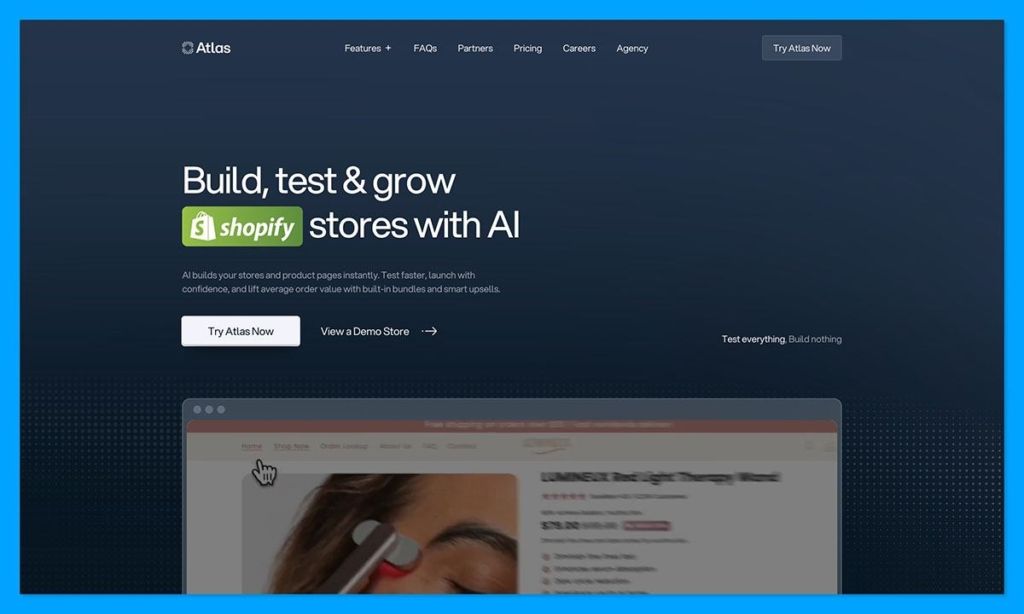
Here is the actual workflow. Atlas analyzes the product, runs a quick market-research pass, generates the store on its Atlas Bolt theme, and lets you import to Shopify in one click. Atlas cites a 2.0-minute average launch time, which I would treat as a vendor-claimed figure rather than a tested guarantee. It supports up to 20 product links, though it is built for one product (more on that in section 7).
In my read of the output, the result is launch-shaped but generic. The AI copy is functional, not audience-optimized, and you will want to spend 30 to 60 minutes editing it before you point paid traffic at the store. The AI product images are usable straight away.
One important correction, because the SERP gets this wrong. Atlas does not do AI product research or product suggestions, it has no CSV import, and there is no standalone drag-and-drop editor. Printkk claims all three; none are real. Atlas needs you to already have a product link in hand.
What works
- Genuinely fast generation, a full store in about two minutes
- Complete store, not just a single landing page
- AI images included and usable out of the box
What does not
- Generic copy that needs human editing before launch
- Not a product finder, you bring the product
- No CSV import for bulk catalogs
Best for sellers who already have a winning product to test fast. Skip it if you expected Atlas to find products for you.
2. Atlas Bolt Theme and Design: Premium Look, Same Look
The Atlas Bolt theme is the best thing about Atlas. It is also a quiet liability, and both things are true at once.
Start with the good. Bolt is a proprietary premium theme built from scratch, not a Dawn reskin. It ships with 35+ customizable sections: hero banners, testimonial blocks, FAQ accordions, urgency timers, comparison tables, and guarantee blocks, plus smooth animations and modern typography. Multiple independent reviewers agree it rivals one-time premium themes that sell for $149 to $349, and it avoids the usual “cheap dropshipping store” feel. It comes with your subscription, or you can buy it standalone for $249 one-time and keep the license for life.
Now the concern competitors mention but never seriously evaluate. Every Atlas store uses the same Bolt theme, so they share the same animations, section patterns, and visual DNA. Experienced ad buyers can spot an Atlas store on sight. For premium categories where brand identity sells the product, that sameness is a real differentiation risk, and even ad-platform pattern detection may flag a recognizable template.
Customization happens inside Shopify’s native theme editor, not a dedicated builder. One reviewer (Motor Mood Co, 3-star) noted that even changing fonts cleanly required CSS. Within Bolt’s 35+ sections you have room to rearrange and restyle, so the store rarely feels locked, but the ceiling is real. I cover that limit in section 7.
What works
- Genuinely premium, polished, and fast-loading
- 35+ conversion sections built in and ready to use
What does not
- Identical across all Atlas stores, a brand risk in premium niches
- Deeper edits need the Shopify editor or hand-written CSS
The verdict: great-looking out of the box, but budget real time to differentiate it if brand identity matters to your category.
3. Built-In Bundles and Upsells: The Real Value Driver
Out of the box, every Atlas store ships with revenue features that merchants normally pay a separate app for. Bundles and cart upsells are active from day one, with no extra install.
The feature set is solid. You get BOGO, mix-and-match, and tiered bundles, plus in-cart upsells that run without popups. Debutify cites a 30% to 50% lift in average order value from upsells like these, which I would read as an upper-bound claim rather than a number you should bank on. Still, the mechanics are the real thing.
In practice, this is genuinely useful and a meaningful part of the value story. Comparable standalone bundle and upsell apps run roughly $10 to $30 per month each, and Atlas folds them in. One nuance, for honesty: a single app like Vitals ($30/mo) packs 40+ features and goes deeper on bundles than Atlas does. So Atlas wins on being included, not on raw depth. That sets up the value math in section 5.
A telling real-world signal: some existing store owners install Atlas mainly for its bundle pages. NutriNature (5-star) called it “a game-changer for setting up my product bundle pages.” That is evidence the feature stands on its own.
What works
- No separate app needed for bundles or upsells
- Multiple bundle types plus no-popup cart upsells
- Works from day one with zero configuration
What does not
- Less deep than a dedicated app like Vitals
- Base plan caps bundle revenue at $1,000 (verify the current limit live)
Quick comparison: if bundles and upsells are all you need, a dedicated app may go deeper. As part of an all-in-one builder, these are a standout.
4. Ease of Use and Setup Speed: From Install to Live Store
Building a one-product store by hand (theme, copy, images, upsells) can eat 40-plus hours or a freelancer’s invoice. Atlas compresses that into an afternoon, and for beginners that is the whole appeal.
The flow is short. Install Atlas from the Shopify App Store, start the 7-day trial, paste your product link, and click Generate. Preview the result, import to Shopify in one click, fine-tune in the Shopify editor, configure bundles and upsells, then publish. No code required to get live.
The beginner-friendly promise mostly holds up, and the reviews back it. JustADfied called it “one of the easiest Shopify page builders I’ve used.” NoviHaven said the sections are “very simple to edit without coding,” and Utina noted “the store builder is very fast.” All three are Shopify App Store five-star reviews, and ease is the most consistent theme across the positive reviews I read.
What makes the flow painless for a first-timer is that the AI handles the structural decisions you would normally agonize over. Section order, hero layout, where the upsell sits, all of it arrives pre-built. You edit a finished store rather than assembling one from a blank canvas.
Where does ease break down? Anything past the AI defaults. Custom fonts and fine layout tweaks push you into Shopify’s native editor or CSS, which is not beginner territory. That ceiling gets its own treatment in section 7.
What works
- No code required to launch a live store
- Minutes, not weeks, from install to preview
- Clear, linear flow with one-click import
What does not
- Advanced tweaks are not beginner-friendly
Direct recommendation: if you want speed over pixel-perfect control, Atlas delivers. Perfectionists will hit the Shopify editor sooner than they expect.
5. Atlas AI Pricing and Value: Does It Really Replace 5 Apps?
Despite competitor pages still listing four or five tiers, Atlas now sells a single plan. Clearing up that confusion is half the job of this section.
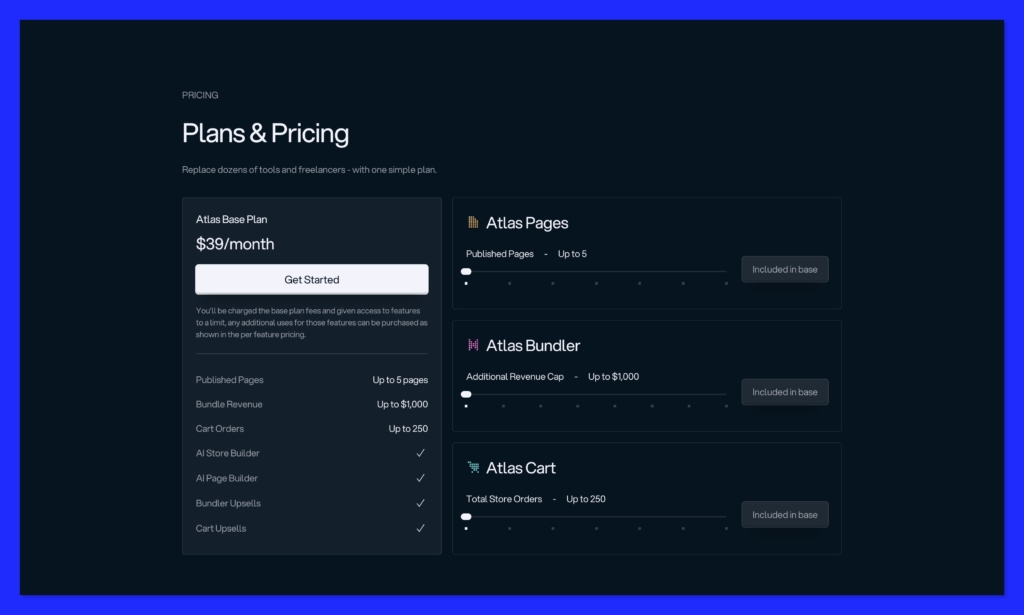
As of mid-2026, Atlas runs one All-in-One plan at $39/month with a 7-day free trial. Development stores install free with all features. The Atlas Bolt theme is a separate $249 one-time purchase. The old $29 Basic / $39 Starter / $49 Pro / $99 Expert structure you will see quoted elsewhere is legacy pricing, retired, and not what you pay today. Usage-based add-ons may raise the base limits, so confirm current numbers on helloatlas.io before you buy.
| Plan | Price | Free trial | What’s included | Usage limits |
|---|---|---|---|---|
| All-in-One | $39/mo | 7-day | AI store generation, Bolt theme, AI copy, AI images, bundles + cart upsells | ~5 published pages, 25 AI photos/mo, $1,000 bundle revenue, 250 cart orders/mo (add-ons may raise these, verify live) |
| Atlas Bolt theme (standalone) | $249 one-time | n/a | Theme + lifetime access (no AI generation, bundles, or upsells) | n/a |
Now the headline claim: does Atlas really replace five apps? Atlas says it replaces a premium theme, a page builder, a bundle/upsell app, an AI copywriter, and an AI image tool, for “$100+ in monthly savings.” Here is the honest math against the two realistic alternatives.
| Approach | Recurring/mo | Upfront | What you get |
|---|---|---|---|
| Atlas All-in-One | $39 | $0 (theme included) | Store generation + Bolt theme + bundles + upsells + AI copy/images |
| DIY stack | ~$59 to $99 | ~$149+ | Premium one-product theme (Shrine ~$149+ or Booster ~$159/yr) + GemPages ~$29 + Vitals ~$30 + AI copy tool ~$20. No AI store generation |
| Single app (Vitals only) | ~$30 | Needs a separate theme | Bundles, upsells, reviews. No store generation, no theme |
The “replaces 5 apps, saves $100+/month” line (a vendor claim from helloatlas.io) holds up directionally against a full DIY launch stack. A theme like Shrine runs $149+ one-time, GemPages adds ~$29/mo, Vitals another ~$30/mo, and an AI copy tool ~$20/mo, so the recurring total realistically lands at $59 to $99 plus the upfront theme. Against that, $39/mo all-in is a genuine saving.
The claim is overstated against a single app like Vitals, or against free Shopify Magic for copy. If all you need is bundles and upsells on a theme you already own, you are not buying five tools, you are buying one. Both readings are true; it depends on what you would otherwise buy.
What works
- $39/mo all-in is fair for a full launch stack
- Theme included in the subscription
What does not
- $249 theme is extra if you want lifetime ownership
- Overstated versus a single conversion app
- Usage caps on the base plan
The verdict: fair value if you would otherwise buy the whole stack, weak value if you only need one piece.
6. Support, Billing, and the Ratings Picture: The Honest Truth
The most common 1-star story about Atlas is not about the product. It is about getting charged after canceling. That is the pattern to walk in knowing, so let me give you the full picture, both sides.
Start with the ratings, with sources attached. On the Shopify App Store, Atlas holds 4.7/5 across roughly 408 to 411 reviews, with 88% five-star and about 5% (19 reviews) at one star. On Trustpilot, helloatlas.io sits at 4.9/5 across 264 reviews, 95% of them five-star. It is Built for Shopify certified, and Atlas has replied to 100% of its negative Trustpilot reviews. By any fair reading, Atlas is genuinely well-liked.
Now the billing pattern. Nearly every 1-star Shopify review I sampled from December 2025 to May 2026 is about billing. AetherMist canceled during the trial yet still got invoiced. The Bark & Whisker Co. wrote that they “KEEP CHARGING ME” after cancellation and uninstall. Aself was charged for two months with zero usage. Snauff.com reported a worse outcome: after uninstalling, “all of the atlas elements stay there and you cannot delete them,” taking the page down.
The mechanism explains it without excusing it. Atlas bills through Shopify’s native app billing, and as a third-party developer it cannot void a Shopify-generated invoice mid-cycle. It can only refund after the charge completes, within 24 hours, “subject to approval.” The practical fix: cancel well before renewal, set a calendar reminder, and email support@helloatlas.io the moment a wrong charge appears.
To be fair, support itself is well-reviewed for speed. NutriNature, VENVORA, and JBTends all credited fast, hands-on help in five-star reviews. The friction is billing handling, not responsiveness.
What works
- Strong overall ratings on two independent platforms
- Responsive support praised repeatedly in reviews
- Replies to negative reviews, including 100% on Trustpilot
What does not
- Recurring billing complaints after cancellation
- Refunds “subject to approval”, not guaranteed
- Leftover theme elements can break a store after uninstall
Direct recommendation: treat Atlas as a good product with a billing-hygiene caveat. Cancel early and watch your next Shopify invoice.
7. Multi-Product and Customization Limits You Should Know
Atlas can technically handle more than one product. Push it toward a real catalog, though, and you hit walls fast.
On multi-product, the headline number is 20 product links, but the practical ceiling is lower. The Bolt theme is optimized for one-product stores, multi-product and catalog layouts are constrained, and full catalog support is still listed as “planned.” The base plan’s roughly 5-published-page cap also fills quickly if you test several funnels at once.
On customization, there is no standalone drag-and-drop builder. Every edit routes through Shopify’s native theme editor, and even basic changes like fonts can require CSS, per the Motor Mood Co 3-star review. It is good enough for tweaking what the AI generated. It is not built for bespoke design systems.
That distinction matters more than it sounds. The ceiling shows up the moment you want something the theme does not already offer, like a custom layout, a non-standard font pairing, or a catalog-style grid. At that point you are writing CSS or living with the defaults, and neither is what a non-technical seller signed up for.
What works
- Fine for 1 to 2 products and focused funnels
- Up to 20 links supported on paper
What does not
- Poor fit for 20+ product catalogs
- 5-page base cap constrains simultaneous testing
- No dedicated editor, everything runs through Shopify
- Deep edits need hand-written CSS
Best for single-product or tightly focused stores. Skip it if you are building a multi-product brand or need a custom design system.
8. Who Atlas AI Is For and Who Should Skip It
Run a 30-second gut check on whether Atlas fits your situation, because the wrong profile pays $39/month for a tool it will outgrow in a week.
Good fit
- Dropshippers and solo founders testing a one-product store who already have a product link from AliExpress, Amazon, or Alibaba
- Speed-first sellers who value built-in bundles and upsells over a unique look and want to be live the same afternoon
- Beginners who want a launch-ready store without hiring a freelancer or learning a page builder
- Paid-traffic merchants for whom $39/mo is small next to a $300 to $2,000 monthly ad budget
Should skip
- Multi-product or catalog stores selling 20-plus SKUs, blocked by the one-product theme and the 5-page cap
- Brand-builders in fashion or premium cosmetics who need a distinctive identity the shared Bolt theme cannot provide
- Pre-validation explorers with no ad budget; free Shopify Magic plus a free theme is a lower-commitment way to test the waters
- Anyone expecting product research, CSV import, a drag-and-drop editor, or built-in analytics, because Atlas does none of those
The verdict: if you are a one-product tester who already has a product, Atlas is built for you. Most other profiles have a better-fit tool, which I cover next.
9. Best Atlas AI Alternatives Compared
Atlas is not the only, or always the best, way to build a converting store. Here is the honest field, priced for the current market.
| Tool | Price | Best for |
|---|---|---|
| Atlas AI | $39/mo (+$249 theme) | Fast one-product stores with built-in upsells |
| DIY stack (Shrine/Dawn + Vitals) | ~$30/mo + ~$149 theme | Maximum design uniqueness and control |
| GemPages (GemAI) | ~$29/mo (free tier) | Conversion page building with A/B testing |
| PageFly | ~$18 to $99/mo | Deep customization and 130+ integrations |
| Zipify Pages | ~$19 to $99/mo | Landing pages with tested templates |
| Shopify Magic | Free | Bootstrappers needing AI product copy only |
| Vitals | ~$30/mo | Bundles, upsells, reviews on a theme you already own |
A few honest trade-offs against Atlas. GemPages ($29/mo, with a free tier) and PageFly ($18/mo entry, $99/mo unlimited) give you more design flexibility and 130+ app integrations on PageFly’s side, plus a 5/5 page-speed rating on GemPages. Neither one generates a full store or includes native bundles, so you assemble the store yourself. The DIY stack pairing a premium theme like Shrine ($149 to $349 one-time) with Vitals gets you a truly unique brand, at the cost of 40-plus hours of setup. Vitals ($30/mo, 40+ features, 2,600+ reviews) goes deeper on bundles and upsells, but it builds no store and ships no theme.
Zipify Pages ($19 to $99/mo) leans on landing-page templates drawn from $180M in tested Shopify sales, useful if conversion templates matter more than a full storefront. Shopify Magic is the free fallback, native to every Shopify plan, but it only writes copy and edits images. None of these match Atlas on raw speed from a single pasted link.
One bit of SERP context worth knowing: Dropmagic and BuildYourStore are themselves rival AI store builders, so their Atlas reviews are not neutral. They pitch unique per-store designs and a free tier against Atlas, so weigh their claims accordingly.
Quick comparison: choose Atlas for speed on one product, the DIY stack for a unique brand, GemPages or PageFly for design control, and Vitals if you only need conversion apps on a theme you already own.
10. The Verdict: Is Atlas AI Store Builder Worth It?
For the right user, yes, with eyes open on billing.
Atlas is a fast, genuinely polished one-product store builder, and its built-in bundles and upsells are the standout. It is well-liked overall, with 4.7/5 across roughly 408 to 411 Shopify reviews and 4.9/5 across 264 on Trustpilot. I score it 3.9 out of 5, the same number from the top of this review.
The caveats belong in one place. The Bolt theme makes every Atlas store look alike, the AI copy needs 30 to 60 minutes of editing, the tool is built for one product, and the billing-complaint pattern is real at cancellation. Cancel early and watch your Shopify invoice. On value, $39/mo all-in is fair against a full DIY stack and overstated against a single app, with the theme a separate $249.
Worth it for
- One-product dropshippers and solo founders who already have a product and want speed
Not worth it for
- Multi-product brands, design-led sellers, and no-budget explorers, who are better served by Shopify Magic plus a free theme, or one of the alternatives above
The practical move is simple. Start on the 7-day free trial, set a calendar reminder to cancel if it is not a fit, and decide inside that window. Pricing here is current as of mid-2026, and the theme is sold separately.
If you have a product to test and want to be live this afternoon, install Atlas and run the trial.
11. Atlas AI Store Builder FAQ
Does Atlas AI have a free trial, and how long is it?
Yes. Atlas offers a 7-day free trial as of mid-2026, per the current Shopify App Store listing. Older sources citing a 5-day trial are outdated. A free “preview” mode also exists, but it only generates and previews a store; it cannot publish live. Given the billing complaints, set a reminder to cancel before day 7 if you decide not to continue.
Can you publish a store on the free plan?
No. The free preview mode only lets you generate and preview a store. You cannot make it live or accessible to customers without the paid $39/month plan. Treat preview as a look-before-you-buy demo, not a functional free tier.
What happens to your store and theme if you cancel Atlas?
It depends on what you bought. On the subscription alone, pages may break or become inaccessible, and leftover Atlas elements can need manual removal; one user’s homepage went down after uninstall. If you bought the Bolt theme separately for $249, you keep the theme for life but lose AI generation, bundles, and upsells.
Is Atlas AI a good fit for a beginner who doesn’t have a product yet?
Mostly no. Atlas is a store builder, not a product-research tool, and it needs a product link before it can do anything. Despite some competitor claims, it does not suggest products for you. Find a product first using a tool like AutoDS, Minea, or Pipiads, then bring that link to Atlas.
Can Atlas build a multi-product store?
Technically yes, up to 20 product links. In practice, the Bolt theme is optimized for one-product stores, and the roughly 5-page base cap constrains catalog layouts. Full multi-product support is listed as “planned.” The best fit remains single-product or tightly focused stores.
Does the AI copy need editing?
Yes. Plan on 30 to 60 minutes of editing before you run paid traffic. The copy is functional but generic, and it is not tailored to a specific buyer persona. It gives you a usable starting point, not launch-ready, conversion-optimized text.
Does Atlas have drag-and-drop editing, AI product research, CSV import, or built-in analytics?
No to all four. These are inaccurate claims from low-quality content, not real Atlas features. Customization runs through Shopify’s native theme editor, there is no AI product research or CSV import, and Atlas relies on Shopify’s standard analytics rather than its own reporting.


