
 By Bogdan Rancea
I sometimes have a hard time comparing accounting software because my heart (and a brain that hates dealing with numbers) tends to tell me to immediately prefer the easier option. A lot of businesses putting tools head-to-head will probably be in the same boat, but sometimes what you define as being easy or convenient varies depending on how your business actually does things.
So in a Xero vs Sage comparison, I can’t automatically say that Xero is the best because it’s more straightforward, since Sage definitely still appeals to companies already familiar with traditional accounting controls. It isn’t easy to say one is definitely more powerful than the other either, since Xero is more useful if you need quick connections to a bunch of business tools, but Sage is helpful if you’ve got complicated accounting controls.
So, I’ve done my best to be objective here, with a complete rundown of where each platform is strongest, or weakest, for different kinds of businesses.
Xero vs Sage: Quick Verdict
For an ecommerce business, Xero is probably the better option. It’s a cloud-based system that works very well with the apps most teams already use. The AI and automation tools are incredibly helpful, plus multiple currencies are supported if you choose the right plan. It’s also helpful that every plan includes unlimited accounts, so if you’re working with a team, you don’t spend extra.
Sage does have “simpler” and more affordable tools for smaller businesses, but it’s the better overall choice for enterprises who need traditional accounting controls, custom rules, advanced reports, and far better inventory management capabilities.
To make this comparison as even as possible, I’m looking specifically at Sage 50 Cloud here, because it seems closer to Xero’s toolkit.
Best for Ecommerce
Xero
See pricing Visit Xero →$25/month (US pricing)
Unlimited users on every plan
- Plenty of great connectors, including a Shopify app
- Customizable reports and quick insights
- Capable for basic stock management
- Smart document capture, automatic reconcile, and JAX assistant
- Online-first support
Best for Complex Inventory

Sage
See pricing Visit Sage →$128.67 per month
1 to 40 users depending on plan
- Decent marketplace of connectors
- Stronger for formal reviews
- Much more advanced inventory controls
- Sage Copilot, duplicate checks, and document capture
- Phone and chat support
Xero vs Sage: How Much Do They Cost?
If you have a limited budget, Xero is immediately more inviting. Plans start at $25 per month, and there’s even a massive discount running at the moment that gives you 80% off for 6 months. The initial plan gives you most of the core features, though caps bills to 5, and invoices to 20. The Growing plan costs $55 per month with unlimited invoices, and it gives you 60 days of forecasting data rather than 30, as well as custom dashboards.
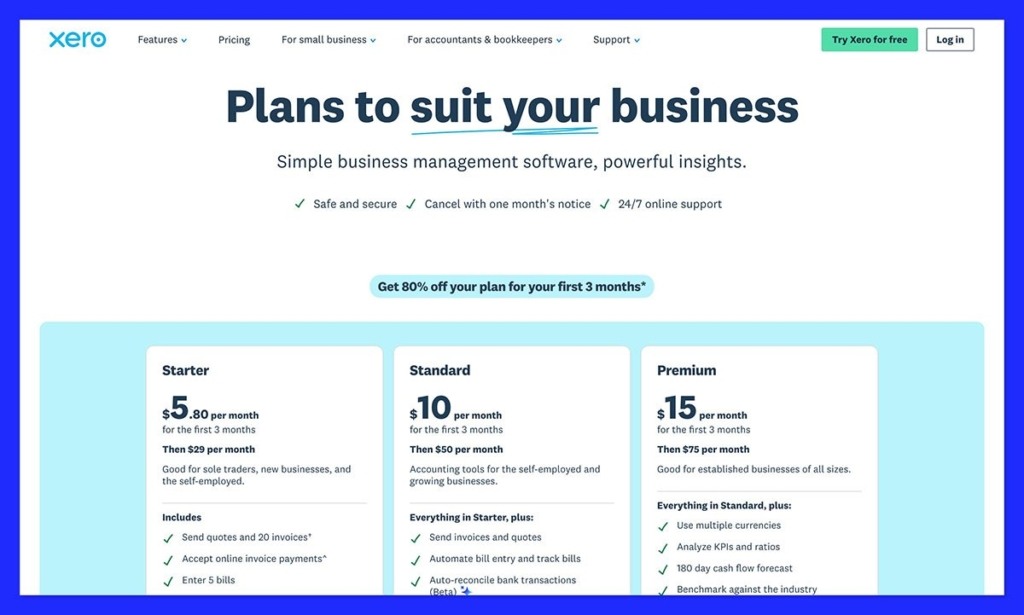
The Established plan is the better one for global brands, although it costs $90 per month, because it supports multiple currencies, time tracking, and advanced reporting. All of those plans come with support for unlimited users.
Sage has multiple packages and plans meant for different business sizes, but since we’re concentrating on Sage 50 here, the first package starts at $128.67 per month. The features you get are similar to what you’d expect from Xero, though you also get job management, real-time collaboration, and no limits on invoices.
The next plan up, costing $182.50 per month supports five users, and has advanced features for budgeting and serialized inventory tracking. There’s also the Quantum plan for $271.17 per month with more features for things like workflow management.
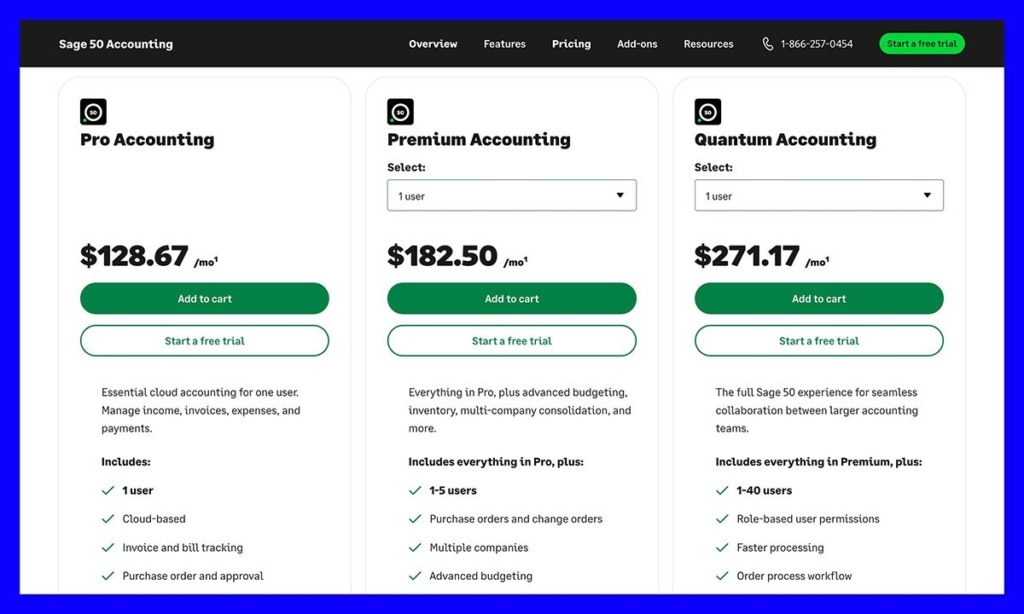
Xero has the obvious value win if you’re low on cash, but Sage still gives you a good deal, particularly if you think you’d end up paying extra for apps and tools that you’d need to built out Xero’s capabilities in the first place.
Xero vs Sage: The Main Accounting Features
Most accounting platforms overlap in feature lists somewhere, and Xero and Sage are no different. They both handle the basics very well, but Xero’s toolkit will probably attract small ecommerce store owners earlier, while Sage’s is better built-out for larger teams.
Invoicing, Bills, Expenses, Payments, and Bank Reconciliation
Xero is brilliant at making the jobs around getting paid easier. You’ve got quotes and customizable invoices, bill tracking tools, automatic receipt capture, bank reconciliation on every plan, cloud file storage, and W-9 and 1099 management. All of the essentials. Xero also introduced a few updates this year, including deposits for invoices, and scheduled invoice sending.
On higher plans, you can also take advantage of automation to handle bill entry for you too, plus there’s free ACH bill payment support across plans. Sage 50 is a bit more advanced, even on the entry-level plans. First, you’re not limited in the number of invoices you can send (but you are with Xero). You can also set up recurring invoices, bill tracking, expense management, purchase order approvals, payroll management, job management, and of course, automated reconciliation.
There’s also an AI document capture feature that Sage added in 2026, which is similar to the “smart document capture” feature on Xero. Overall, Xero still has the edge for simpler everyday bookkeeping, but Sage gives you more flexibility when things get less straightforward.
Ecommerce Channels, Marketplaces, and Integrations
Xero definitely wins on this front, and not because Sage is terrible. The platform is designed for cloud-based users who know they need to consolidate data from a lot of different apps in one place. The Shopify app is fantastic, and free to use. It lets you choose between per-sale transaction insights and daily summaries, and can even track refunds, taxes, and POS sales. You’ll also get imports for up to 90 days of history. Plus, you’re not limited to Shopify connections, there are more than 1,000 third-party apps that work with Xero now.
Sellers can combine their accounting system with various payment services, fulfillment and time-tracking tools, as well as marketplaces.
Sage doesn’t ignore integrations or ecommerce, but it’s a little more complicated. There’s the Sagify tool that can turn Shopify orders into Sage invoices and documents. It can also create missing inventory items and map taxes. Also, the CartSpan tool supports a wide range of ecommerce platforms from BigCommerce to SquareSpace. The problem is that all the systems you need to link require extra connectors, and those connectors can come with an extra cost.
The good news, though, is that since Sage has more advanced features for things like inventory management built-in already, you might not need as many integrations.
Inventory, COGS, Purchasing, and Job Costing
I really think Xero’s tools are more than fine for a smaller ecommerce company. You can track products and categories, monitor stock quantities and purchase orders, plus experiment with valuation reports and COGS. There’s also a new tracking feature for backorders, too.
Still, if you have a more complicated inventory setup, Xero seems to expect you to use an integration, rather than it’s built-in tools. You could try “Inventory Plus”, which connects Shopify and Amazon FBA, handles returns, and partial receipts, tracks multiple locations and supports FIFO, but that comes with an extra fee.
Sage 50 has more built-in from the start. There’s automated reordering and low stock alerts, multi-warehouse and batch tracking, assemblies, FIFO and average costing, specific unit costing, audit trails, change and purchase orders, plus extensive budgeting tools. Sage can also show you your net revenue, and whether jobs are running over budget.
For complicated inventory management, Sage is the obvious choice, but it still might be a bit overwhelming for a basic ecommerce store.
Multi-Currency, Sales Tax, 1099s, Payroll, and Compliance
Xero is plenty for most sellers. In the United States, sellers can use Avalara through Xero to calculate tax rates in thousands of jurisdictions, and you can easily create W-9 and 1099 documents. There’s support for VAT management for EU companies too.
Multi-currency support is available, but it does mean upgrading to the Established plan (which arguably, is still cheaper than the basic Sage 50 plan). Once you’re there, you get hourly exchange-rate updates, localized invoicing, supplier bill recording, and the option to maintain foreign bank accounts.
Sage 50 might feel a bit more built-out for global sellers initially, though. Most plans include automated exchange rates and real-time revaluation. You can also use the foreign trader module for your supplier accounts, and there’s role-based permissions, and audit trails. Unfortunately, Sage 50 doesn’t offer multi-currency natively, although there are other tools in the Sage toolkit to help there.
Sage also has more tools for payroll management, with the DIY payroll add-on to help you calculate state and federal deductions, produce W-2 reports, and track leave or benefits. Xero has integrated payroll options powered by Gusto, but the feature set isn’t quite as comprehensive at this stage.
Reporting, Dashboards, and Analytics
Sage is more advanced from a reporting perspective, with more than 150 options to choose from, including specialist solutions for things like manufacturing and distribution. You can dive deep into every transaction, apply filters, build custom reports, and even produce bulk reports together. On Premium plans, there’s also budgeting and multi-company consolidation.
Really, all of that just adds to the idea that Sage is built for bigger businesses who have more complicated questions to answer with their reports.
The downside is that Sage is generally more complicated overall. You can create more reports, but you’ll need to spend more time figuring out what they mean. Xero gives you the kind of insights you can understand and share immediately. You’ve got basic graphs, cashflow forecasts, and even financial health and performance dashboards on some plans. You can customize your reports too, changing the layout, adding or removing rows and columns, and using formulas or tracking categories to dig into different areas of your business. There’s plenty of flexibility if you want to go beyond the standard reports and focus on the numbers that matter most to you.
The AI assistant, JAX, can also help you out if you need a bit more assistance diving into the numbers. It can even provide explanations inside of dashboard widgets, with custom date ranges, run scheduled reports automatically, or benchmark your business against the competition.
AI, Automation, and Security
I wouldn’t really spend too much time comparing Xero and Sage from a security perspective, because they both get the main things right. You’ve got the JAX permissions model on Xero which helps to limit assistant access to data, plus SOC23 compliance, and plenty of business-level controls.
Sage also handles AI and data protections, as well as providing certifications for most global standards like PCI and GDPR.
The AI and automation side is more interesting. Both companies offer safe AI tools, but those solutions concentrate on different areas. JAX from Xero is more about making managing your finances easier, with smart categorization, and useful data interpretations. JAX also has a Claude and Microsoft 365 connector, and there’s the XeroForce platform for building no-code agents, although it’s still invite-only right now.
Sage offers AI access across it’s entire suite of products, from the Sage Copilot that works a lot like JAX to help you with day-to-day work, to the AI document capture tools, finance intelligence agent, and the AI Gateway. Some of these tools, however, are intended for companies on more expensive enterprise-level plans, like Sage Intacct.
Ease of Use and Customer Support
I’m reluctant to call any accounting software easy to use, but Xero is definitely the simpler one of the two. It’s meant to be simple for teams without a lot of accounting knowledge, even if it does expect you to know the basics of dual-entry accounting. The dashboards are straightforward, the AI assistant helps with the tricky parts, and the onboarding setup is fast.
Sage takes a lot more work to get up and running, and even more effort to understand fully, thanks to the traditional, data-heavy layout. It’s reliable once you know how to use it, and again, the AI tools are helpful, but there’s a far higher learning curve.
On the other hand, Sage beats Xero on support, because plans on Sage 50 include unlimited online chat and phone assistance. Xero gives you free 24/7 online help, but there’s no phone support, even if the team can set up call-backs.
Should You Choose Xero or Sage for Your Team?
Really, the decision depends on how complicated your business really is. If you need features that can help you with complicated inventory, supplier, and team management, plus in-depth reports and a lot of extra capabilities built-in so you can avoid integrations, Sage is the better choice. It’s more expensive, but it’s also more comprehensive for larger teams.
If you want a simpler way to manage finances for your ecommerce business, and you need something that’s affordable, easy-to-use, and meant for teams working on the cloud, Xero is a lot more attractive. It’s probably the first option I’d start with if I was looking for initial bookkeeping software for an ecommerce business, whereas you might consider moving to Sage after you’ve already outgrown all the tools you were already using.
Weighing up other options too? We’ve also put Xero head-to-head with QuickBooks, and broken down QuickBooks pricing for ecommerce.


