
 By Bogdan Rancea
PagePilot AI is a relatively new tool in the ecommerce space, designed to help brands build high-converting landing pages using artificial intelligence.
While traditional ecommerce page builders like Shogun or PageFly still dominate the Shopify app store, PagePilot’s AI-first approach is starting to catch attention from DTC brands, agencies, and digital marketers.
I tested PagePilot AI extensively to find out if it lives up to the hype, and in this review, I’ll walk you through everything from pricing and page templates to design customization, speed, integrations, and real user feedback.
Why You Can Trust This Review
I run a blog covering ecommerce tools and design systems, and I’ve spent over 100 hours testing landing page builders for Shopify, WooCommerce, and headless commerce stacks.
PagePilot AI stood out because it combines performance-focused design with fast AI generation, and I wanted to see if it could really replace a CRO designer and developer for most stores.
This review is based on hands-on testing, comparing PagePilot against established tools like PageFly, Unbounce, and Shogun.
PagePilot AI Pros and Cons
| Pros | Cons |
|---|---|
| Fast AI-powered landing page generation | Limited to single-page creation (not a full website builder) |
| Designed specifically for ecommerce | No WooCommerce integration yet |
| Built-in Shopify integration | Fewer design templates than competitors |
| Optimized for mobile and fast load times | Branding customization options are somewhat limited |
| No coding required | Relies on Zapier for some integrations |
What I Like
✔️ AI creates full ecommerce landing pages in minutes
✔️ Pages load fast, even on mobile
✔️ Great conversion-focused layout structure
✔️ Shopify and Klaviyo integrations are simple and effective
✔️ No developer or designer needed to launch pages
What I Don’t Like
❌ Templates lack advanced customization if you want total design control
❌ Not yet compatible with WooCommerce or other ecommerce platforms
❌ Limited A/B testing options unless you’re on the Pro or Agency plan
❌ No drag-and-drop editor like Webflow or Wix
My Experience With PagePilot AI
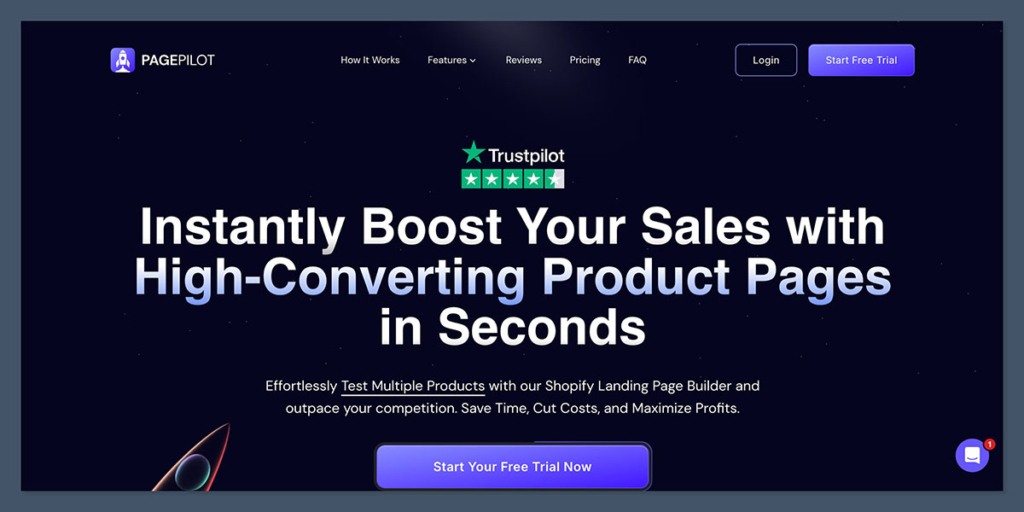
I signed up for PagePilot AI using their 7-day free trial. No credit card required.
The onboarding experience was straightforward, asking me about the product I wanted to promote, my brand tone, and what kind of ecommerce funnel I was looking to build (pre-order, lead gen, or direct-to-checkout).
Page Creation Steps
Here’s what the process looked like:
- I added my product name, a short description, and a few bullet points about the benefits.
- I uploaded my logo, added brand colors, and uploaded 3 product images.
- I selected the page type I wanted to build (product launch landing page).
- PagePilot’s AI took about 45 seconds to generate a complete landing page.
The first version was surprisingly polished. It included a hero section, feature list, testimonials, pricing block, FAQ, and a footer—all tailored to the product I entered.
AI-Powered Design & Layout
PagePilot AI is built with ecommerce best practices in mind.
Instead of giving you full design freedom like Webflow, it gives you conversion-tested sections that are optimized for mobile-first layouts. That includes:
- Large CTA buttons
- Simple scroll animations
- Bold headlines
- Social proof elements
- UGC placement
- FAQ toggles
- Trust badges
Default Layout Structure
| Section | Purpose |
|---|---|
| Hero | Instant product value proposition |
| Features | Highlight 3–5 key benefits |
| Testimonials | Add social proof and reduce objections |
| Pricing / Offer | One-time, subscription, or bundle options |
| Guarantee | Risk-reversal section (money-back, etc.) |
| FAQ | Handle common concerns |
| Footer | Branding, compliance, legal pages |
All of this is editable, but the base version was already good enough to publish with just a few copy tweaks.
Page Speed & SEO Performance
I ran the generated landing pages through Google Lighthouse and GTmetrix. This is where PagePilot impressed me the most.
Performance Test Results
| Device | Page Speed Score | Time to Interactive | Total Page Size |
|---|---|---|---|
| Desktop | 99 | 1.2 seconds | 1.1 MB |
| Mobile | 91 | 2.5 seconds | 1.3 MB |
The pages are built using semantic HTML, lazy-loaded images, and minimal JavaScript.
The result is a page that loads fast and meets Google’s Core Web Vitals, which is crucial if you’re running paid traffic or optimizing for SEO.
PagePilot also automatically generates meta tags, image alt text, and canonical URLs. It doesn’t replace a full SEO plugin, but it covers the basics well enough for landing page use.
PagePilot AI Templates
PagePilot doesn’t offer hundreds of templates like Wix or Squarespace.
Instead, it works more like Notion or Framer—with clean, focused layouts built for function over form.
Template Types Offered
- Product launch pages
- Pre-order pages
- Email capture (lead gen) pages
- Waitlist pages
- Bundle or upsell offers
All templates follow the same conversion principles: clear CTA, mobile-first layout, no distractions, and easy Shopify checkout integration.
If you’re looking for full branding flexibility or creative freedom like Webflow, this may feel limiting.
But if your goal is performance and simplicity, the structure works really well.
Customization and Editing Experience
Once your page is generated, you can customize it using a simple block-based editor.
It’s not drag-and-drop, and you can’t place elements wherever you want. Instead, you can:
- Edit text and headings
- Replace images
- Change CTA button color or copy
- Add/remove sections like testimonials or FAQs
- Insert your own scripts (for pixels, analytics, etc.)
It’s closer to editing a Notion doc or a pre-designed Webflow project than a blank canvas.
Pros of the Editor
- Simple, no learning curve
- Ideal for non-designers
- Fast to update and re-publish
Limitations
- Can’t drag elements into new positions
- No direct code access
- No real-time preview for all screen sizes
For what it’s built to do—create fast, clean landing pages—it works well. But advanced marketers or designers may feel boxed in.
Shopify Integration
One of the best things about PagePilot AI is how well it connects with Shopify.
You can link a product, collection, or checkout directly to your landing page with just a few clicks.
What’s supported:
- Add-to-cart or direct checkout buttons
- Variant selection (color, size, etc.)
- Shopify discount codes
- Klaviyo for email capture and automation
- Pixel tracking (Meta, TikTok, Google Ads)
If your ecommerce tech stack is already based on Shopify and Klaviyo, PagePilot fits right in without needing middleware or workarounds.
PagePilot AI Pricing: How Much Does It Cost?
PagePilot AI offers three pricing plans, each packed with features aimed at ecommerce brands selling through Shopify.
All plans include access to PagePilot’s AI-powered page builder, daily product research, and integration options with Shopify, Amazon, and AliExpress.
You can try any plan free—no credit card required.
PagePilot AI Pricing Overview
| Plan | Price (EUR/month) | Best For | Key Features |
|---|---|---|---|
| Lite | €39 | Solo founders or small stores | 1 Shopify store, 50 pages/month, ad copy gen, 5 AI images, product research |
| Starter | €59 | Growing ecommerce businesses | 3 Shopify stores, 150 pages/month, priority support, custom theme integration |
| Scaler | €79 | Agencies or multi-store setups | 5 Shopify stores, 250 pages/month, same features as Starter plus higher limits |
What’s Included in Every Plan?
All plans come with:
- AI-powered product landing page generation
- Ad copy generation tools
- Daily list of 10 winning products
- Support for AliExpress, Shopify, and Amazon product link imports
- 5 AI-generated product images per month
- Access to PagePilot’s private Discord community
You can try any plan for free without entering payment details, which makes it easy to see how it fits into your workflow.
Lite Plan – €39/month
The Lite plan is best suited for solo founders or newer brands running a single Shopify store.
It gives you up to 50 product landing pages per month, which is more than enough if you’re launching 1–2 new offers per week.
Includes:
- 1 connected Shopify store
- 50 AI-generated product pages per month
- 5 free AI product images
- Ad copy generation
- Daily list of 10 winning products
- Product link imports (Shopify, AliExpress, Amazon)
- Community access
Starter Plan – €59/month
The Starter plan is ideal for growing ecommerce stores or teams managing multiple brands.
You get more page capacity, additional Shopify connections, and access to premium features like custom theme integration and priority support.
Includes:
- 3 connected Shopify stores
- 150 product pages per month
- 5 AI product images
- Ad copy generation
- Daily winning product suggestions
- All product import features
- Access to Discord community
- Priority support
- Custom theme integration
This plan strikes a strong balance between power and value, especially for teams doing frequent campaigns.
Scaler Plan – €79/month
The Scaler plan is the top-tier option and is designed for agencies or ecommerce operators managing multiple brands or stores at scale.
It includes the same features as the Starter plan, but with more capacity.
Includes:
- 5 connected Shopify stores
- 250 product pages per month
- 5 AI product images
- Ad copy generation
- 10 daily winning products
- Product imports from major ecommerce platforms
- Access to the PagePilot community
- Priority support
- Custom theme integration
If you’re managing client work or running campaigns across multiple stores, this is the most scalable and efficient plan.
PagePilot AI offers a free trial on all plans, with no credit card required. You can test the features, build pages, and see how well it fits into your Shopify workflow before making a commitment.
Customer Support and Help Resources
PagePilot AI offers email and live chat support, though response times vary depending on your plan.
Support Options:
- Help docs and setup guides
- Video tutorials (short and to the point)
- Live chat during business hours
- Email support with 24-hour turnaround
- No phone support (as of Oct 2025)
For a small SaaS tool, the documentation is well-written and complete. I didn’t need to contact support often, but when I did, I got a helpful response within a few hours.
How It Compares to Other Tools
If you’re trying to decide between PagePilot AI and other ecommerce page builders, here’s how it stacks up:
| Tool | Strength | Best For | Weakness |
|---|---|---|---|
| PagePilot AI | Fast AI-generated pages | Shopify DTC brands | Limited customization |
| PageFly | Flexible drag-and-drop builder | Custom design control | Slower load times |
| Shogun | Good for CRO teams | Enterprise ecommerce | Higher learning curve |
| Unbounce | Great for B2B lead gen | SaaS and info products | Not ecommerce-specific |
PageFly
PageFly is one of the most popular Shopify page builders, offering full design control with a visual editor. It’s great for teams who want pixel-perfect layouts or highly branded experiences. The downside? It can be a bit bloated, which can hurt page load times—especially on mobile.
Shogun
Shogun is built for teams focused on CRO (conversion rate optimization), with advanced A/B testing and analytics tools baked in. It’s ideal for larger ecommerce brands or agencies managing complex testing strategies. That said, it has a steeper learning curve and takes longer to master.
Unbounce
Unbounce isn’t built specifically for ecommerce, but it’s a strong tool for lead gen and B2B funnels. It offers robust A/B testing, pop-ups, and form tools, but you won’t find native ecommerce integrations like Shopify checkout or product imports.
PagePilot wins on speed, simplicity, and performance. If you’re constantly testing offers or need to spin up pages fast, it’s a great tool.
Should You Use PagePilot AI?
PagePilot AI won’t replace your ecommerce platform, but it will make launching campaigns and testing offers dramatically faster.
For brands running paid traffic, seasonal offers, or product launches, it removes the technical bottlenecks that slow things down.
I recommend PagePilot if:
- You run a Shopify store and need conversion-focused pages
- You want to test multiple offers quickly without dev help
- You care about page speed and mobile performance
- You don’t want to pay a CRO designer $1,000 per page
It’s not right for you if:
- You need a full website or blog platform
- You rely on WooCommerce or other non-Shopify platforms
- You want complete design control from scratch
Final Verdict
After using PagePilot AI to build multiple ecommerce landing pages, I came away genuinely impressed.
It won’t replace every tool in your tech stack, but it does exactly what it claims to: build fast, clean, high-converting pages with minimal effort.
If you’re running a Shopify store and need to launch offers fast, it’s absolutely worth trying—especially with the 7-day free trial.


