
 By Bogdan Rancea
As someone who has worked with dozens of Shopify themes across fashion, beauty, lifestyle, and direct-to-consumer brands, I’m always skeptical when a theme comes with a higher-than-average price tag.
At $380 USD, the Stiletto Shopify theme is definitely positioned as a premium product.
But after testing it on both small catalogs and larger product collections, I can confidently say that it does justify the price, if you’re the right kind of store.
This review covers what makes Stiletto a top-tier theme for visually-driven brands, where it falls short, and how to make the most of its features without slowing your site down.
Whether you’re a designer, store owner, or developer, I’ll walk you through everything I’ve learned using this theme in real-world projects.
What Is the Stiletto Theme?
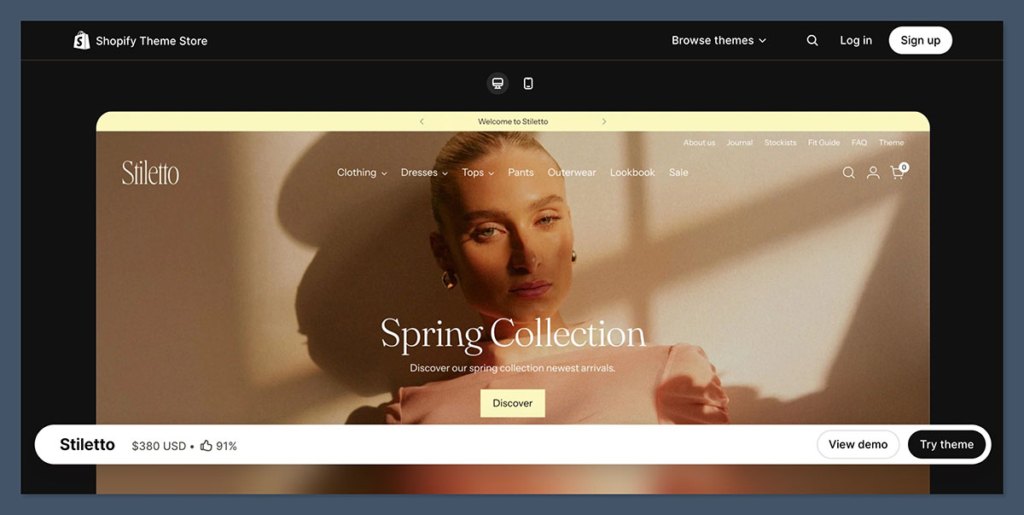
Stiletto is a premium Shopify theme created by Fluorescent Design Inc., a trusted name behind other well-known themes like Lorenza, Ira, and Spark.
Released on the Shopify Theme Store and consistently updated (the latest being version 5.2.1 in December 2025), it’s built specifically for luxury fashion and visually-led ecommerce brands.
Here’s a quick overview:
| Feature | Details |
|---|---|
| Price | $380 USD one-time fee (per store) |
| Creator | Fluorescent Design Inc. |
| Last Update | Version 5.2.1 (December 2, 2025) |
| Presets | Stiletto, Luster, Linen, Glimmer, Tapestry |
| Best for | Fashion, jewelry, accessories, editorial brands |
| Main Features | Lookbooks, video banners, mega menu, conversion tools, mobile settings |
| Reviews | 91% positive feedback (130+ reviews as of January 2026) |
This theme is clearly built with storytelling and conversions in mind. It gives store owners the ability to design an editorial-style layout without needing third-party tools or custom code.
Pros and Cons
Pros
- Clean, luxury-focused design with lookbooks, videos, and galleries
- Built-in conversion tools like sticky cart, countdowns, and upsells
- Strong mobile controls and responsive layout options
- Reduces reliance on third-party apps
- Great for large, visually-led catalogs
Cons
- $380 USD price is only worth it if you use the full feature set
- Can slow down if overloaded with media or unnecessary apps
- Not ideal for very small or minimalist stores
- Custom code edits can make future updates tricky
Design and Visual Storytelling: Where Stiletto Shines
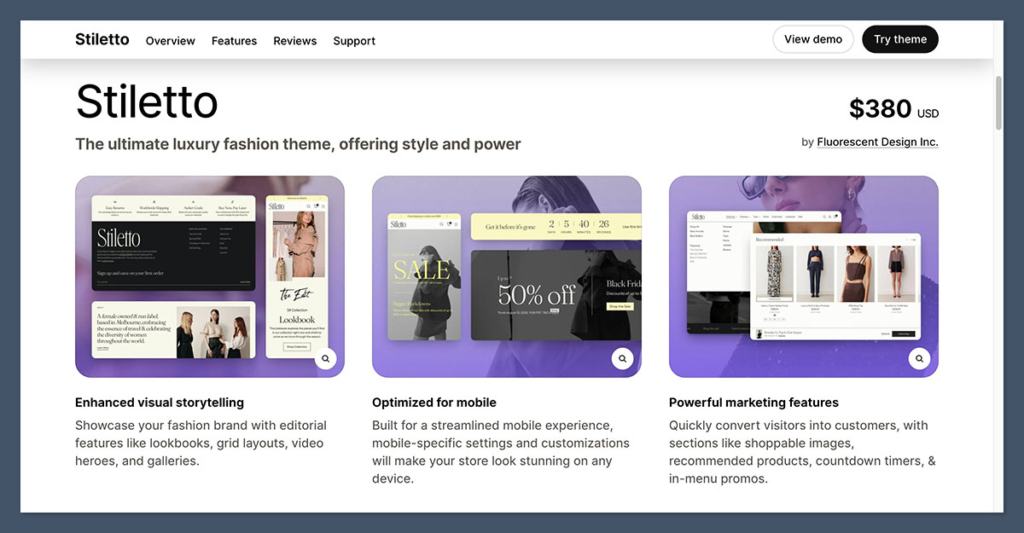
If your brand depends heavily on photography, styling, and lifestyle imagery to drive sales, Stiletto is one of the best themes on the market right now.
It was clearly designed for high-end visuals and strong product narratives.
Here’s what stands out:
- Editorial Layouts: The theme includes dedicated sections like lookbooks, galleries, and grid-based content blocks that feel like something out of a magazine spread. These layouts aren’t just decorative — they drive engagement and allow you to position your products in a more aspirational context.
- Video Heroes and Shoppable Images: You can embed autoplay videos directly into the hero sections or turn a lifestyle image into a product discovery tool with image hotspots. This creates a much more immersive experience than a standard homepage carousel.
- Mobile-Specific Settings: While many themes claim to be responsive, Stiletto goes further by letting you fine-tune how content displays on mobile devices. You can control padding, order, and visibility of sections without needing any extra CSS.
For brands in fashion, skincare, or accessories, this is the kind of layout that helps tell a story and build trust.
It makes a small brand feel bigger, and it gives larger brands more flexibility to run seasonal campaigns or product drops without rebuilding landing pages every time.
Key Design Features Summary
- 5 high-quality presets to get started quickly
- Grid-based layouts ideal for editorial storytelling
- Built-in support for video content and image carousels
- Custom content blocks like testimonials, lookbooks, featured collections
- Multiple product gallery styles and zoom options
Conversion Features: How Stiletto Reduces Your App Stack
One of the biggest strengths of the Stiletto theme is how many conversion-focused features are built directly into the theme. These are the kinds of features that, with other themes, you usually have to add via third-party apps.
Here are some of the tools included by default:
- Cart and Checkout Enhancements:
- Sticky cart
- Slide-out cart drawer
- Pre-order functionality
- Free shipping progress bar
- Trust badges and payment icons
- Urgency and Persuasion Tools:
- Countdown timer section
- Promo banners and popups
- Stock level indicators
- Product badges like “Low Stock” or “Best Seller”
- Merchandising and Upsells:
- Cross-selling and recommended products
- Recently viewed product carousel
- Size charts and product tabs
- Color swatches and image zooms
- Navigation and Filtering:
- Mega menu with promo image options
- Advanced collection filtering
- Search auto-suggestions
- Swatch filters
- Infinite scroll or pagination toggle
All of this is baked into the theme and customizable through the Shopify Theme Editor.
You don’t need to rely on apps like Vitals, Frequently Bought Together, or free shipping bar apps, which saves you both money and load time.
These features also align with how Shopify’s algorithm scores stores for performance. Fewer apps mean fewer JavaScript calls, less bloat, and a better user experience.
Performance and Speed Considerations
Now, let’s talk about where things can go sideways.
While Stiletto has clean code and strong documentation, it’s not a lightweight theme.
It’s built to support heavy media and advanced merchandising, which means you can absolutely bog down your site if you overdo it.
Some of the most common mistakes I’ve seen include:
- Uploading uncompressed hero videos or oversized images
- Using all the conversion sections at once
- Layering third-party apps on top of built-in features
- Enabling mega menus or filters when they’re not needed
These problems aren’t unique to Stiletto, but they are more visible in a feature-rich theme like this one.
One user review on the Shopify Theme Store even called the performance “abysmal,” though in that case, the merchant had loaded 4–5 third-party apps that duplicated built-in features.
Fluorescent actually has a detailed support article about this. They recommend:
- Compressing video and image files before uploading
- Using fewer homepage sections with better content
- Avoiding overlapping functionality between apps and theme tools
- Testing your store with Shopify’s built-in speed report
If you manage content carefully, the theme performs well. But if speed is your number one priority and you don’t need lookbooks or advanced merchandising, a simpler theme might serve you better.
Who Should (and Shouldn’t) Use Stiletto
Every theme has a sweet spot. Based on my experience and the kind of features Stiletto offers, here’s who I believe will get the most value from this theme:
Good Fit For:
- Fashion, beauty, jewelry, and accessories brands
- Stores with large, visual product catalogs
- Merchants who need storytelling and strong visual branding
- Ecommerce teams that want built-in tools over multiple apps
- Designers looking to build high-end aesthetics without custom code
Probably Not Ideal For:
- Minimalist stores with fewer than 10 products
- Drop shippers or one-product stores focused purely on speed
- Budget-conscious merchants who can’t justify a $380 theme
- Users who don’t need the editorial features or visual storytelling
If you plan to take full advantage of Stiletto’s lookbook, gallery, and merchandising capabilities, it’s easily worth the investment.
But if you’re only going to use basic collection pages and a single homepage layout, you might not see the full ROI.
Practical Setup Tips to Get the Most from Stiletto
Setting up Stiletto is pretty straightforward, but here are a few suggestions that can help you avoid common mistakes and get better results.
1. Start with a Preset
Stiletto offers five built-in presets. Each one includes a complete homepage, typography settings, color schemes, and example sections.
Choose one that aligns closely with your brand and then remove anything you don’t need. Don’t try to build from scratch unless you have a specific design in mind.
2. Prioritize Core Templates First
Before adding 20 homepage sections, build your core templates:
- Home
- Collection
- Product
- Cart
Then preview them on both desktop and mobile to ensure consistency. Once the foundation is solid, you can start layering in features like upsells, timers, or badges.
3. Treat Media Like a Budget
High-resolution video and images are great for storytelling, but each file comes with a cost. Think of your homepage like a portfolio — you only need a few strong visuals to sell your story.
Use compressed images, WebP formats where possible, and avoid multiple autoplay videos above the fold.
4. Avoid Redundant Apps
Stiletto includes a wide range of built-in features. Before installing another app for upsells, countdown timers, popups, or size charts, double-check that the theme doesn’t already include the same functionality.
Not only will this improve speed, but it also keeps your backend simpler to manage.
Final Thoughts: Is Stiletto Worth It?
After working with dozens of Shopify themes, I can say that Stiletto is one of the most complete premium themes available today.
It offers a high-end, editorial-style design that doesn’t compromise on ecommerce functionality. The fact that so many merchandising tools are built in saves time and app costs, which makes the $380 feel more like a long-term investment rather than a splurge.
But it’s not for everyone. If your catalog is small or your focus is pure speed, you might not need the extra features.
But for visually-led brands that want a strong design out of the box, it’s one of the best themes you can get in the Shopify Theme Store right now.
Would I recommend it? Absolutely, if you’re the kind of brand that sells through visuals, and you want flexibility without going full custom.


