
 By Bogdan Rancea
If you’re comparing website builders for your business, Webflow and Squarespace are two of the most popular options – but they couldn’t be more different.
I can confidently say that Squarespace is the better choice for most small businesses, based on over 200 hours of hands-on testing and research conducted.
It gives you a polished, professional website with built-in business tools – without needing to know what a CSS class is. But if you’re a designer or developer who needs pixel-perfect control? Webflow is in a league of its own.
Comparing Webflow vs Squarespace
I’ll review design flexibility, AI features, pricing, e-commerce, and more in this comparison. If you’re short on time, here’s a quick side-by-side look:
| Best for Design Control | Best All-in-One |
|---|---|
| Webflow | Squarespace |
| Starting Price $14/mo | Starting Price $16/mo |
| Free plan or free trial Free plan (limited) | Free plan or free trial 14-day free trial |
| AI website builder ✅ AI CodeGen + Assistant | AI website builder ✅ Blueprint AI Builder |
| Transaction fees 2% on Standard plan | Transaction fees 0% on Commerce plans |
| Recommended for Designers, agencies, and scalable startups who need pixel-perfect control | Recommended for Small businesses, freelancers, and creatives who want a stunning site live fast |
Key Takeaways 🔍
- Both builders have gone all-in on AI in 2026, but in completely different ways – Squarespace builds your site for you, Webflow builds with you
- Squarespace is significantly easier to use. If you don’t know what CSS padding is, Squarespace is the move
- Webflow’s new Next-Gen CMS can handle 1 million+ items – it’s now a legitimate headless CMS competitor
- Squarespace has better built-in business tools: invoicing, scheduling (Acuity), POS, and 0% transaction fees on Commerce plans
- Webflow is the stronger choice for technical SEO and Answer Engine Optimization (AEO), which matters more than ever in 2026
- Webflow’s pricing gets complicated fast once you add workspace seats for a team
What Kinds of Businesses Is Webflow or Squarespace Best For?
Have a specific business need in mind? Here’s a summary of what kinds of businesses Webflow and Squarespace are best for:
Squarespace Is Best for…
- Small business owners who want a polished, professional site live in hours – not days or weeks
- Freelancers, photographers, and artists who need a beautiful portfolio without touching code
- Service-based businesses that need built-in scheduling (Acuity), invoicing, and client management
- Local businesses – restaurants, salons, gyms – that want an all-in-one site with booking and POS
- Anyone selling a small catalog of products or subscriptions without third-party integrations
Webflow Is Best for…
- Professional web designers and agencies who need pixel-perfect control over every element
- Tech startups and SaaS companies building complex, data-rich marketing sites that need to scale
- Enterprise teams that need a headless CMS with API access to power multi-channel content
- Marketing teams focused on technical SEO and AEO who want granular control over schema and structured data
- Brands that need advanced animations, custom interactions, and a design that looks nothing like a template
Webflow vs Squarespace Pricing: Which Is Better Value?
At a glance, both platforms start around the same price point – Webflow at $14/mo and Squarespace at $16/mo. But the real costs diverge quickly depending on what you need.
Squarespace is more predictable. You pick a plan and that’s your cost. Webflow’s pricing can snowball, especially if you’re working with a team, because workspace seats are billed separately on top of your hosting plan.
How Much Does Squarespace Cost?
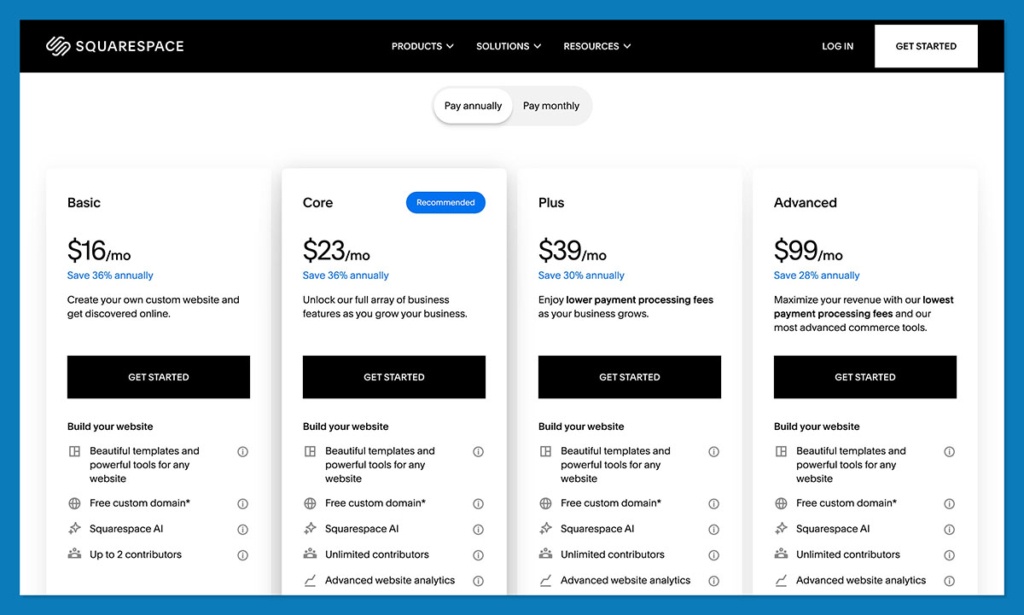
Squarespace’s pricing ranges from $16 to $52 per month (billed annually), and every plan except Personal includes some level of e-commerce functionality.
- Personal – $16/mo (portfolios and basic websites, no e-commerce)
- Business – $23/mo (basic e-commerce with a 3% transaction fee)
- Commerce Basic – $28/mo (0% transaction fees, subscriptions, advanced shipping)
- Commerce Advanced – $52/mo (abandoned cart recovery, advanced discounting)
Squarespace doesn’t have a free plan, but there’s a 14-day free trial on all tiers. It’s enough time to get a feel for the editor, but probably not enough to build and launch a full site. I’d start building before you commit so you’re not scrambling at day 12.
How Much Does Webflow Cost?
Webflow’s pricing ranges from $14 to $29+ per month for site plans (billed annually), though the real cost depends heavily on whether you need a CMS, e-commerce, or team collaboration.
- Basic – $14/mo (custom domain, no CMS)
- CMS – $23–$29/mo (full CMS access with 1,000+ templates)
- E-commerce Standard – $29/mo (2% transaction fee, up to 500 products)
Author’s notes… Webflow’s pricing looks competitive until you factor in workspace seats. If you’re a solo designer, the CMS plan at $23–29/mo is genuinely good value. But the moment you bring in a client or a developer for collaborative editing, you’re looking at an additional $16–$49/mo per seat. For a three-person agency team, that’s potentially $150+/mo before you’ve even factored in the hosting plan. Squarespace doesn’t have this problem – contributor access is included.
The 2026 AI Feature Showdown
This is where things get really interesting. Both Webflow and Squarespace made massive AI investments between late 2025 and early 2026. AI isn’t a gimmick anymore – it’s actively generating layouts, writing code, optimizing for search, and even coaching you on business strategy. But the two platforms use AI in fundamentally different ways.
Squarespace AI (“Design Intelligence”)
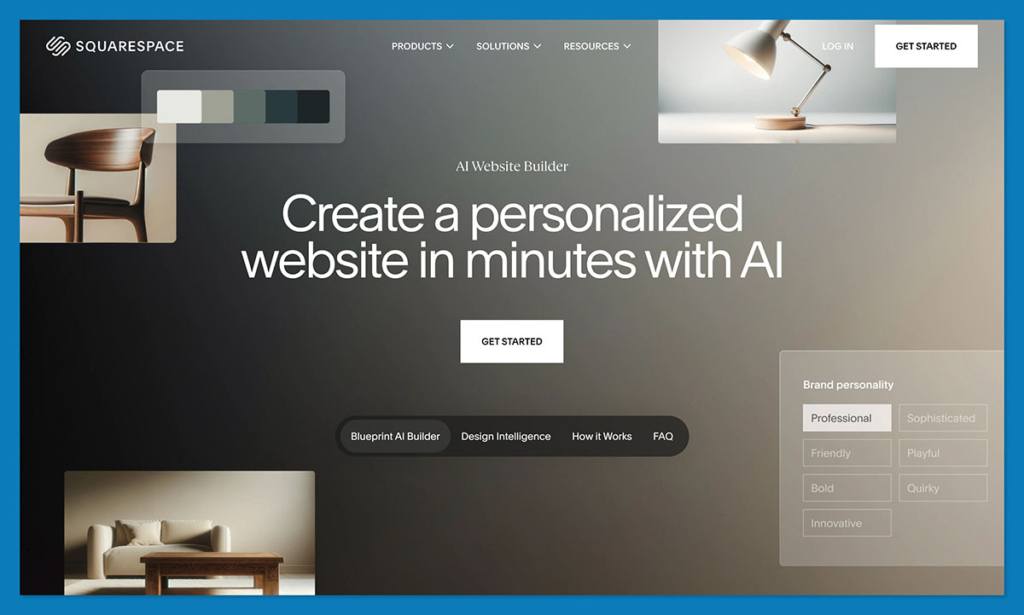
Squarespace’s AI is built around what they’re calling “Design Intelligence” – and it’s basically designed to eliminate blank-page syndrome entirely. The flagship feature is the Blueprint AI Builder, which was recognized as one of TIME’s Best Inventions of 2025. You answer a few conversational prompts (or use the Squarespace GPT inside ChatGPT) and it generates a personalized layout with tailored copy and background images matched to your brand.
On top of that, Squarespace launched Beacon AI as part of their 2025/2026 “Refresh.” It’s a centralized AI business partner that lives in your dashboard – think of it like a digital consultant that gives you step-by-step guidance on growing your business, improving your SEO, and streamlining site management.
Other notable AI tools include:
- AI Product Composer: Generates professional product listings from a single image or short prompt
- AI FAQ Composer: Builds FAQ sections designed to boost visibility in AI-generated search summaries
- AI Discount Composer: Recommends optimal discount strategies to drive sales without wrecking your margins
- SEO/AIO Scanner: Automatically audits your site for missing metadata and alt-text, then fills in the gaps using AI
Webflow AI (“The Creative Partner”)
Webflow’s AI goes a completely different direction. Where Squarespace builds the site for you, Webflow’s AI acts like a senior developer sitting next to you. They’ve shifted from simple text generation to full-scale Prompt-to-App capabilities.
The standout feature is AI CodeGen – Webflow’s AI can now generate production-ready code components (React, Astro modules) and even entire functional web apps like pricing calculators or dashboards, purely from text prompts. The conversational AI assistant can also restructure CMS collections, refactor code, apply bulk class naming, and troubleshoot layout issues.
For SEO and visibility, Webflow introduced AEO (Answer Engine Optimization) tools that help structure content so it can be read by AI systems like ChatGPT and Perplexity – not just Google. Their native analytics can also detect when traffic comes directly from AI assistants, and Webflow Optimize runs automated A/B testing based on user behavior.
Top Tip 💡 If data privacy is a dealbreaker for your clients, it’s worth noting that Webflow explicitly states they don’t use customer data to train their generative AI models. That’s a meaningful differentiator for enterprise teams or agencies handling sensitive content.
Design Flexibility: How Much Control Do You Actually Get?
This is probably the most important section for most people, because it’s where the two platforms diverge the hardest.
Designing with Squarespace
Squarespace uses a section-based, drag-and-drop editor powered by their Fluid Engine. It’s designed to prevent you from breaking things – and it does that well. You get around 200 free, highly polished templates that honestly look better out-of-the-box than most custom sites.
In 2026, Squarespace rolled out the “Finish Layer” suite, which is a big deal. You now get interactive block animations (scroll and hover triggered), block transforms (rotate, scale, skew), native font uploads without needing custom CSS, and block hiding so you can clean up the mobile experience without deleting desktop elements. These were legitimate gaps that Squarespace has now plugged.
Designing with Webflow
Webflow is essentially a visual interface for writing CSS. You’re working with classes, divs, flexbox, and the actual CSS box model. If that sentence made you nervous, this isn’t the platform for you. But if you nodded along, you already know the power this gives you.
There are over 6,000 templates (free and paid, with premium ones often running $49–$100+), and the new Component Canvas introduced in 2026 is a game-changer. It’s a multi-context environment where you can build, test, and edit components like buttons or cards outside of the main webpage. Changes cascade globally in real-time. They also integrated GSAP-powered interactions for incredibly complex, smooth web animations.
| Feature | Webflow | Squarespace |
|---|---|---|
| Editor type | Visual CSS canvas | Drag-and-drop (Fluid Engine) |
| Templates | 6,000+ (free & paid) | ~200 (all free) |
| Custom code | Full HTML/CSS/JS access | Limited code injection |
| Animations | GSAP-powered interactions | Block Animations (2026) |
| Learning curve | Steep – need CSS knowledge | Low – beginners welcome |
| Mobile control | Breakpoint-level editing | Block Hiding (2026) |
What the researchers think… I’d recommend Squarespace if you want a site live this week. One of its standout features is how the Blueprint AI chatbot walks you through setup – it genuinely feels like working with a designer, not filling out a form. I could ask it to reconfigure layouts, tweak the color scheme, or restructure pages after the initial build. But if you’re a designer who lives in Figma and needs total creative freedom, Webflow’s Component Canvas is worth the learning curve.
CMS & Content Management: How Do They Handle Your Content?
If you’re running a blog or managing a content-heavy site, the CMS is going to matter a lot. And this is where the gap between the two is probably the widest.
Squarespace is excellent for standard blogging. You get clean categorization, tags, RSS feeds, and an intuitive editing experience that anyone can pick up. It does what most small businesses need it to do, and it does it well. But it’s not built for massive relational databases or complex content structures.
Webflow, on the other hand, rolled out its Next-Gen CMS in late 2025 – and it’s a completely different beast. It was rebuilt from scratch to handle 1 million+ CMS items per site, 100 fields per collection, and 20 multi-reference fields per collection. It also operates as a headless CMS with Content Delivery APIs, meaning you can publish content from one Webflow database to multiple apps, platforms, or front-ends.
For a local bakery blog? Squarespace is overkill-good. For a SaaS company with 10,000+ knowledge base articles and a multi-channel content strategy? Webflow’s CMS is the only real option here.
E-Commerce: Which Builder Is Better for Selling Online?
Neither Webflow nor Squarespace is a dedicated e-commerce platform like Shopify – but both can get the job done, with different tradeoffs.
Selling with Squarespace
Squarespace is the better option for most small online stores, especially if you want everything bundled together. The Business plan starts at $23/mo with basic e-commerce (though it charges a 3% transaction fee), and the Commerce plans at $28–$52/mo drop that to 0%.
What stands out here are the built-in tools that other platforms charge extra for:
- Recurring invoices and subscription selling
- Class and appointment booking via Acuity Scheduling
- Native Point-of-Sale (POS) through the Squarespace mobile app
- 0% transaction fees on Commerce plans
Selling with Webflow
Webflow’s e-commerce starts at $29/mo with a 2% transaction fee. Where it shines is design control – you get 100% granular customization over the checkout page and cart experience, plus support for up to 15,000 SKUs with custom fields. But honest take? Complex e-commerce setups on Webflow often end up needing third-party integrations like Shopify or FoxyCart to fill the gaps.
Author’s notes… If selling products is your primary goal, I’d honestly point you toward Shopify or even Wix before either of these two. Squarespace is solid if your store is a secondary part of your site (say, a photographer selling prints alongside a portfolio). Webflow’s e-commerce is more about the design experience than the selling experience – it gives you a beautiful checkout, but the operational side requires more work.
SEO & AI Visibility: Which Builder Helps You Get Found?
In 2026, “getting found” doesn’t just mean ranking on Google anymore. AI overviews, ChatGPT-powered search, and Perplexity are pulling traffic from traditional search results. Your website builder needs to help you show up in both worlds.
Squarespace has the fundamentals covered and then some. The new SEO/AIO Scanner automatically audits your site for missing metadata and alt-text, and uses AI to fill in the gaps instantly. It’s genuinely difficult to launch a Squarespace site with bad SEO hygiene now. For beginners, this is a massive win.
Webflow is a technical SEO powerhouse. You get custom schema markup, auto-generated sitemaps, granular control over canonical tags, and hyper-clean code. The new AEO tools help structure content so it’s optimized for AI-driven search environments, and Webflow’s native analytics can detect traffic coming from AI assistants specifically. If you have a marketing team that cares about dominating both Google and AI search, Webflow is the clear winner.
Top Tip 💡 Answer Engine Optimization (AEO) is becoming critical in 2026. If your business depends on organic traffic, look closely at how each platform handles schema markup and structured data. Webflow gives you full control here. Squarespace handles the basics automatically but doesn’t offer the same level of granularity.
Is Webflow or Squarespace Easier for Beginners?
Squarespace. By a mile. This isn’t even close.
Squarespace’s Blueprint AI builder walks you through site creation in a conversational flow that genuinely feels like chatting with a designer. You can choose a template and customize from there, or let the AI generate a fully personalized layout. The drag-and-drop editor is intuitive and forgiving – you can’t accidentally break your layout, which is an underrated feature.
Webflow is powerful but intimidating. You’re working with a visual representation of the CSS box model. You need to understand classes, divs, flexbox, and how elements nest inside each other. The conversational AI assistant helps – you can ask it to restructure layouts or troubleshoot issues – but it doesn’t eliminate the fundamental learning curve. Webflow is a professional design tool that happens to be no-code.
What the researchers think… The learning curve gap has narrowed thanks to AI on both sides, but it’s still significant. In my testing, I had a Squarespace site that looked polished and professional within about 90 minutes. Getting a comparable result in Webflow took closer to a full day – and that’s with prior experience in the platform. If you’re a business owner who just wants a site up, Squarespace respects your time.
Which Builder Has Better Templates?
Webflow wins on volume with over 6,000 templates, but Squarespace wins on accessibility – all 200 of its templates are free, polished, and designed to look stunning out of the box.
Webflow’s free templates are solid, but the premium ones ($49–$100+) are where the real quality lives. If you’re already paying for a Webflow plan, adding $79 for a premium template can sting. On the other hand, the sheer variety means you’re almost guaranteed to find something that fits your specific industry or aesthetic.
Squarespace’s templates are fewer but more consistently polished. They’re organized by industry and use case, and every single one is free. For most small businesses, Squarespace’s template library is more than sufficient.
🛠️ How Do Webflow and Squarespace Support Your Business?
Squarespace offers 24/7 customer support via email and live chat, plus an extensive help center with guides and video tutorials. Their support team is responsive and genuinely helpful – you’re unlikely to feel stranded.
Webflow’s support is more community-driven. You get access to Webflow University (which is honestly one of the best free learning resources in the web design space), a community forum, and email support. But Webflow doesn’t offer live chat support, which can be frustrating if you’re stuck on something and need a quick answer. The Beacon AI in Squarespace also acts as an on-demand business advisor, which Webflow doesn’t have an equivalent for.
How We Test Website Builders
We want to make sure our comparisons are fair and reflective of both platforms in their current state, which is why we carry out regular testing and data collection. Our research process assesses a website builder across seven core areas:
- Design Flexibility (25%): Template quality, editor tools, animation capabilities, and customization depth
- AI Features (20%): Quality of AI-assisted design, content generation, and business intelligence tools
- SEO & Visibility (15%): Technical SEO capabilities, AEO features, and search performance tools
- E-Commerce (15%): Sales features, payment options, transaction fees, and inventory management
- Ease of Use (10%): Onboarding experience, editor intuitiveness, and time-to-launch
- Pricing & Value (10%): Plan costs, feature-to-price ratio, hidden fees, and upgrade paths
- Help & Support (5%): Available support channels, response quality, and learning resources
When I talk about what Webflow and Squarespace are like to use in this comparison, it’s based on real, hands-on experience with both platforms.
Final Verdict: Do I Recommend Webflow or Squarespace?
After comparing both platforms across design, AI features, e-commerce, SEO, pricing, and ease of use, Squarespace is the better choice for most people – and it’s not because it’s the more powerful platform. It’s because it delivers a professional, polished result with dramatically less effort and complexity. For small businesses, freelancers, creatives, and anyone who values their time over pixel-level control, Squarespace gets you there faster.
That said, there is no bad choice here. The two platforms are built for fundamentally different people:
- Squarespace is ideal for small businesses, freelancers, and creatives who want a stunning, professional website with built-in business tools – live in hours, not weeks. It trades ultimate creative freedom for massive time savings and built-in logistics.
- Webflow is the right choice for professional designers, agencies, and scalable startups who need pixel-perfect control, complex animations, enterprise-grade CMS capabilities, and advanced SEO/AEO tools. It trades a steep learning curve for infinite scalability and elite-level design.
The simplest gut check: if you design user interfaces in Figma for a living, choose Webflow. If you don’t know what CSS padding is, choose Squarespace. Both will give you a great site – they just take wildly different routes to get there.


