
 By Bogdan Rancea
When I started looking for a premium Shopify theme that would elevate the look and functionality of an online store, I kept seeing Icon mentioned over and over.
After testing it in a few client builds and using it for my own projects, I’ve spent enough time with it to give you a full picture.
This review is built on hands-on experience, not just marketing claims.
I’m going to walk through the features, pricing, performance, design quality, and where Icon shines or falls short.
If you’re running a visual-first brand in fashion, lifestyle, or home goods, Icon might be one of the best investments you can make.
But it’s not for everyone, and I’ll explain why.
What Is Icon and Who Is It For?
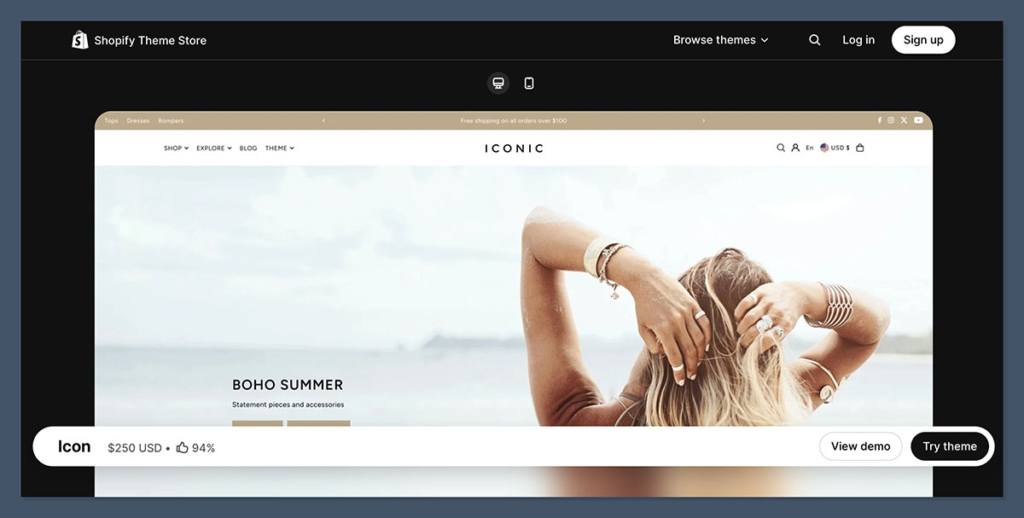
Icon is a premium Shopify theme listed at $250 on the Shopify Theme Store.
It’s designed by We Are Underground, a long-time theme developer known for creating visually polished themes that still prioritize performance and built-in ecommerce tools.
In my experience, Icon is best suited for:
- Fashion and apparel brands with strong product photography
- Lifestyle stores that sell curated collections
- Brands that rely heavily on merchandising and visual navigation
- Ecommerce teams that want built-in features without stacking multiple apps
The theme is built for merchants who want a professional-looking store that doesn’t require heavy developer work.
If you want to launch quickly and still have all the necessary ecommerce features, this is where Icon stands out.
That said, if you’re running a content-heavy site, need complex product logic, or want a highly customized layout for every page, you may find Icon’s layout structure a bit too opinionated.
It works best for direct-to-consumer brands that prioritize clarity and conversion over heavy customization.
Pros and Cons
Pros
- Modern, clean design that highlights product photography
- Deep merchandising tools included out of the box
- Built-in product discovery features like filtering and enhanced search
- Four presets for different visual styles
- Active updates with clear changelogs and support
Cons
- Requires high quality images to shine
- May include features you don’t need if you prefer minimal design
- Not ideal for content-heavy sites that rely on storytelling over product merchandising
Pricing and What You Actually Get
At $250, Icon sits below some of the newer premium themes that now reach $350 or even $400.
On the surface, that price might look like a stretch if you’re just starting out. But once you factor in how many apps it replaces, it actually becomes a money saver.
Theme Features That Replace Paid Apps
Here’s a breakdown of what comes bundled with Icon and the typical app categories it replaces:
| Feature Included in Icon | Commonly Paid App Equivalent | Estimated Monthly Cost Saved |
|---|---|---|
| Product filtering and swatches | Product filter app | $15–$20/month |
| Promo banners and tiles | Announcement/promo bar | $5–$10/month |
| Quick view and quick buy | Conversion/cart enhancer app | $10–$15/month |
| Trust and product badges | Trust badge app | $5/month |
| Mega menu with product links | Menu enhancer app | $5–$10/month |
| Countdown timers, testimonials | Conversion-focused widget apps | $10/month |
If you’re using even half of these app categories, Icon can save you between $30 and $60 per month. That means the theme could pay for itself in less than six months.
Another major advantage is Shopify’s one-time payment structure. You can try the theme in your store, customize it fully, and only pay if you publish it. That makes testing low-risk and easy to evaluate.
Design Quality and Built-In Presets
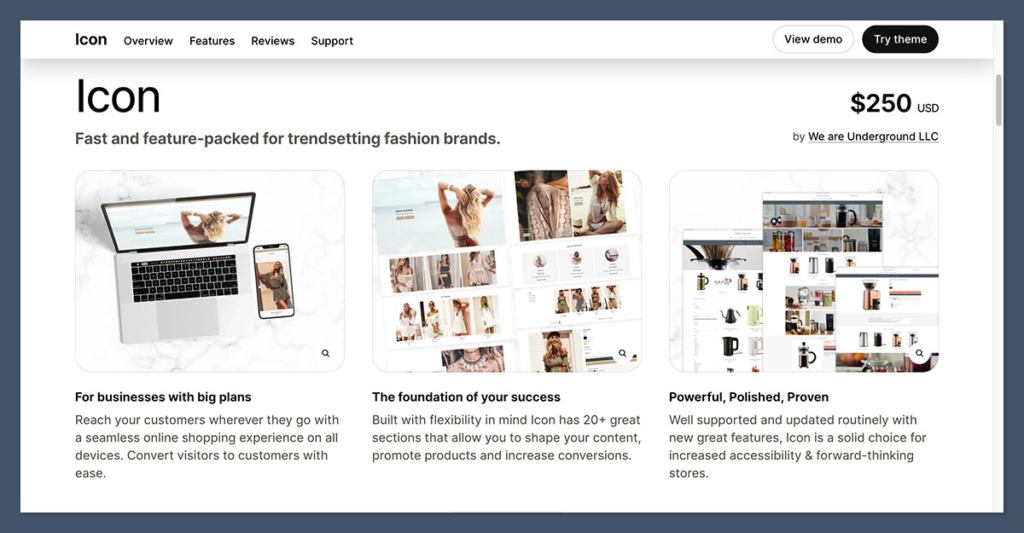
One of the reasons I picked Icon for a few fashion and lifestyle clients is the overall look and feel. The design quality is clean, modern, and editorial.
It doesn’t feel cluttered or overloaded with unnecessary effects. Instead, it gives breathing room to images and layouts.
You also get four design presets included:
| Preset Name | Best For | Visual Feel |
|---|---|---|
| Icon | General stores | Balanced, flexible, minimal |
| Dolce | Boutique apparel and lifestyle | Editorial and slightly artistic |
| Yves | Trend-focused fashion brands | Bold contrast, luxury image focus |
| Louis | Large premium catalogs | Sleek, structured, premium flagship |
What I appreciate is that these presets aren’t separate themes. They’re different starting configurations. You can load one to get a feel for a visual direction and then swap blocks, fonts, and colors as needed.
This saves a lot of time during development, especially if you’re working with tight brand guidelines.
The spacing, typography, and image handling all feel intentional. Text never crowds the visuals, and the visual hierarchy guides the eye naturally from hero banners to CTAs.
Store Building Experience and Theme Sections
Shopify’s modern theme architecture is built around “sections,” and Icon includes over 20 customizable section types that allow you to shape your storefront without needing custom code or page builders.
My Go-To Homepage Structure Using Icon
Here’s how I typically build a fashion store homepage using Icon:
- Hero slideshow or video banner with strong CTA
- Promo tiles for categories like “New Arrivals” or “Seasonal Sale”
- Featured collection grid with high-quality images
- “Shop the Look” section for outfit inspiration
- Press or customer testimonials to build trust
- Recently viewed and recommended products to drive engagement
What I really like is that these aren’t just “nice to have” blocks.
They’re practical, conversion-focused sections that you’d usually have to build or pay for separately.
You also get built-in countdowns, testimonials, and parallax image blocks, which give the site a dynamic feel without slowing things down.
Product Pages and Conversion Features
Product pages in Icon are designed to sell. You can tell the developer understands how ecommerce works, because the theme includes all the core conversion features right out of the box.
Here’s what I always turn on:
- Quick Buy and Quick View: Speeds up shopping from collection pages
- Product Badges: Useful for labeling “New,” “Limited,” or “Back in Stock”
- Stock Counter: Builds urgency, especially for fast-moving items
- Trust Badges: Helps with conversion during the decision phase
- Slide Out Cart: Keeps shoppers on-page while adding products
The product image zoom and gallery features are especially valuable if you sell products where texture, material, or detail matters. Whether it’s fashion, homeware, or artisan goods, the visual presentation is smooth and high resolution.
Another useful feature is “Shop the Look.” This allows you to display styled outfits and link each product shown, which can be a huge upsell tool for fashion brands.
Icon also supports local pickup options directly in the cart flow. This may not be relevant for everyone, but if you run a physical location, this adds convenience without custom development.
Collection Pages and Discovery Tools
This is where Icon really stands out. Collection pages and product discovery features are some of the strongest I’ve seen in a theme at this price point.
Built-in Discovery Tools
- Product Filtering: Size, color, material, price range
- Swatch Filters: Visual selectors for colors and styles
- Infinite Scroll (optional): Improves browsing flow
- Enhanced Search: Auto-suggest and predictive results
- Multi-column navigation: Surfaces more content without clutter
You don’t need a separate filtering app, which simplifies your tech stack and reduces load times. For stores with lots of SKUs, this is a massive advantage.
Infinite scroll is optional, which I find important. In some cases, it can improve browsing. But if you rely on footer content or want more structured behavior for analytics, you can disable it easily.
If you’re running any store with variations (like shoes, clothing, accessories), the built-in filtering tools make it much easier for customers to find what they want quickly.
Navigation and Merchandising Features
Icon includes a flexible mega menu system that allows you to build deeper navigation without forcing the customer to click through multiple layers. This is especially helpful if your product catalog has more than a few top-level categories.
You can also include promotional tiles inside the menu itself. That means you can use your navigation space to highlight:
- New arrivals
- Gift guides
- Seasonal collections
- Best sellers
This kind of feature helps turn your navigation into a merchandising tool. Instead of acting purely as a utility, the menu becomes part of your sales strategy.
Sticky headers are another small detail that helps mobile navigation. As users scroll, they don’t lose the ability to search or check out quickly. It’s a small touch that improves usability.
Mobile Optimization and User Experience
Mobile experience is a deal-breaker for most ecommerce stores. On average, over 70 percent of traffic comes from mobile devices.
Icon does a solid job handling mobile layouts, with tappable elements, clear product grids, and persistent navigation.
What I always check on mobile:
- Are product images legible and not cropped oddly?
- Is the “add to cart” button easy to reach?
- Does the cart open smoothly without reloading the page?
- Can customers browse collections without losing track?
Icon checks all of these boxes. The quick buy and quick view features carry over cleanly to mobile, and the sticky header keeps navigation simple.
Just remember: no theme can save you from unoptimized media. If you use large image files or autoplay videos on mobile, you’ll see slowdowns. Icon gives you a solid structure, but you still need to prep your content properly.
Performance, Updates, and Accessibility
Icon is currently on version 12.1.3 as of December 2, 2025. This latest update addressed Liquid template errors and improved compatibility with Shopify’s stricter parser standards.
That’s a good sign the theme is actively maintained and ready for long-term use.
The developer also pushes regular updates that improve accessibility and performance. For example, recent updates have included:
- Accessibility improvements to slide-out drawers
- Performance enhancements to quick view features
- UI consistency fixes across multiple devices
Accessibility improvements might not be your top priority, but they often come with better keyboard navigation, screen reader support, and general UI stability.
These things matter more than you’d expect, especially when your customer base grows more diverse.
Keep in mind, performance is still your responsibility too. A good theme helps, but if you add 20 apps and dozens of large images, you’ll still see performance issues.
Support, Documentation, and Reputation
Icon is developed by We Are Underground LLC, a Shopify theme partner with a solid track record. What I’ve seen over the years is consistent support, regular updates, and detailed documentation.
The Shopify Theme Store reviews back this up. Icon has a 94 percent positive rating with hundreds of reviews, and most of the feedback mentions either great support or ease of customization.
The documentation is especially useful.
Before publishing any store on Icon, I recommend reading through it. You’ll learn how the theme is structured, which sections to use, and what limitations you might face. It saves a lot of trial and error during setup.
Is Icon Right for You?
Icon is a strong choice if you’re running a brand where imagery does the heavy lifting.
If you’re in fashion, beauty, lifestyle, or even premium home goods, this theme can give you the polish of a custom build without hiring a developer.
You’ll also benefit from built-in merchandising tools, which means you can avoid spending extra money on apps.
You should probably skip Icon if:
- You don’t have strong visual content yet
- You’re building a blog-first or content-heavy site
- Your navigation needs are more complex than most themes support
- You’re still testing product-market fit and want to avoid upfront theme costs
Icon vs Other Popular Shopify Themes
If you’re comparing Icon with other high-end themes, here’s how it stacks up:
| Theme | Price | Best For | Key Strengths |
|---|---|---|---|
| Icon | $250 | Fashion, lifestyle, image-heavy brands | Visual layout, built-in merchandising |
| Prestige | $400 | Luxury and editorial brands | Premium design, minimalist elegance |
| Impulse | $400 | Promo-focused stores | Banners, promotions, conversion features |
| Motion | $400 | Video-heavy brands | Animations, video storytelling |
| Symmetry | $400 | General stores with complex catalogs | Layout flexibility, many homepage sections |
Icon tends to win when you want a professional look and strong merchandising features without spending $400. It’s not as minimalist as Prestige, but it’s more feature-rich out of the box.
Final Thoughts
If you’re serious about running a polished Shopify store where visuals matter, and you want a deep set of conversion tools already included, Icon is a top contender.
It’s not just a good-looking theme. It’s functional, flexible, and regularly updated.
For $250, it’s a solid investment that can replace several monthly apps and give your store a premium feel. Just make sure you’re ready to supply high quality product photography to get the most out of it.


