
 By Bogdan Rancea
Kittl is a browser-based design platform built to help creators move from idea to finished asset with speed and control.
It offers design-first features for people working on logos, merchandise, social graphics, and print-on-demand products.
If you run an ecommerce store or sell custom designs online, Kittl could be a strong alternative to general design tools like Canva or Photoshop.
In this review, I’ll walk through everything I discovered while testing Kittl’s features, plans, AI tools, and licensing terms.
I’ll also share where Kittl fits into ecommerce workflows, what limitations to watch out for, and who I’d recommend it for.
Why You Can Trust This Review
This Kittl review is based on firsthand experience using the platform for designing and exporting ecommerce-ready assets.
I’ve worked with both free and paid plans and tested tools like vector exports, AI generation, and mockup creation.
I also cross-referenced official help documentation and licensing policies to ensure accurate coverage of what Kittl offers today.
Kittl at a Glance
| Feature | Available on Pro Plan | AI Tools Included | Designed for Print | Browser-Based | Commercial Use Allowed |
|---|---|---|---|---|---|
| Typography-Focused Templates | Yes | Yes | Yes | Yes | Yes (Pro and higher) |
| High-Resolution and Vector Export | Yes | No (Free Plan) | Yes | Yes | Yes |
| Mockup Generation | Yes | No | Yes | Yes | Yes |
| AI Token System | Yes | Yes | Yes | Yes | Yes |
What I Like About Kittl
- The templates are high quality and well-structured, especially for merchandise and branding work.
- Vector export and high-resolution output make it a great fit for ecommerce stores that need professional-quality files.
- Licensing terms are clear and well-documented, especially for commercial use and trademarks.
- The built-in mockup tools save time and reduce the need to switch between design platforms.
What I Dislike About Kittl
- The free plan is only for personal use, which limits how far you can go without upgrading.
- AI tokens can add up in cost if you generate frequently or at high volumes.
- Commercial use is capped at 500,000 reproductions unless you upgrade to a Business plan.
- It doesn’t offer deep photo editing or presentation tools, so it’s not a full replacement for platforms like Adobe or Canva in every case.
My Experience With Kittl
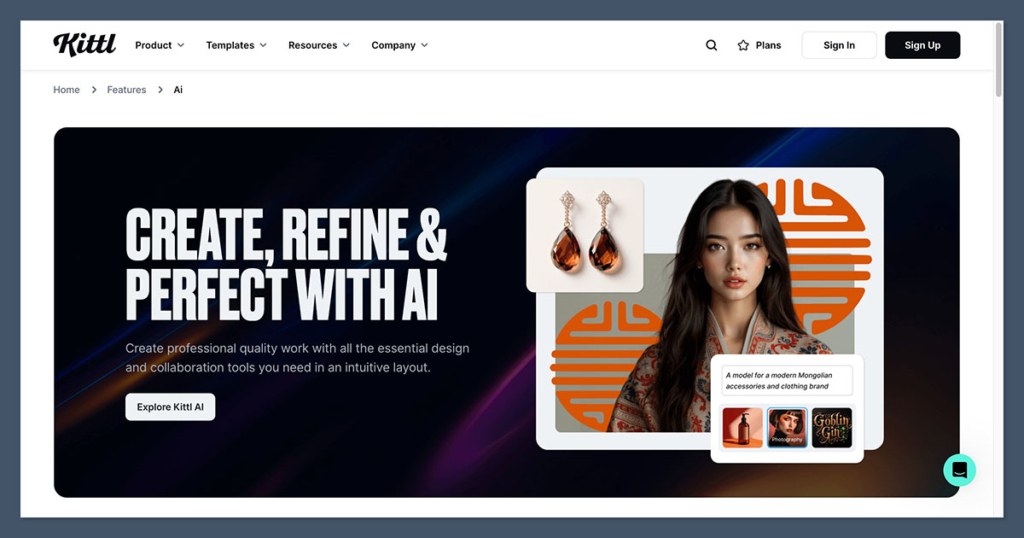
Signing up for Kittl was simple and quick. I could use the editor directly in my browser without downloading software.
The interface is clean, responsive, and feels focused on helping you start and finish a design quickly.
I started by testing some of the t-shirt design templates, which came pre-loaded with strong typography and clear layout choices.
Within minutes, I was able to customize colors, replace text, and export a finished design as a high-resolution PNG and vector PDF.
From there, I moved on to testing mockups and logo designs, which were just as easy to create. I didn’t run into any performance issues, even with large file sizes or detailed exports.
The overall experience felt like it was designed for people who want to create with speed and clarity.
How Much Does Kittl Cost?
Kittl offers four pricing tiers: Free, Pro, Expert, and Business.
The Free plan is designed for personal projects and exploration, while the paid plans unlock higher resolution, commercial rights, and premium features.
Here’s a summary of the plans and what they cost:
| Plan | Price (Monthly) | Main Features | Best For |
|---|---|---|---|
| Free | $0 | Low-res exports, 5 projects, personal use only | Testing the editor |
| Pro | $15 | High-res/vector exports, commercial rights | Solo ecommerce creators |
| Expert | $30 | Brand kits, unlimited projects, more AI tokens | Freelancers or brand managers |
| Business | $65 | Enhanced license, team features | Design teams or high-volume sellers |
You can also get discounts by paying annually, with savings of up to 33 percent depending on the plan.
What You Get With Each Plan
Free Plan
The Free plan is a solid way to test Kittl’s tools, but it has some strict limitations. You’re limited to 5 projects, and exports are capped at 800px at 72dpi. It’s fine for testing ideas, but not usable for commercial work.
Included:
- Personal use only
- Public visibility for AI assets
- 5 projects maximum
- No access to high-res or transparent exports
- No vector files
Pro Plan
This is the entry-level plan for serious creators. I used the Pro plan to produce vector assets for print-on-demand and digital download stores.
Included:
- High-res exports (up to 10800px, 300dpi)
- PDF, PNG, SVG file types
- Transparent backgrounds
- 10GB of file storage
- Commercial license (up to 500,000 copies)
- 200 AI tokens per month
Expert Plan
Expert adds more control for those managing multiple brands or client projects. It also increases storage and token limits.
Included:
- Unlimited brand kits
- Unlimited saved projects
- 100GB of file storage
- 500 AI tokens per month
- Everything in Pro
Business Plan
The Business tier is aimed at teams and businesses with higher licensing needs. It allows commercial reproduction beyond 500,000 copies and includes enhanced rights and team collaboration tools.
AI Tools and the Token System
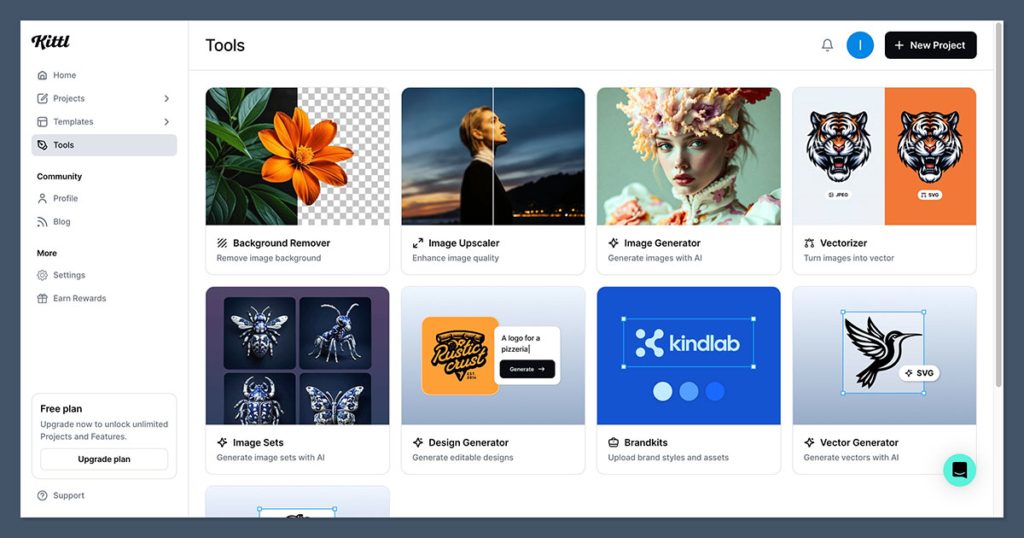
Kittl includes AI features that help speed up design workflows. These tools run on a token system, which resets monthly for subscribers. If you need more tokens, you can buy additional packs.
Here are the AI tools available:
- AI image generation
- AI vector creation
- Background remover
- Vectorizer for raster-to-vector conversion
- Logo generation
- Text tools (headlines, slogans, etc.)
- Upscaler for improving image resolution
Token usage is as follows:
| Plan | Tokens per Month | Token Packs (Add-On) |
|---|---|---|
| Free | 200 (one-time) | 1,000 for $8, 2,500 for $20, 10,000 for $60 |
| Pro | 200 | Same pricing applies |
| Expert | 500 | Same pricing applies |
If you’re using AI tools to generate batches of assets or concepts for clients, the tokens can go quickly. I recommend monitoring usage if you rely on AI in your workflow.
Licensing and Commercial Use Explained
Kittl’s licensing model is one of the clearest I’ve seen among design platforms. Here’s how it works:
What’s Allowed on Paid Plans
- Sell physical or digital products containing your designs
- Use designs on merchandise, marketing, or packaging
- Trademark designs if they include your own elements or AI-generated images
What’s Not Allowed
- You can’t trademark or resell designs made purely from Kittl templates or assets
- The Free plan cannot be used for anything commercial
- AI images cannot depict public figures or branded characters
What Happens After Cancellation
If you cancel a paid plan, you retain rights to the work you created while subscribed. You must maintain a free account to continue accessing those assets, but the license remains active.
This clarity gives me confidence when creating for clients or selling through platforms like Etsy, Shopify, or Gumroad.
Templates and Design Quality
Kittl’s template quality is one of its biggest strengths. Many templates are typography-first and built for real-world applications like t-shirts, posters, and stickers.
I found the logo and t-shirt templates to be the most useful. They saved me hours of layout work and gave me a strong foundation for branding projects.
Every template is fully customizable, and the platform allows for easy font substitution and element adjustments.
The built-in mockup engine lets you preview designs on physical products without exporting to another program. This was especially helpful when preparing visuals for online listings.
Categories include:
- Logos
- T-shirts
- Posters
- Mugs
- Social graphics
- Stickers
- Cards
Kittl vs Canva: Which Is Better?
If you’re deciding between Kittl and Canva, your choice depends on your goals.
| Feature | Kittl | Canva |
|---|---|---|
| Templates | Typography-focused, merch-first | General purpose, wide variety |
| Mockups | Built-in and part of workflow | Available but less integrated |
| Vector exports | Included with Pro and higher | Available but more limited |
| Licensing | Clear, especially around trademarks | Less detailed for commercial resale |
| Collaboration | Business plan only | Included in most plans |
| Presentations | Not supported | Fully supported |
For ecommerce creators focused on print and branding, I found Kittl’s design tools to be more focused and efficient.
Canva remains the stronger choice for marketers, social content creators, and teams building presentations.
Final Thoughts: Is Kittl Worth It?
Kittl is a strong design platform for ecommerce creators who need clean output, strong licensing, and time-saving templates.
If you sell print-on-demand products or offer branding services, the Pro plan offers excellent value for $15 per month.
Its AI tools, mockup integration, and typography-focused editor give it a competitive edge in creative workflows, especially compared to more generalist tools.
I recommend Kittl if:
- You sell digital or physical merchandise and need clear licensing
- You want quick access to vector exports and scalable designs
- You work on branding projects where typography matters
- You plan to use AI tools but want to stay in control of costs
It may not be the right choice if you need extensive collaboration features or are looking for a general-purpose design tool.
But for ecommerce creators, it’s one of the most efficient and affordable platforms available right now.


