
 By Bogdan Rancea
I’ve been deep in ecommerce for over a decade, working with clients to build, optimise, and grow online stores across dozens of industries.
Through our ecommerce design gallery at ecomm.design, we’ve analysed over 6,000 Shopify stores to curate the best examples of design, UX, and performance. On top of that, I’ve worked directly with brands to build custom Shopify sites, migrate stores to Shopify, audit underperforming stores, and help ecommerce teams scale more effectively.
That vantage point matters here, because Pensight is not Shopify and does not pretend to be. It’s a link in bio store aimed squarely at coaches and creators, and it’s competing for the money you’d otherwise hand to Calendly, Zoom, Kajabi, and Mailchimp. The question I care about is whether it holds up once real revenue runs through it.
So I signed up, built a store page, and shipped three products: a digital download, a 1:1 coaching session, and a course. Then I checked every fee claim against the live pricing page, which is where things got interesting, because most of what’s written about Pensight’s pricing is wrong.
This isn’t a surface-level review or an affiliate-driven top-10 list. It’s a real look at how Pensight performs in the wild: the good, the bad, and the two things its marketing doesn’t lead with.
The verdict up front: Pensight bundles more into $29 a month than almost any rival, and it’s the best link in bio store I’ve tested for 1:1 coaches. On features-per-dollar it beats Stan Store at the same price, which is not a close call.
Two things the marketing doesn’t lead with, though, and both change the maths. Your per-sale cost is identical on every plan, so upgrading buys features, not cheaper sales. And the free tier ships with zero design control and Pensight’s logo stuck to your page, which is the sort of thing you only notice once a client asks why your storefront looks like everyone else’s.
Below, I walk through what Pensight actually costs, how far the storefront bends, the three products I built, and how it stacks up against Stan Store, Gumroad, Whop, and Beacons.
Key Takeaways 🔍
- Three tiers: Basic (free forever), Pro at $29/mo (about $23 billed annually), and Biz at $99/mo, with a 7-day trial and no card required on the paid plans.
- The 3% fee applies on every plan. Pensight’s pricing page shows a 3% charge on Basic, Pro, and Biz alike. Upgrading does not reduce your per-sale cost, it buys you features.
- The free plan has no design control. Themes, background colors, fonts, custom domains, and logo removal are all locked. A free Pensight store carries Pensight’s branding.
- A real all-in-one for service creators, with native 1:1 scheduling, built-in video calls, courses, and memberships behind one link. Call recording is Pro-only.
- Real limits: no quizzes or certifications, minimal checkout customization, no native website builder, and browser-only with no mobile app.
- New ownership plus AI: Japan’s MOSH acquired Pensight in November 2025, and an AI-agent integration lets you run the store from Claude, ChatGPT, or Cursor.
Pensight Pros and Cons: The Short Version
Want the verdict before the deep dive? These are the points that shaped my thinking after three products and a full store build.
What I Like
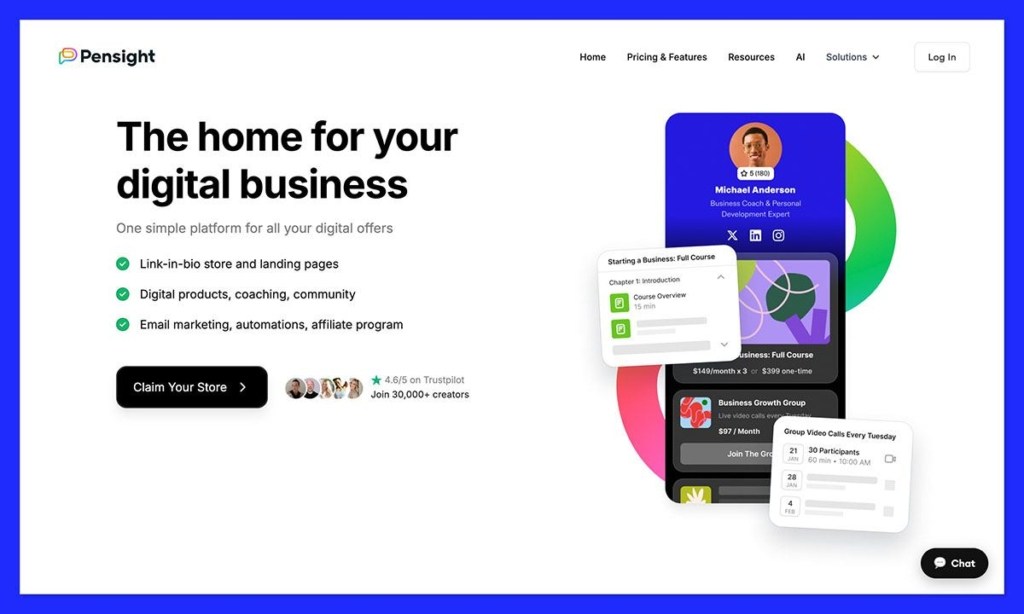
- ✔️ A free-forever Basic tier that lets you list digital products, run 1:1 sessions, and make unlimited video calls, so you can validate an offer without paying a cent up front.
- ✔️ Unmatched features-per-dollar on Pro. Email marketing, funnels, an affiliate program, pixel tracking, and a custom domain all land at $29, where Stan Store gates most of them behind $99.
- ✔️ Native scheduling plus built-in video that syncs with Google and Outlook, so Pensight really does replace a Calendly-and-Zoom pairing for a 1:1 coach.
- ✔️ Eight product types in one dashboard: downloads, courses, 1:1 sessions, session bundles, group events, video Q&A, memberships, and group programs.
- ✔️ AI-agent control from Claude, ChatGPT, or Cursor lets you build and manage the store from an outside assistant, which is unusual in this category.
What I Dislike
- ❌ The 3% fee never goes away. It applies on Basic, Pro, and Biz alike, so paying $29 a month buys features, not cheaper sales.
- ❌ No design control on the free plan whatsoever. No themes, no colors, no fonts, no custom domain, and Pensight’s logo stays on your page.
- ❌ No native website builder and minimal checkout customization at any tier, so your storefront stays templated even on Pro.
- ❌ No quizzes, certifications, or graded assessments anywhere in the course builder, which rules Pensight out for accredited programs.
- ❌ Basic email automations with no A/B testing and no if/then conditional logic, so complex funnels need Zapier.
- ❌ Inconsistent support concentrated in UK business hours, with Trustpilot reviewers reporting unexplained payout holds and multi-day silences.
None of these are dealbreakers on their own. The support inconsistency is the one I would weigh most heavily before moving real revenue onto the platform.
How Much Does Pensight Cost?
Three sources I checked describe three different Pensight pricing realities. One says the free plan does not exist, another references a free plan stripped of themes, and Pensight’s own page advertises a free-forever tier. So I opened the live pricing page and worked out what is actually true.
The correction that matters most:
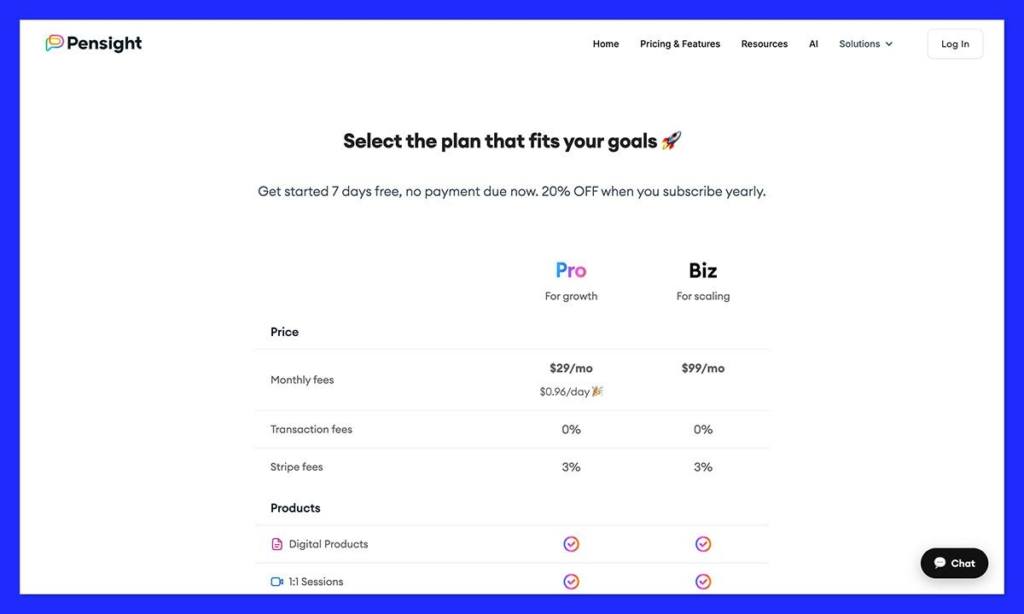
Nearly every Pensight comparison online claims the paid tiers drop your transaction fee to zero. They do not. Pensight’s live pricing page shows the same charge on all three plans: a 0% platform transaction fee and a 3% fee across Basic, Pro, and Biz. Pensight’s own headline confirms it, describing a 3% transaction fee that covers payment processing, support, and hosting.
In plain terms: you keep roughly 97% of every sale whether you pay $0 or $99 a month. Pro does not make your sales cheaper. It buys you features. Any review telling you to upgrade to “save on fees” has the math backwards.
Pensight runs on three tiers:
- Basic (free forever): no trial because it never expires. Good for testing an idea with simple digital products and 1:1 sessions, as long as you can live with Pensight’s branding on your page.
- Pro ($29/mo, or about $23/mo billed annually at 20% off): a 7-day free trial with no card up front. Unlocks email marketing, unlimited courses, memberships, custom domains, page themes, and pixel tracking.
- Biz ($99/mo): keeps the 7-day trial and layers on white-glove onboarding, free course migration, and biweekly growth-manager calls. The core product is identical to Pro.
| Plan | Basic | Pro | Biz |
|---|---|---|---|
| Monthly price | Free | $29 ($23 annual) | $99 |
| Platform transaction fee | 0% | 0% | 0% |
| Per-sale fee (processing, hosting, support) | 3% | 3% | 3% |
| Free trial | None (free forever) | 7 days, no card | 7 days, no card |
| Email marketing | ❌ | ✔️ Unlimited contacts | ✔️ Unlimited contacts |
| Courses / memberships | ❌ | ✔️ Unlimited | ✔️ Unlimited |
| Page themes, colors, fonts | ❌ Locked | ✔️ | ✔️ |
| Custom domain / remove branding | ❌ Locked | ✔️ | ✔️ |
| Best for | Testing an offer | Most creators | High-touch scaling |
Is Pensight Good Value for Money?
- Basic is generous on function, punitive on brand. You get real products and unlimited video calls for free, but your page is Pensight-branded and visually locked down.
- Pro undercuts Stan Store at the same $29. Stan gates email marketing, funnels, affiliate tools, and pixel tracking behind its $99 Creator Pro plan, and supports no custom domains at any tier.
- Biz earns its price only for the services, meaning migration help and growth calls, not any extra core feature.
- Do not upgrade to save on fees. The 3% is identical across tiers. Upgrade for the features and the design controls, or do not upgrade at all.
Author’s Testing Notes:
I would put most coaches and course creators on Pro, but for different reasons than the usual advice gives. The $29 does not pay itself back through lower fees, because there are no lower fees. It pays itself back the moment you stop paying for Calendly, an email tool, and a course host, and the moment your storefront stops advertising somebody else’s brand.
Stay on Basic only while you validate an offer and revenue is thin. Choose Biz only if you genuinely need hands-on migration or coaching support, because the core product is identical to Pro.
Pensight Storefront Design and Branding Limits
For a product sold as your storefront, it is strange how little of Pensight’s coverage asks what the storefront can actually look like. Pensight is a link-in-bio page, not a website builder, and the branding ceiling arrives faster than the feature ceiling.
Tier by tier, here is exactly what you can and cannot change:
| Design element | Basic (free) | Pro and Biz | Detail |
|---|---|---|---|
| Page themes | ❌ Locked | ✔️ Yes | A curated set of themes, not a marketplace |
| Background colors | ❌ Locked | ✔️ Yes | Page-level color control |
| Fonts and font colors | ❌ Locked | ✔️ Yes | Selection from Pensight’s set |
| Remove Pensight logo | ❌ Locked | ✔️ Yes | Free stores carry Pensight branding |
| Custom domain | ❌ Locked | ✔️ Yes | Host your page on your own domain |
| Open Graph customization | ❌ Locked | ✔️ Yes | Controls how your link previews on social |
| Content blocks | ✔️ Yes | ✔️ Yes | Stacked text, video, image, and external links |
| Product landing pages | ✔️ Yes | ✔️ Yes | Images, video, and text per product |
| Website builder | ❌ No | ❌ No | Not available at any tier |
| Layout and grid control | ❌ No | ❌ No | Blocks stack; you cannot art-direct the page |
| Checkout design | ❌ No | ❌ Minimal | Templated checkout with very little customization |
| Custom CSS or code | ❌ No | ❌ No | No code access at any tier |
Two things follow from that table, and both are worth sitting with.
First, the free plan is not really a free storefront. It is a functional checkout wearing Pensight’s clothes. You cannot change the theme, the background, or the fonts, and you cannot remove the Pensight logo. If you are a coach whose credibility depends on looking established, a free Pensight page quietly undercuts you. The $29 is, in practice, the price of your own brand.
Second, even Pro is themes, not design. You get a curated theme, colors, fonts, a custom domain, and clean product landing pages. You do not get layout control, a page builder, or code access, and the checkout stays templated. That is a real step above Gumroad, which offers no themes at all. It is well short of Shopify or a Squarespace store, where the storefront can actually do persuasion work.
Author’s Testing Notes:
Here is the test I would apply: ask where your credibility is built. If it lives on your Instagram or your newsletter, and buyers land on the page already convinced, then a tidy fast-loading template is all you need, and Pensight gives you exactly that.
If the page itself has to close the sale, particularly on a high-ticket coaching package aimed at people who have never heard of you, you are asking a theme picker to do the job of a design system. It will not stretch that far.
My Experience With Pensight
No competitor I read documents what actually happens after you hit signup. So I built the whole thing: a store page, a digital download, a 1:1 coaching session, and a course.
Signing Up and Choosing a Plan
I started at Pensight’s signup page and filled out a short registration form. At the end, Pensight made me pick a plan, Pro or Free, then dropped me on the dashboard. It opens on an earnings panel plus page-traffic and link-click analytics.
Setting Up My Store Page
The link-in-bio page is built from stacked content blocks: text, video, images, external links, and email collection. Every product and link lives behind this page, so it is worth spending time here.
The theme and color controls live in the same editor, but as covered above, they only unlock on Pro. On a free account you are arranging blocks inside a fixed visual shell.
Creating a Digital Download
My first product was a digital download. Pensight hosted the file for me (external storage also works), then let me customize a landing page with images, video, and text. I added a discount code and a checkout upsell, and buyer emails are captured automatically on every sale.
Booking a 1:1 Coaching Session
A coaching product meant connecting my Google or Outlook calendar, then setting recurring availability windows tied to that product so no slot double-books. I could auto-accept requests or screen each one, and switch on email, calendar, and SMS reminders for both sides.
Building a Course
The course builder follows a clear structure: Chapters and Sections holding Lessons, each lesson taking video, text, image, audio, or file content. I marked a couple of lessons as free previews and set a drip schedule to release the rest over time.
One absence stood out: no quiz or assessment option appears anywhere, which I cover in the courses section below.
Author’s Testing Notes:
The build flow hangs together because every product type shares the same landing-page and checkout pattern, so after the first product the rest felt familiar. Users echo this: several report going live fast and dropping separate Zoom, Calendly, and PayPal subscriptions once everything lived in one place.
Top Tip:
Any product can be sold for $0. Set the price to free for an instant lead magnet that builds an email list before you pitch a paid offer. Just remember email marketing itself is Pro-only, so the list has nowhere to go until you upgrade.
How Pensight Handles Checkout and Payouts
A store is only as good as its checkout and its payouts. The two questions that keep sellers up at night: when do I get paid, and what does each sale actually cost?
Payment Options and BNPL
Payments run through Stripe. Buy-now-pay-later through Klarna and Affirm is available, but it is gated:
- Requires an active Pro subscription and a live Stripe Express account
- Needs matching product and account currency
- Klarna covers 27 countries; Affirm is US and Canada only
- Not available on Subscription or Payment Plan pricing
- Costs 6% total per sale versus the standard 3%
Top Tip:
Turning on Klarna or Affirm can lift conversion on higher-priced offers, but weigh that against the jump from 3% to 6% per sale. On thin margins, the BNPL premium can quietly eat your profit.
Fees and Payouts
You keep roughly 97% of revenue on every plan. Payout timing is where the tiers genuinely differ: Pro’s Accelerated Payouts mark transactions complete one hour after purchase, rather than waiting for a session to finish.
Your first bank payout takes 7 days, later ones land within 3 business days in the US or up to 7 days internationally, and eligibility follows Stripe’s country coverage.
| Product type | Basic payout trigger | Pro (Accelerated Payouts) |
|---|---|---|
| Digital products and courses | Instant | Instant |
| 1:1 sessions | When the meeting finishes | 1 hour after purchase |
| Video Q&A | When the response is sent | 1 hour after purchase |
| Group sessions | When the event ends | 1 hour after purchase |
| Coaching bundles | After the first session completes | 1 hour after purchase |
Coaching, Scheduling, and Video Calls on Pensight
For a 1:1 coach, this is the section that can retire a Calendly-plus-Zoom-plus-reminders stack in a single afternoon. It is the strongest part of the platform and the clearest reason to choose it over Stan Store.
Scheduling and Booking
Pensight syncs with Google and Outlook calendars, and you assign recurring or custom availability windows to each product so two clients cannot book the same slot. I could set availability once and let requests auto-accept, or screen each booking manually. Automated email, calendar, and SMS reminders fire for both sides, which quietly removes a lot of admin.
Built-in Video Calls
The native video does not need Zoom or Meet, though you can still use them. It includes:
- Screen sharing and participant controls
- Guest invites
- Call recording with playback saved to the chat (Pro and Biz only)
- In-call and post-call client chat
Unlimited video calling is available even on the free plan. Recording is not, which is worth knowing if you sell sessions clients expect to rewatch.
Coaching Bundles
Bundles package repeating sessions into one purchasable offer. You set a meeting to repeat a custom number of times, and the whole series sells as a single product. This is a genuine gap in Stan Store, which does not offer coaching bundles at any tier.
User sentiment on the calls themselves is mixed. Some reviewers note the calls need a strong connection, and one found calendar setup unintuitive after switching from Zoom Scheduler. Others land firmly positive, describing Pensight as replacing both their website and their scheduling tool outright.
Building Courses, Memberships, and Community
Pensight’s course builder does plenty, but there is one thing it flatly will not do, and course sellers should know before they commit.
Course Builder
Courses are structured as Chapters and Sections holding Lessons, each lesson taking video, text, image, audio, or file content. Pro and Biz unlock unlimited courses and unlimited videos or files per course, plus drip content (time-delay or enrollment-based) and free-preview lessons for marketing.
The limitation is assessment: no quizzes, certificates, graded tests, or if/then logic. Teachable or Thinkific still win if certification matters to your audience.
Memberships and Community
Memberships run on subscription billing (monthly, weekly, bi-weekly, or yearly) or one-time lifetime access. Each membership opens a private content feed where you post video, image, audio, or file updates, sort them into up to 10 categories, and toggle comments per post. You can let members post too, giving you a Patreon-style community alongside your 1:1 and course products on one storefront.
Author’s Testing Notes:
The no-quiz gap is easy to accept if you sell knowledge, coaching, or community, which is most of Pensight’s audience. If you run accredited or certification-based training where learners expect a graded exam and a certificate at the end, this is the point where Pensight stops being the right tool.
Pensight Email Marketing, Automations, and AI Tools
Pensight lets you run your entire store from an outside AI agent, and its email tool bundles unlimited contacts. But the “unlimited on every plan” line making the rounds is simply wrong.
Email Marketing and Automations
First, the correction: unlimited contacts and emails are included from Pro upward, and the free Basic tier has no email marketing at all. Once you are on a paid plan, purchase-triggered automations add buyers to Segments, and you can send broadcasts and sequences while tracking opens, clicks, and unsubscribes.
The ceiling is real. Automations are fairly basic, with no A/B testing and no if/then conditional logic. There is also a deliverability guardrail to respect:
- Keep your bounce rate under 5%
- Keep your complaint rate under 0.1%
- Cross either threshold and Pensight can suspend your sending with no refund
Several reviewers found the email and upsell setup confusing and time-consuming. If you outgrow the native tool, Zapier connects Pensight to Mailchimp and thousands of other apps.
Pensight AI
The standout recent feature is the AI-agent integration. It lets you control Pensight from an external agent (Claude, ChatGPT, or Cursor) rather than only the dashboard, so you can create, update, and publish digital products, Q&A consultations, and 1:1 events, turn uploaded files into sellable products, and wire up follow-up email automations from one conversation.
What Pensight AI actually does:
Agent-driven workflows you trigger from your existing assistant:
- Build a full funnel, from a free lead magnet to a paid offer to automated follow-up
- Audit what is ready to publish versus what is blocked
- Diagnose an underperforming funnel
Pensight’s stated rationale is that 97% of its creators already use AI tools daily.
How Does Pensight Compare to Competitors?
Is Pensight actually cheaper than the store you are on now? It depends entirely on how you sell, because the fee structures differ far more than the sticker prices suggest.
| Platform | Entry price | Transaction fee | Free plan | Design control | Native coaching |
|---|---|---|---|---|---|
| Pensight | Free / $29 Pro | 3% on every plan | Yes (Basic) | Themes, colors, fonts (Pro only) | Yes (calendar + video) |
| Stan Store | $29 (no free plan) | 0% platform | No (14-day trial) | Templates; no custom domain at any tier | Limited |
| Gumroad | $0 (pay per sale) | 10% + $0.50 per sale | Yes | Minimal (colors, font) | No |
| Whop | $0 (pay per sale) | ~2.7% + $0.30, stacks to ~6-7% | Yes | Hub-based | No |
| Beacons | Free / $10 | 9% on Free and $10 tiers | Yes (1 product) | Templates | No |
- Stan Store keeps branding simpler and offers a 14-day trial, but has no free plan, no custom domains at any tier, and gates email, affiliate, and pixel tracking behind its $99/mo Creator Pro plan. At the same $29, Pensight includes all of it. Both Pensight’s own comparison and independent third-party comparisons agree on this gating.
- Gumroad charges no monthly fee and acts as Merchant of Record for tax, but 10% plus $0.50 per sale (effectively 13% to 21% once Stripe is added) makes it far pricier at scale, and it has no coaching tools at all.
- Whop also skips a monthly fee and has strong community tooling, but its fee stack (international cards, currency conversion, an automation surcharge, payout and dispute fees) lands around 6% to 7% per domestic sale, and there is no scheduling product.
- Beacons starts at $10 and imports from Gumroad, Etsy, Stan Store, and Payhip, but it charges 9% on the Free and $10 tiers and limits the free storefront to a single product.
On migration, I found no documented self-serve import tool on Pensight’s site. Biz-tier customers get white-glove “free course migration,” but the mechanics are undocumented, whereas Beacons and Podia both advertise self-serve import.
Update: Pensight is now owned by MOSH 📅
Japan’s MOSH acquired Pensight in November 2025. MOSH is a Tokyo-based creator platform serving 80,000+ creators, and it is investing to grow Pensight’s US market. At acquisition Pensight had around 30,000 creators.
For anyone weighing platform longevity, that is a well-funded parent with a clear reason to keep investing.
How We Test Creator Store Platforms
Our verdicts come from building on a platform, not from reading its marketing. Every creator store we cover goes through the same five steps.
| Stage | What it meant for Pensight |
|---|---|
| 1. Build a real store | Opened a live account and shipped three products end to end: a digital download, a 1:1 coaching session, and a course, including calendar sync and payout setup. |
| 2. Map the branding ceiling | Worked out, tier by tier, which themes, colors, fonts, domains, and layout controls are actually available, and where the platform’s branding is forced on you. |
| 3. Reconcile the pricing | Matched every plan, fee, and feature claim against the live pricing page. This is where we found the transaction-fee error repeated across most Pensight coverage. |
| 4. Model it against rivals | Ran Pensight next to Stan Store, Gumroad, Whop, and Beacons on per-sale cost, free-plan limits, branding freedom, and coaching depth. |
| 5. Read the complaints | Worked through public seller feedback on support response times and payout holds, weighting recurring patterns over one-off reviews. |
Anything we could not stand up against Pensight’s own documentation or our own account, we left out or labelled as disputed. That discipline is what surfaced the fee correction at the top of this review.
Final Verdict: Should You Build Your Creator Store With Pensight?
The right answer depends entirely on what you sell, so rather than hand you a single score, here is the verdict split by creator type.
Overall, Pensight is a strong, features-per-dollar all-in-one store that shines brightest for service creators. It bundles scheduling, video, courses, memberships, and email behind one link at a price its rivals struggle to match. The real gaps are assessments, storefront design, and support consistency, and this review would be dishonest to gloss over them.
- 1:1 coaches and consultants: the best fit, full stop. Native scheduling, built-in video, reminders, and coaching bundles genuinely replace Calendly plus Zoom. Go with Pro.
- Course creators: strong for knowledge courses with drip content and free previews, but a no if you need quizzes, certifications, or graded assessments.
- Membership builders: a solid Patreon-style community with subscription or lifetime pricing and a private feed. Pro handles it well.
- Digital-download sellers: Basic is fine to start, but the 3% applies forever, so run the math against Gumroad and Beacons rather than assuming free is cheapest.
- Brand-led sellers: look elsewhere. If your storefront needs to look like nobody else’s, Pensight gives you a theme picker where you need a design system.
Weigh the deal-breakers honestly too. Support sits in UK hours with reports of payout holds, there is no native app, and the automations stay basic. None of those sank the platform for me, but the support inconsistency is the one to watch if you plan to route real revenue through Pensight.
Your next move is low-risk. Start free on Basic to validate an offer while revenue is thin, accepting that your page will carry Pensight’s branding. Or take the 7-day Pro trial with no card required to test email marketing, courses, themes, and a custom domain before you commit a cent. Just go in knowing what the $29 actually buys: features and your own brand, not a lower fee.
Pensight Review FAQ
Is Pensight free?
Yes. Pensight’s pricing page lists a free-forever Basic tier. It excludes email marketing, memberships, unlimited courses, custom domains, and all page design controls, and your page carries Pensight branding. The paid Pro ($29) and Biz ($99) plans add a 7-day trial with no card required.
What does Pensight cost per sale?
3% on every plan. Pensight’s pricing page shows a 0% platform transaction fee and a 3% charge on Basic, Pro, and Biz alike, covering Stripe processing, support, and hosting. Upgrading does not lower your per-sale cost. Klarna and Affirm buy-now-pay-later checkout costs 6% total and requires an active Pro subscription.
How much can you customize a Pensight store page?
Less than you would expect. Paid plans hand you a curated theme, page colors, fonts, your own domain, and the removal of Pensight’s logo. What no plan hands you is a page builder, layout control, a designable checkout, or access to the code. On the free plan, every one of those visual settings stays locked.
How does Pensight compare to Stan Store?
Both start at $29/mo. Pensight adds a free plan, unlimited-contact email on Pro, coaching bundles, and custom domains, while Stan Store locks email, affiliate, and pixel tracking to its $99 tier and supports no custom domains at any price. Stan Store offers a 14-day trial versus Pensight’s 7-day.
Does Pensight have a mobile app?
No. Pensight is a responsive web app that runs in any mobile or desktop browser for you and your clients, with no app-store download. The company says this is by design, to avoid app-store fees and ship features faster.
Can I sell courses with quizzes or certificates on Pensight?
Not natively. The course builder supports chapters, lessons, drip scheduling, and free previews, but no quiz, assessment, or certification features. If graded assessments or certificates are essential, a dedicated LMS like Thinkific or Teachable is a better fit.
How fast do I get paid on Pensight?
It varies by plan and product. Basic pays out instantly for digital products and courses, and on session or event completion for 1:1s. Pro’s Accelerated Payouts mark transactions complete one hour after purchase. Your first bank payout takes 7 days, later ones 3 business days in the US or up to 7 internationally.
Who owns Pensight now?
Japan’s MOSH acquired Pensight in November 2025, with the deal value undisclosed. MOSH is a Tokyo-based creator platform with 80,000+ creators and is investing to grow Pensight’s US presence. Pensight now operates as a MOSH subsidiary rather than an independent company.


