
 By Bogdan Rancea
When I first looked at the Booster Shopify Theme, I was skeptical. A theme that promises to replace a full stack of conversion apps, improve load speed, and offer ready-made designs for fast setup?
That sounded great on paper, but I wanted to see how it actually performs.
After spending time working directly with the theme on multiple stores, this is my detailed review of what Booster really is, where it shines, and where it falls short.
If you’re running a one-product store, a direct-to-consumer setup, or a dropshipping model with paid traffic, the Booster Theme could be a practical option.
It’s especially appealing if you’re trying to simplify your tech stack or reduce your reliance on monthly app subscriptions.
But it’s not for everyone, and it definitely comes with tradeoffs.
In this article, I’m going to walk you through everything I learned using BoosterTheme.com’s Booster product, not to be confused with the “Boost” theme sold on Shopify’s Theme Store.
I’ll break down features, setup, pricing, support, performance, and who I think this theme is actually a good fit for.
What Booster Is (And Isn’t)
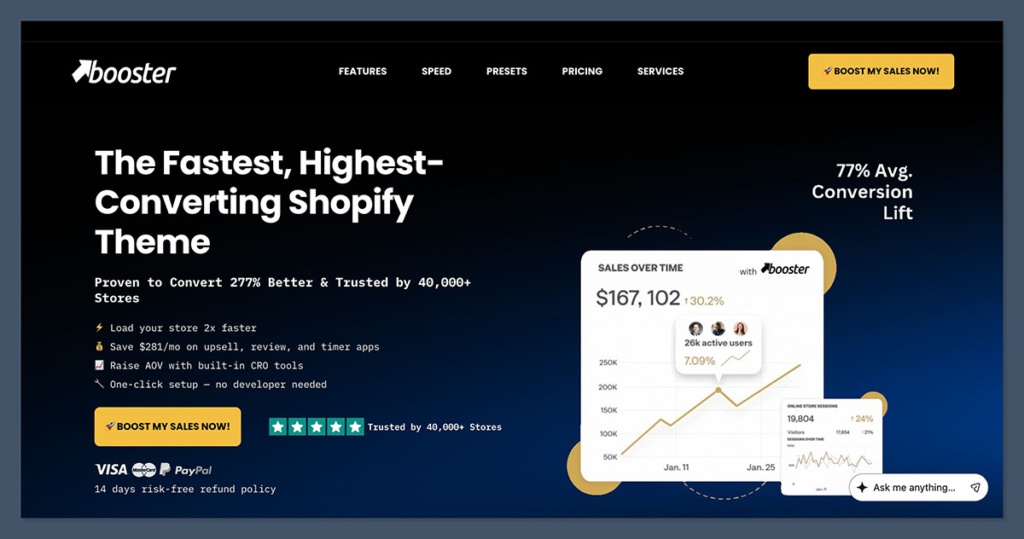
Let’s start by clearing up the confusion. The Booster Theme I’m reviewing is sold on BoosterTheme.com. It’s not available on the official Shopify Theme Store, and it’s not the same as the Boost theme that Shopify lists.
On top of that, there are other “Booster” themes on ThemeForest that have nothing to do with this one.
Booster is a third-party premium Shopify theme designed for conversion-focused stores. Its biggest selling point is that it includes many of the features you’d typically install third-party apps for, such as:
- Cart upsells
- Countdown timers
- Sales notification popups
- Sticky add to cart buttons
- Free shipping goal bars
- Exit intent overlays
- Trust badges
Instead of using five or six apps for those features, Booster bakes them directly into the theme.
This creates a leaner site and avoids extra monthly app costs. According to Booster’s marketing, this also improves site speed because fewer external scripts are loaded.
But Booster is not just a theme with a bunch of widgets. It’s a very specific type of theme with a clear design philosophy: conversion comes first.
That means its layouts, tools, and visual elements are designed to push shoppers toward a purchase quickly. If you’re looking for a minimal or luxury brand feel, this may not be the best match out of the box.
Pros and Cons
Pros
- Replaces multiple CRO apps like upsells, timers, and popups
- Speeds up setup with prebuilt layouts and built-in tools
- Online Store 2.0 compatible with drag-and-drop sections
- One-time lifetime pricing option
- Regular updates with public changelog
- 14-day refund policy
Cons
- Not listed in the Shopify Theme Store
- Easy to overuse widgets and clutter the UX
- Limited design flexibility for brand-first stores
- Support is time-limited on the lifetime plan
- You still need to remove duplicate apps to see full value
Booster Theme Pricing and Licensing
Booster offers two pricing options: an annual subscription and a one-time lifetime license. Depending on when you buy and whether there are promotions running, the prices can vary slightly. As of now, here’s what you’re looking at:
| License Type | Price | Support | Updates | Best For |
|---|---|---|---|---|
| Yearly | $169 to $199/year | While subscription active | While subscription active | Short-term use or testing a product store |
| Lifetime | $299 one-time | Usually 12 months | Ongoing theme updates | Long-term use without recurring payments |
Booster also offers a 14-day refund window, which I think is smart. You get some time to try it out, and if it doesn’t match your expectations, you’re not stuck.
One thing to keep in mind is that the yearly plan only gives you updates and support while it’s active.
That means if you cancel your subscription, you still get to keep the theme installed, but you lose access to updates and tech support. T
he lifetime plan removes that issue, but it’s a bigger upfront investment.
In my opinion, this model works well if you’re comparing it to an app-heavy setup where monthly costs can add up fast.
But you should be ready to commit to using Booster’s built-in features instead of external apps for it to make financial sense.
Practical Cost Comparison: Theme vs App Stack
Let’s break down the math. Booster claims you can save money by cutting out apps.
That’s true, but only if you actually remove those apps and use the theme’s features instead.
Here’s a common setup I’ve seen in many Shopify stores:
- Cart drawer upsell app: $15 to $30/month
- Free shipping bar: $5 to $10/month
- Countdown timer: $5 to $20/month
- Sales notification popup: $10 to $15/month
- Sticky add to cart: $5 to $10/month
- Trust badge plugin: $5/month
That’s $45 to $90 per month, or $540 to $1,080 per year.
If you switch to Booster and remove those apps, you’re paying either $169 to $199 per year (annual plan) or $299 one time (lifetime plan). That’s a huge potential saving, especially if your store is app-heavy.
But it only works if:
- You actually turn off and remove the overlapping apps
- You’re happy with Booster’s implementation of each feature
- You don’t mind giving up some customization options those apps provide
For some store owners, especially ones that need granular control over how an upsell behaves or looks, Booster may not replace every app.
But if your goal is simplicity and speed, this kind of bundle can be a smart shortcut.
Setup Experience and Workflow
Booster claims a fast setup process with one-click install options and prebuilt layouts. That’s mostly true.
Getting started is easy, especially if you’ve installed a Shopify theme before.
Here’s what setup typically looks like:
- Upload the theme ZIP file
- Choose a layout preset or start with a blank version
- Customize homepage sections, typography, and colors
- Configure product and collection templates
- Set up navigation and footer
- Configure built-in features like upsells, timers, and sales bars
Booster does a nice job giving you templates and pre-designed layouts. That helps if you’re launching fast or testing offers with paid traffic.
You don’t need to build from scratch, and many of the key sales elements are already placed in logical spots.
You’ll still need to do the normal Shopify setup work, like connecting your payment gateways and adding shipping zones, but on the design and feature side, Booster is much faster than most themes I’ve used.
One major benefit of Booster is that you don’t need to log into six different apps to manage timers, popups, and upsells.
Everything is inside the theme editor. That cuts down on conflicts and improves performance.
Design and Customization Flexibility
Booster is a conversion-first theme. That comes with design opinions. It leans heavily into layouts that focus on:
- Product images and benefits above the fold
- Urgency widgets like timers and stock levels
- Sticky call-to-action buttons
- Cart drawer flows and checkout-focused navigation
This style works well for products that rely on impulse or urgency-driven purchases. But it may not suit brands that want a more relaxed, storytelling approach.
If your brand relies on editorial visuals, whitespace, or a minimalist shopping experience, you might find Booster’s defaults too aggressive. That doesn’t mean you can’t change them, but it takes more effort.
Here’s a quick customization checklist I used when evaluating Booster:
- Can I change typography and spacing to match my brand?
- Can I simplify product pages and hide sales elements?
- Can I create custom templates for key collections?
- Can I tone down urgency elements without breaking layout?
- Can I hide or edit sales popups for mobile users?
In most cases, the answer was yes, but with limitations.
Some modules don’t offer deep design settings. For example, you can disable timers, but not change their placement on mobile. You can often override styles using custom CSS, but that requires dev skills.
In short, Booster offers more flexibility than many conversion themes, but it’s still not a blank canvas.
You get more control than you would with a funnel builder like Zipify Pages, but less than a minimal theme like Studio or Craft.
Conversion Tools and Built-In Features
This is where Booster really shines. It’s loaded with built-in conversion tools, and they’re fully integrated into the theme editor.
Here are some of the most useful ones I’ve tested:
Included CRO Tools
- Cart drawer upsells and post-add-to-cart offers
- Countdown timers (global, per product, and cart timers)
- Free shipping goal bar in cart
- Trust badges on product pages
- Sticky add to cart button
- Quick buy buttons on collection pages
- Exit intent popup (for desktop)
App Replacements (If Used Wisely)
- Upsell apps like ReConvert or UFE
- Timer tools like Hurrify
- Cart bar apps like Ultimate Free Shipping Bar
- Popup apps like Privy (for exit intent or sales alerts)
- Add-to-cart boosters like Sticky Cart
These tools are powerful, but the key is restraint. Overloading your site with every widget active can overwhelm users.
I recommend using only the features that have a proven impact on your average order value or conversion rate.
For example, I found the cart drawer upsell to be the most effective. It lets you show one complementary product based on cart contents. That’s usually enough to increase AOV without distracting buyers.
Too many popups or aggressive timers, especially on mobile, can reduce trust. Use each feature intentionally, not just because it’s available.
Speed and Performance
Booster markets itself as a fast theme, and in my experience, that claim holds up, as long as you’re smart about your store setup.
I tested Booster on both demo stores and live stores using PageSpeed Insights and SpeedVitals.
On a clean install with no apps, I consistently saw load times between 1.8 and 2.5 seconds on mobile, which is solid.
Once you start adding your products and media, performance depends on your choices.
What affects speed most:
- Number of third-party apps still installed
- Tracking scripts (like Meta Pixel, TikTok, GA4)
- Image sizes and formats
- Video embeds on homepage or PDPs
- Custom fonts or third-party widgets
The real performance win with Booster happens when you remove redundant apps and lean into native theme features. If you install Booster but still keep 8 conversion apps, you’ll lose the speed advantage.
My advice is to test performance at these stages:
- Before installing Booster (baseline)
- After clean Booster install (demo setup)
- After adding your products and media
- After re-adding your necessary apps
Use PageSpeed Insights and GTmetrix, and watch for increases in script size and render-blocking time. Don’t just trust one score, test your actual funnel.
Updates, Support, and Long-Term Use
Booster publishes a public changelog that shows new features, bug fixes, and compatibility updates. That’s a good sign.
Many third-party themes don’t offer transparency like this, and it makes a difference when you’re planning for the long term.
Booster is also compatible with Shopify Online Store 2.0, meaning it supports:
- Section-based editing across all templates
- Flexible metafields and blocks
- Dynamic content fields
- Drag and drop customization
For support, Booster includes email-based tech support. With the yearly plan, support continues while your subscription is active.
With the lifetime plan, it typically includes a set support period (like 12 months), but updates continue beyond that.
Before buying, I recommend confirming:
- How fast they respond to support tickets
- What kind of support is included (bugs only vs general help)
- What happens when Shopify rolls out major updates
- Whether there’s onboarding help or just documentation
Booster has a help center and tutorial videos, but it’s not as comprehensive as the Shopify Theme Store experience.
If you’re someone who needs a lot of hand-holding, you might be better off hiring a Shopify expert or using a Theme Store option.
Who Booster Is Best For
After working with the Booster Theme across multiple projects, here’s who I think it works best for:
Strong Fit
- One-product or narrow catalog stores
- Dropshipping stores running paid ads
- Brands in early stages that want fast setup and CRO tools
- Store owners who want fewer apps and simpler maintenance
Weaker Fit
- Luxury or editorial-style brands
- Stores with large, complex catalogs
- Merchants who prefer complete control over every design detail
- Brands that rely on Shopify’s support ecosystem
If you fall into the strong fit category, Booster can save you money, reduce app fatigue, and help you launch faster. If you fall into the weak fit category, you’ll probably spend more time stripping features out than benefiting from them.
Final Thoughts: Should You Buy Booster?
Here’s my honest verdict. If your goal is to reduce your app stack, launch a conversion-focused store fast, and spend less time managing separate tools, Booster is a smart choice.
It’s not magic, but it bundles proven sales tools into a single, performance-optimized theme.
If you plan to keep all your existing apps or need total design flexibility, Booster might become more of a burden than a benefit.
Use Booster when your offer is dialed in, your product is the star, and you want your tech stack to stay lean.
The Booster Shopify Theme gives you a simple way to launch a CRO-friendly store quickly, but like any tool, it works best when you’re clear about your goals.


