
 By Rebekah Carter
Shopify POS is one of the strongest point-of-sale systems available for retail businesses, and it’s particularly compelling if you already sell (or plan to sell) online through Shopify.
Unlike standalone POS tools that bolt on ecommerce as an afterthought, Shopify POS is built from the ground up around unified commerce, one backend for your physical store, your online store, and every sales channel in between.
I’ve put Shopify POS through its paces alongside the rest of the team, and it holds up impressively well for omnichannel retailers.
That said, it’s not the right fit for everyone. In this review, I’ll walk through its pricing, features, hardware, and real-world performance so you can decide whether it’s the right POS for your business.
Shopify POS: Pros & Cons
| Pros | Cons |
|---|---|
| ✅ Native integration with Shopify ecommerce — no connectors needed | ❌ Requires a Shopify ecommerce subscription, even if you only sell in person |
| ✅ Real-time, multi-location inventory sync across all channels | ❌ Advanced features like loyalty and deep reporting often need extra apps or higher-tier plans |
| ✅ Intuitive Smart Grid checkout interface — staff learn it quickly | ❌ Offline mode can be sluggish in high-traffic environments |
| ✅ Scales from pop-up markets to multi-location retail chains | ❌ Not purpose-built for restaurants, hospitality, or highly specialized verticals |
| ✅ 24/7 chat support on all plans | ❌ POS Pro adds a per-location cost on top of your existing ecommerce plan |
How Much Does Shopify POS Cost?
Shopify POS pricing has two layers: first, you need an active Shopify ecommerce subscription, and then you choose between POS Lite (included free) or POS Pro (an additional per-location fee). On top of that, you’ll need to budget for hardware.
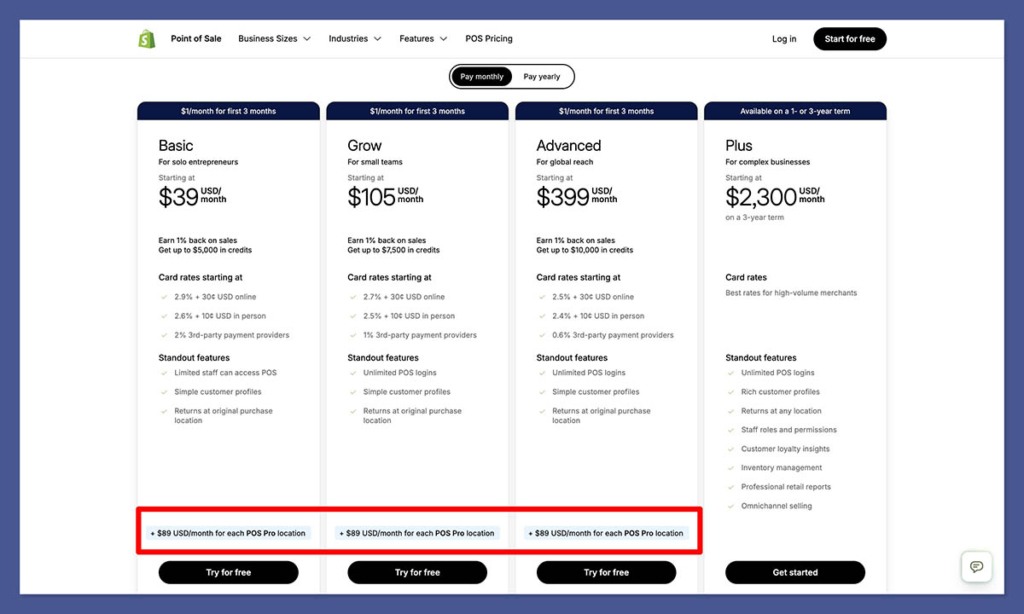
Ecommerce Plan + POS Tier
| Shopify Plan | Monthly Price (annual billing) | POS Lite | POS Pro |
|---|---|---|---|
| Basic | $29/month | Included | Additional per location |
| Shopify | $79/month | Included | Additional per location |
| Advanced | $299/month | Included | Additional per location |
| Plus | Custom pricing | Included | Included for up to 20 locations |
POS Lite covers basic in-person checkout, simple inventory tracking, and limited staff access — adequate for pop-ups and casual sellers.
POS Pro unlocks the features serious retailers need: smart inventory management, in-store pickup, ship-from-store, granular staff permissions, and performance tracking.
Hardware Costs
| Hardware Item | Approximate Cost (USD) |
|---|---|
| Tap & chip card reader | ~$49 |
| POS Terminal | ~$349 |
| Tablet stand | ~$149–$185 |
| Barcode scanner | ~$49–$289 |
| Receipt printer | ~$249–$369 |
| Cash drawer | ~$129–$139 |
You can purchase hardware directly from Shopify’s hardware store or use compatible third-party devices, though Shopify’s branded equipment is designed to guarantee compatibility and simplify setup.
Author’s Testing Notes
The cost picture gets more complex the more locations you add. A single-location retailer on the Basic plan with POS Pro will pay noticeably less than a growing chain on the Advanced plan with multiple Pro locations. Run the numbers for your specific situation before committing — the per-location fee adds up quickly for multi-site retailers.
Is Shopify POS Good Value for Money?
That depends heavily on whether you’re already on Shopify. If you are, POS Lite is essentially free, making it an easy add-on for the occasional market or pop-up.
POS Pro becomes genuinely compelling once you have a permanent physical presence and need the full retail workflow.
If you’re not yet on Shopify and only need a POS, the value equation is harder to justify — you’re paying for an ecommerce platform you may not fully use. Square, for instance, offers a free plan for in-person only sellers. But for any business selling across both channels, Shopify’s unified approach typically delivers more value than managing two separate systems with a sync layer between them.
Key Features
Unified Inventory and Product Management
The standout capability of Shopify POS is its single product catalog that syncs in real time across your physical locations, online store, and social or marketplace channels. When you sell the last item in-store, it’s instantly reflected online. When a customer buys through Instagram, your shop floor sees it immediately. For multi-location retailers, you can track stock by store or warehouse, transfer inventory between locations, set low-stock alerts, and create purchase orders — all from the same backend.
Top Tip 💡
If you’re running multiple locations, POS Pro’s smart inventory features are where you’ll get the most value. The ability to see stock across all sites and initiate transfers without jumping between systems is a real operational win for growing retailers.
Smart Grid Checkout Interface
The POS checkout screen is built around a customizable Smart Grid — a tile-based layout that puts your most-used actions front and centre.
You can add tiles for discounts, loyalty programs, pickup orders, ship-to-home, email carts, and custom workflows. In practice, it’s one of the cleaner retail checkout interfaces available, and most staff can get comfortable with it quickly.
Exchanges, store credit, partial payments, and mixed cart scenarios (part pickup, part delivery) are all supported, though some of the more advanced scenarios require POS Pro.
Customer Profiles
Every customer interaction — whether online or in-store — feeds into a shared profile that stores order history, contact details, and notes. Staff can pull up a customer’s record at the register, see what they’ve ordered before, and apply any loyalty discounts or personalized offers. This cross-channel visibility is something standalone POS systems simply can’t replicate without a third-party integration.
Staff Roles and Permissions
POS Lite gives you basic PIN logins and simple role assignments. POS Pro expands this significantly with granular permission settings, performance tracking per staff member, and more control over what each employee can see and do. For multi-person teams, the Pro-level controls are genuinely useful.
Reporting and Analytics
Shopify centralizes sales, inventory, and customer reports across all channels, so you’re not reconciling data from two separate systems at the end of the day. More advanced and custom reporting is available on higher ecommerce tiers and Shopify Plus. For most retailers, the standard reporting covers what you need — channel-level performance, top products, inventory turnover, and customer behavior.
AI-Assisted Features
Shopify has been adding AI-powered tools across its platform, including inside the POS experience. Shopify Sidekick, its AI assistant, can help staff find features, troubleshoot issues, and get answers to business questions without leaving the interface. Availability varies by region and rollout stage, but it’s a direction Shopify is clearly investing in.
Hardware and Deployment
Shopify POS runs as an app on iOS and Android, so deployment typically means pairing a tablet or smartphone with the relevant hardware accessories. The setup scales from minimal to fully kitted out depending on your operation:
- Pop-up / market setup: smartphone or tablet plus a tap & chip reader — that’s genuinely all you need to get started
- Countertop setup: tablet stand, POS Terminal or card reader, receipt printer, cash drawer, and barcode scanner
- Multi-location: multiple POS devices at each site, all linked to the same Shopify backend with inventory and reporting segmented by location
Shopify’s branded POS Terminal and hardware kits are designed to simplify the setup process and guarantee compatibility.
The trade-off is cost: Shopify hardware isn’t the cheapest option on the market. If budget is a concern, compatible third-party hardware can reduce upfront investment, though you’ll want to verify compatibility before purchasing.
Ease of Use
Shopify POS scores well on usability. The onboarding process is straightforward, and the Smart Grid checkout interface is one of the more intuitive retail POS experiences available. Staff training time is generally low, which matters when you’re dealing with seasonal hires or high turnover.
The backend — shared with Shopify’s ecommerce platform — is where things get slightly steeper. There’s a lot of capability packed into the dashboard, and fully leveraging all the omnichannel features takes time to learn. That said, Shopify’s Help Center, 24/7 chat support, and community resources do a reasonable job of filling the gap.
Author’s Testing Notes
The POS app itself is genuinely easy to use at the register. Where merchants tend to struggle is in setting up the more advanced workflows — multi-location inventory transfers, ship-from-store, and custom staff permissions all require some configuration time upfront. Block out a proper onboarding window rather than trying to set it up on the fly.
Support
Shopify offers 24/7 live chat on all plans, which is one of the better support commitments in the POS space. Higher-tier plans unlock phone support, and Shopify Plus merchants get priority and dedicated retail support.
The Help Center is well-stocked with guides and video tutorials, and the community forum is active enough to be genuinely useful for troubleshooting edge cases.
The main frustration flagged in user reviews is occasional inconsistency in support quality and response times — not universal, but worth noting if responsive support is a hard requirement for your business.
How Does Shopify POS Compare to Alternatives?
| Feature | Shopify POS | Lightspeed Retail | Square POS |
|---|---|---|---|
| Ecommerce integration | Native — fully unified | Requires connectors or add-ons | Built-in but less powerful |
| Inventory management | Strong, multi-location, channel-synced | Deeper matrices for niche inventory (rentals, serialized items) | Good for single-location, simpler needs |
| Vertical focus | General retail and DTC | Specialty retail, some hospitality | Broad — retail, food service, services |
| Pricing structure | Ecommerce plan + POS Pro per location + hardware | POS subscription per register + hardware | Free plan available; paid plans per location |
| Ease of use | Modern, intuitive, fast onboarding | Steeper learning curve | Very beginner-friendly |
| Offline mode | Adequate but criticized by some users | Generally more robust offline capability | Limited offline functionality |
The headline trade-off is native ecommerce integration versus vertical depth.
Shopify wins on the former; Lightspeed can win on complex, niche inventory needs; Square wins on accessibility and price for in-person-only sellers.
Who Is Shopify POS Best For?
Shopify POS is the strongest choice for omnichannel retail brands — fashion, lifestyle, home goods, cosmetics, specialty retail — that sell both online and in physical locations.
It’s also an excellent fit for DTC brands starting online and expanding into pop-ups or permanent stores, and for multi-location retailers who want centralized control without the complexity of stitching together separate systems.
It’s less ideal for full-service restaurants, bars, or hospitality venues that need table management, menu coursing, or kitchen printing.
It’s also a tough sell for very price-sensitive micro-merchants who only need in-person sales and have no intention of building an online store — there are cheaper, simpler options for that use case.
Shopify POS Review: Verdict
Shopify POS is the best point-of-sale system available if you’re already on Shopify or planning to be.
The native ecommerce integration isn’t just a convenience feature — it’s a genuine operational advantage that removes an entire layer of complexity from running a retail business across multiple channels.
Real-time inventory sync, unified customer profiles, and centralized reporting across online and in-person sales are difficult to replicate with any competing setup.
The caveats are real but manageable. You’re paying for an ecommerce platform whether you need it or not, advanced features can push you toward higher tiers or app spend, and the offline mode isn’t as bulletproof as some competitors.
But for the omnichannel retailer this system is built for, those trade-offs are easy to live with.
If that sounds like your business, Shopify POS is worth a serious look.
Frequently Asked Questions
Does Shopify POS work without a Shopify ecommerce subscription?
No. Shopify POS requires an active Shopify plan, which includes the ecommerce platform. If you only need an in-person POS without an online store, you’ll still be paying for the full Shopify subscription — making alternatives like Square a more cost-effective option for in-person-only sellers.
What’s the difference between POS Lite and POS Pro?
POS Lite is included with all Shopify plans and covers basic in-person checkout, simple inventory, and standard staff access. POS Pro adds smart inventory management, in-store pickup, ship-from-store, granular staff permissions, performance tracking, and more advanced retail workflows. POS Pro is charged as an additional fee per physical location.
Can Shopify POS work offline?
Yes, Shopify POS has an offline mode that allows you to continue processing sales when your internet connection drops. However, some users report that syncing after reconnection can be slow, and the offline experience isn’t as robust as some competing systems. It’s adequate for most retailers but worth testing in your specific environment before relying on it heavily.
What hardware does Shopify POS support?
Shopify POS runs on iOS and Android devices, and Shopify sells its own range of compatible hardware including card readers, a POS Terminal, tablet stands, receipt printers, barcode scanners, and cash drawers. Some compatible third-party hardware is also supported, which can reduce upfront costs — though you should verify compatibility with Shopify’s hardware documentation before purchasing.
Is Shopify POS good for restaurants?
Not really. Shopify POS is designed for retail, not full-service food and beverage. It doesn’t include table management, kitchen routing, menu coursing, or the other hospitality-specific workflows that restaurant POS systems like Toast or Lightspeed Restaurant are built around. Restaurants would be better served by a purpose-built hospitality POS.
How many locations can I manage with Shopify POS?
Shopify supports multiple physical locations, with inventory and reporting segmented by site. The number of locations you can manage, and the cost per location, depends on your Shopify plan. Shopify Plus includes POS Pro for up to 20 locations as part of the plan pricing, making it the most cost-efficient option for large-scale multi-location retailers.


