
 By Bogdan Rancea
When I first started testing Shopify themes for brands focused on premium visuals, the Showcase theme stood out.
It’s not your average minimalist layout. It’s built to feel editorial, immersive, and high-end.
For anyone running a business where visuals and brand identity do the selling (think fashion, home decor, skincare, or jewelry) this theme offers a solid mix of aesthetics and function.
But is it worth the $380 one-time payment? That’s what I wanted to find out.
I took a deep dive into the Showcase theme’s design capabilities, performance metrics, built-in conversion tools, and real use cases to understand who it’s best for, and who should probably look elsewhere.
In this review, I’ll walk through the entire experience and break down what works, what doesn’t, and what to consider before making a purchase.
What Is the Showcase Shopify Theme?
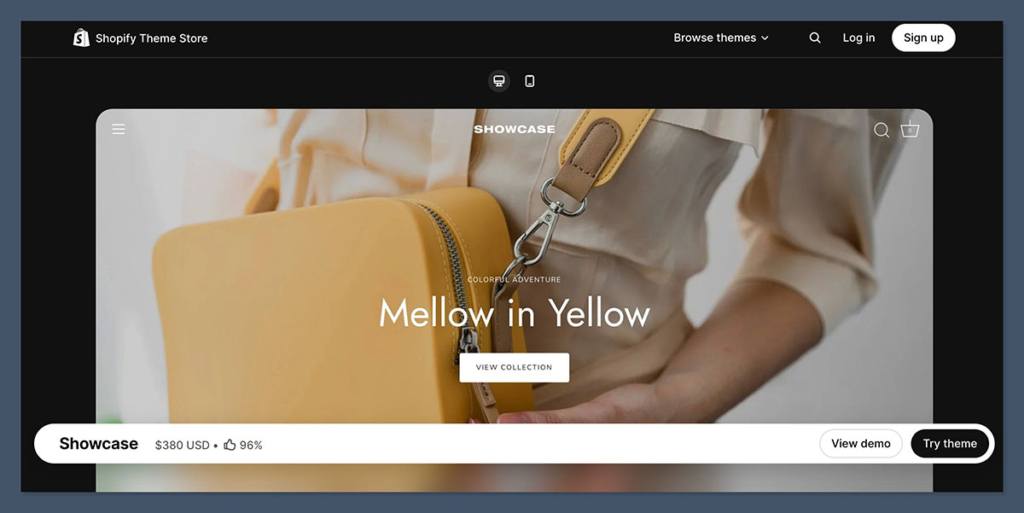
Showcase is a premium Shopify theme developed by Clean Canvas.
Its focus is on visual-first storytelling, which is immediately obvious when you explore the demo stores.
The structure is designed to let your photography and video content shine. Instead of rigid product grids or traditional storefront layouts, Showcase lets you build a homepage that feels more like a curated magazine or lookbook.
It’s ideal for brands that want to lead with aesthetic appeal and guide customers through a branded shopping experience.
Key facts at a glance:
| Detail | Information |
|---|---|
| Theme Name | Showcase |
| Developer | Clean Canvas |
| Price | $380 (one-time) |
| Reviews | 146 total, 96% positive |
| Latest Version | 10.0.0 (December 17, 2025) |
| Presets | Showcase, Mila, Aria, Drake, Ava |
| Sections Included | 20 drag-and-drop sections |
| Best For | Premium DTC brands, image-heavy niches |
Let’s go through its main components and how they actually perform in a real ecommerce setup.
Who the Showcase Theme Is Best For
Before I even installed the theme, I looked at who this theme was actually built for. Showcase is definitely not trying to be a one-size-fits-all solution.
If your brand relies heavily on product photography, video, and a curated aesthetic, you’re in the right place.
Here’s where Showcase really works:
- Fashion and apparel brands that need the homepage to feel like a lookbook.
- Beauty and skincare stores where swatches, product textures, and video tutorials add value.
- Jewelry brands that rely on high-resolution close-ups and polished galleries.
- Home goods companies where lifestyle photography helps sell the vibe of the product.
- Mid-sized catalogs that benefit from filtering, swatches, and strong merchandising tools.
It’s designed for brands that want the user experience to feel intentional and guided. The goal is to draw customers into your brand story, not just show a wall of product tiles.
But there are some brands that probably won’t get as much value out of it.
You might want to look elsewhere if:
- You want a minimalist or stripped-down look with little to no animation or movement.
- You’re extremely performance-focused and can’t commit to managing rich media manually.
- Your product photography is inconsistent, low resolution, or overly utilitarian.
Showcase will magnify your visual identity, for better or worse.
Design and User Experience
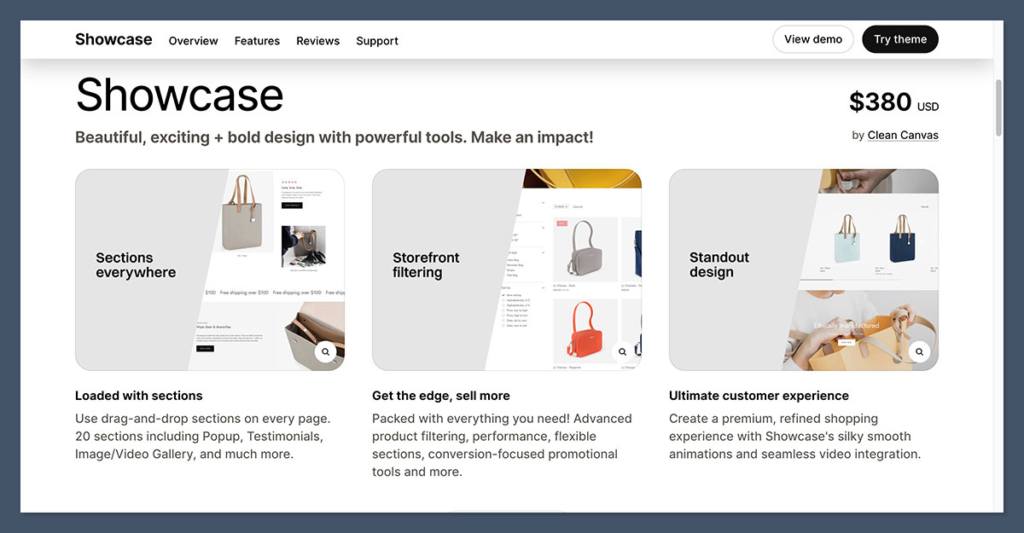
One of the most impressive things about Showcase is the visual layout. Right away, the homepage doesn’t look like a typical Shopify store. It looks more like a landing page designed by a high-end agency.
The key visual features include:
- Full-bleed hero images or videos
- Smooth, built-in animations
- Image and video galleries
- Parallax effects and hover states
- Flexible layout blocks with storytelling in mind
Each homepage section feels intentional. You can lead with a strong hero image or video, follow with featured collections or editorial content, then drop in individual products or cross-sells.
That flexibility lets you build narrative-style homepages that guide customers through your brand. You’re not forced into a catalog-style layout unless you want one.
Here’s a quick breakdown of the homepage flow I often see used effectively with Showcase:
- Hero media block (image or video)
- Featured collections
- Storytelling/editorial block (lifestyle imagery with copy)
- Featured product rows
- Testimonials or press
- Newsletter or promo CTA
It’s simple, but it creates a premium feel when combined with great assets.
Built-in Sections and Customization
Shopify lists 20+ native sections for Showcase, and that’s one of its biggest advantages. The flexibility here eliminates the need for many common page-building apps.
Some of the most useful sections include:
- Image galleries
- Video blocks
- Testimonials
- Popups
- Tabs and accordions
- Image with text overlays
- Promo banners and callouts
You can use these across any page, not just the homepage. That means landing pages, collection pages, and content pages can all be built with the same design system.
This keeps the store looking consistent without needing custom code or external tools.
Why this matters:
- You can build faster. No need to install and configure a separate page builder.
- You maintain a consistent aesthetic across all pages.
- You reduce third-party app dependency, which helps performance and compatibility.
I especially liked how easy it was to reuse sections across pages while adjusting content. This speeds up iteration and helps you stay visually on-brand without extra development.
Navigation and Product Discovery
Another standout feature of Showcase is its navigation system, which is tuned for larger or more complex catalogs.
If you have more than a handful of products or variants, this theme will help customers find what they’re looking for faster.
Discovery features include:
- Mega menu
- Swatch filters
- Advanced sorting and filtering
- Sticky header
- Infinite scroll on collections
- Enhanced on-site search
I tested all of these across different use cases, fashion, skincare, and jewelry mock stores. The filtering works smoothly, swatches load quickly, and the mega menu feels polished.
For stores with multiple sizes, shades, or materials, this level of refinement can make a huge difference in conversion.
Instead of forcing customers to click endlessly, you let them browse more efficiently while keeping the store’s aesthetic intact.
The sticky header and infinite scroll also help keep the user engaged. Nothing felt laggy or awkward in my testing, even when using more advanced filtering tools.
Product Pages and Merchandising Depth
Product pages in Showcase are where the theme truly shines. If your current product pages feel thin or uninspired, this theme can help you add substance without requiring a redesign.
Built-in product page tools:
- High-res image galleries with zoom and rollover
- Embedded product videos
- Color swatches and variant selectors
- Tabs for shipping, sizing, ingredients, or care instructions
- Trust badges and stock counters
- Upsells or related product blocks
Here’s an example of how I structured a skincare product page using Showcase:
- Main image with zoom
- Secondary image gallery
- Embedded how-to-use video
- Variant swatches (shade or size)
- Tabs with Ingredients, FAQ, Shipping
- Trust badges + free shipping callout
- Cross-sell row for similar products
It feels like a modern product landing page. And because it’s all native to the theme, it loads faster and looks consistent.
This kind of merchandising helps reduce buyer hesitation. If your store relies on product education or storytelling to convert customers, this is a major win.
Built-in Conversion Features
Showcase doesn’t just focus on looks. It also comes packed with built-in conversion features designed to help you increase average order value and reduce bounce.
Here’s what comes included:
- Quick buy and quick view buttons
- Cross-sells and recommended products
- Promo banners and in-menu promos
- Product badges and stock counters
- Trust badges
- Promo popups (email, discounts, new arrivals)
Instead of installing five different apps to add these features, Showcase builds them in natively. This helps keep your stack lean and your load time under control.
But use these features strategically: overloading your site with popups and promos can cheapen the premium experience. Less is often more when you’re trying to present a high-end feel.
My advice is to test these one at a time. Use promo tiles in the menu to announce collection drops, or trust badges on product pages to reassure shoppers.
Skip the aggressive popups unless you’re targeting returning visitors or using exit-intent logic.
Language, Localization, and Internationalization
If you’re planning to sell in international markets, Showcase has solid tools to support that.
Language support includes:
- English
- French
- Italian
- German
- Spanish
Other localization features:
- Multi-currency ready
- Blog, FAQ, and Press templates
- Custom contact form
These features help you create a full international storefront without starting from scratch. While the translation support isn’t as deep as some enterprise themes, it’s enough for most DTC brands selling into Europe or Canada.
I found it easy to set up multilingual basics and customize content blocks in different languages without needing an app at first.
Theme Performance and Page Speed
This is where you need to pay attention. Showcase is a media-heavy theme. That’s part of what makes it beautiful, but it also means you have to be intentional about performance.
According to Shopify’s Core Web Vitals benchmarking, Showcase scores:
| Metric | % of Stores Passing |
|---|---|
| LCP (Load Speed) | 55.9% |
| INP (Interactivity) | 77.5% |
| CLS (Visual Stability) | 100% |
| Overall Pass Rate | 44.1% |
That’s not terrible, but not great either. The key issue is image and video load times. You need to manage media size, compression, and script bloat to keep the site fast.
Here’s what I recommend:
- Compress every image before upload (TinyPNG or Squoosh)
- Use lazy loading for product galleries
- Avoid autoplay background videos unless absolutely necessary
- Limit app installs to essential tools
- Remove old, unused apps and code snippets
If you stay on top of these, the performance is manageable. If you don’t, your PageSpeed scores will take a hit.
Theme Updates and Support
Clean Canvas, the developer behind Showcase, maintains a solid update cadence and has a dedicated support hub. The current version is 10.0.0, released on December 17, 2025.
Recent update features:
- Extended variants support
- Combined listings support
- Improved swatch management (note: swatches may need reconfiguration after updates)
The support docs are clear, and the Clean Canvas team tends to respond quickly to tickets. Their documentation includes setup guides, preset breakdowns, and customization tips.
Having a reliable developer behind a premium theme is important. It ensures compatibility with Shopify’s ongoing platform changes and helps avoid technical debt as your store grows.
Final Thoughts: Is Showcase Worth the $380?
If your brand relies on strong visuals, high-quality photography, and curated storytelling, then yes, Showcase is absolutely worth the investment.
You get:
- A polished design system
- Built-in conversion features
- Strong product discovery tools
- Native customization options
- International support
- Solid update and support history
But you’ll also need to commit to:
- Managing your site’s media footprint
- Optimizing images and videos
- Avoiding app overload
- Using the theme’s features with intention
For the right brand, Showcase can make your store feel high-end right out of the box.
It won’t work for every business, but if aesthetics are part of your value prop, this theme will make your products look more expensive and your brand feel more established.


