
 By Bogdan Rancea
After years of helping ecommerce businesses launch and grow, I have tested more platforms than I can count. Square and Squarespace are two I get asked about constantly, mostly because their names are easy to confuse.
But these are very different tools. Square is a payments and operations platform built around POS and omnichannel selling. Squarespace is a website builder with ecommerce layered on top. Choosing the wrong one can cost you time, money, and flexibility you will not get back.
As you will see in this comparison, the right pick depends entirely on how you sell. Neither platform is “better” in a vacuum. The key is matching the tool to your business model.
Based on our analysis, Square is the better choice for in-person selling and operations, while Squarespace is the better choice for design-led websites and content-first businesses.
Square vs Squarespace: Quick Verdict
1. Square – Best for POS, in-person selling, and omnichannel operations
2. Squarespace – Best for branded websites, content, and online-first stores
In this comparison, I will walk through where each platform wins and loses, covering pricing, fees, sales features, design tools, ease of use, and support. By the end, you will know exactly which platform makes sense for your business.
Quick Comparison: Square vs Squarespace
Here is a side-by-side snapshot of how the two platforms stack up:
| Category | Square | Squarespace |
|---|---|---|
| Primary purpose | Payments, POS, omnichannel commerce | Website builder with ecommerce |
| Starting price | $0/mo (Free plan) | $16/mo (Basic, billed annually) |
| Paid tiers | Plus ($49/mo), Premium ($149/mo), custom | Core ($23/mo), Plus ($39/mo), Advanced ($99/mo) |
| In-person card rate | 2.6% + 15c (Free), down to 2.4% + 15c | N/A (uses third-party processors) |
| Online card rate | 3.3% + 30c (Free), 2.9% + 30c (paid) | 2.9% + 30c (Basic/Core), down to 2.5% + 30c |
| Commerce transaction fee | None | 2% on Basic, 0% on Core and above |
| Free trial | Free plan (no trial needed); 30-day trial on Plus/Premium | 14-day free trial, no credit card required |
| POS hardware | Yes, full range | Limited (iOS app only, via Square integration) |
| Website builder | Basic online store included | Full drag-and-drop site builder |
| Best for | Retail, restaurants, appointments, field service | Portfolios, content brands, memberships, online stores |
Best for Pricing: Square
If you are looking for the most affordable way to start selling, Square has the clear advantage thanks to its free plan. You can process payments, set up a basic online store, manage inventory, and send invoices without paying a monthly subscription.
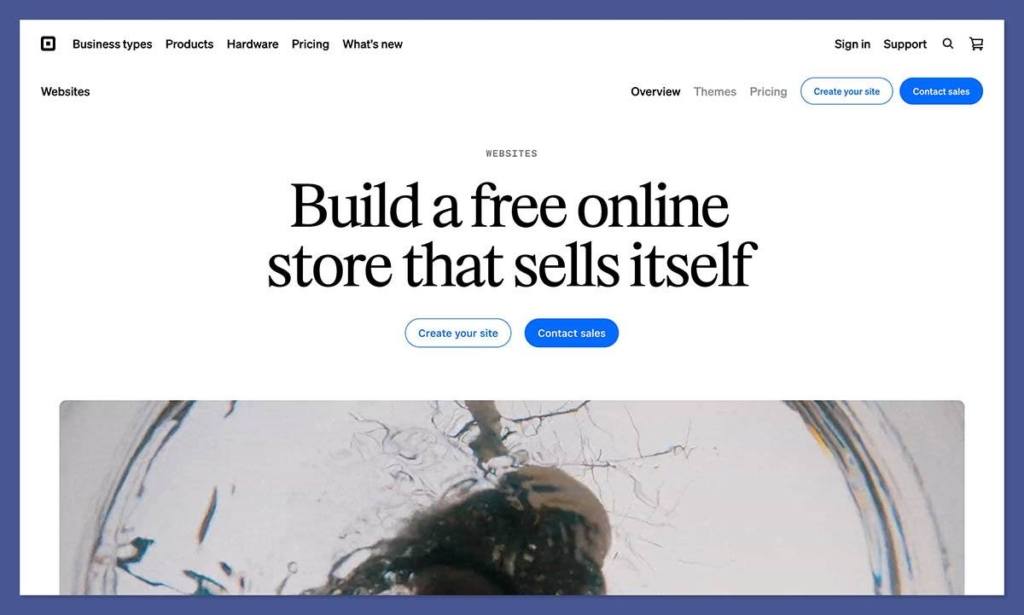
The catch is that you pay processing fees on every transaction: 2.6% + 15c for in-person card payments and 3.3% + 30c for online payments on the free plan.
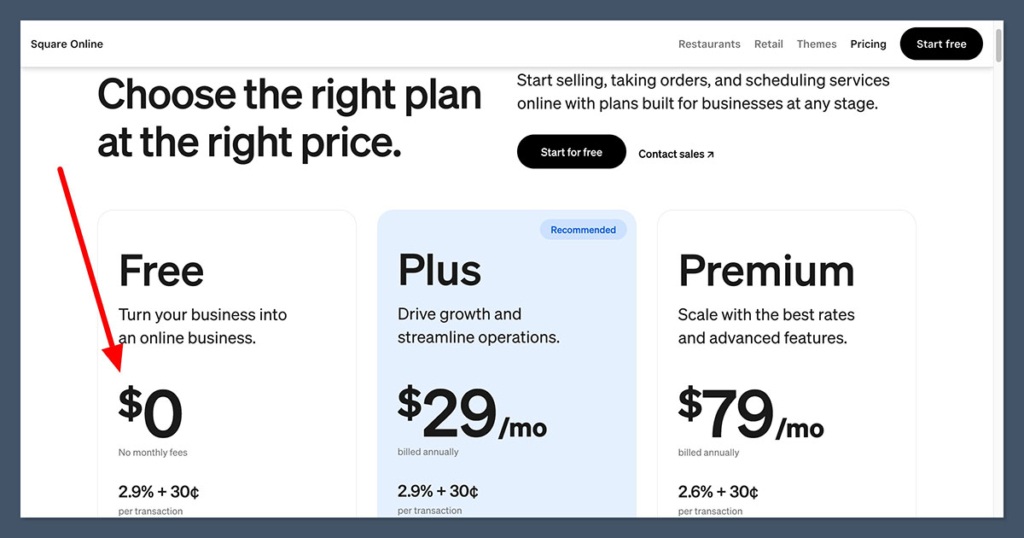
Square’s paid tiers step up from there. The Plus plan runs $49 per month and brings the in-person rate down to 2.5% + 15c, while Premium costs $149 per month and drops rates to 2.4% + 15c for in-person payments and 2.9% + 30c online. For businesses processing over $250,000 per year, Square also offers custom pricing.
Squarespace takes a different approach. There is no free plan, but prices start at $16 per month on the Basic plan (billed annually). Monthly billing is higher. The plan ladder goes Basic, Core ($23/mo), Plus ($39/mo), and Advanced ($99/mo), with fees stepping down as you move up.
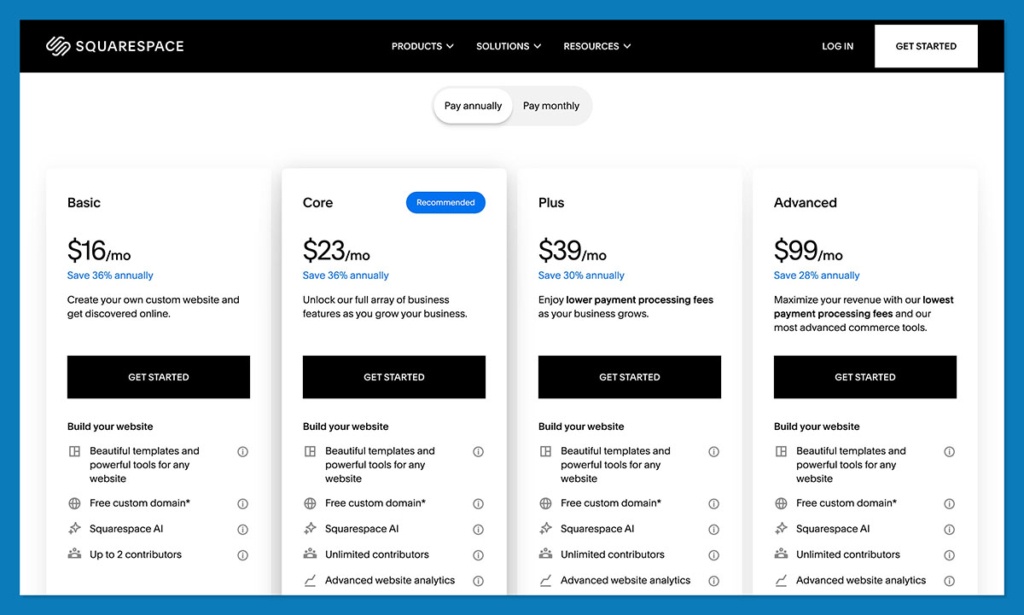
One cost to watch on Squarespace is the commerce transaction fee. On Basic, you pay an extra 2% on every sale on top of payment processing fees. That fee disappears on Core and above, which means most serious sellers will need at least the Core plan. By contrast, Square never charges a separate commerce transaction fee on any plan.
Here is how the pricing breaks down:
| Plan | Square | Squarespace |
|---|---|---|
| Entry | $0/mo (Free) | $16/mo (Basic, annual billing) |
| Mid-tier | $49/mo (Plus) | $23/mo (Core) / $39/mo (Plus) |
| Top tier | $149/mo (Premium) | $99/mo (Advanced) |
| Enterprise / custom | Custom (Pro) | Not available |
| Free trial | Free plan; 30-day trial on paid tiers | 14-day trial, no card required |
Square
- Free ($0/mo) – POS app, basic online store, item library, invoicing, booking, inventory tracking, basic reporting. Processing: 2.6% + 15c in-person, 3.3% + 30c online.
- Plus ($49/mo) – Everything in Free plus advanced POS for retail/restaurants/appointments, loyalty program, email and text marketing, staff scheduling, custom domain, advanced reporting. Processing: 2.5% + 15c in-person, 2.9% + 30c online. 30-day free trial.
- Premium ($149/mo) – Everything in Plus plus lowest processing rates (2.4% + 15c in-person), 24/7 dedicated phone support, waived gift card fees, advanced management tools. 30-day free trial.
- Pro (custom pricing) – For businesses processing over $250,000/year. Custom rates, hardware discounts, dedicated onboarding and account management.
Squarespace
- Basic ($16/mo, annual) – Drag-and-drop builder, up to 1,000 pages, unlimited products, free domain (first year), 2 contributors, 30 min video storage, basic analytics. 2% commerce fee, 2.9% + 30c processing. 14-day free trial.
- Core ($23/mo, annual) – Everything in Basic plus unlimited contributors, custom code injection, commerce analytics, premium integrations (Mailchimp, OpenTable, Zapier), pop-ups, Google Workspace email, 5 hrs video. 0% commerce fee, 2.9% + 30c processing.
- Plus ($39/mo, annual) – Everything in Core plus lower processing (2.7% + 30c), 1% digital product fee, 50 hrs video storage, shipping labels, product waitlists, advanced marketing tools.
- Advanced ($99/mo, annual) – Everything in Plus plus lowest processing (2.5% + 30c), 0% digital product fee, unlimited video, abandoned cart recovery, real-time shipping rates, commerce APIs.
It is worth noting that Square’s pricing page also lists extra monthly fees for add-ons such as Square KDS (kitchen display) and Square Kiosk, so the headline subscription price is not always the full picture. Always factor in which add-ons you actually need when comparing total cost.
The Winner: Square is the more affordable starting point
Square’s free plan lets you start selling without a monthly fee, and it never charges a separate commerce transaction fee. Squarespace requires a paid subscription from day one, and its cheapest plan includes a 2% commerce fee.
Best for Transaction Fees: It Depends on How You Sell
Transaction fees are where the Square-vs-Squarespace comparison gets nuanced, because the two platforms charge in fundamentally different ways.
Square bundles payment processing directly into its platform. On the Free plan, you pay 2.6% + 15c per in-person tap, dip, or swipe, and 3.3% + 30c per online payment. Those rates improve on the paid tiers, dropping to 2.9% + 30c online for Plus and Premium. There are no additional commerce fees layered on top.
Squarespace uses its own payment processing (Squarespace Payments) and also lets you connect third-party processors like Stripe, PayPal, and even Square itself.
For US merchants using Squarespace Payments, domestic card processing runs 2.9% + 30c on Basic and Core, 2.7% + 30c on Plus, and 2.5% + 30c on Advanced. International cards add a 1.5% surcharge. ACH direct debit fees range from 1.5% on Basic down to 1% on Core, Plus, and Advanced, with a $10 cap on the Advanced plan.
The extra layer to watch on Squarespace is the commerce transaction fee. Basic plan users pay 2% on top of their payment processing rate. That fee disappears starting at the Core plan, but it makes a meaningful difference for anyone selling at volume on the cheapest tier.
| Fee type | Square | Squarespace |
|---|---|---|
| In-person card rate | 2.6% + 15c (Free) to 2.4% + 15c (Premium) | N/A (POS via Square integration on iOS only) |
| Online card rate | 3.3% + 30c (Free); 2.9% + 30c (paid) | 2.9% + 30c (Basic/Core) to 2.5% + 30c (Advanced) |
| Commerce transaction fee | None | 2% on Basic; 0% on Core+ |
| International card surcharge | Not listed separately | 1.5% |
| ACH / direct debit | Varies by plan | 1.5% (Basic) to 1% (Advanced), $10 cap on Advanced |
The Winner: It depends on your sales channel
Square wins for in-person selling because Squarespace simply does not have its own POS hardware or in-person processing. For online-only stores, the two are competitive, but Squarespace’s higher tiers offer slightly lower online card rates. Watch out for Squarespace’s 2% commerce fee on Basic.
Best for Selling Online: Square
Square positions itself as a system to sell in person, online, over the phone, or in the field. Its pricing page emphasizes POS terminals, item libraries, invoicing, booking, staff management tools, and industry-specific features for retail, restaurants, and appointments. If you need to sell across multiple channels from one backend, Square is built for that.
Square also bundles loyalty programs, marketing tools, offline payments, instant transfers, and even banking products into its ecosystem. For businesses that want one platform to handle everything from the cash register to the back office, it is hard to beat.
Squarespace, on the other hand, is designed around the website first and ecommerce second. You can sell products, digital content, and memberships on any plan, and the platform includes useful commerce features such as customer accounts, shipping tools, abandoned checkout recovery, and Facebook/Instagram syncing.
The point of sale feature exists, but it is limited to the iOS app and runs through a Square integration.
For pure online selling, both platforms are capable. But Square’s broader commerce ecosystem, with its payment options, POS hardware, invoicing, and operations tools, gives it the edge for businesses that sell across more than one channel.
The Winner: Square offers a stronger commerce toolkit
Square’s omnichannel capabilities, built-in payment processing, POS hardware, and operational tools make it the better platform for businesses that need to sell in more than one place. Squarespace is capable for online-only stores, but its commerce features are secondary to its website builder.
Best for Website Design: Squarespace
If the look and feel of your website is a top priority, Squarespace is in a different league. The platform is built around drag-and-drop editing with polished, designer-quality templates.

Even on the Basic plan, you get up to 1,000 pages, and higher tiers unlock code injection, custom code, and deeper content storage.
Squarespace templates have long been the benchmark for website builders when it comes to visual quality. Whether you are building a portfolio, a content site, a membership platform, or a brand-focused online store, Squarespace gives you far more control over layout, typography, and presentation than Square does.
Square does include basic online store tools, and you can build a simple site through its platform. But Square’s website builder is functional rather than beautiful.
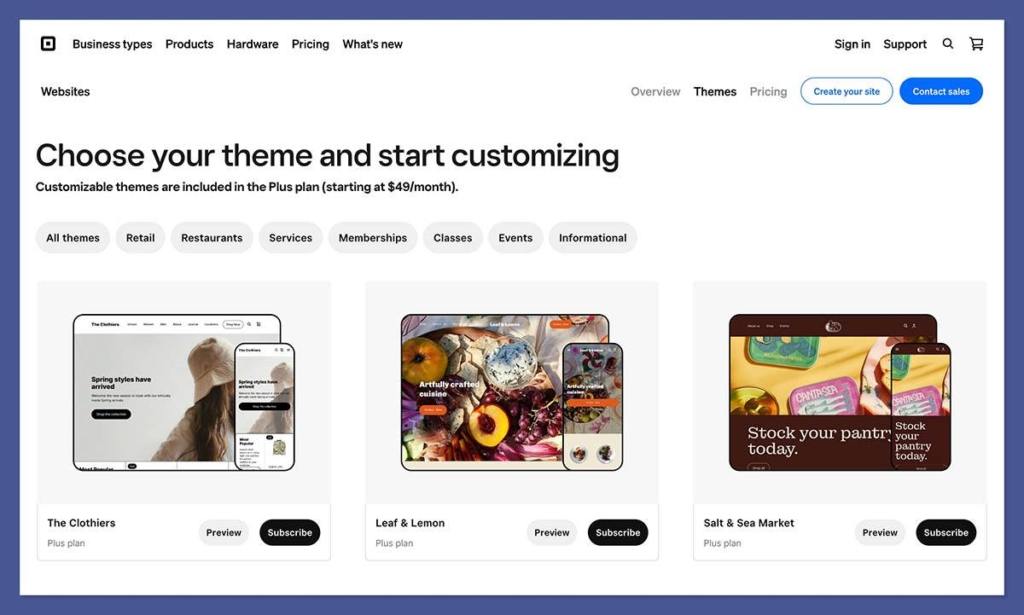
It exists to support the commerce side of the business, not to serve as a standalone website platform. If site aesthetics, blogging, or content publishing matter to your business, you will find Square’s design capabilities limiting.
The Winner: Squarespace delivers far superior website design tools
Squarespace’s drag-and-drop editor, premium templates, and deep layout controls make it the obvious choice for anyone who needs a polished, design-led website. Square’s site tools are basic and functional.
Best for Content and Memberships: Squarespace
Squarespace was built for content. Its plan structure highlights features like blogging, content pages, video storage, and membership tools. On the Plus and Advanced plans, you get expanded video storage and lower digital-product fees, which makes Squarespace a natural fit for creators selling courses, downloads, or gated content.
The platform also supports customer accounts, email campaigns, and scheduling, so content-driven businesses can manage their audience and their storefront from one place.
Square does not compete here. It has no blogging tools, no content management system, and no membership features. Square is focused on transactions and operations, not publishing.
The Winner: Squarespace is purpose-built for content brands
Squarespace’s blogging tools, membership features, and content storage make it the right platform for businesses built around content, digital products, or subscriptions. Square does not play in this space.
Best for In-Person Selling: Square
This one is not close. Square started as a card reader and has grown into a full POS ecosystem with hardware for retail counters, restaurants, kiosks, and mobile sellers. Its platform includes features like offline payments, staff management, inventory tracking, appointment booking, and even banking products.
Squarespace’s point of sale feature is limited to its iOS app and works through a Square integration. If you need to accept payments in person, Squarespace is not a real option on its own. You would end up using Square’s payment processing anyway.
The Winner: Square dominates in-person selling
Square’s POS hardware, in-person payment processing, and operational tools are its core strength. Squarespace has only a basic POS option through Square itself, making it a non-starter for businesses that need to sell face-to-face.
Best for Ease of Use: Squarespace
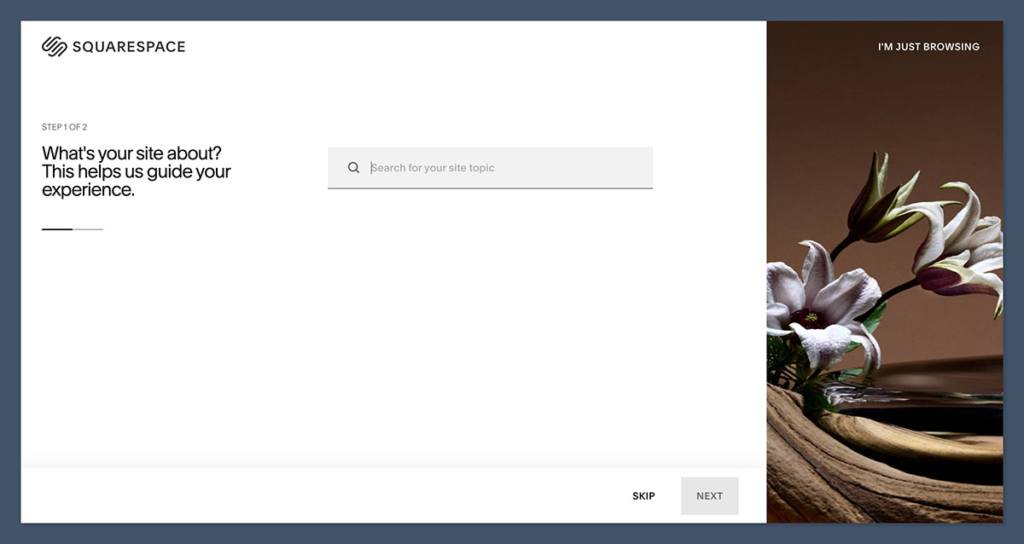
Squarespace makes getting started straightforward. Its 14-day free trial requires no credit card, and the drag-and-drop editor is intuitive enough that most users can build a presentable site within a few hours. The platform is designed for people who want a polished result without touching code.
Square is also easy to set up, especially with its free plan. You can start processing payments almost immediately, and the dashboard is clean and well-organized for managing products, invoices, and staff.
However, Square’s interface is oriented around operations and transactions, so if you are coming to it expecting a website builder experience, it can feel less intuitive.
For businesses that primarily need a website, Squarespace is simpler. For businesses that primarily need a payment and operations system, Square is simpler. The “easier” platform depends on what you are actually trying to do.
The Winner: Squarespace is easier for building a website; Square is easier for setting up payments
Squarespace’s drag-and-drop editor and visual onboarding make it the more user-friendly choice for site building. Square’s streamlined dashboard and free plan make it the easier option for getting commerce up and running quickly.
How We Compared Square and Squarespace
To make this comparison as useful as possible, we evaluated Square and Squarespace across six categories, weighted by how much each one matters to a typical business choosing between the two.
| Category | Weight |
|---|---|
| Sales and Commerce Features | 30% |
| Pricing and Fees | 25% |
| Website Design and Templates | 20% |
| Ease of Use | 10% |
| Content and Membership Tools | 10% |
| Help and Support | 5% |
We reviewed current pricing pages, support documentation, and feature lists from both platforms, and cross-referenced with third-party research to verify plan details and fee structures. Pricing and features reflect what was publicly available at the time of writing.
Square vs Squarespace: Our Verdict
Square and Squarespace are not competitors so much as they are platforms built for different priorities. The right choice depends entirely on what your business needs most.
Choose Square if you need POS hardware, in-person payments, retail or restaurant tools, staff management, invoicing, or an all-in-one commerce and operations stack. Square’s free plan makes it the cheapest way to start, and its paid tiers scale with your processing volume.
Choose Squarespace if you need a polished, design-led website with ecommerce, content publishing, memberships, or digital product sales layered on top. Squarespace is the better platform for businesses where the site itself is the product.
If you are still unsure, both platforms let you try before you commit. Square has a free plan you can use indefinitely, and Squarespace offers a 14-day trial with no credit card required. Test both, and see which one fits the way you actually work.
Square vs Squarespace: FAQ
Is Square the same as Squarespace?
No. Despite the similar names, Square and Squarespace are completely different platforms. Square is a payments and point-of-sale system built for in-person and omnichannel selling. Squarespace is a website builder with ecommerce, content, and membership features. The only connection between them is that Squarespace allows you to use Square as a payment processor for its iOS point of sale feature.
Can I use Square and Squarespace together?
Yes. Squarespace supports Square as a third-party payment processor, specifically for point of sale through the iOS app. Some businesses use Squarespace for their website and Square for in-person payments. However, the integration between the two platforms is limited, so managing inventory and orders across both can require manual work.
Which is cheaper, Square or Squarespace?
Square is cheaper to start because it has a genuinely free plan with no monthly subscription. Squarespace’s cheapest plan is $16 per month (billed annually) and includes a 2% commerce transaction fee. However, Squarespace can be more predictable for online-only businesses that prefer a flat subscription over per-transaction pricing. The cheaper option depends on your volume and how you sell.
Is Square good for online stores?
Square includes basic online store tools, and you can set up a simple ecommerce site through its platform. However, the website builder is functional rather than design-focused. If your online store needs a polished brand experience, detailed content pages, or advanced design controls, Squarespace or a dedicated ecommerce builder like Shopify will serve you better.
Does Squarespace have a point of sale system?
Squarespace has a limited point of sale feature that works through its iOS app and uses Square as the payment processor. It is not a full POS system. If you need hardware terminals, receipt printers, kitchen displays, or multi-location POS, Square is the platform designed for that.
Which platform is better for a restaurant?
Square. It offers industry-specific tools for restaurants, including kitchen display systems, table management, menu building, and staff management. Squarespace is a website builder and does not have restaurant-specific operational features.


