
 By Bogdan Rancea
Best Overall

BuildYourStore.ai
See pricing Visit BuildYourStore.ai →Free store build, no credit card
Selling needs Shopify plus AutoDS from $26.90/month
- Free AI-built Shopify store
- 10 niche products via AutoDS
- Free .store domain
Best for design

Atlas
See pricing Visit Atlas →Free web plan to build, publishing from $25/month
App Store: $39/month plus usage, 7-day trial
- Builds from any product link
- Edit any element by asking
- Built-in bundles and cart upsells
Among the best AI Shopify store builders, BuildYourStore.ai helps you find something to sell, while Atlas designs pages around your product. BuildYourStore.ai wins for beginners and tight budgets. This BuildYourStore.ai vs Atlas comparison explains when Atlas is worth paying for instead.
With the free build, you get 10 AutoDS products and a .store domain. In comparison, Atlas costs from $25 per month through its web app, or $39 per month plus usage charges through the Shopify App Store. However, it wins on design and built-in conversion tools.
I’ll cover seven rounds, from startup costs and fulfillment to what happens when you leave.
Key Takeaways
- BuildYourStore.ai is our overall winner: our editorial scores put it at 4.7/5 versus Atlas’s 4.4/5, with a free build, 10 niche products and a free .store domain.
- Neither tool is free once you sell: Shopify and AutoDS bring BuildYourStore.ai’s first-year subscription budget to $676.80 on monthly billing. Atlas adds its own builder fee.
- Atlas wins on design: 35+ sections, store and pre-sell templates, and conversational editing give you more control over your starting layout.
- Atlas wins on sales tools: bundles, cart upsells, listicles and advertorials are built in. Web app bundles and cart upsells require Scale, starting at $49 per month.
- BuildYourStore.ai is easier for a first store: choose a niche and it selects products; Atlas expects you to bring a product.
- BuildYourStore.ai is easier to leave: you own a standard Shopify store after handover, without an ongoing builder subscription attached to its design.
A Quick Comparison of BuildYourStore.ai vs Atlas
BuildYourStore.ai has no builder fee, while Atlas adds design and sales tools. The prices below are in US dollars and billed monthly unless marked yearly. Our editorial ratings follow the weights in How We Test.
| Feature | BuildYourStore.ai | Atlas |
|---|---|---|
| Overall rating | 4.7/5 | 4.4/5 |
| What it is | Free tool that builds and hands over a Shopify dropshipping store | Web and Shopify app for stores, product pages and pre-sell pages |
| Starting price | $0 to build | Launch: from $25 per month; All-in-One: $39 per month plus usage |
| Free plan or trial | Free build, no credit card | Free web plan: 15 credits, no publishing; App Store: 7-day trial |
| Also needed to sell | Shopify; AutoDS after its trial for included products | Shopify; supplier or fulfillment app for dropshipping |
| Products | 10 niche products through AutoDS | Product link or existing Shopify product |
| Design | Niche theme, edited in Shopify | 35+ sections, conversational and drag-and-drop editing |
| Built-in sales tools | Product pages and sales badges | Bundles, quantity breaks, cart upsells, listicles and advertorials |
| Free domain | .store domain | Not included |
| Shopify App Store rating | No dedicated listing | 4.4 from 382 reviews |
| Trustpilot rating | 4.6 from 200 reviews | 4.9 from 380 reviews, displayed on Atlas’s sign-up page |
| Support | Build support by email; Shopify and AutoDS after handover | In-app AI chat, team chat and email |
| Best for | Budget-conscious first-time dropshippers | Product-led sellers wanting branded pages and upsells |
What Kinds of Business Is BuildYourStore.ai or Atlas Best For?
Your choice depends on how much you’ve already decided. BuildYourStore.ai gives you a starting catalog, while Atlas builds around your product.
BuildYourStore.ai Is Best for…
- First-time dropshippers who haven’t chosen a product and want a starting selection.
- Tight budgets that prioritize Shopify and advertising over another builder subscription.
- Sellers looking for connected setup, with products and order forwarding through AutoDS.
- Niche testing before committing money to custom design or detailed branding.
Atlas Is Best for…
- Product-led sellers who already have a product link they believe in.
- Design-conscious brands that want to change pages by asking rather than coding.
- Ad-driven stores using listicles, advertorials and pages for different selling angles.
- Stores needing bundles and cart upsells that don’t want to choose separate apps for each feature.
Considering another free builder? Our StoreBuild.ai vs Atlas AI comparison covers that alternative.
1. Best for Pricing: BuildYourStore.ai
The Winner
BuildYourStore.ai costs nothing to build
The build is $0 with no credit card. Shopify and AutoDS cost extra; Atlas adds a subscription from $25 per month through its web app, or $39 per month plus usage through the Shopify App Store.
Neither option is free to run, since you’ll still need to pay separately for Shopify and fulfillment.
BuildYourStore.ai wins this round because you won’t pay a builder fee. For Atlas to be worth its subscription, you’ll need the design and sales tools I cover in Rounds 3 and 4.
How Much Do BuildYourStore.ai and Atlas Cost?
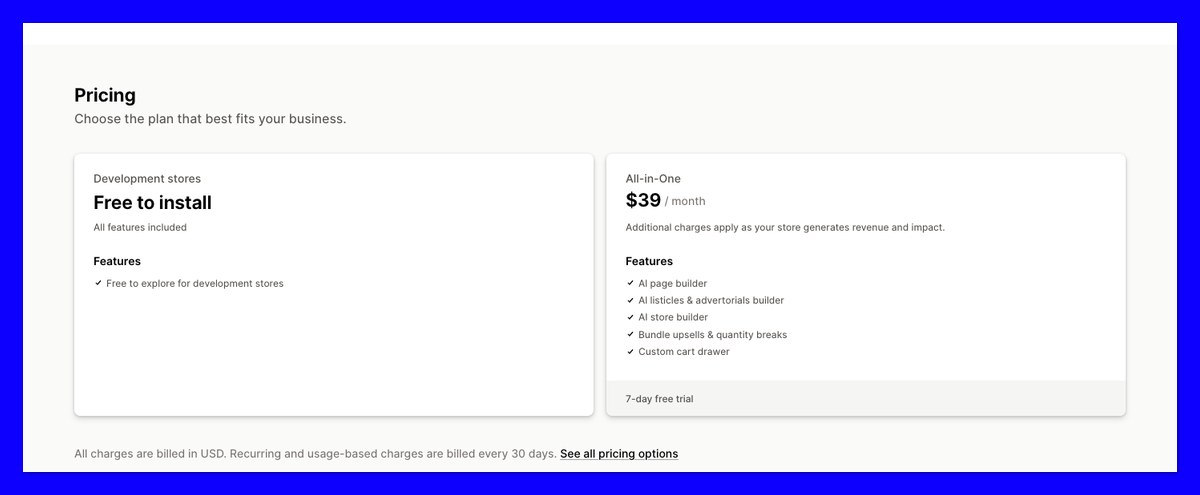
You have two routes for Atlas AI store builder pricing. You can buy web subscriptions directly from Atlas, or choose All-in-One through its Shopify App Store listing and pay through Shopify.
| Option | Price | What you get |
|---|---|---|
| BuildYourStore.ai build | $0, no card | Niche store, 10 AutoDS products, product pages, .store domain |
| Atlas Free, web app | $0; 15 credits; saving a card gives 15 monthly credits without charging it | Build, edit and preview; no publishing, bundles or cart upsells |
| Atlas Launch, web app | From $25 per month | Publishing and credit rollover; no bundles or cart upsells |
| Atlas Scale, web app | From $49 per month | Publishing, credit rollover, bundles and cart upsells |
| Atlas All-in-One, Shopify App Store | $39 per month plus revenue-based usage charges; 7-day trial | Store, page, listicle and advertorial builders, bundles, quantity breaks, cart drawer |
| Atlas development stores | Free | Free use on development stores |
- Generation credits: a full store uses 3 credits, a product page uses 2, and a pre-sell page uses 1.
- Editing: requests use credits, but publishing, bundles and cart upsells don’t.
- Rollover: unused plan credits carry forward for up to 2 months.
- Capacity: paid web plans offer 100 to 1,000 monthly credits, with prices rising as capacity increases.
- Yearly billing: you get 2 months free.
App Store usage rates aren’t published. Ask Atlas what they’ll add at your revenue level before the trial ends.
What Will Your First Year Cost?
Shopify Basic offers 3 free days, then $1 per month for 3 months, then $39 per month: $354 across 12 paid months. Our Shopify pricing guide covers other plans.
I used AutoDS Import 200 throughout when adding up the subscriptions. Atlas doesn’t require AutoDS, but including it keeps the fulfillment subscriptions comparable.
| Cost item | BuildYourStore.ai | Atlas Launch, web app | Atlas All-in-One, App Store |
|---|---|---|---|
| Builder, 12 monthly payments | $0 | $300 | $468 plus usage |
| Shopify Basic with introductory offer | $354 | $354 | $354 |
| AutoDS Import 200, $26.90 per month | $322.80 | $322.80 if chosen | $322.80 if chosen |
| Domain | Free .store domain | Not included | Not included |
| Year-one subscription budget | $676.80 | $976.80 | $1,144.80 plus usage |
Scale’s starting price adds up to $588 across 12 monthly payments, bringing that setup to $1,264.80. These budgets count full subscription months, without prorating the app trials.
With yearly billing, Shopify Basic costs $348, or $29 per month billed yearly, and AutoDS Import costs $248.70 per year. That comes to $596.70 combined, without Shopify’s introductory offer. Atlas’s two-month saving brings the starting annual budgets to $250 for Launch and $490 for Scale.
Product costs, shipping, payment fees, ads and extra apps remain outside these totals. See what it costs to run a Shopify store.
Good to know
- Coordinate trials: Shopify gives 3 free days; AutoDS offers 3 days for $0.99 directly or free through its App Store listing.
- Atlas trials can incur usage charges, as Atlas confirmed in its August 2026 reply to a UK reviewer; the App Store subscription starts after 7 days.
- Ask about domain renewal: BuildYourStore.ai doesn’t state how long the domain stays free or its renewal price.
- ZipStore is separate: BuildYourStore.ai’s developer also sells this paid single-product app; you don’t need it for the free build.
For a tight budget, I recommend starting with BuildYourStore.ai.
2. Best for Finding Products and Fulfillment: BuildYourStore.ai
The Winner
BuildYourStore.ai supplies products and a fulfillment route
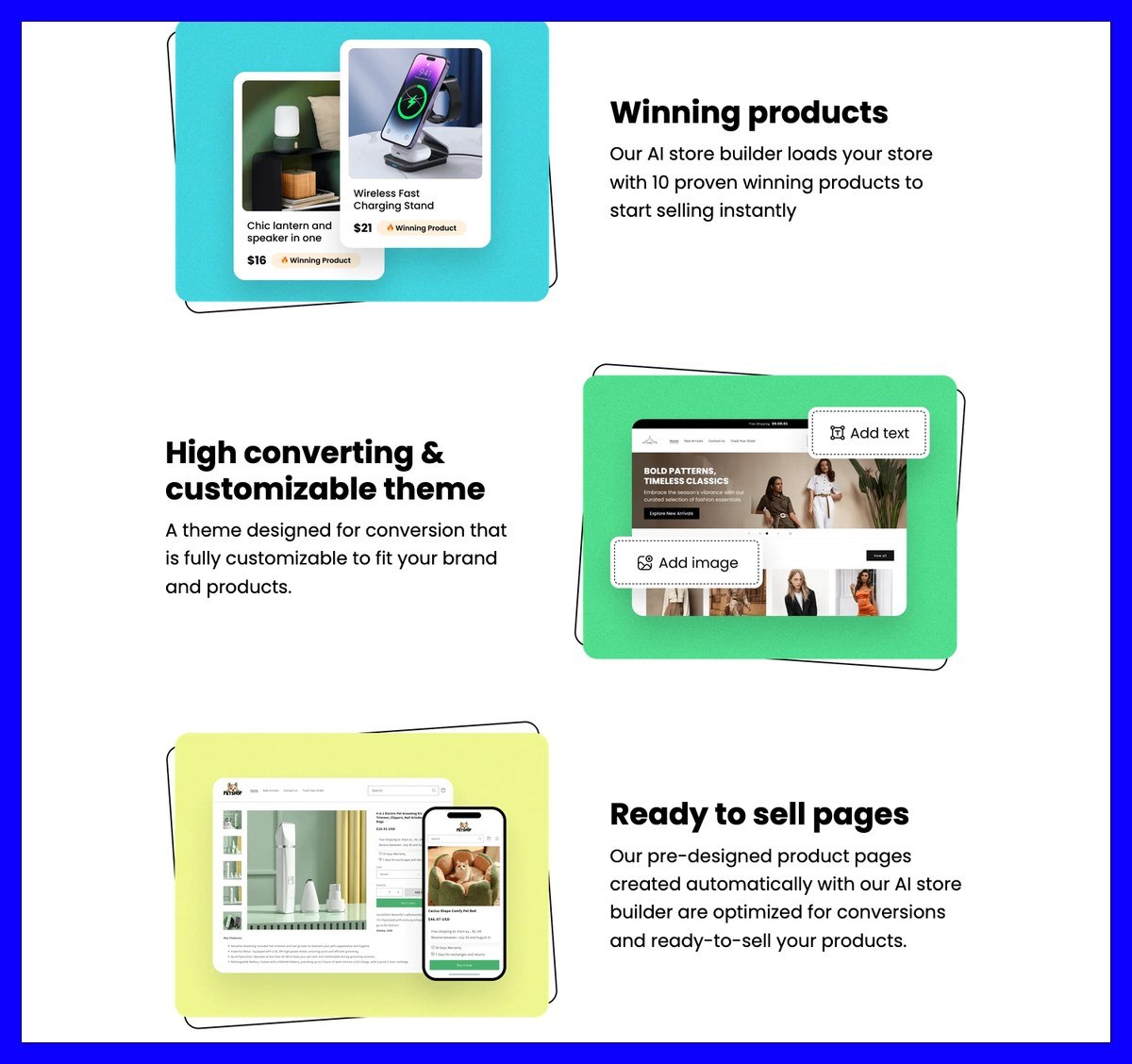
It loads 10 niche products through AutoDS, which forwards orders to suppliers. Atlas builds around your product, but leaves sourcing and fulfillment to you.
If you don’t know what to sell, BuildYourStore.ai picks your initial products. With Atlas, you’ll need to have made that decision already.
How BuildYourStore.ai Picks Your Products
BuildYourStore.ai starts with a fixed niche selection:
- Pet stores
- Electronics
- Fashion and beauty
- Home and garden
- Sports
It loads 10 products through AutoDS. Customer orders go to the supplier, who ships them; the FAQ gives 7 to 20 days for supplier shipping and tells you to review the generated shipping profiles in AutoDS.
You can delete products and add your own goods, print-on-demand items or other dropshipping products. However, “winning” is the vendor’s label, not evidence that those products will sell in your store.
Do You Need AutoDS?
For the included products, effectively yes. BuildYourStore.ai’s FAQ says a separate AutoDS subscription may be required after the trial.
- Import 200: $26.90 per month or $248.70 per year, covering up to 200 products.
- Starter 500: $39.90 per month or $368.70 per year.
- Advanced 1K: $66.90 per month or $608.70 per year.
- Trial and extras: every plan offers a 3-day trial. The hand-picked winning-product selection is an optional $14.97 extra, while marketplace access is free.
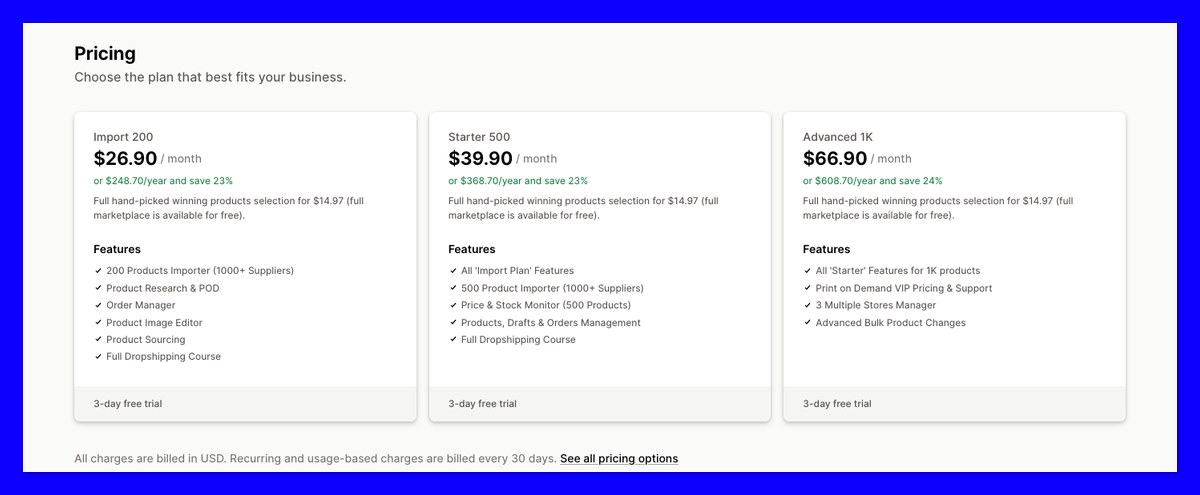
Import 200 covers the initial store with room to expand. AutoDS has 4.6 stars from 1,403 Shopify App Store reviews.
How Atlas Handles Products
You can give Atlas a product link or an existing Shopify product. Its full-store option then builds around that product, making it relevant to one-product Shopify stores.
However, Atlas doesn’t handle supplier ordering. For dropshipping, you’ll still need a supplier or fulfillment app, such as AutoDS, so budget for that service separately from your Atlas subscription.
Having a usable product link doesn’t give you content rights. Use your own images and descriptions, or get permission before importing someone else’s material.
Top Tip
Compare supplier cost plus shipping against your selling price before advertising. Remove products whose margins leave too little room for fees and customer acquisition, and make the supplier’s delivery window clear to customers.
Go with BuildYourStore.ai if you haven’t picked a product, or Atlas if you already have a product worth building around.
3. Best for Store Design and Customization: Atlas
The Winner
Atlas gives you more design control
Atlas combines 35+ sections with templates and conversational editing. BuildYourStore.ai supplies a niche theme that you customize through Shopify.
Atlas is the clear winner if you want more control over your initial layout. You can generate different page types and ask for changes, rather than begin with a shared niche template.
Designing With Atlas
Atlas lets you build in your browser and publish into a Shopify theme you choose, such as Horizon.
- Browser-based generation: Atlas says generation takes about two minutes.
- Reusable templates: build stores, product pages, listicles or advertorials, then save your best stores as templates.
- Edit by asking: tell Atlas what to change through its chat editor.
- Manual editing: change text and images, and drag sections into a different order.
- 35+ sections: you also get global sections and styles, custom fonts, custom code, translation and page versions.
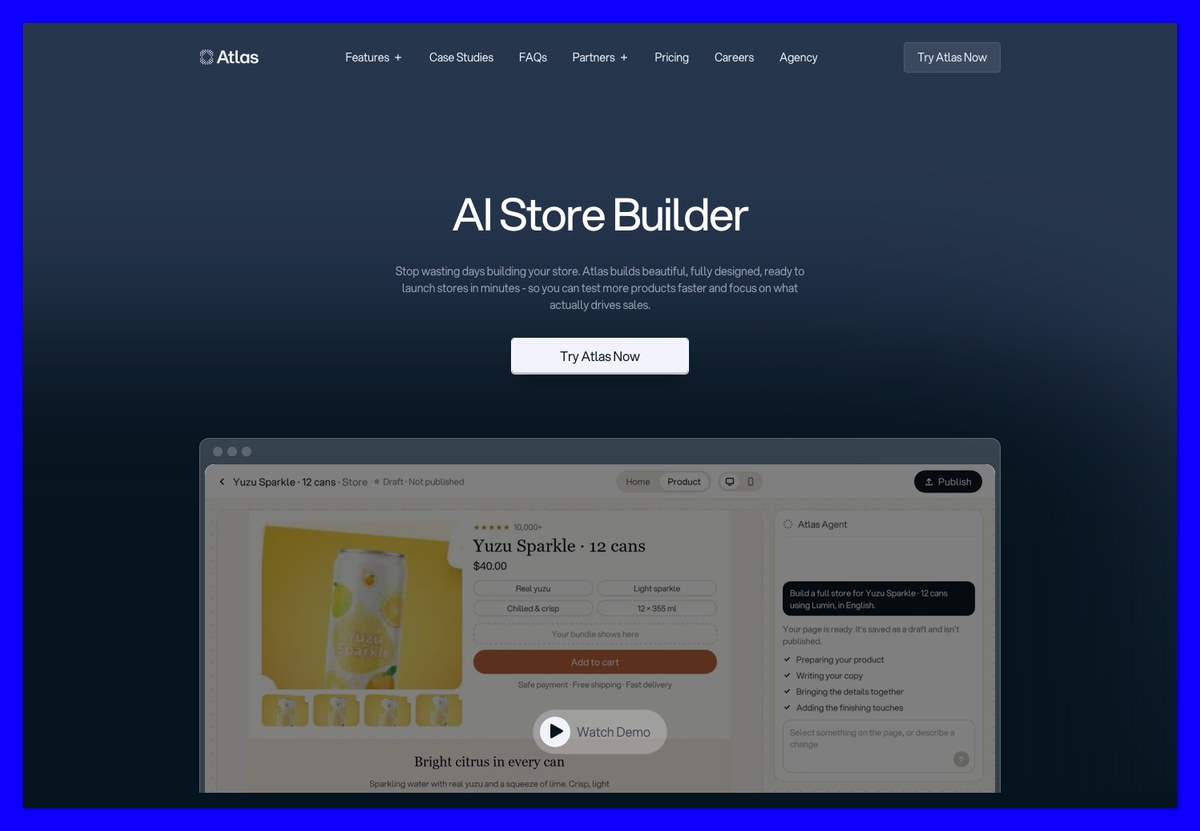
The editor demo places the generated page beside the Atlas Agent chat panel. I can see the appeal for a seller who knows what needs changing but doesn’t want to write code.
Since chat edits use credits, keep an eye on your allowance. Save those credits for structural changes and use manual editing for straightforward text corrections.
If you’re building around a product, review the product explanation and section order first. Put the strongest benefits before secondary details, then check that your images support the claims instead of simply filling space in the layout.
Designing With BuildYourStore.ai
BuildYourStore.ai promises a customizable theme and pre-designed product pages. Our earlier BuildYourStore.ai vs Dropmagic comparison documented a store built on Shopify’s free Dawn theme.
After handover, the FAQ points you to Shopify’s theme editor for branding and page changes. That means you can make those edits without relying on BuildYourStore.ai.
Keep in mind that you start with a preset niche template, rather than a design created around your brand. You’ll need to revise the AI copy and layout before treating them as finished branding, especially if your products resemble another seller’s catalog.
Our take
If your store’s appearance is a competitive advantage, Atlas earns its fee here. For testing a niche, BuildYourStore.ai provides a starting theme without a builder charge.
Top Tip
Change your logo, colors, hero image and product titles before spending time on minor styling details. Our guide explains how to customize your Shopify theme with AI.
4. Best for Boosting Sales: Atlas
The Winner
Atlas includes the stronger sales toolkit
Atlas includes bundles, cart upsells and pre-sell pages. BuildYourStore.ai gives you product pages and sales badges, but you’ll need separate apps to add those extra tools.
Atlas is the stronger option if you want to build offers and landing pages together. You get those controls within the builder, although having them there doesn’t guarantee more sales.
Atlas’s Bundles and Cart Upsells
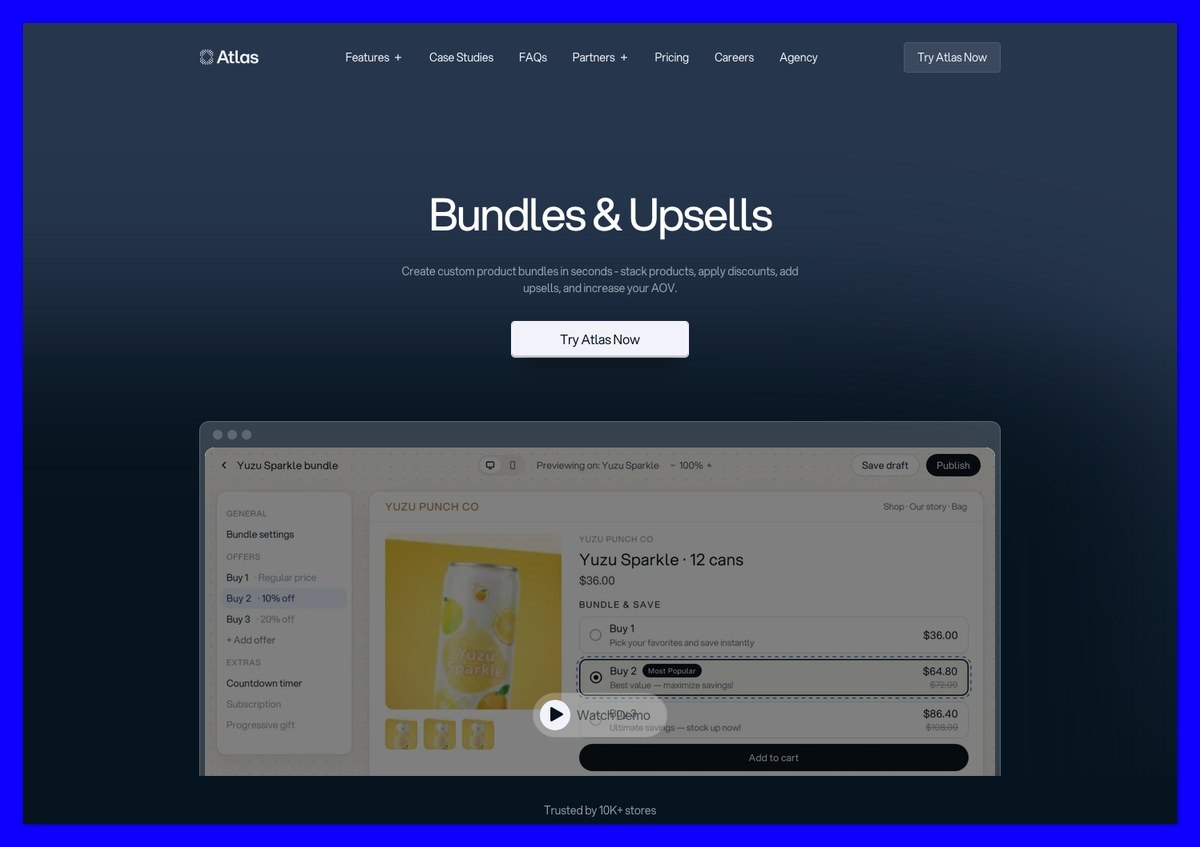
- Quantity breaks: Buy 1, Buy 2 and save, or Buy 3 with a larger saving.
- Offer extras: gift add-ons and subscribe-and-save options.
- Styling controls: customize how the bundle offer appears.
- Cart upsells: present additional products through a custom cart drawer.
- No credit charge: publishing, bundles and cart upsells don’t consume credits.
The bundle example shows quantity choices on the product page, with discount and extras settings alongside them. That gives you more control over an offer than a sales badge alone.
For example, use a quantity break when customers have a reason to buy multiples, rather than discounting every product automatically. Check the margin at each quantity, including shipping and any gift, before publishing the offer.
Good to know
Web app bundles and cart upsells require Scale, from $49 per month, not Launch or Free. The Shopify App Store’s All-in-One plan includes them at $39 per month plus usage charges.
Pre-Sell Pages and New Angles
Atlas also creates listicles and advertorials, using 1 credit per pre-sell page. These let you explain a product’s use case before sending visitors to its product page.
Its listing includes:
- A/B testing and analytics for comparing page approaches.
- Facebook Pixel compatibility.
- Judge.me Reviews compatibility.
- Loop and Seal Subscriptions compatibility.
Build a dedicated page for one audience or selling angle, and make sure the product offer matches that page. Atlas gives you the page tools, but you’ll still need an offer that makes sense.
What BuildYourStore.ai Gives You
BuildYourStore.ai advertises ready-to-sell product pages, premium apps and sales badges, but not a built-in bundle builder or upsell cart drawer.
You can add one of the Shopify bundle apps we’ve compared. For a cart drawer with upsells, UpCart is another option, with its own subscription cost.
If you aren’t using offers or paid-traffic landing pages yet, don’t buy Atlas solely for unused features.
5. Easiest to Use: BuildYourStore.ai
The Winner
BuildYourStore.ai leaves fewer decisions to make
Choose a niche and it generates the store with products. Atlas adds product, template, plan and theme choices before you publish.
You can start BuildYourStore.ai without entering a card. Comparing the setup flows, I found its guided selection simpler for a first store, while Atlas offers more control once you know your product.
Setting Up a Store With BuildYourStore.ai
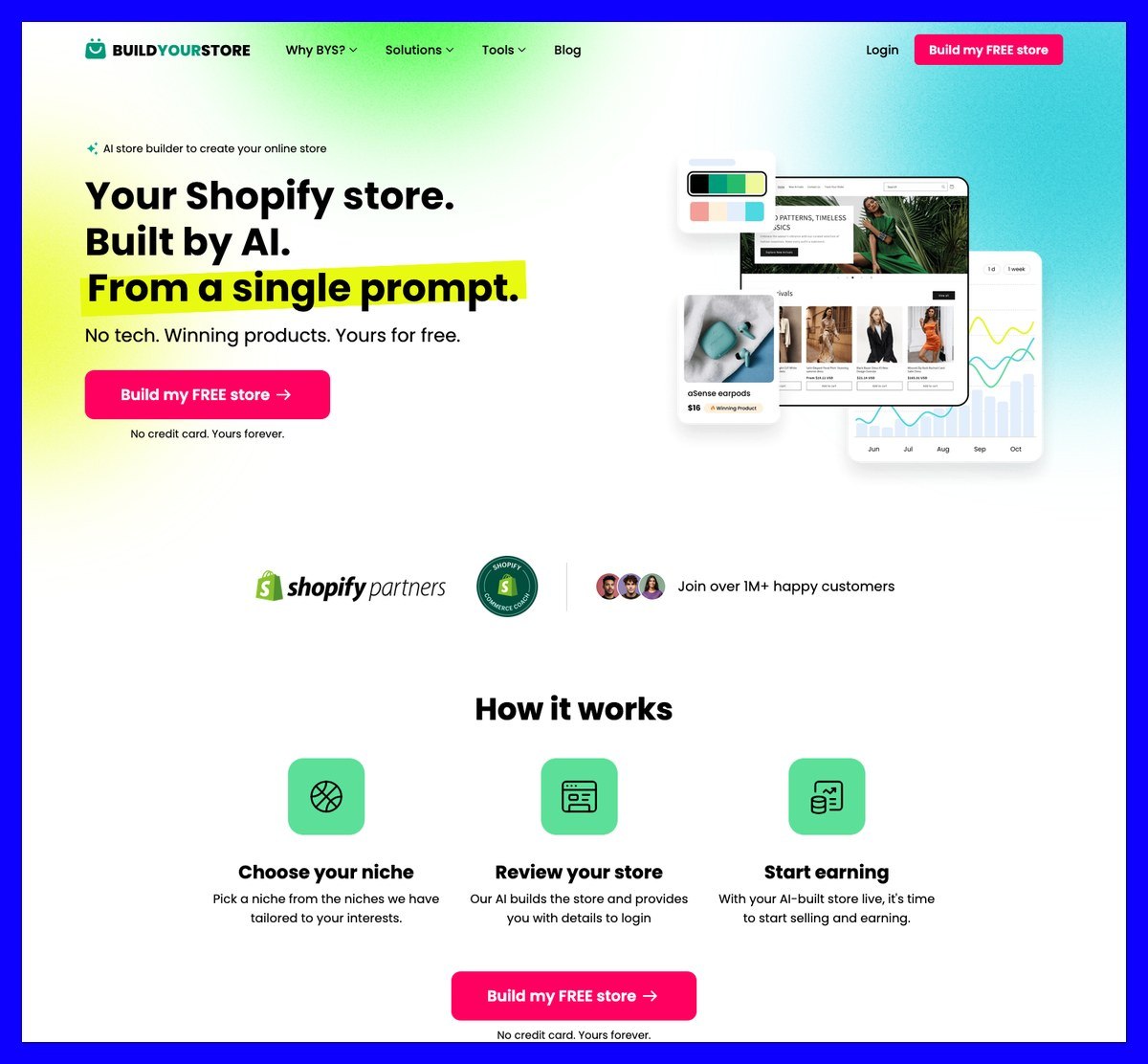
BuildYourStore.ai presents three homepage steps:
- Choose your niche.
- Review your store.
- Start earning.
The site promises to generate your store in minutes. Its final step is a marketing label, though, and you’ll still have setup work to do before accepting orders.
Finish the store before paying for traffic:
- Connect your account with Shopify. Shopify’s $1 offer applies after the initial free trial.
- Activate AutoDS for supplier order forwarding.
- Configure payments, using a supported option such as Shopify Payments, PayPal or Stripe.
- Review shipping profiles against the suppliers’ actual terms.
- Revise the AI copy and add your logo in Shopify’s theme editor.
A generated homepage doesn’t mean you’re finished. Your store needs to be ready to accept and fulfill orders. Review each included product before treating the catalog as ready to advertise.
Setting Up a Store With Atlas
Atlas takes you from product to published pages:
- Choose a product: paste a link or select an existing Shopify product.
- Choose a page type: full store, product page or pre-sell page.
- Generate and review: Atlas says generation takes about two minutes.
- Publish into your chosen theme.
You can build without Shopify, but publishing needs a paid plan. Connecting Shopify installs the Atlas app.
You’ll have more decisions to make about your product, pricing route, credit allowance and destination theme. In return, Atlas’s listing supports 20 languages, alongside its broader page-editing controls.
Top Tip
Generate the free BuildYourStore.ai store first. Start Shopify’s trial and AutoDS’s 3-day trial when you’re ready to finish setup, rather than while you’re still deciding what to sell.
BuildYourStore.ai asks less of you upfront, making it my pick for your first AI dropshipping store builder.
6. Best for Store Ownership: BuildYourStore.ai
The Winner
BuildYourStore.ai hands over a standard Shopify store
You own the store, data and branding after handover, with no ongoing builder fee. Atlas publishes into your theme, but its Free plan excludes publishing, bundles and cart upsells.
Before committing your storefront, check what you’ll keep if you cancel. Owning your Shopify account doesn’t mean you’ll retain access to paid app features.
What You Keep With BuildYourStore.ai
BuildYourStore.ai’s FAQ says you become the full owner after handover and connection to Shopify. You can move platforms or change domains; our guide explains how to change your Shopify domain.
You won’t have an ongoing BuildYourStore.ai build payment. However, you’ll still rely on AutoDS for those products, so you’ll need another fulfillment route if you cancel it.
When you leave, remember that keeping your storefront doesn’t preserve supplier automation. Arrange replacement fulfillment before disconnecting the app that forwards your orders.
What Happens When You Cancel Atlas?
Atlas separates the theme from its subscription tools as follows:
- Publishing: product pages replace the relevant product page; a full-store build also replaces the chosen theme’s home page. Atlas says, “Your theme stays yours.”
- Theme changes: review the destination theme before publishing, because Atlas adds its pages there.
- Web app cancellation: open Settings, then Billing & credits, Manage plan, and Switch to Free. The plan continues until the paid period ends.
- Free-plan limits: publishing, bundles and cart upsells are not included.
A US Shopify App Store reviewer on November 6, 2026, after seven months of use, alleged that Atlas placed obfuscated code in theme JavaScript files and that their store locked when they tried to uninstall. No Atlas reply was shown in November 2026.
This remains one reviewer’s unproven allegation, so it doesn’t establish what happens when you uninstall Atlas. Consider it alongside Atlas’s statement that your theme stays yours, and keep a working theme before making changes.
Top Tip
Duplicate your live Shopify theme before publishing Atlas pages, then use the copy. Keep the untouched original available if you later want to switch back.
BuildYourStore.ai is the simpler starting point if your priority is avoiding an ongoing builder dependency.
7. Best for Support and Reputation: It’s a Tie!
The Winner
Atlas has more contact channels; BuildYourStore.ai splits support by service
Atlas offers in-app AI chat, team chat and email. BuildYourStore.ai handles build issues by email; Shopify and AutoDS support their respective services.
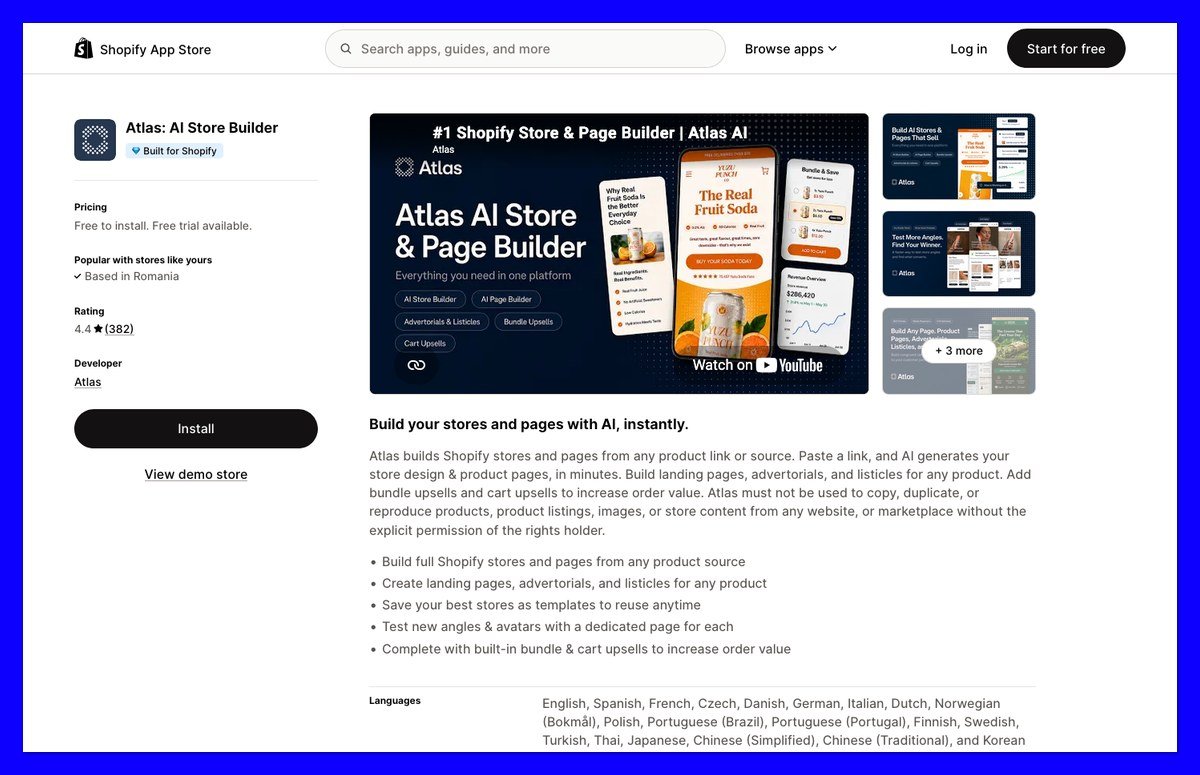
Both have a 9% one-star share, although the reviews come from different platforms. BuildYourStore.ai’s reviews are on Trustpilot, while Atlas has a dedicated Shopify App Store listing, so these figures don’t offer a like-for-like measure of satisfaction.
BuildYourStore.ai Support
Pros
- 4.6 from 200 Trustpilot reviews, with 85% five-star.
- Responsive support praised by a November 2026 Trustpilot reviewer.
- Shopify Support is available 24/7; AutoDS handles fulfillment questions.
- Replies to every negative review, typically within a week, according to its Trustpilot profile.
Cons
- Email-first build support, despite homepage advertising of 24/7 support.
- Trial-to-subscription complaints in the Trustpilot summary in November 2026.
- 9% one-star reviews on Trustpilot.
With the free build, there’s no subscription to convert. An October 2026 Trustpilot reviewer said they accidentally accepted a paid upgrade, which support resolved as an exception.
Atlas Support
Pros
- In-app AI chat, team chat and email offer more contact options.
- 4.4 from 382 App Store reviews, 84% five-star, plus the Built for Shopify badge.
- Public refunds: Atlas refunded a UK reviewer on November 17, 2026, explaining that the trial expired before uninstalling; it refunded a French reviewer on November 13, citing billing restarted by store reactivation.
Cons
- 34 one-star reviews, representing 9%.
- Billing dispute: a Canadian reviewer on October 9, 2026 reported a $83.13 charge after cancellation and difficulty finding support. Atlas replied that the trial was 7 days, not 30, and billing preceded uninstalling.
- The November 2026 uninstall allegation in Round 6 had no public reply.
Our Atlas AI Store Builder review covers billing considerations further.
| Metric | BuildYourStore.ai | Atlas |
|---|---|---|
| App Store rating | No dedicated listing | 4.4, 382 reviews |
| Trustpilot rating | 4.6, 200 reviews | 4.9, 380 reviews, displayed on sign-up page |
| One-star share | 9%, Trustpilot | 9%, App Store |
| Channels | Email; Shopify and AutoDS | AI chat, team chat, email |
| Reported billing complaint | Paid trial conversion | Charges after cancellation or trial expiry |
For in-app contact, go with Atlas. BuildYourStore.ai suits you if you’re happy with separate Shopify and AutoDS support.
How We Test AI Store Builders
Pricing and ease of use carry 40% of our score because this comparison prioritizes first-time sellers on a budget.
| Criterion | Weight | What we look at | BuildYourStore.ai | Atlas |
|---|---|---|---|---|
| Pricing and value | 20% | Plans, trials, add-ons, first-year cost | 5.0 | 3.9 |
| Products and fulfillment | 15% | Sourcing, routing, product flexibility | 4.8 | 4.4 |
| Design and customization | 15% | Templates, editor, theme control | 4.4 | 4.8 |
| Sales and conversion tools | 10% | Bundles, upsells, pre-sell pages | 4.0 | 4.9 |
| Ease of use | 20% | Setup steps and decisions | 4.9 | 4.5 |
| Store ownership | 10% | Theme access, cancellation, retained content | 4.9 | 4.0 |
| Support and reputation | 10% | Channels, ratings, complaints | 4.4 | 4.4 |
| Overall, weighted | 100% | Weighted average, rounded | 4.7 | 4.4 |
I compared setup instructions, pricing and FAQs with November 2026 App Store and Trustpilot records. The screenshots show the public product pages used for the feature comparisons.
These are editorial suitability scores, not customer-review averages. The weighted totals are 4.69 and 4.39, rounded to one decimal. If branding and conversion tools matter more than startup cost, give Atlas’s design and sales wins greater weight.
BuildYourStore.ai vs Atlas: Our Winner
For first-time sellers and tight budgets, BuildYourStore.ai is the better AI store builder. Its $0 build includes 10 niche products connected to AutoDS, a free .store domain and a Shopify store you own. It scores 4.7/5 against Atlas’s 4.4/5.
Atlas is my pick once you have a product and want more design control and built-in sales tools. Its 35+ sections, conversational editing, bundles and advertorials make it worth considering. You’ll need to budget $39 per month plus usage through the Shopify App Store, or from $49 per month for web app Scale if you need bundles and cart upsells.
Whichever you choose, budget separately for Shopify and, if you dropship, fulfillment through a supplier app such as AutoDS.
I recommend starting with BuildYourStore.ai, then previewing your strongest product with Atlas’s Free plan before paying to publish. Start free and upgrade deliberately, and generate your first store before activating the short paid-service trials.
FAQ
Is BuildYourStore.ai really free?
Building the store is free, with no credit card, and a .store domain is included. Selling requires Shopify: Basic offers 3 free days, then $1 per month for 3 months, then $39 per month. The included products use AutoDS, whose Import 200 plan costs $26.90 per month after its trial. The first-year subscription budget is $676.80 on monthly billing.
Does Atlas have a free plan or free trial?
Atlas offers both. Its web app’s Free plan provides 15 credits without a card for building, editing and previewing, but not publishing. The Shopify App Store’s All-in-One plan costs $39 per month plus usage charges after a 7-day trial. Atlas says usage charges can accrue during the trial. Development stores can use Atlas free.
Do I need AutoDS to use BuildYourStore.ai?
For the included products, effectively yes. BuildYourStore.ai sources them through AutoDS, which forwards orders to suppliers, and its FAQ says a separate subscription may be needed after the trial. You can delete those products and add your own goods, print-on-demand items or other dropshipping products, but you’ll need an appropriate fulfillment route for those replacements.
Can I cancel Atlas and keep my store?
Your Shopify store remains yours, and Atlas says your theme does too. For web app cancellation, select Settings, Billing & credits, Manage plan, then Switch to Free; paid access lasts until the period ends. Free excludes publishing, bundles and cart upsells. Keep a theme backup, and see the Store Ownership round above for the reported uninstall concern.
Which is better for a first dropshipping store?
BuildYourStore.ai is better for most first-time dropshippers. It selects products within your chosen niche, connects them to AutoDS for fulfillment and charges nothing for the build. Your budget can go toward Shopify, AutoDS and marketing instead. Choose Atlas when you already have a product and need branded pages, bundles and cart upsells enough to justify its subscription.


