
 By Bogdan Rancea
Short answer: BigCommerce plans run $39 per month for Core, $105 for Growth, and $399 for Scale, with roughly 25 percent off on annual billing. Performance is custom priced and starts at $1,499 per month on an annual contract.
But the sticker price is now the least interesting part of the equation. BigCommerce restructured its plans on June 1, and the changes underneath the rename matter far more than the monthly fee.
BigCommerce still gets labelled an enterprise-only platform, and that has never been true. It remains one of the better setups for growing stores that need real control over design, SEO, and performance without hitting a ceiling.
What has changed is how you should budget for it. After consulting ecommerce brands for over a decade and reviewing over 6,000 stores for our ecommerce design gallery, I have watched a lot of merchants pick a platform on the headline price and get surprised eighteen months later. On BigCommerce right now, that risk is higher than it used to be.
The question that actually matters is not what each plan costs. It is what each plan unlocks or restricts when it comes to design, performance, SEO, and the features that genuinely grow a business.
So here is the full breakdown: what each tier actually costs, what it unlocks, and where the new fee structure quietly changes the math.
What Changed in the BigCommerce Plan Restructure
Three things happened at once on June 1, and any pricing guide that predates that date is no longer safe to budget from.
1. Every plan was renamed. Standard became Core. Plus became Growth. Pro became Scale. Enterprise became Performance. If you are reading older comparisons, translate accordingly.
2. The sales caps dropped sharply. The entry tier cap fell from $50,000 to $30,000. The mid tier cap fell from $180,000 to $100,000. The same revenue that kept you on a $79 plan last year now pushes you onto a $299 plan.
3. The no transaction fees promise gained conditions. BigCommerce introduced an Open Payment Provider Fee of up to 2 percent on orders processed through gateways outside its approved list. For years, zero transaction fees was the single cleanest argument for BigCommerce over Shopify. That argument now comes with an asterisk.
Verify before you commit
BigCommerce has changed its pricing structure once already this cycle and may adjust it again. Every figure in this guide was checked against BigCommerce’s official pricing page before publishing. If you are close to a threshold or negotiating a contract, confirm the current numbers directly with BigCommerce.
BigCommerce Pricing at a Glance
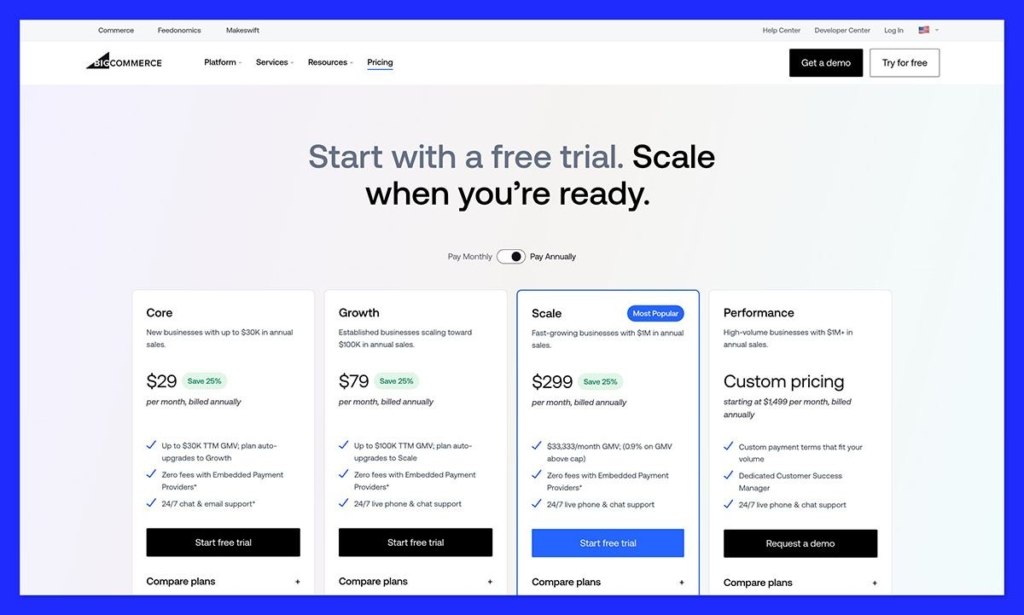
| Plan | Monthly | Annual billing | GMV threshold | Open Payment Provider Fee |
|---|---|---|---|---|
| Core (was Standard) | $39/mo | $29/mo | Up to $30K trailing 12 months | 2.0% |
| Growth (was Plus) | $105/mo | $79/mo | Up to $100K trailing 12 months | 1.0% |
| Scale (was Pro) | $399/mo | $299/mo | $33,333/mo, then 0.9% overage | 0.6% |
| Performance (was Enterprise) | Custom | From $1,499/mo | Custom | None under contract |
Prices exclude tax. All four plans include unlimited products, unlimited file storage, unlimited bandwidth, and unlimited staff accounts, which is still one of BigCommerce’s genuine structural advantages over competitors that meter those things.
The Fee That Changes the Math: Open Payment Provider
This is the part most merchants miss, so it is worth being precise.
BigCommerce maintains a list of Embedded Payment Providers. Process an order through one of those and you pay no additional platform fee. Process it through anything else and BigCommerce charges a percentage of that order’s GMV, billed monthly as a separate line item on your invoice. It is charged to you, not your shopper, and it sits on top of whatever your payment provider already charges.
The rates: 2.0 percent on Core, 1.0 percent on Growth, 0.6 percent on Scale, and none on Performance under a contract.
Which providers avoid the fee
The Embedded list currently includes BigCommerce Payments, Stripe, Adyen, Checkout.com, Worldpay, Global Payments, Amazon Pay, PayPal Wallet, PayPal Braintree, PayPal Complete Payments, Klarna, Affirm, Afterpay, Clearpay, Sezzle, Zip Money, Bluesnap, Bankful, Fortis, TD Online Mart, and Bank of New Zealand.
For a typical US or UK store running Stripe or PayPal, the fee is a non-event. The people it hurts are merchants on regional gateways, merchants in markets where none of the embedded options operate cleanly, and B2B sellers who take orders offline. Manual payment methods and purchase orders are fee eligible too, which is a real cost for wholesale operations.
Decide your gateway before you sign
At $500,000 in annual sales, a 2 percent fee is $10,000 a year. Choosing your payment provider is now a bigger financial decision than choosing your plan. Confirm your gateway is on the Embedded list before you build.
How BigCommerce Calculates Your Sales Threshold
Your plan is assigned by trailing twelve-month GMV, and the definition of GMV is doing quiet work here.
BigCommerce measures GMV as your gross order value minus 10 percent. Eligible sales include product price after discounts, plus taxes and shipping. Social commerce transactions from Pinterest, Facebook, and Twitter count, and so do native marketplace orders from eBay and Amazon.
Taxes and shipping counting toward the cap is the detail that catches people out. A store selling $28,000 in actual product can cross the $30,000 Core threshold on tax and freight alone.
When you exceed your cap on Core or Growth, the upgrade is automatic. You get notified and moved to the next plan. On Scale, BigCommerce replaced the old hard tier jumps with a continuous 0.9 percent overage on monthly GMV above $33,333, which is a genuine improvement in predictability. Once trailing twelve-month GMV hits $2 million, the account moves to Performance.
Core Plan: $39 per Month
The entry tier. Good for testing a product idea or launching something simple. It gives you enough to sell, but not much room to build a brand.
What you get
- Unlimited products, storage, bandwidth, and staff accounts
- Free sitewide HTTPS and a dedicated SSL certificate
- Single-page checkout with Apple Pay, Google Pay, and Amazon Pay
- Coupons, discounts, and gift cards
- Multi-currency and real-time shipping quotes
- Built-in blog, product ratings and reviews, professional reporting
- Point of sale, plus Amazon, eBay, and Walmart channels
- Feedonomics Surface free for Google, Meta, TikTok, Microsoft, and Pinterest feeds
- Up to 4 inventory locations, additional storefronts at $30/mo up to 3
- 24/7 chat and email support
Where it holds you back
- No product filtering, so shoppers cannot narrow by price, size, or attribute
- No abandoned cart saver, no persistent cart, no stored credit cards
- No customer groups or segmentation
- The highest Open Payment Provider Fee at 2 percent
- The lowest threshold at $30,000, which arrives faster than most founders plan for
- No included phone support, though BigCommerce has said a paid add-on is coming
From a design point of view, Core puts you in a box. You are working with the visual editor and a Stencil theme, and anything beyond surface changes needs HTML and CSS. For a solo founder with a handful of SKUs, that is fine. For anyone building a brand, you will feel the walls inside a year.
Growth Plan: $105 per Month
This is the most common plan I see among stores doing real volume but still scaling. It is the minimum tier I would suggest if conversion and user experience matter to you.
What you get on top of Core
- Abandoned cart saver with automated recovery emails
- Customer groups and segmentation for targeted pricing and offers
- Persistent cart and stored credit cards, which smooth returning-customer checkout
- 24/7 live phone support included
- Up to 5 inventory locations, additional storefronts at $50/mo up to 5
- Open Payment Provider Fee halved to 1 percent
- Threshold raised to $100,000 trailing twelve-month GMV
Where it still limits you
- Still no product filtering, which is the single biggest UX gap on the platform
- No Google customer reviews integration
- API limits constrain deeper integrations and headless experimentation
- The $100,000 cap is 44 percent lower than the old Plus cap, so upgrade pressure arrives sooner
Segmentation plus persistent cart is a meaningful combination if you actually use it. You can build differentiated experiences for wholesale versus retail, or returning versus first-time buyers, and that is where design-led conversion work starts to pay for itself. But if you have a catalogue of any real depth, the missing filtering will keep costing you.
Scale Plan: $399 per Month
This is where BigCommerce becomes a serious platform for brands that need design freedom and room to grow.
What you get on top of Growth
- Product filtering and custom product filtering
- Google customer reviews integration
- Higher API limits, which is what makes real integrations and headless builds viable
- Up to 8 inventory locations, additional storefronts at $100/mo up to 8
- Lowest self-service Open Payment Provider Fee at 0.6 percent
- Continuous 0.9 percent overage instead of a hard tier jump
What to watch
- The $33,333 monthly GMV cap converts to roughly $400,000 a year before overage kicks in
- Price Lists and advanced promotions management are still Performance only
- Automatic move to Performance at $2 million trailing twelve-month GMV
Product filtering alone justifies the jump for most catalogue-driven stores. Navigation is the highest-leverage design work you can do on an ecommerce site, and being unable to filter is a self-inflicted conversion problem.
See what good looks like
Want to see what great design on BigCommerce actually looks like? Check out our curated gallery of the best BigCommerce stores, with real brands and real design inspiration.
Scale is also where headless becomes practical. Which brings us to the thing most older pricing guides get wrong.
Stencil is no longer the only option
BigCommerce now ships two officially supported storefront frameworks. Stencil is the traditional Handlebars-based theme engine, still fully supported and still the fastest path to launch. Catalyst is the composable framework built on Next.js and React server components, with a Makeswift visual editor and a GraphQL Storefront API client.
Catalyst is an alternative, not a mandatory migration. If your GMV is modest and your storefront is conventional, Stencil remains the cost-effective choice. If you need aggressive Core Web Vitals performance or custom UX that a theme framework fights you on, Catalyst removes most of the reason to build a headless frontend from scratch.
I have worked with brands who launched on the mid tier and moved up because they were hitting friction. This is the plan where most teams stop feeling like they are fighting the platform.
Performance Plan: From $1,499 per Month
Performance replaced Enterprise, and the notable change is that it now has a published floor. Enterprise pricing used to be entirely quote-based, which made budgeting a guessing game. You now have a starting number to work from.
What it unlocks
- No Open Payment Provider Fee under contract, whatever gateway you use
- Price Lists and advanced promotions management
- Dedicated Customer Success Manager and API support
- ShipperHQ shipping rules engine included rather than as an add-on
- Custom inventory locations and storefront allocations
- Custom payment terms scaled to your volume
The trade-offs
- Annual contract required, unlike Core, Growth, and Scale
- Final pricing varies with GMV, storefront count, B2B modules, and API tier
- Overkill for most stores under $2 million
Who it is really for: brands past $1 million that want maximum control, companies working with external design and dev teams who cannot afford platform bottlenecks, sites with heavy traffic spikes, and teams running a custom frontend. If you process a significant share of orders through a non-embedded gateway, the fee waiver alone can shift the math in Performance’s favour earlier than you would expect.
So What Are You Actually Paying For?
You are not paying for features. You are paying for leverage, and now also for fee mechanics.
At the lower tiers you trade money for constraints. You save on subscription and pay for it in missing filtering, missing segmentation, and a 2 percent gateway fee if you are not on the embedded list.
At the higher tiers you buy flexibility, lower fee rates, and tools that let your team move without workarounds.
The simple version:
- Core: fine if you are testing
- Growth: the realistic minimum for a store that intends to grow
- Scale: the sweet spot for scaling brands with design or dev resource
- Performance: for teams that need full control, or whose payment setup makes the fee waiver pay for itself
BigCommerce vs Other Platforms From a Design Perspective
I have worked with stores on Shopify, Squarespace, WooCommerce, Webflow, and Wix. Here is how BigCommerce compares if design, SEO, and scale are what you care about.
| Platform | Design flexibility | SEO control | Headless friendly | Gateway fees | Notes |
|---|---|---|---|---|---|
| BigCommerce | Good, strong on Scale and above | Very good | Yes, via Catalyst or custom | 0.6% to 2% outside embedded providers | Strong SEO foundation, unlimited staff and bandwidth |
| Shopify | Limited without Liquid developers | Decent | Yes, via Hydrogen | 0.2% to 2% outside Shopify Payments | Easier to start, deepest app ecosystem |
| Squarespace | Limited | Weak | No | None | Beautiful but rigid once you scale |
| WooCommerce | Fully flexible | Strong | Yes | None from the platform | Developer-heavy, plugin maintenance burden |
| Webflow | Excellent front end | Needs developer input | Possible but fragile | None | Better suited to content-first brands |
The honest update here: BigCommerce and Shopify are now priced almost identically at comparable tiers, and both charge for using an outside gateway. The old differentiator is gone. What remains in BigCommerce’s favour is unlimited staff accounts, unmetered bandwidth, deeper native B2B, and cleaner URL control. What remains in Shopify’s favour is the app ecosystem and the sheer volume of developers who know it.
Squarespace still looks lovely out of the box. I have used it plenty for early-stage brands. But once you want to customise anything meaningful, you are designing inside a glass box. Same with Wix.
SEO and Design: The Underrated Pair
People always ask whether BigCommerce is good for SEO. The answer is yes, but only if you use it properly.
The real advantages:
- Full control over URL structure, without forced subfolders
- Editable robots.txt and sitemap
- Solid performance on well-built Stencil themes, and considerably better on Catalyst if you have the engineering capacity
- Feedonomics Surface included free for up to 100,000 SKUs, which handles product feeds for Google, Meta, TikTok, Microsoft, and Pinterest
One thing worth flagging: the old native Ads and Listings on Google integration has been discontinued, and Feedonomics Surface is the replacement path. If you are following an older tutorial for Google Shopping setup, it will not match what you see in the control panel.
None of this is magic. Default themes will not win awards, and you still need to invest in navigation structure, internal linking, and speed work. But the foundation is genuinely good, and it does not fight you the way some builders do.
Hidden Costs to Budget For
- Open Payment Provider Fee: 0.6 to 2 percent if your gateway is not on the embedded list. This is now the largest hidden cost on the platform.
- Payment processing: separate from the above. Card processing on BigCommerce Payments starts around 2.89 percent plus $0.29 per transaction, with better published rates on higher plans.
- Threshold creep: taxes and shipping counting toward GMV means your upgrade arrives earlier than your product revenue suggests.
- Apps and integrations: most stores end up with a few, typically $10 to $50 each per month.
- Additional storefronts: $30, $50, or $100 per month depending on plan.
- Themes: premium Stencil themes usually run $150 to $300 one time.
- Design and development: a Stencil build with real customisation is a meaningful line item. A Catalyst build is a larger one, plus hosting.
When to Choose BigCommerce, and When to Skip It
Go with BigCommerce if
- Your payment provider is on the Embedded list, which makes the platform fee structure clean
- You want strong URL and technical SEO control
- You need unlimited staff accounts and bandwidth without metering
- You sell B2B and want native price lists and customer groups rather than bolt-on apps
- You are working with a design team or agency, or planning a Catalyst build
Skip BigCommerce if
- You depend on a regional or niche gateway that sits outside the embedded list
- You take a high share of orders offline or via purchase order and cannot absorb the fee
- You want drag-and-drop freedom with no development resource
- Your site is mostly content with a small commerce component
- You are validating an idea for a few weeks and want the cheapest possible exit
Final Thoughts
When I help a brand choose a platform, I do not start with price. I start with where they are going, and now I add a second question: how do you take payment?
That second question used to be an afterthought on BigCommerce. It is not anymore. Two identical stores on the same plan can have wildly different total costs based purely on gateway choice, and nothing on the pricing page makes that obvious at a glance.
If you are building something that needs to scale, perform, and hold up under real SEO scrutiny, Scale or Performance still make a lot of sense. If you are early, Growth is the honest starting point. And if you are choosing on sticker price alone, you are missing the real cost, which is the cost of hitting a wall later.
Frequently Asked Questions
How much does BigCommerce cost per month?
Core is $39 per month, Growth is $105, and Scale is $399, with roughly 25 percent off on annual billing, which brings them to $29, $79, and $299. Performance is custom priced starting at $1,499 per month on an annual contract. All figures exclude tax.
What happened to the Standard, Plus, Pro, and Enterprise plans?
They were renamed on June 1. Standard became Core, Plus became Growth, Pro became Scale, and Enterprise became Performance. Base prices for the first three did not change, but the sales thresholds attached to each plan dropped and a new payment provider fee was introduced.
Does BigCommerce charge transaction fees?
Not on orders processed through an approved Embedded Payment Provider such as Stripe, PayPal, Adyen, or BigCommerce Payments. Orders processed through any other gateway carry an Open Payment Provider Fee of 2 percent on Core, 1 percent on Growth, and 0.6 percent on Scale. Performance customers pay none under contract. This is separate from your payment provider’s own processing fees.
How does BigCommerce decide when to upgrade my plan?
By trailing twelve-month GMV, which BigCommerce calculates as gross order value minus 10 percent. Core auto-upgrades to Growth above $30,000 and Growth auto-upgrades to Scale above $100,000. Scale applies a 0.9 percent overage above $33,333 per month and moves to Performance at $2 million.
Do taxes and shipping count toward my sales threshold?
Yes. Eligible sales include product price after discounts, plus taxes and shipping. Marketplace orders from Amazon and eBay and social commerce transactions from Pinterest and Facebook also count. This means a store can cross a threshold on freight and tax before its product revenue would suggest.
Is there a free trial?
Yes, a fully functional 15-day trial with no credit card required. You can launch and take payments during the trial once a payment provider is configured. If you do not upgrade, BigCommerce holds your data for 90 days before deleting the store.
Does BigCommerce require a contract?
Core, Growth, and Scale are month to month with no contract, and cancelling stops billing immediately. Performance is contract based.
Is BigCommerce cheaper than Shopify?
Not by default anymore. The two are priced almost identically at comparable tiers, and both now charge a percentage fee for using an outside payment gateway. Which one is cheaper for you depends on your gateway, your app stack, and how much of your revenue comes through marketplaces. Run the numbers on your own order mix rather than relying on the old no-transaction-fees comparison.
Should I use Stencil or Catalyst?
Stencil is still fully supported and remains the faster, cheaper path for conventional storefronts. Catalyst, built on Next.js and React server components, is worth the engineering overhead when you need aggressive performance tuning or custom UX that a theme framework cannot accommodate. It is an option, not a required migration.
Which BigCommerce plan is best for SEO?
All plans give you the same core technical SEO control, including editable URLs, robots.txt, and sitemap. The practical difference shows up on Scale and above, where product filtering improves site architecture and higher API limits make performance-focused builds possible. SEO outcomes depend far more on your build quality than your plan tier.


