
 By Bogdan Rancea
Canva for Education is a free, Pro-level design platform built specifically for K-12 teachers and students, offering classroom management tools, LMS integrations, and a vast template library layered on top of Canva’s familiar graphic design experience.
Our team has spent considerable time testing design and visual communication tools across the education sector, so I can say with confidence that Canva for Education stands out as one of the most capable free tools available for teachers.
In this review, I’ll take a closer look at its features, eligibility requirements, pricing structure, and real-world classroom use cases so you can decide if it’s the right fit for your school.
Why You Can Trust This Review
We’ve conducted hands-on testing and in-depth research across a range of education technology platforms to bring you accurate, unbiased assessments.
Our recommendations are backed by data and direct product experience, giving you everything you need to make the right call for your classroom or school.
Best for: K-12 teachers, schools, and districts looking for a free, full-featured visual design and collaboration platform
Pricing: Free for eligible K-12 educators and their students
Pros
- 100% free for verified K-12 teachers and students
- Pro-level features including Magic Studio AI tools
- 80,000+ educational templates
- Real-time collaboration and peer feedback tools
- Integrates with Google Classroom, Microsoft Teams, and Canvas
Cons
- Not available to higher-education students or staff
- Students can only access via teacher invite, not independently
- Colleges and universities need a separate paid plan (Canva for Campus)
My Experience With Canva for Education
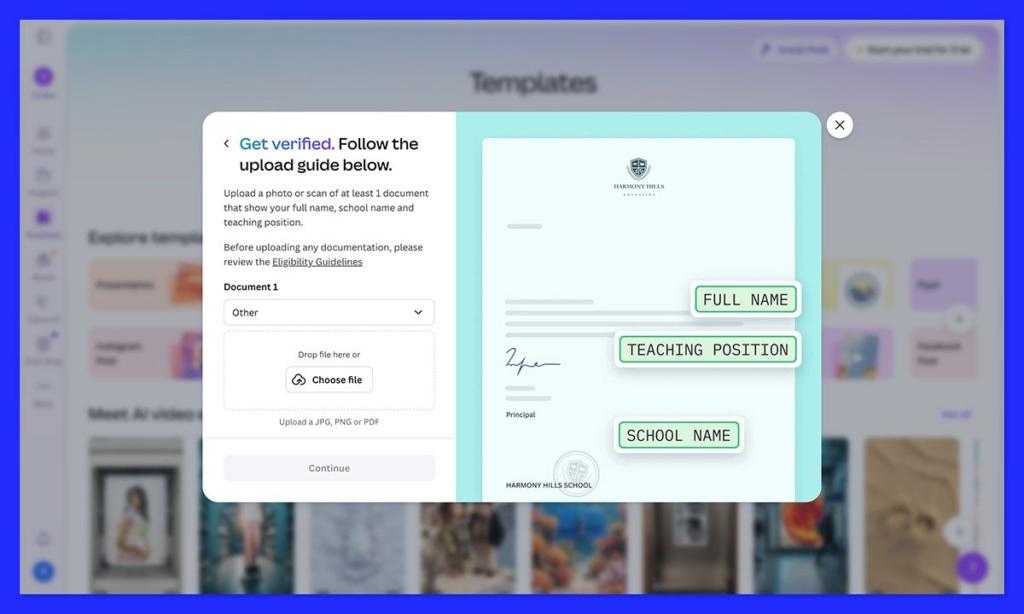
Getting started with Canva for Education is straightforward, but the process differs from a standard Canva sign-up. Teachers need to verify their educator status before unlocking the free Education tier.
The verification process asks for your institution details and teaching role, and Canva cross-references these against accreditation records.
Once verified, the dashboard immediately feels more expansive than the standard free plan. The template library surfaces education-specific content right away, organized by subject, grade level, and content type. I found this particularly useful for getting up and running quickly without having to search through general-purpose design assets.
One thing that stood out immediately: students cannot sign up on their own. They only gain access when a verified teacher invites them into a class or when their school has been approved as an Education customer at the district level. This adds a layer of friction for independent student use, but it also makes classroom management considerably cleaner.
Author’s Testing Notes
The onboarding experience for teachers is efficient once verification clears, but the wait time on verification can vary. If you’re planning to launch Canva for Education at the start of a semester, I’d recommend applying for verification at least one to two weeks in advance to avoid delays.
Canva for Education Pricing: What Does Free Actually Mean?
Canva for Education is 100% free for verified K-12 teachers, librarians, learning support educators, curriculum specialists, and their students, as well as eligible schools and districts.
There is no freemium tier here with features locked behind a paywall, which is genuinely impressive.
What you unlock is effectively the full Canva Pro experience, including premium assets, advanced design tools, Magic Studio AI features, and around 1 TB of storage per user. For context, Canva Pro costs individuals around $15 per month, so the value on offer for qualifying educators is significant.
| Plan | Who It’s For | Price | Key Features |
|---|---|---|---|
| Canva for Education | K-12 teachers, students, schools, districts | Free | Full Pro features, classroom management, LMS integrations, 80,000+ templates |
| Canva Free | Any individual | Free | Basic templates and design tools, limited assets |
| Canva Pro | Individuals and small teams | ~$15/month | Premium assets, Magic Studio AI, brand kits, 1 TB storage |
| Canva for Teams/Enterprise | Organizations and businesses | Custom pricing | Team management, advanced admin controls, enterprise security |
| Canva for Campus | Higher-education institutions | Custom pricing (paid) | University-specific features, institutional deployment |
| Canva for Nonprofits | Qualifying non-profit organizations | Free (verified) | Pro features for mission-driven organizations |
Important: Canva for Education is not available to individual college or university students or staff. Higher-education institutions use Canva for Campus, which is a separate, paid offering with custom pricing. If you’re in higher education, you’ll need to contact Canva’s sales team directly.
Canva for Education Features: What Can You Actually Do?
Template Library
One of the most immediately useful aspects of Canva for Education is the sheer scale of its template library. Over 80,000 customizable education templates are available, covering lesson plans, worksheets, quizzes, infographics, project-based learning materials, and more, organized by subject and grade level.
This is a practical advantage for teachers who need to produce quality classroom materials quickly. Rather than building from scratch, you can pull an existing template, adapt it to your content, and have something print- or screen-ready within minutes.
Winner for Template Variety: Canva for Education offers far more education-specific templates than any comparable free tool on the market.
Real-Time Collaboration
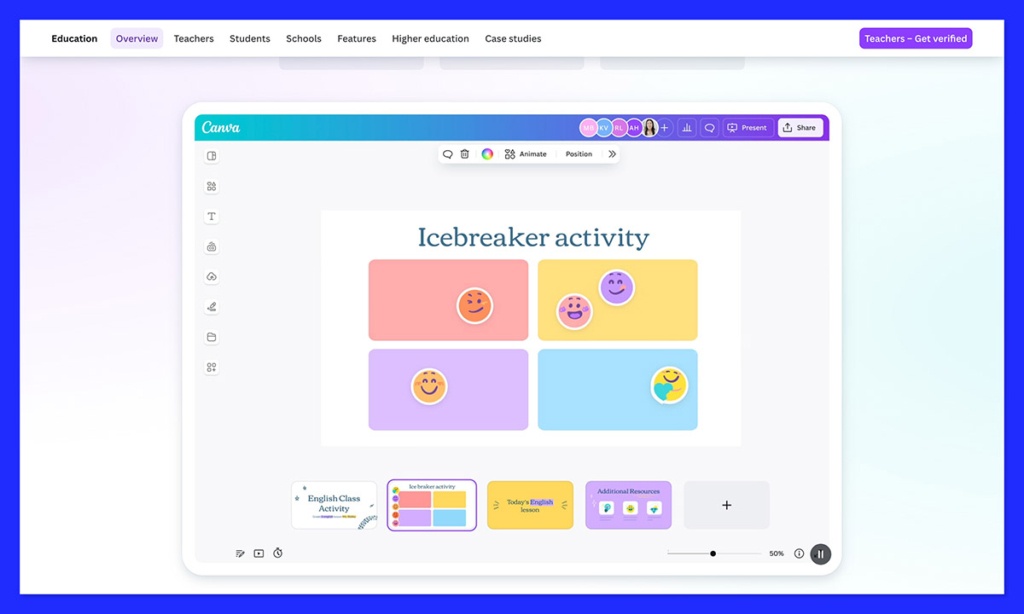
Canva for Education supports simultaneous editing on shared designs, which opens up genuine group project work within the platform. Students can co-author presentations or collaborative posters in real time, and teachers can monitor and contribute to student work as it develops.
The feedback system goes beyond simple comments. In addition to text annotations, teachers and peers can leave visual “sticker” feedback directly on designs, which makes the review process more intuitive for younger students and more engaging overall.
Author’s Testing Notes
Real-time collaboration in Canva for Education is one of its genuine standout features. I found the sticker feedback particularly well-suited to K-12 use: it’s fast, visual, and far less intimidating for students than receiving a wall of written corrections. For formative assessment, this is a strong differentiator.
Classroom Management Tools
Canva for Education gives teachers a dedicated classroom workspace that goes well beyond what you’d expect from a design tool. From within this workspace, teachers can manage virtual classes, invite students, organize class folders, assign work, review submissions, and track progress.
This makes Canva for Education something closer to a lightweight LMS than a standalone design app, especially when combined with its integrations. For schools that don’t want to add yet another separate platform to their tech stack, this level of built-in management is genuinely useful.
LMS Integrations
Canva for Education integrates with the major learning management systems in use across K-12 schools, including Google Classroom, Microsoft Teams, and Canvas. Assignments and feedback can flow directly through these existing environments, which means teachers don’t have to ask students to learn a new workflow just to submit a Canva project.
Winner for Integration Depth: The combination of LMS integrations and built-in classroom management makes Canva for Education a practical fit within existing school technology setups.
AI and Magic Studio Features
As part of the Pro-level access included in Canva for Education, teachers and students get access to Canva’s Magic Studio suite. This includes AI-powered tools for generating and editing image backgrounds, producing text for presentations and worksheets, and supporting content creation more broadly.
For teachers, this can significantly reduce the time spent building lesson materials from scratch. For students, it opens up creative possibilities for visual projects and multimodal assignments that go beyond traditional text-based outputs.
Pedagogical Use Cases: How Teachers Are Using It
Canva for Education is flexible enough to fit a wide range of teaching styles and subject areas. Here are some of the most common practical applications:
Lesson design and delivery: Teachers use Canva to create visually rich lesson content, combining whiteboards, presentations, and video in interactive sequences. The platform supports flipped-classroom models and self-paced learning formats particularly well.
Student multimodal projects: Rather than limiting students to text-based assignments, Canva enables outputs like video presentations, research posters, infographics, digital portfolios, and collaborative slide decks. This broadens how students can demonstrate understanding across subjects.
Formative assessment and peer review: The built-in feedback and real-time collaboration tools make Canva a solid environment for ongoing assessment. Teachers can review in-progress work, leave comments, and students can iterate on designs before final submission.
District-wide standardization: For schools and districts deploying Canva at scale, centralized admin and IT controls, domain-wide deployment options, and priority support help standardize design tools across classrooms while maintaining governance and safeguarding standards.
Eligibility: Who Qualifies for Canva for Education?
Eligibility is one of the more nuanced aspects of Canva for Education. To qualify, you must be an active certified K-12 teacher or hold an equivalent role at a formally accredited institution. Canva’s eligible roles include classroom teachers, librarians, learning support assistants, curriculum specialists, and technical or vocational teachers serving primary or secondary students.
Students do not qualify independently. They gain access only when invited into a class by an eligible teacher, or when their school or district has been approved as an Education customer.
This structure keeps the platform governed and age-appropriate, but it does mean individual students cannot use Canva for Education outside of a class context on the free tier.
There is currently no officially published hard cap on classroom participant numbers. Canva for Education is designed to support whole classes, and via district programs, entire school systems can be onboarded.
College and university readers: Canva for Education is explicitly not available to individual higher-education students or staff. If your institution wants Canva access, the relevant product is Canva for Campus, which operates on a separate, paid, custom-pricing model. Contact Canva directly for higher-education pricing.
How Canva for Education Compares
| Feature | Canva for Education | Google Slides (free) | Microsoft PowerPoint (school license) |
|---|---|---|---|
| Cost | Free (verified K-12) | Free | Varies by school license |
| Template library | 80,000+ education templates | Limited | Moderate |
| Real-time collaboration | Yes, with sticker feedback | Yes, basic comments | Yes, via Teams |
| Classroom management | Built in | Via Google Classroom | Via Microsoft Teams |
| LMS integrations | Google Classroom, Teams, Canvas, others | Google Classroom | Microsoft Teams |
| AI tools | Magic Studio (Pro-level) | Limited | Copilot (license-dependent) |
| Student multimodal output | Video, posters, infographics, portfolios | Slides only | Slides, some video |
| Storage per user | ~1 TB | 15 GB (shared Google Drive) | 1 TB (via OneDrive) |
How We Evaluate Education Design Tools
Our assessments cover several key dimensions weighted by relevance to classroom use:
- Feature depth (30%): Range and quality of design and collaboration tools available to teachers and students
- Ease of use (20%): How quickly teachers and students can get productive with the platform
- Classroom management (20%): Assignment, submission, feedback, and progress tracking capabilities
- Integration and compatibility (15%): How well the platform works within existing school tech stacks
- Pricing and accessibility (10%): Value delivered relative to cost and eligibility barriers
- Support and resources (5%): Quality of documentation, tutorials, and help channels
Final Verdict: Should You Use Canva for Education?
Canva for Education is one of the most compelling free tools available to K-12 teachers and schools. The combination of Pro-level features, a massive education-specific template library, real-time collaboration, and tight LMS integrations makes it a genuinely useful addition to most classrooms, not just a novelty design app.
For verified K-12 teachers, the case for using Canva for Education is straightforward: the price is zero, the feature set is substantial, and the classroom management tools reduce friction in day-to-day use.
The main limitation is the eligibility boundary, which excludes higher-education users and prevents students from accessing the platform independently outside of a class context.
If you’re a K-12 teacher, applying for Canva for Education is a no-brainer. If you’re in higher education, you’ll need to explore Canva for Campus and factor in the cost of a custom institutional license.
Frequently Asked Questions
Is Canva for Education really free?
Yes. Canva for Education is completely free for verified K-12 teachers and their students, as well as eligible schools and districts. It unlocks most of Canva Pro’s features, including premium assets, Magic Studio AI tools, and around 1 TB of storage per user, at no cost. There are no hidden fees or freemium limitations for qualifying educators.
Can students sign up for Canva for Education on their own?
No. Students cannot independently enroll in Canva for Education. They gain access only when invited by a verified K-12 teacher into a class, or when their school or district is approved as an Education customer. This structure is intentional and supports safeguarding and classroom governance.
Is Canva for Education available to university students?
No. Canva for Education is not currently available to individual college or university students or staff. Higher-education institutions use a separate offering called Canva for Campus, which is available on a paid, custom-pricing basis. Contact Canva’s sales team for higher-education licensing details.
What LMS platforms does Canva for Education integrate with?
Canva for Education integrates with major LMS platforms including Google Classroom, Microsoft Teams, and Canvas, among others. These integrations allow assignments and feedback to flow within the learning environments teachers and students already use, reducing the need to switch between platforms.
How many templates does Canva for Education offer?
Canva for Education provides access to over 80,000 customizable education-specific templates, covering lesson plans, worksheets, quizzes, infographics, project-based learning materials, and more, organized by subject and grade level. All templates can be adapted by teachers or students to suit specific classroom needs.
Does Canva for Education include AI tools?
Yes. Canva for Education includes access to Magic Studio, Canva’s Pro-level AI suite. This includes tools for generating and editing image backgrounds, producing text content, and supporting broader creative projects. Both teachers and students can use these features as part of the free Education plan.


