
 By Bogdan Rancea
Shopify and Bluehost take fundamentally different approaches to ecommerce.
One is an all-in-one platform built for selling online, the other is a web host you pair with WordPress and WooCommerce to build a store from the ground up. I’ve spent considerable time analyzing both options to help you figure out which makes sense for your business.
As a result of our testing, Shopify is the stronger choice for most ecommerce-focused businesses. It handles hosting, checkout, payments, and security under one roof, so you can focus on selling rather than managing infrastructure.
Bluehost, paired with WooCommerce, is better suited for people who want deep control over their WordPress stack and are comfortable handling more of the technical work themselves.
Shopify vs Bluehost: Quick Verdict
1. Shopify – Best overall for ecommerce, ideal for businesses that want to launch and scale quickly
2. Bluehost + WooCommerce – Best for WordPress users who want low-cost hosting and full code-level control
In this comparison, I’ll break down exactly why Shopify outperforms Bluehost for selling online, and where Bluehost has a legitimate edge, looking at pricing, features, ease of use, scalability, and support.
One important thing to note upfront: when we say “Bluehost,” we’re really talking about the Bluehost + WordPress + WooCommerce stack. Bluehost on its own is a web host, not a store builder. You need WordPress as the CMS and WooCommerce as the ecommerce engine to make it comparable to Shopify.
Quick Comparison: Shopify vs Bluehost
Get a clear side-by-side overview of what each option brings to the table:
| Aspect | Shopify | Bluehost + WooCommerce |
|---|---|---|
| Type | Hosted SaaS ecommerce platform | Web host + open-source CMS + plugin |
| Starting price | $39/month (Basic plan) | ~$1.99/month (shared hosting promo) |
| Transaction fees | Card fees + extra % if not using Shopify Payments | Only payment processor fees (no host cut) |
| Hosting | Fully managed, SSL and CDN included | Managed by Bluehost (shared, VPS, or dedicated) |
| Ease of use | Guided setup, minimal technical knowledge needed | Steeper learning curve, requires hands-on management |
| Apps/plugins | 8,000+ in the Shopify App Store | Massive WordPress/WooCommerce plugin ecosystem |
| POS | Native Shopify POS with hardware ecosystem | Requires third-party integrations |
| Scalability | Upgrade plan tiers, infrastructure handled for you | Upgrade hosting (shared to VPS/dedicated), manual optimization |
| Best for | Ecommerce-first businesses at any stage | WordPress-savvy users, content-heavy sites with a store component |
1. Pricing: Bluehost Is Cheaper, but the Gap Narrows Fast
On paper, Bluehost looks dramatically cheaper. Its shared hosting starts from around $1.99/month on promotional terms, while Shopify’s Basic plan sits at $39/month.
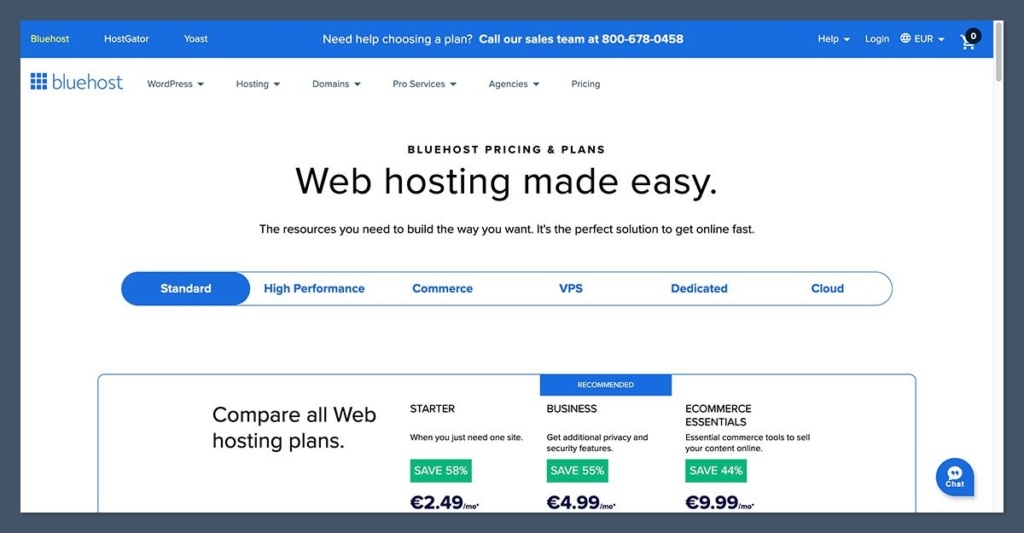
That’s a big difference at the starting line, and it’s the main reason people even consider Bluehost as an ecommerce option.
But those numbers don’t tell the full story. Bluehost’s introductory pricing is tied to long-term commitments (typically 12 or 36 months), and renewal rates jump significantly once the promo period ends.
On top of the hosting cost, you’ll need to budget for a WordPress theme, WooCommerce extensions, and potentially premium plugins for features that come built into Shopify.
Shopify’s Plans
Here’s what Shopify currently charges on monthly billing:
| Plan | Monthly Price | Best For |
|---|---|---|
| Starter | ~$5/month | Selling via links and social (no full storefront) |
| Basic | $39/month | New stores, small businesses |
| Grow | $105/month | Growing businesses needing more reports and features |
| Advanced | $399/month | High-volume stores needing advanced analytics and lower card rates |
| Plus | From ~$2,300/month | Enterprise businesses with complex requirements |
Online card rates with Shopify Payments range from about 2.9% + $0.30 per transaction on the Basic plan down to 2.4% + $0.30 on Advanced.
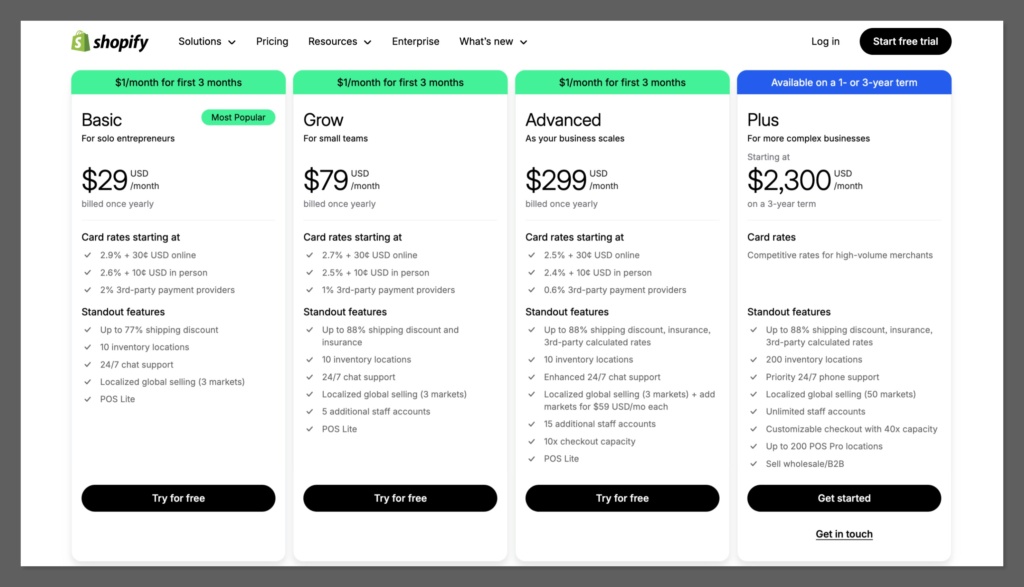
If you use an external payment gateway instead of Shopify Payments, Shopify charges an additional platform fee on top of whatever your gateway charges.
It’s also worth noting that many Shopify merchants end up paying for apps from the App Store to extend their store’s functionality. Most apps use a subscription model, which adds to the effective monthly cost.
Bluehost’s Plans
Bluehost’s pricing is structured differently because you’re paying for hosting, not an ecommerce platform:
| Plan | Promo Price | What You Get |
|---|---|---|
| Shared Basic | ~$1.99/month | 1 site, limited resources |
| Choice Plus | ~$3.79/month | Unlimited sites, more storage |
| eCommerce / Online Store | ~$7.45–$14.99/month | Optimized for WooCommerce, supports more products and traffic |
| Managed WordPress | ~$19.99/month | Performance-optimized hosting for high-traffic WordPress sites |
These are introductory prices. Renewals are higher, sometimes significantly so. And remember, this is just hosting. You still need to pay for your WordPress theme, any premium WooCommerce extensions, and payment processing through Stripe, PayPal, or another gateway. The upside? Bluehost doesn’t take any cut of your transactions at the host level.
Keep in mind: Comparing Shopify’s $39/month Basic plan to Bluehost’s $1.99/month shared hosting is misleading. Shopify’s price includes hosting, SSL, CDN, checkout, and the entire storefront builder. With Bluehost, you’re paying for hosting alone and assembling the rest yourself.
The Winner: It depends on what you value. Bluehost offers lower hosting costs and no platform-level transaction fees, making it cheaper at the entry level. Shopify’s pricing is more predictable and includes everything you need to run a store, with no hidden renewal surprises. For ecommerce-first businesses, Shopify’s all-inclusive model usually works out better long-term.
2. Best for Selling Online: Shopify

This is where the gap between the two becomes most obvious. Shopify was built from the ground up as an ecommerce platform, and that focus shows in every part of the experience.
Bluehost paired with WooCommerce can absolutely power a capable online store, but it requires more assembly and plugin management to get there.
Storefront and Checkout
Shopify gives you a tightly integrated storefront builder with themes designed specifically for selling products. The checkout is hosted by Shopify, PCI-compliant out of the box, and optimized for conversions. You don’t have to think about security certificates, compliance, or checkout performance.
With Bluehost and WooCommerce, your storefront is built through WordPress themes and page builders like Elementor. The checkout is handled by WooCommerce and can be customized through plugins or code. It’s more flexible in terms of what you can change, but you’re responsible for making sure everything works smoothly together and stays secure.
Payment Options
Shopify connects to over 100 payment methods and offers Shopify Payments as its native gateway. Using Shopify Payments reduces your transaction fees and simplifies setup. If you use a third-party gateway instead, expect an additional percentage fee on each transaction.
WooCommerce on Bluehost gives you a wide selection of gateways too, including Stripe and PayPal, with no platform-level transaction fees layered on top. You only pay whatever your chosen processor charges.
Apps and Plugins

Shopify’s App Store has over 8,000 integrations covering marketing, shipping, subscriptions, accounting, and more. The tradeoff is that Shopify leans heavily on this ecosystem.
Many features that you might expect to be built in require installing (and often paying for) a third-party app.
WooCommerce’s plugin ecosystem is arguably even larger, given the breadth of the entire WordPress repository. You’ll find extensions for subscriptions, bookings, memberships, multilingual support, and virtually anything else. Many are free or sold as one-time purchases rather than subscriptions, which can be easier on the budget.
Multichannel Selling
Shopify has built-in integrations for selling across social media platforms, marketplaces like Amazon and Etsy, and in-person through Shopify POS. Setting this up is straightforward and managed from a single dashboard.
WooCommerce supports multichannel selling too, but through plugins and API integrations. It works, but it takes more effort to set up and maintain. For point-of-sale, you’ll need a third-party solution entirely.
The Winner: Shopify wins for selling online. Its native ecommerce features, optimized checkout, multichannel integrations, and POS system are purpose-built for merchants. WooCommerce on Bluehost can match many of these capabilities, but you’ll spend more time piecing things together.
3. Best for Content and Flexibility: Bluehost
If your business is content-first with ecommerce as a secondary function, the Bluehost and WordPress combination has a clear advantage.
WordPress is, at its core, the most powerful content management system available. Its blogging capabilities, editorial workflows, and content organization tools are far more robust than what Shopify offers.
Shopify has a built-in blog, and it’s serviceable for basic brand content, but it’s not in the same league as WordPress for content-heavy strategies.
Beyond content, WordPress with Bluehost gives you full access to server files, your database, and PHP configuration. You can run multiple sites or entirely different applications (a blog, a learning management system, a community forum) under one hosting plan. This level of control simply isn’t available on Shopify, which intentionally abstracts the infrastructure away.
Bluehost also supports one-click WordPress and WooCommerce installs and includes AI-powered site creation tools on some plans, which makes getting started less painful than it used to be.
The Winner: Bluehost + WordPress is the better option if content, blogging, or running multiple types of web applications are central to your business. Shopify can’t match the depth of the WordPress CMS.
4. Easiest to Use: Shopify
Shopify is designed for people who want to get a store up and running without dealing with backend infrastructure. The onboarding is guided, the interface is clean, and you don’t need to worry about software updates, server configuration, or plugin compatibility.
Setup is quick. Shopify asks a few questions about your business during signup and then drops you into a dashboard with a step-by-step checklist to add products, choose a theme, and configure payments.
The section-based editor is straightforward, and while it’s not a full drag-and-drop builder, it gets the job done without requiring any coding knowledge.
Bluehost has gotten easier over the years, with one-click WordPress installs and a simplified dashboard. But once you’re inside WordPress and WooCommerce, the learning curve steepens. You’re managing themes, plugins, updates, security, and performance optimization.
Plugin conflicts are a real thing. If you’re not comfortable troubleshooting compatibility issues or applying security patches, this stack requires either learning or hiring someone who knows it.
On shared hosting plans in particular, performance can be an issue. Caching, CDN configuration, and database optimization are things you may need to handle yourself or through additional plugins.
The Winner: Shopify is significantly easier to use. It abstracts away the technical complexity and lets you focus on your products and customers. Bluehost + WooCommerce offers more control, but that control comes with responsibilities that less technical users may find overwhelming.
5. Scalability: Shopify
As your business grows, Shopify scales with you without requiring infrastructure decisions.
Moving from the Basic plan to Advanced or Plus increases your feature set, lowers your transaction rates, and gives you access to more advanced tools. Shopify handles the traffic spikes, uptime, and server capacity behind the scenes.
With Bluehost, scaling usually means upgrading from shared hosting to managed WordPress hosting, a VPS, or a dedicated server. Each jump requires more configuration, potentially re-architecting your caching and CDN setup, and sometimes migrating between environments. It’s doable, especially with development resources, but it’s a more hands-on process.
Shopify also has a clear enterprise path with Shopify Plus, which starts from around $2,300/month and supports high-volume merchants with customizable checkout, dedicated support, and advanced automation tools.
On the Bluehost side, enterprise scaling means building and managing that infrastructure yourself or moving to a specialized managed WordPress host.
The Winner: Shopify handles scalability seamlessly. You upgrade your plan, and the platform takes care of the rest. Bluehost scaling is more manual and requires technical planning.
6. Best for Business Support: Shopify
Both Shopify and Bluehost offer 24/7 support, but the type and depth of support differ.
Shopify provides 24/7 live chat with the option to escalate to a human advisor, and phone support is available for Plus merchants. Its Help Center is thorough, with guides, video tutorials, a community forum, and business courses. Because Shopify controls the entire platform, its support team can troubleshoot most issues directly.
Bluehost offers 24/7 phone support and a live chatbot for routine questions. Its knowledge base covers hosting-related issues well. However, Bluehost’s support scope is limited to the hosting layer.
If you run into a WooCommerce bug, a theme conflict, or a plugin compatibility issue, you’ll likely need to look elsewhere for help, whether that’s the WordPress community forums, the plugin developer’s support channel, or a freelance developer.
This is a meaningful distinction. With Shopify, one support team covers the entire stack. With Bluehost + WordPress + WooCommerce, support is fragmented across multiple providers.
The Winner: Shopify offers more cohesive support for ecommerce businesses. With Bluehost, support stops at the hosting level, and you’re left managing multiple support channels for the rest of your stack.
7. Best for AI Capabilities: Shopify
When it comes to AI-powered features, Shopify takes the lead, thanks to its robust suite of innovative tools specifically designed to enhance ecommerce. BlueHost, on the other hand, offers basic AI functionality but lacks the same depth and sophistication.
Shopify has been investing heavily in AI to make ecommerce management more intuitive and scalable.

Here’s what you get:
- Shopify Magic: This AI tool simplifies content creation, allowing users to generate product descriptions, blog posts, and marketing copy in seconds. It’s a huge time-saver and ensures your content remains engaging and relevant.
- Shopify Sidekick: A built-in virtual assistant that helps store owners manage tasks like inventory updates, sales analytics, and even business decision-making. Sidekick is a game-changer for entrepreneurs looking to streamline operations.
- Personalized Customer Experiences: Shopify’s AI tools enable dynamic product recommendations, personalized upsells, and smarter search results, boosting sales conversions.
- Automation Tools: Shopify uses AI to automate workflows, like sending abandoned cart emails, improving efficiency without requiring third-party apps.
Overall, Shopify’s AI features are specifically built for ecommerce, helping sellers improve efficiency, scale faster, and create tailored experiences for their customers.
BlueHost doesn’t have the same focus on ecommerce-specific AI. Its AI solutions come primarily from BlueHost WonderSuite, a basic AI-driven setup assistant for WordPress. Key features include:
- Guided Website Creation: WonderSuite uses AI to walk users through the process of building a website. This tool is helpful for beginners but lacks depth for ecommerce.
- Content Suggestions: The AI offers limited suggestions for website copy and layout improvements. While useful for general websites, it doesn’t provide specialized ecommerce capabilities.
- Third-Party AI Plugins: Since BlueHost supports WordPress, users can integrate plugins like ChatGPT, RankMath AI, or Jasper AI to add custom AI features. However, this requires extra setup and can lead to compatibility issues.
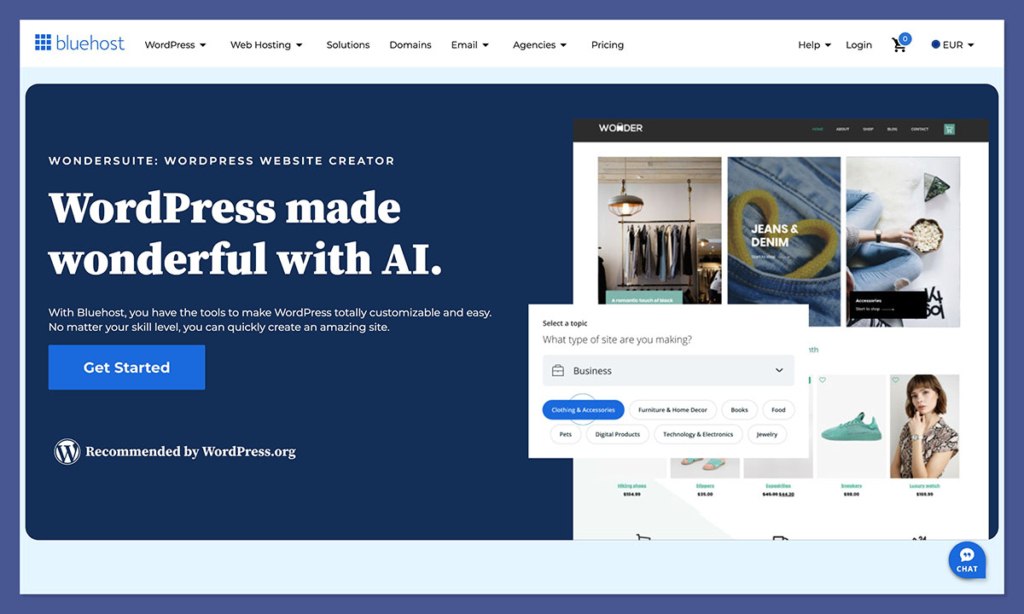
While BlueHost provides basic AI tools for setting up and managing a website, it lacks advanced AI for ecommerce tasks like inventory management, personalized shopping experiences, or automated marketing.
Verdict on AI Capabilities
If AI tools are a priority for your ecommerce business, Shopify is the clear winner. Its tools are tailored to ecommerce workflows, helping you save time, optimize content, and deliver personalized customer experiences.
BlueHost’s AI capabilities are mo
Feature Comparison Table
| Feature | Shopify | Bluehost + WooCommerce |
|---|---|---|
| Storefront builder | Native, ecommerce-focused themes and editor | WordPress themes + page builders (Elementor, etc.) |
| Checkout | Hosted, PCI-compliant, optimized | WooCommerce checkout, customizable via plugins/code |
| Hosting & SSL | Fully managed by Shopify | Managed by Bluehost (shared/VPS/dedicated) |
| Payment gateways | 100+ options, native Shopify Payments | Stripe, PayPal, and many others via WooCommerce |
| Transaction fees | Card fees + extra % on third-party gateways | Processor fees only, no host-level cut |
| Apps/plugins | 8,000+ in Shopify App Store | Massive WordPress/WooCommerce repository |
| POS | Native Shopify POS with hardware | Requires third-party POS integrations |
| Multichannel selling | Built-in social and marketplace integrations | Available through plugins and APIs |
| Blogging/CMS | Basic blogging, sufficient for brand content | Full WordPress CMS, excellent for content-heavy strategies |
| Server access | Limited (more open on Plus) | Full access to files, database, and configuration |
| Internationalization | 30+ languages, automatic redirects | Multilingual via plugins (WPML, Polylang, etc.) |
When Should You Choose Shopify?
Shopify makes sense when ecommerce is the core of your business.
If you’re launching a DTC brand, running a dropshipping operation, or managing retail with in-person sales through POS, Shopify gives you the most direct path from setup to selling.
It’s also the better choice if you want predictable costs without needing to manage hosting infrastructure, or if you don’t have a developer on hand to maintain a WordPress site.
The app ecosystem, native multichannel integrations, and Shopify Payments make it straightforward to build and grow a store without deep technical involvement.
When Should You Choose Bluehost?
Bluehost paired with WordPress and WooCommerce is the right call when your business goes beyond just selling products.
If you’re building a content-driven brand, running online courses, managing a membership community, or need a blog-heavy strategy alongside your store, WordPress gives you tools that Shopify simply can’t match.
It’s also worth considering if you or your team are comfortable managing hosting, updates, and plugin ecosystems.
You’ll save on platform fees, avoid transaction surcharges, and gain the freedom to customize virtually every aspect of your site. For developers or technically inclined teams, this flexibility is a real advantage.
Shopify vs Bluehost: Our Verdict
For businesses focused on selling products online, Shopify is the better choice. It gives you a complete, managed ecommerce platform where hosting, checkout, payments, and security are handled for you. The learning curve is gentler, the path to scaling is clearer, and the support covers your entire stack.
Bluehost paired with WooCommerce is a strong alternative if you need the full power of WordPress, whether that’s for content, customization, or running multiple types of sites under one roof.
It’s cheaper at the hosting level and gives you more control, but that comes with more responsibility and a steeper learning curve.
The right choice depends on what your business actually needs. If ecommerce is the priority, go with Shopify. If you’re building a broader WordPress-powered presence with a store as one part of it, Bluehost and WooCommerce will serve you well.
Shopify vs Bluehost: FAQ
Can I use Bluehost without WordPress?
Technically, yes. Bluehost is a web host, so you can install any CMS or build a custom site on it. But for ecommerce, the vast majority of Bluehost users pair it with WordPress and WooCommerce. Without WooCommerce, Bluehost doesn’t offer any built-in store functionality.
Does Shopify charge transaction fees?
Shopify charges credit card processing fees on all plans through Shopify Payments (ranging from about 2.9% + $0.30 down to 2.4% + $0.30 depending on your plan). If you use a third-party payment gateway instead of Shopify Payments, there’s an additional platform fee on top of whatever your gateway charges.
Is Bluehost really that much cheaper than Shopify?
At the entry level, yes. Bluehost’s promotional hosting prices are a fraction of Shopify’s monthly plan cost. But the gap narrows once you factor in renewal pricing, premium themes, WooCommerce extensions, and the time or money spent on setup and maintenance. For a fully functional ecommerce site, the total cost of ownership can be closer than the sticker prices suggest.
Can I migrate from Bluehost/WooCommerce to Shopify later?
Yes. Shopify offers import tools for products, customers, and orders. Third-party migration apps can also help automate the process. It’s not seamless, especially for large catalogs or heavily customized stores, but it’s very much doable.
Which is better for SEO?
Both platforms support solid SEO fundamentals like custom URLs, meta tags, sitemaps, and image alt text. WordPress has a slight edge for advanced SEO due to its plugin ecosystem (Yoast, Rank Math) and the granular control you get over site structure. Shopify’s SEO capabilities are more than adequate for most stores, though, and it has its own app integrations for deeper optimization.


