
 By Bogdan Rancea
Sellfy is one of the fastest ways I have tested to get a creator store online, offering a flat monthly fee with 0% platform transaction fees, built-in print-on-demand, and digital delivery from a single dashboard.
In this review, I’ll take a closer look at Sellfy’s pricing, features, and templates, including the two things most reviews gloss over: the conflicting pricing numbers floating around the internet (one site says $22, another says $29, and both are technically right) and the revenue caps that decide whether the flat fee is actually a good deal for you.
Key Takeaways 🔍
- Sellfy charges 0% platform transaction fees on every plan, so you keep everything beyond processor fees
- Plans range from $29 to $159 per month, dropping to $22 to $119 with the 25% annual discount
- Every plan has a rolling 12-month revenue cap ($10K, $50K, or $200K), with a 2% overage fee above it
- The store editor is module-based, not drag-and-drop, with only 11 templates and no HTML or CSS access
- Built-in print-on-demand (120+ products) and PDF stamping work without a single add-on app
Sellfy Pros & Cons
Need a quick summary of Sellfy? I’ve collected the platform’s best and worst features below:
What I Like
- ✔️ The fastest setup I’ve tested, with a real store live in roughly 15 minutes
- ✔️ 0% platform fees on all plans, a flat predictable cost instead of a percentage cut
- ✔️ Built-in print-on-demand with 120+ products and no Printful or Printify account needed
- ✔️ PDF stamping included free, embedding the buyer’s email into downloads to deter piracy
- ✔️ Fast, friendly email support, with replies often within minutes in testing
What I Dislike
- ❌ Hard revenue caps on every plan, calculated on a rolling 12-month basis with a 2% overage fee
- ❌ Only 11 templates and a module-based editor with no HTML or CSS access
- ❌ Only Stripe and PayPal at checkout, with no Apple Pay, Google Pay, Klarna, or local payment methods
- ❌ Inflexible billing, with no mid-cycle downgrade on annual plans
How Much Does Sellfy Cost?
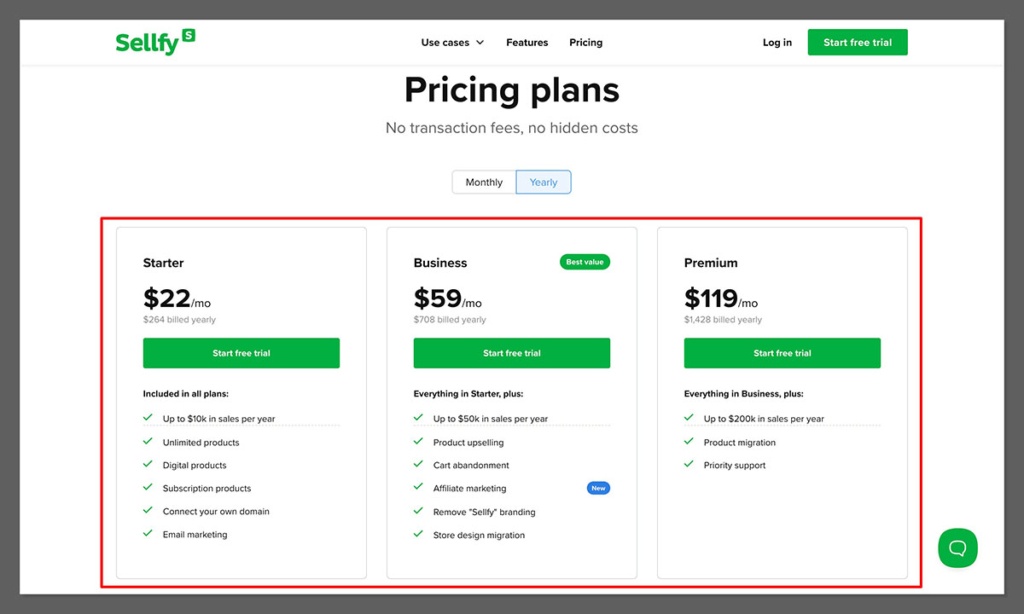
Sellfy’s pricing is split between three core plans, ranging from $29 to $159 per month (or $22 to $119 billed annually):
- Starter ($29) for solo creators just getting going
- Business ($79) for growing stores that want upsells and cart abandonment recovery
- Premium ($159) for high-volume sellers who need priority support and the highest caps
| Plan | Monthly price (paid annually) | Monthly price (paid monthly) | Annual total | Revenue cap (rolling 12 mo) | Email credits/mo | File size |
|---|---|---|---|---|---|---|
| Starter | $22 | $29 | $264 | $10,000 | 2,000 | 10 GB |
| Business | $59 | $79 | $708 | $50,000 | 10,000 | 15 GB |
| Premium | $119 | $159 | $1,428 | $200,000 | 50,000 | 20 GB |
Top Tip 💡 If you’ve seen Sellfy priced at both $22 and $29 on different sites, that’s not a contradiction. It’s simply annual billing versus monthly billing. Pay annually and you lock in a 25% discount. Ignore the legacy $19/$49/$99 figures still floating around in old articles.
Is Sellfy Good Value for Money?
- Every plan has 0% platform transaction fees, a 14-day free trial with no card required, and a 30-day money-back guarantee
- There’s no free plan, unlike Gumroad, Payhip, or Ko-fi
- The revenue caps are the hidden cost: cross your limit and Sellfy applies a 2% fee to every order above it until you upgrade
- Email marketing is metered by credits, which reviewers on lower plans call “limited and very costly” (extra credits cost $2 per 1,000)
- You’ll still pay your payment processor around 2.9% + $0.30 per transaction via Stripe or PayPal
So is the flat-fee model actually worth it? Compare Sellfy’s 0% platform fee against the percentage cutters: Gumroad takes 10% + $0.50, Payhip Free takes 5%, and Lemon Squeezy takes 5% + $0.50. Sellfy Starter beats Gumroad’s percentage model once you clear roughly $350/month in sales. At $1,000/month, Sellfy runs about $58 total versus Gumroad’s ~$173, saving you ~$115 every month. At $5,000/month, Sellfy is about $174 versus Gumroad’s ~$775, a saving of roughly $600 a month. Below ~$350/month, Gumroad’s free entry is the cheaper choice.
Author’s Testing Notes
I recommend starting with the $29 per month Starter plan (or $22 annually) if your store is still finding its feet. It includes the essentials: unlimited products, digital delivery, PDF stamping, built-in POD, and email marketing. You’ll only need Business or Premium if you want upsells and cart abandonment recovery, or if your sales are approaching the $10K rolling cap.
One warning before you commit: if you bill annually, there’s no mid-cycle downgrade. Reviewers have reported being locked into a year they didn’t want. Start monthly, confirm the fit, then switch to annual for the discount.
My Experience With Sellfy
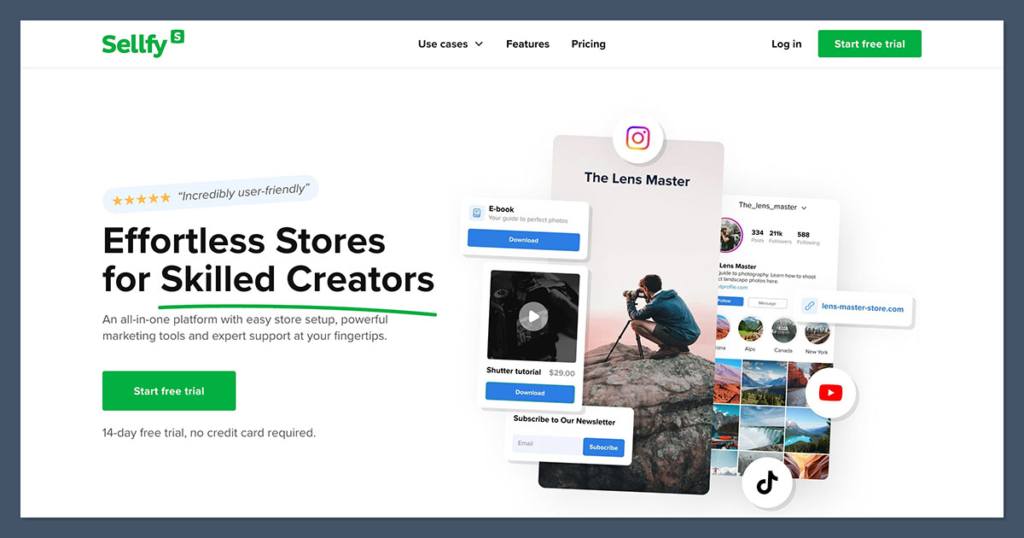
There’s no need to enter credit card details when signing up to Sellfy. I could join the 14-day free trial with just an email address, and every feature was available during the trial except live checkout, so I built the entire store before paying a cent.
After signing up, a completion checklist in the dashboard walked me through each step, and the dashboard itself loaded almost instantly with no noticeable lag. The whole path from signup to a real, live store took about 15 minutes, faster than any major ecommerce platform I tested, and EXPERTE’s independent hands-on testing backs that up with a 9.1/10 setup score.
Setup came down to five steps:
- Choose a template from the 11 available
- Upload your logo and set your store name
- Add your first product (digital, POD, subscription, or physical)
- Connect Stripe or PayPal as your payment processor
- Publish your store
Real creators echo the experience. Linda Skuja said it took “30 minutes to set up my listings,” and Eunice Arreza of Eumicakes called Sellfy “a fully functional website that doesn’t require any coding skills.”
How I Added Products
Adding products was the easiest part of the process. Sellfy handles a broad set of product types from one dashboard:
- Digital downloads (ebooks, templates, presets, music, video)
- Subscriptions and memberships (recurring revenue)
- Print-on-demand merch (t-shirts, hats, mugs, and more)
- Physical products (ship your own inventory)
You can also list free products, which work nicely as lead magnets. File-size limits scale with your plan: 10 GB per product file on Starter, 15 GB on Business, and 20 GB on Premium, with up to 50 files per product on all plans. That’s fine for ebooks, templates, and presets, but it can pinch a large video-course bundle. For context, Gumroad imposes no file-size limit and Payhip allows up to 5 GB on its free plan, so Sellfy sits in the middle.
Author’s Testing Notes
The real friction I hit was product variants. Sellfy has no automatic size by color by material matrix, so you build variants manually. For a simple catalog that’s fine, but if you sell apparel with dozens of combinations it gets tedious fast, and it becomes a genuine bottleneck as your catalog grows.
Designing With Sellfy
Sellfy only has a handful of templates to choose from. At the time of writing, there are 11 templates in total, all mobile-responsive. That’s a small library next to the hundreds or thousands you get with general website builders, and independent tester EXPERTE scored Templates and Design just 4.7/10, its lowest category by a wide margin.
Now the myth correction, because some reviews get this wrong. Sellfy is NOT true drag-and-drop. It’s a module-based store customizer: you click page elements and edit their properties, but you can’t freely move blocks around, and you have no access to HTML or CSS. I could get a clean, professional-looking store live quickly, but I couldn’t get creative with layouts or make anything feel truly bespoke.
Findstack reviewers describe the themes as “stylish but rigid,” and that matches my experience. If your brand lives or dies on a distinctive storefront, this is the ceiling you’ll hit first.
Author’s Testing Notes
The design trade-off is deliberate: Sellfy optimizes for speed over freedom. For non-technical creators who want to be selling this afternoon, that’s the right trade. If you need deep design control, you’ll eventually migrate out, and it’s worth knowing that the Business plan includes design-migration help if you’re coming from another platform.
Selling Online With Sellfy
A store that takes 0% of your sales is great, but can it actually help you make those sales? Here’s what’s built in, and where the toolkit runs thin.
🛒 Print-on-Demand
Unlike Shopify, Sellfy’s print-on-demand is built in. No Printful subscription, no Printify account, no extra app fees, and it ships from 11 global fulfillment centers. The workflow is simple: choose from a catalog of 120+ items, upload your design (PNG or SVG), place it on the front, back, or sleeve (embroidery is available on select hats and apparel), set your retail price, and orders go to production automatically after each sale. There’s no upfront inventory: you pay the base cost plus fulfillment only after a sale closes.
Here are real base costs from the product editor, with realistic sell prices and the profit you keep per unit:
| Product | Base cost (from) | Example sell price | Profit per unit |
|---|---|---|---|
| Unisex Staple Tee (Bella+Canvas 3001) | $11.69 | $25-30 | $13.31-18.31 |
| Classic Dad Hat (Yupoong 6245CM) | $14.65 | $28 | ~$13.35 |
| Clear iPhone Case | $9.38 | $20 | ~$10.62 |
| Matte Framed Poster | $20.35 | $35 | ~$14.65 |
A $13 to $18 margin on a $25 to $30 tee is a 50%-plus gross margin with zero inventory risk, which is hard to beat for a creator dropping merch on an existing audience. Shipping takes 2-6 business days for the USA, Canada, and Europe, or 8-14 business days worldwide, printed DTG via Kornit equipment.
The honest limit is variety and control. You can’t add custom inside labels, the blank selection is narrower than Shopify’s Printful, Printify, and Gelato ecosystem, and you’re limited to standard DTG. Built-in convenience trades away breadth.
✅ Digital Delivery and PDF Stamping
Delivery is automatic and secure: the buyer gets an instant download link after purchase, and those links can be set to expire. For course creators, video streaming and embedding reduce the exposure that comes with direct downloads.
The standout feature deserves a correction to a claim floating around in biased reviews. Sellfy DOES offer PDF stamping. It embeds the buyer’s email address into any downloaded PDF, which is a genuine deterrent against people sharing your file for free, and it’s included at no extra cost on all paid plans. Most competing platforms make you bolt on a third-party DRM tool to get the same thing, so for ebook and template sellers this is a real differentiator.
💰 Payment Options
This is the recurring weakness, and it’s worth stating plainly. Sellfy accepts only Stripe and PayPal. There’s no Apple Pay, Google Pay, Klarna, or local payment method. In regions where Stripe and PayPal are weak or distrusted (Germany, the Netherlands, parts of Southeast Asia), this costs you sales at checkout, and the independent reviewer EcommerceGold along with multiple user reviews report exactly that.
📨 Marketing Your Business
The built-in marketing tools cover the basics a solo creator needs:
- Email marketing for newsletters and product announcements, metered by monthly credits (2,000 on Starter, 10,000 on Business, 50,000 on Premium, with extra credits at $2 per 1,000)
- Upsells, a genuine conversion driver. Film creator David Killingworth of Think Make Push told reviewers: “I had no background in marketing… I tried it out, I was like, Wow, this is great.” Available on Business and above.
- Cart abandonment recovery, with automated follow-up emails (Business plan and above)
- Coupons and discount codes, included on all plans
- Embeddable buy buttons and product widgets, so you can sell from any existing site or blog
🔌 Integrations
Sellfy offers 7 native connections: Google Analytics, Facebook Pixel, Twitter/X Ads, Facebook Live Chat (a widget for your OWN store), Google Merchant Centre, Patreon, and Zapier, which bridges to 5,000+ apps including Mailchimp, ConvertKit, MailerLite, and ActiveCampaign.
You may see older sources cite 5 integrations. That discrepancy resolves to 7, because the older counts omit Google Merchant Centre and Facebook Live Chat. What you don’t get is a native app marketplace anywhere near Shopify’s 8,000+ apps.
Author’s Testing Notes
The built-in basics genuinely cover a solo creator’s marketing needs, and the upsell tool alone can pay for the plan. If you depend on local payment methods or a deep app ecosystem, this is the section where Sellfy starts to feel thin.
Understanding Sellfy’s Revenue Caps
This is the part that catches people off guard, so I’m giving it its own section. When you cross your plan’s limit, say at $10,001 on Starter, your store does NOT freeze. It keeps selling. But Sellfy applies a 2% overage fee to every order placed above the cap until you upgrade, and any accrued fees are collected at your next billing date even if you upgrade in the meantime.
Top Tip 💡 The critical detail: this is a ROLLING 12-month calculation, not a calendar-year reset. As one reviewer (creatingawebsitetoday) warned, “The revenue limits catch people off guard… This isn’t a one-time threshold, it’s a rolling 12-month calculation.” You cannot wait out the year to clear it. Plan your tier around your trailing 12 months of sales, not your calendar year.
What Real Users Say About Sellfy
The star ratings are positive, but I went into the actual reviews to find what keeps coming up, good and bad. Across 161 reviews, Sellfy averages roughly 4.2 out of 5, and the spread tells a story:
| Platform | Rating | Reviews |
|---|---|---|
| Trustpilot | 4.2/5 | 71 |
| G2 | 3.9/5 | 58 |
| Capterra | 4.5/5 | 32 |
| EXPERTE (hands-on score) | 6.6/10 | expert test |
| Aggregate | ~4.2/5 | 161 total |
G2 draws the most technical, most critical reviewers, which is why it sits lowest. Capterra skews positive with 91% positive sentiment and standout marks for ease of use (4.7/5), customer service (4.4/5), and value (4.3/5), plus zero one-star ratings, so even the critics are mild.
The praise is specific and attributed. Zara of Efikzara (171K YouTube subscribers) said: “the purchasing process is straightforward… so effortless that it’s easy to get a high conversion rate.” On the outcome side, photographer Sorelle Amore reportedly cleared $25,000 in her first month selling presets, though that figure would instantly blow past the $10K Starter cap and force a Business upgrade.
The complaints are equally specific, and these are the ones that could burn you:
- Billing and downgrade trap. A Capterra and GetApp reviewer reported being told “I would only be able to downgrade after the billing period was over which is a year from now,” resulting in roughly $600 in unwanted charges.
- Slow development and no roadmap. A Capterra reviewer wrote that it was “time for me to move on because of the lack of/slow development and there being a cap to the revenue limit,” adding there is “no public roadmap.”
- Region-limited payments. Only Stripe and PayPal, which costs sales in markets where those processors are weak.
- Email credits. GetApp and RevenueGeeks reviewers repeatedly call them “limited and very costly” on lower plans.
Using Sellfy’s Customer Support
Sellfy’s own support is email-only, with no live chat and no phone support. That sounds thin, but in EXPERTE’s hands-on tests, replies came “often within minutes” and were friendly, and fast support is one of the most consistent themes in user reviews. Premium plans get priority email support.
One correction worth making: the “24/7 live chat” a few sources cite is actually the Facebook chat widget sellers add to their OWN store, not a Sellfy support channel. If live chat or phone support is a dealbreaker for you, Shopify is the stronger pick here.
How Does Sellfy Compare to Competitors?
Here’s the one comparison most reviews don’t give you straight: prices AND fee structures side by side. A $0/month platform that skims 10% off every order is not free once you’re doing real volume, so I’ve put both columns next to each other.
| Platform | Monthly cost | Platform fee on sales | Built-in POD | Best for |
|---|---|---|---|---|
| Sellfy | $22-159 (annual) | 0% | Yes (120+ products) | All-in-one digital + merch, flat fee |
| Gumroad | $0 | 10% + $0.50 (30% on Discover) | No | Tiny or just-starting sellers, marketplace discovery |
| Payhip | $0 / $29 / $99 | 5% free, 2% Plus, 0% Pro | No | EU/UK tax handled, cost-conscious above $2K/mo on Pro |
| Lemon Squeezy | $0 | 5% + $0.50 (+surcharges) | No | Software/SaaS needing merchant-of-record global tax |
| Shopify | $39+ ($29 annual) | 0% w/ Shopify Payments (2% otherwise) | Via apps (Printful/Printify) | Scaling brands, multichannel, full customization, no caps |
| Ko-fi | $0 / $12 Gold | 5% free, 0% Gold | No | Tip and donation-style creator support |
Where each one beats Sellfy:
- Gumroad is cheaper only below ~$350/month, and its Discover marketplace brings built-in traffic. But the 10% cut is permanent and gets expensive fast at scale, running an effective 15-19% all-in regardless of volume.
- Payhip handles EU and UK VAT automatically, and its Pro plan ($99) hits 0% fees, undercutting rivals above ~$2K/month. There’s no built-in POD, though.
- Lemon Squeezy is a full merchant of record, handling global tax compliance. That’s the one edge Sellfy lacks for international software sellers, though surcharges (+1.5% international, +1.5% PayPal) stack up.
- Shopify has no revenue caps, 8,000+ apps, full HTML/CSS, multichannel selling, and 24/7 live chat. It’s pricier and steeper, and digital delivery needs a paid app since core plans have no native downloads.
- Ko-fi is the cheapest flat-fee option ($12 Gold for 0% fees), but it’s donation-oriented with no POD and no tax handling.
This is where the sellfy vs shopify decision usually lands: Shopify wins on scale, customization, and channels, while Sellfy wins on simplicity and the flat-fee math for a creator who just wants to sell.
How I Tested Sellfy
To bring you a fair and accurate review, I signed up for Sellfy’s free trial, built a test store from scratch, added products across the digital and print-on-demand categories, and pulled real base costs from the product editor. I verified all pricing against Sellfy’s own site and reconciled it with independent sources, and I cross-referenced user sentiment across Trustpilot, G2, Capterra, GetApp, and EXPERTE’s independent hands-on testing rather than cherry-picking one flattering number.
Sellfy Review: Should You Sell With Sellfy?
Sellfy is the easiest, most predictable, flat-fee way for a solo creator to sell digital products AND merch from a single store with 0% platform fees. The built-ins are genuinely useful: PDF stamping, upsells, and built-in POD all work without a single add-on app.
The price of that simplicity is real, and I want you to go in clear-eyed. You get 11 templates and a module-based editor, only Stripe and PayPal at checkout, email-only support, and hard rolling-12-month revenue caps with a 2% overage fee.
Who should buy it: non-technical creators and solopreneurs selling digital downloads, presets, courses, or merch who want a store live this week and whose revenue sits comfortably under their plan cap. If you’re above ~$350/month in sales, Sellfy’s flat fee also stops the bleeding from Gumroad’s 10%.
Who should skip it or plan to outgrow it: skip Sellfy if you need deep design control, local payment methods, a built-in affiliate program, multichannel selling, rich product variants, or you’re approaching $150K-200K a year and the cap looms. The natural migration targets are Shopify (scale, customization, multichannel, no caps), Payhip Pro (pure digital, cost-conscious above $2K/month), and Lemon Squeezy (software and international tax compliance).
And don’t forget, you can get started with Sellfy’s 14-day free trial with no card required and build your full store before you pay anything. If you plan to bill annually, weigh the revenue cap and the no-mid-cycle-downgrade rule first, because those are the two things that surprise people most.
FAQ
How much does Sellfy cost?
Monthly billing is $29 (Starter), $79 (Business), and $159 (Premium). Annual billing applies a 25% discount, bringing it to $22, $59, and $119 per month. There is no free plan, but a 14-day free trial needs no credit card. The $22-versus-$29 confusion online is simply annual versus monthly billing.
What happens if I exceed Sellfy’s revenue cap?
Your store keeps selling. It does not freeze. Sellfy applies a 2% fee to every order above your cap until you upgrade, and accrued fees are collected at your next billing date. The cap is a rolling 12-month calculation, not a calendar-year reset. Starter caps at $10K, Business at $50K, Premium at $200K.
Does Sellfy take a percentage of my sales?
No. Sellfy charges 0% platform transaction fees on all paid plans. You only pay your payment processor (Stripe or PayPal), typically around 2.9% + $0.30 per transaction. This flat-fee model is a key advantage over Gumroad (10% + $0.50) and Payhip’s free plan (5%), where the platform takes a cut of every sale.
Is Sellfy better than Gumroad?
It depends on your sales volume. Sellfy is cheaper above roughly $350/month, because its flat fee beats Gumroad’s 10% + $0.50 per transaction. At $1,000/month, Sellfy costs about $58 versus Gumroad’s ~$173. At $5,000/month it saves about $600. Gumroad only wins at very low volume, where its free entry costs nothing upfront.
Does Sellfy have live chat support?
No. Sellfy’s own support is email-only, though replies are fast, often within minutes in testing. The “24/7 live chat” some sources mention is the Facebook chat widget you add to your OWN store, not Sellfy’s support channel. Premium plans get priority email support, but no direct live chat exists.
What print-on-demand products does Sellfy offer?
Sellfy offers 120+ POD items: apparel, hats (print and embroidery), bags, home and living goods (mugs, posters, canvas, bottles, notebooks, aprons), phone cases for iPhone and Samsung, and stickers. Printing is DTG via Kornit equipment, and orders ship from 11 fulfillment centers in 2-6 business days for the US and Europe, or 8-14 days worldwide.
Does Sellfy protect digital files from piracy?
Yes. Sellfy includes PDF stamping, which embeds the buyer’s email into downloaded PDFs as a deterrent against redistribution. It is free on all paid plans, where most competitors require a third-party DRM add-on. You also get expiring secure download links, plus video streaming for course creators who want to limit downloads.
Can I sell on Sellfy from outside the US?
Yes. Sellfy supports sellers in 200+ countries with multi-currency checkout. Two caveats matter. First, only Stripe and PayPal are available, which can hurt conversion where those processors are weak. Second, Sellfy is not a merchant of record, so you handle your own VAT and sales tax (unlike Lemon Squeezy, which handles tax for you).


