
 By Bogdan Rancea
Best Overall

Instant
See pricing Visit Instant →$0-$249 per month
Free on development stores, 7-day trial
- Publishes Liquid theme sections
- Figma plugin on every plan
- Unlimited landing pages from $39
Closest to GemPages

PageFly
See pricing Visit PageFly →$0-$299 per month
Free plan with 1 published slot
- A/B testing from $39 per month
- 320+ page and section templates
- Built for Shopify, 4.9 from 5,938 reviews
Best app-free option

Shopify
See pricing Visit Shopify →Included in every Shopify plan
From $29/month billed yearly
- No app fee or app code
- Sidekick and Canvas included
- A/B tests from the Grow plan
Based on our research into 10 Shopify page builders (including Shopify’s own editor), Instant is the best GemPages alternative for 2027 because it publishes native Shopify theme sections and templates, includes a Figma plugin on every plan, and offers unlimited landing pages from $39/month.
In this guide, I’ll walk you through the features, pricing and drawbacks of the best GemPages alternatives, with prices as of November 2026, so you can choose or switch. For a broader comparison of apps like GemPages, our best Shopify page builders ranking covers the wider market.
Key Takeaways
- Instant is our top pick for Liquid theme output and Figma-led design, with unlimited landing pages from $39/month or $31/month billed yearly.
- Standard paid app plans span $19-$599 per month, excluding enterprise extensions. GemPages costs $29-$199 monthly and no longer offers yearly plans to new customers.
- PageFly and EComposer publish one page free, like GemPages. Shogun and Replo cannot publish free; Instant and Zipify restrict free publishing to development stores.
- Uninstall policies matter: GemPages removal can affect files your pages need, Shogun retains HTML pages, and EComposer moves pages to Trash after 48 hours.
- Shopify’s editor costs nothing extra, but Experiments require Grow at $89/month billed yearly. Canvas, launched October 1, 2026, is desktop-only and one-way.
How we test GemPages alternatives
We rank alternatives against GemPages using six weighted categories: design control and templates (25%), publishing limits and price (20%), A/B testing access (15%), lock-in and uninstall (15%), speed and code output (15%), and support and reputation (10%). Prices and limits reflect App Store listings and vendor pages checked in November 2026.
GemPages Alternatives Comparison Table
Compare publishing limits alongside testing costs, not just entry prices. GemPages is the reference point in both tables; prices are monthly USD as of November 2026, with annual billing marked.
| GemPages | Instant | PageFly | Shopify’s built-in editor | EComposer | |
|---|---|---|---|---|---|
| Best for | Reference point | Best overall | Like-for-like switch | Going app-free | CRO toolkit under $50 |
| Starting paid price | $29 (Build) | $39 (Starter) | $24 (Builder) | Included; Basic $29/month billed yearly | $25 (Standard) |
| Free plan or trial | Free, 1 published page | Development stores; 7-day trial | Free, 1 page or section | 3-day trial, then $1/month for 3 months | Free, 1 page or section; 7-day trial |
| Published pages on entry paid plan | Unlimited | Unlimited landing pages, 10 sections | 5 pages or sections | No publishing slots to buy | 15 pages or sections |
| A/B testing starts at | Separate GemX app, $49 | Pro, $99 | Optimize, $39 | Grow, $89/month billed yearly | Pro, $49; one test at a time |
| Cheapest unlimited pages plus A/B testing | $78: Build + GemX Page Optimize | $99: Pro | $99: Accelerate | Grow, $89/month billed yearly or $105 monthly | $129: Premium |
| Page output and uninstall | App-rendered; removal can affect required files/scripts | Liquid theme sections and templates | App-rendered; keep data retains pages, remove data blanks them | Native theme code; no app to remove | Live for 48 hours, then Trash |
| Built for Shopify badge | No | No | Yes | Not applicable | Yes |
| App Store rating | 4.9 (4,293 reviews) | 4.9 (358) | 4.9 (5,938) | Not applicable | 4.9 (3,455) |
| GemPages | Shogun | Replo | Zipify Pages | |
|---|---|---|---|---|
| Best for | Reference point | Pages that outlast the app | Teams testing every launch | Split testing on a $19 budget |
| Starting paid price | $29 (Build) | $39 (Build) | $119 (Starter) | $19 (Starter) |
| Free plan or trial | Free, 1 published page | Drafts only; 10-day trial | Previews only | Development stores; 14-day trial |
| Published pages on entry paid plan | Unlimited | 25 | 15 published items | 5 landing pages, 1 product page |
| A/B testing starts at | Separate GemX app, $49 | Separate Shogun AB Testing app | Starter, $119; 10k sessions | Starter, $19; 1 page and 1 section campaign |
| Cheapest unlimited pages plus A/B testing | $78: Build + GemX Page Optimize | Grow, $199, plus separately priced testing app | $599: Pro | $99: Advanced |
| Page output and uninstall | App-rendered; removal can affect required files/scripts | Published pages remain as HTML | Pages stay; no new publishing | Not publicly documented |
| Built for Shopify badge | No | No | No | Yes |
| App Store rating | 4.9 (4,293 reviews) | 4.8 (1,983) | 4.7 (186) | 4.7 (420) |
PageFly’s $39 Optimize plan appears on its pricing page, not its App Store plan cards.
1. Instant: Best Overall GemPages Alternative
- Pricing: $0-$249/month; paid yearly plans $31-$199/month; Enterprise custom
- Free plan: development stores only; 7-day paid-plan trial
- Figma plugin: included on every plan
Instant is my top recommendation for stores that want designs published as Liquid theme code. Instant offers unlimited landing pages for $39/month, $10 more than GemPages Build.
The trade-off is A/B testing from $99/month, versus PageFly’s $39. Instant also lacks the Built for Shopify badge, despite its 4.9 rating from 358 reviews.
Pros
- Publishes Liquid theme sections rather than app-rendered pages
- Figma plugin included, even on the free plan
- Unlimited landing pages from $39 per month
- 500+ templates and custom Liquid on all plans
Cons
- Free plan works on development stores only
- A/B testing requires Pro at $99 per month
- Theme sections capped at 10, 20 or 50
What’s new with Instant?
Instant’s App Store listing now leads with AI: the AI builds the first draft and you refine it on a no-code canvas. Monthly credits range from 1,000 on Starter to 10,000 on Business; AI-agent MCP calls are capped at 100 daily on Starter and unlimited from Pro.
Why use Instant instead of GemPages?
GemPages warns uninstalling can remove required files and scripts. Instant publishes Liquid into your theme, without an app-rendering layer. Pair it with one of our fastest Shopify themes. Unlike GemPages, Instant also offers yearly billing to new customers.
My Instant testing notes
I’d start a rebuild with the free Developer plan and Figma plugin. Our Figma-to-Shopify guide covers that workflow. Plan around one restriction: publishing to draft themes requires Pro, not Starter.
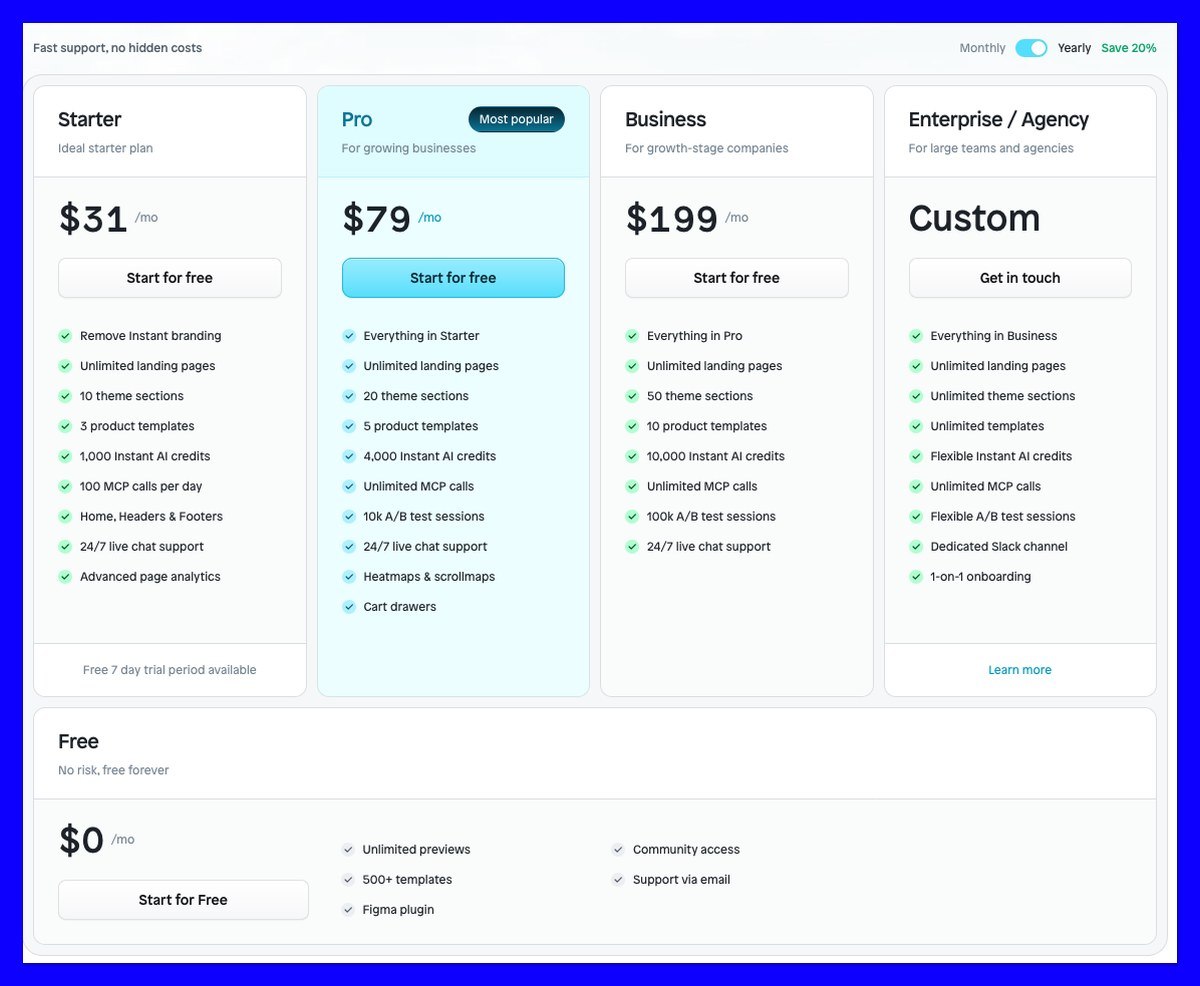
How Much Does Instant Cost?
| Plan | Monthly price | Billed yearly | Key limits |
|---|---|---|---|
| Developer | $0 | $0 | Development stores, unlimited previews, Figma plugin |
| Starter | $39 | $31/month | Unlimited landing pages, 10 sections, 3 product/collection templates, 1,000 AI credits |
| Pro | $99 | $79/month | 20 sections, 5 templates, 4,000 credits, 10K testing sessions, heatmaps, cart drawers |
| Business | $249 | $199/month | 50 sections, 10 templates, 10,000 credits, 100K testing sessions |
| Enterprise | Custom | Custom | Custom limits |
Choose Instant for Liquid output and Figma workflows. Skip it if budget A/B testing drives your switch.
2. PageFly: Best Like-for-Like Replacement for GemPages
- Pricing: $0-$299/month on the App Store; Enterprise extends to $999
- Free plan: 1 published slot; 30-day paid-plan money-back guarantee
- Read our GemPages vs PageFly comparison
PageFly is the closest replacement for GemPages’ template-first, drag-and-drop workflow. PageFly adds in-app A/B testing from $39, versus GemPages’ separate GemX subscription starting at $49.
It has 5,938 reviews averaging 4.9 and the Built for Shopify badge GemPages lacks. However, slot-based pricing replaces GemPages’ unlimited paid-plan publishing, and pages remain app-rendered.
Pros
- Familiar template-first workflow for existing GemPages users
- A/B testing and heatmaps from $39 per month
- Built for Shopify with 5,938 App Store reviews
- 30-day money-back guarantee on your first payment
Cons
- Builder starts with five pages or sections
- Unlimited publishing costs $99 per month
- Editing still depends on the PageFly app
What’s new with PageFly?
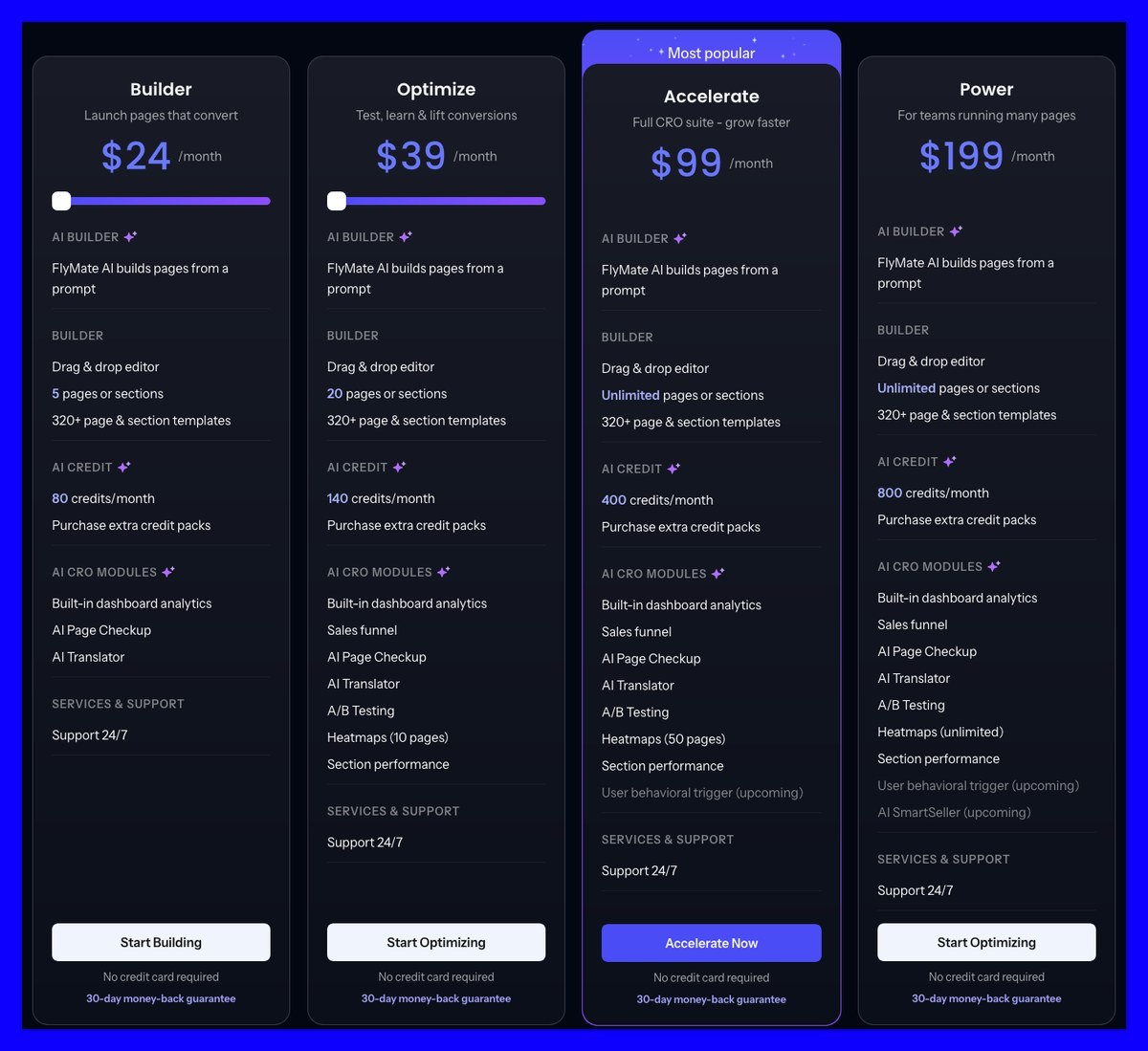
The Optimize slider plan runs from 20 slots for $39 to 75 for $94. Its MCP connector supports building and publishing through chat in Claude, ChatGPT and Sidekick.
Why use PageFly instead of GemPages?
GemPages Build plus separate GemX Page Optimize costs $78/month, against PageFly Optimize’s $39 for 20 slots. Unlimited publishing reverses the saving: PageFly Accelerate costs $99. GemPages has no time-limited trial; PageFly offers its refund window.
My PageFly testing notes
I’d count sections alongside pages: both consume slots. Downgrading requires unpublishing to your limit; uninstalling with “Keep all data” retains pages, while “Remove all data” blanks them. Our PageFly trial walkthrough covers the free plan and refund window.
How Much Does PageFly Cost?
| Plan | Monthly price | Where listed | Key limits |
|---|---|---|---|
| Free | $0 | Both | 1 slot, 10 AI credits, 320+ templates |
| Builder | From $24 | Both | 5 slots, 80 credits; $5 per 5 extra slots |
| Optimize | From $39 | Vendor only | 20 slots, 140 credits, 3 simultaneous tests, 10-page heatmaps, funnels |
| Accelerate | $99 | Both | Unlimited slots, 400 credits, 10 simultaneous tests, funnels |
| Power | $199 | Vendor only | Unlimited slots, tests and heatmaps; 800 credits |
| Enterprise/Scale | $299 | Both | 1 store, 1,600 credits, priority support |
Enterprise adds Dominate at $499 and Empire at $999 for multi-store brands. Pick PageFly over Instant for affordable testing, not native output.
3. Shopify’s Built-In Editor: Best for Going App-Free
- Pricing: included; plans $29-$359/month billed yearly, Plus from $2,300. See our Shopify pricing guide
- Free trial: 3 days, then $1/month for 3 months
- Read our Shopify review
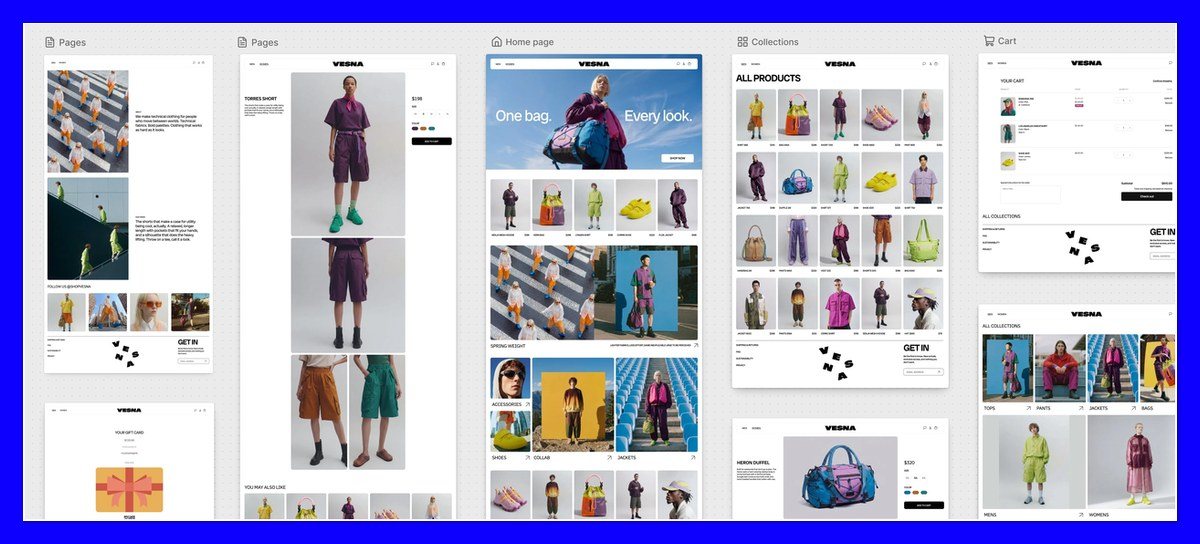
Shopify’s built-in editor is my choice if you want to stop paying for a page builder app. Every Shopify plan from Basic up includes the theme editor, Sidekick and Canvas; Experiments start on Grow.
There’s no extra app fee or app-rendering layer, but you lose GemPages’ page-template library and free-form editing. Canvas introduces restrictions too.
Pros
- No app fee or builder code cleanup
- Sidekick included with every Shopify subscription
- Native Rollouts from Basic, Experiments from Grow
- AI block generation across Theme Store themes
Cons
- No page-template library or free-form drag-and-drop editor
- Experiments require Grow, $89/month with annual billing
- Canvas is desktop-only and cannot return to classic editing
What’s new with Shopify’s built-in editor?
Canvas launched October 1, 2026, showing multiple pages in one workspace. Sidekick now works directly on theme files and validates its own code, and Shopify says Sidekick made more than 25 million theme edits in the first half of 2026.
Why use Shopify’s built-in editor instead of GemPages?
You remove GemPages’ $29-$199 monthly fee. Basic includes scheduled and gradual Rollouts; Grow adds theme-against-theme Experiments, versus GemPages’ separate GemX app from $49. Experiments cover the online store only; Rollouts cannot change Liquid templates. Browse our Horizon themes guide for native design options.
My Shopify editor testing notes
I’d duplicate before entering Canvas: Canvas themes cannot return to the theme editor, receive updates or be downloaded. It requires desktop access, Edit code permission and a Shopify-made or custom theme; app blocks and embeds aren’t supported. Follow our Shopify theme customization guide before committing.
How Much Does Shopify Cost?
| Plan | Monthly price, billed yearly | Billed monthly | Page-building tools |
|---|---|---|---|
| Basic | $29 | $39 | Theme editor, Sidekick, Canvas, Rollouts |
| Grow | $89 | $105 | Basic tools plus Experiments |
| Advanced | $359 | $399 | Everything in Grow |
Shopify Plus starts at $2,300/month. Try rebuilding your homepage natively before buying another app.
4. EComposer: Best CRO Toolkit Under $50
- Pricing: $0-$129/month; paid yearly plans $19-$103/month
- Free plan: 1 live page or section; 7-day paid-plan trial
- A/B testing: one test on Pro; unlimited on Premium
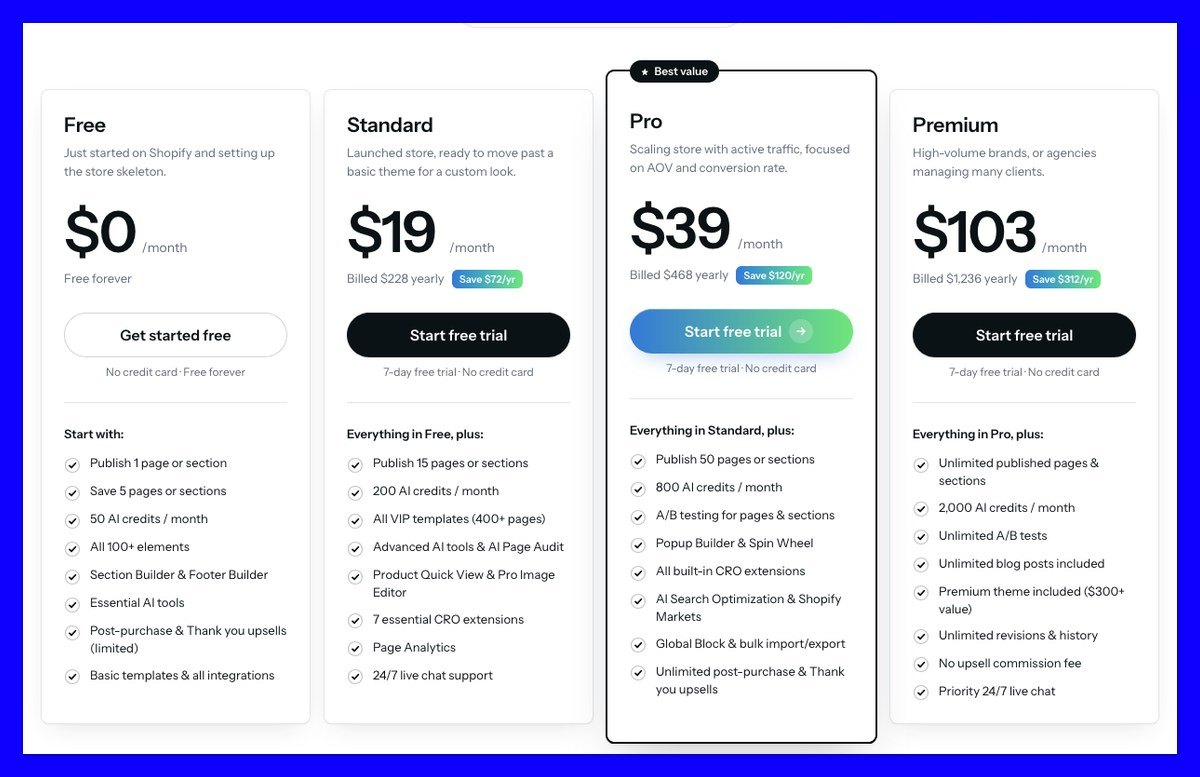
EComposer is my pick for page testing and CRO tools under $50. EComposer Pro includes 50 live items and page testing; GemPages requires separate GemX.
Its 4.9 rating from 3,455 reviews is reassuring. Its exit policy isn’t: pages work for 48 hours, enter Trash, then are permanently deleted after 30 days.
Pros
- Built for Shopify with a 4.9 rating
- Free plan publishes one page or section
- Pro includes testing and 29+ CRO extensions
Cons
- Pages move to Trash 48 hours after uninstall
- Unlimited testing requires Premium at $129/month
- Unlimited blog posts cost extra below Premium
What’s new with EComposer?
Premium includes one Vetro or Athora theme, claimed through live chat and valued by EComposer at $300+. Its App Store listing also emphasizes AI Page Audit and AI search optimization.
Why use EComposer instead of GemPages?
Pro costs $49 monthly or $39 billed yearly, versus $78 for GemPages Build plus separate GemX Page Optimize. Its CRO extensions can replace separate apps; compare the bundle with our best store design apps for Shopify.
My EComposer testing notes
I’d count pages, templates and sections together against publishing limits. Before removal, restore theme templates, then run “Clean theme” and “Reset app.” Pages cannot be restored after the 30-day Trash window.
How Much Does EComposer Cost?
| Plan | Monthly price | Billed yearly | Key limits |
|---|---|---|---|
| Free | $0 | $0 | 1 live item, 5 saved templates, 50 AI credits |
| Standard | $25 | $19/month ($228/year) | 15 live items, 200 credits, analytics, 24/7 chat |
| Pro | $49 | $39/month ($468/year) | 50 live items, 800 credits, 29+ extensions, global blocks, one test |
| Premium | $129 | $103/month ($1,236/year) | Unlimited pages, sections and tests; 2,000 credits, premium theme |
Unlimited blog posts cost $39/month extra below Premium. I recommend EComposer for value while you stay, not flexibility when you leave.
5. Shogun: Best for Pages That Outlast the App
- Pricing: $0-$499/month; paid yearly plans $31-$399/month
- Free plan: drafts only; 10-day paid-plan trial
- A/B testing: separate Shogun AB Testing app
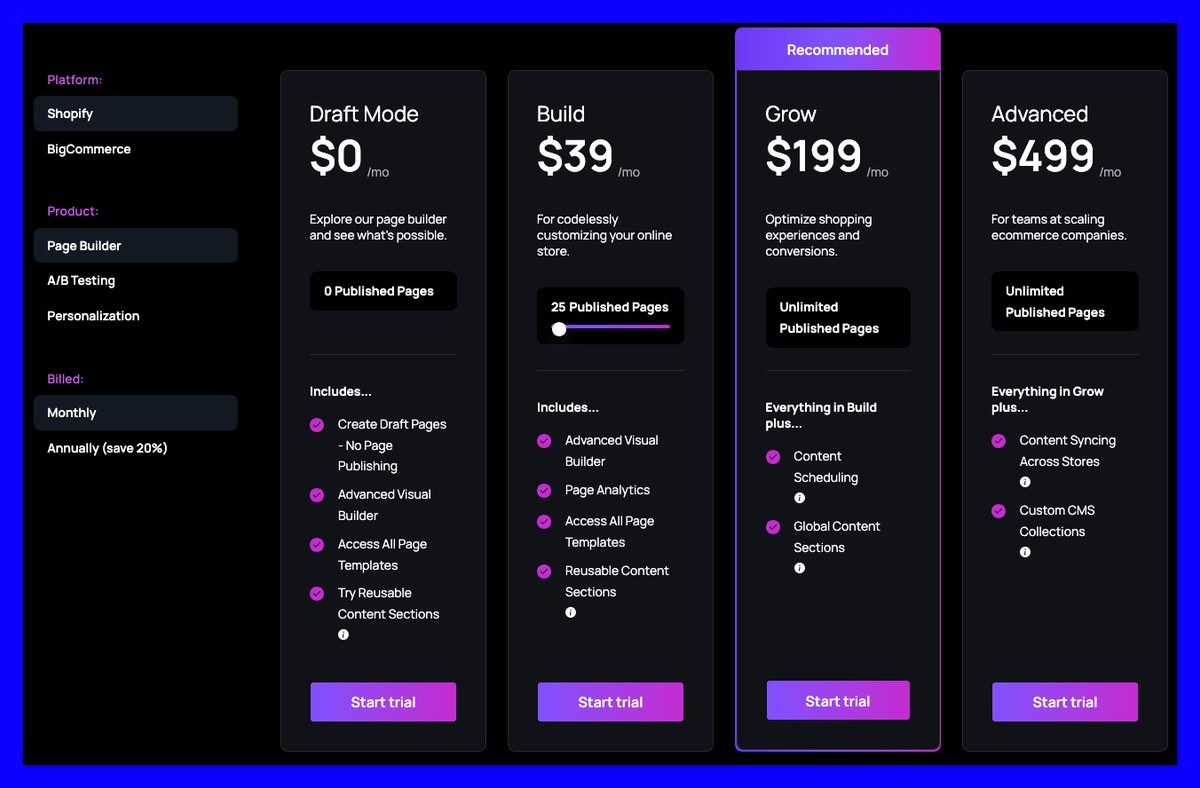
Shogun has the strongest documented exit terms among these app-rendered builders. Shogun keeps published pages live as HTML after uninstall and retains drafts.
It’s rated 4.8 from 1,983 reviews. However, unlimited publishing starts at $199/month, and testing requires a separate app, like GemPages’ separate GemX arrangement.
Pros
- Published pages remain as HTML after uninstall
- Annual billing reduces Build to $31/month
- Scheduling and global content sections on Grow
- Custom CMS collections and syncing on Advanced
Cons
- Free Draft Mode cannot publish your pages
- Unlimited pages require the $199 Grow plan
- A/B testing needs a separate app subscription
What’s new with Shogun?
Shogun sells testing and personalization separately, metered by Monthly Tracked Users. Each unique shopper visiting a page with an active test or personalized experience counts once that month.
Why use Shogun instead of GemPages?
For GemPages vs Shogun, I prioritize exit terms: GemPages removal can affect essential files; Shogun retains HTML pages. But GemPages Build’s $29 unlimited publishing beats Shogun Build’s $39 for 25 pages.
My Shogun testing notes
I’d replace Shogun forms before leaving: they stop working after data redaction. External edits can strip styling and require republishing through Shogun. Analytics and form data are deleted; media assets remain.
How Much Does Shogun Cost?
| Plan | Monthly price | Billed yearly | Key limits |
|---|---|---|---|
| Draft Mode | $0 | $0 | Drafts only |
| Build | $39 | $31/month | 25 pages, analytics, reusable sections |
| Grow | $199 | $159/month | Unlimited pages, advanced media management, scheduling, global sections |
| Advanced | $499 | $399/month | Store syncing, custom CMS collections, custom code elements |
Skip Shogun for budget unlimited publishing. GemPages Build and Instant Starter cost less for unlimited pages or landing pages.
6. Replo: Best for Teams That Test Every Launch
- Pricing: $0-$599/month
- Free plan: unlimited preview time, no publishing
- A/B testing: 10k monthly sessions on Starter
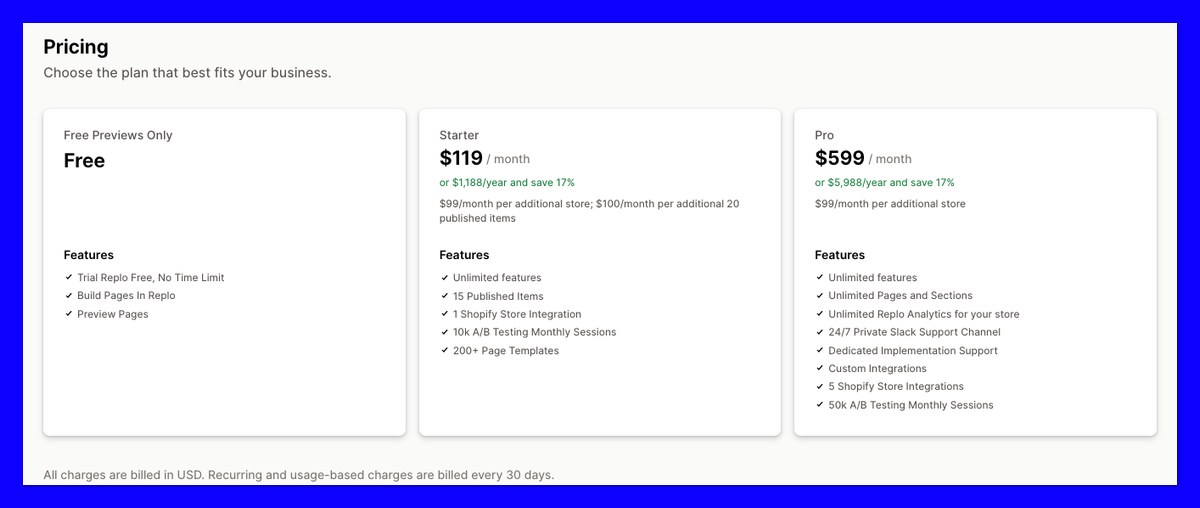
Replo suits marketing teams that want testing included in campaign building. Replo Starter includes 10k monthly testing sessions, while GemPages requires separate GemX.
The entry price is $119 for 15 published items. Its 4.7 rating comes from 186 reviews, the smallest review base here; existing pages remain after uninstall, but publishing changes stops.
Pros
- A/B testing included with the entry plan
- More than 200 page templates on Starter
- Existing pages remain available after app removal
- Private Slack support and implementation on Pro
Cons
- Starter costs $119 for 15 published items
- The free plan cannot publish live pages
- Smallest App Store review base among these picks
What’s new with Replo?
Replo’s website promotes a separate hosted-site product, with $99 Starter and $499 Pro monthly equivalents billed annually. Those aren’t Shopify app prices. See our best ecommerce landing page builders for standalone options.
Why use Replo instead of GemPages?
I recommend Replo for team support and design control, not savings over GemPages. Pro includes five store integrations and dedicated implementation; App Store reviewers praise its Figma- and Webflow-style controls.
My Replo testing notes
I’d rebuild a representative GemPages page with the time-unlimited preview plan before subscribing. Starter expansion costs $100/month per extra 20 published items; each extra store costs $99/month.
How Much Does Replo Cost?
| Plan | Monthly price | Key limits |
|---|---|---|
| Free (Previews Only) | $0 | Build and preview, no publishing, no time limit |
| Starter | $119 | 15 items, 1 store, 10k testing sessions, 200+ templates |
| Pro | $599 | Unlimited pages, sections and analytics; 50k testing sessions, private Slack, dedicated implementation |
If $119 for 15 items feels excessive, PageFly Optimize offers 20 slots for $39, with A/B testing included.
7. Zipify Pages: Best for Split Testing on a $19 Budget
- Pricing: $0-$99/month; free on development stores
- Free trial: 14 days, longest among these apps
- Split testing: one page and one section campaign on Starter
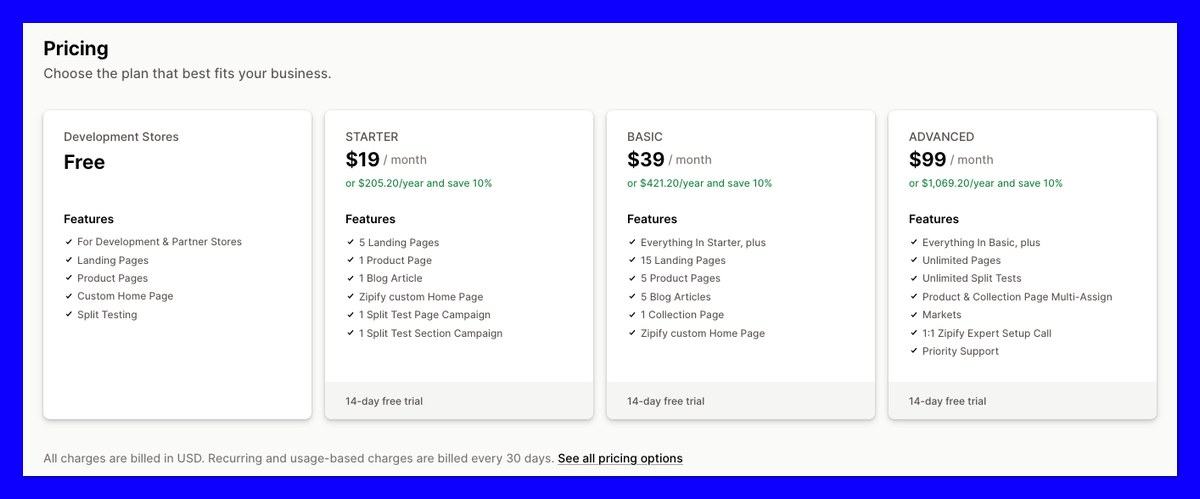
Zipify Pages is the cheapest paid split-testing option in this list. Zipify Pages starts at $19, versus $78 for GemPages Build plus separate GemX Page Optimize.
Its direct-response funnel focus suits offer-led stores. It carries the Built for Shopify badge and a 4.7 rating from 420 reviews, but Starter permits only five landing pages.
Pros
- Split testing starts at $19 per month
- 14-day trial and Built for Shopify badge
- Unlimited pages and tests on $99 Advanced
- Marketing templates built by store operators
Cons
- Starter permits only five published landing pages
- Free publishing is limited to development stores
What’s new with Zipify Pages?
Zipify groups its products under Zipify AI, described as shared intelligence reading catalog, order and funnel data across its apps. The Pages listing says it’s packed with AI-powered features and marketing templates built by store operators.
Why use Zipify Pages instead of GemPages?
GemPages Free and Build cap post-purchase upsell volume at $100/month. Zipify keeps funnel pages in Pages and sells post-purchase upsells separately, in its OneClickUpsell app. Our Funnelish vs GemPages comparison explores that funnel-first decision.
My Zipify Pages testing notes
I’d map existing pages by type: limits aren’t a shared pool. Zipify doesn’t publicly document uninstall outcomes, so ask support before removing it.
How Much Does Zipify Pages Cost?
| Plan | Monthly price | Key limits |
|---|---|---|
| Development Stores | $0 | Development and partner stores only |
| Starter | $19 | 5 landing pages, 1 product page, 1 blog article, custom homepage, 1 page and 1 section testing campaign |
| Basic | $39 | 15 landing pages, 5 product pages, 5 blog articles, 1 collection page |
| Advanced | $99 | Unlimited pages and tests, Markets, 1:1 expert setup |
Use the 14-day trial to split test your best-selling offer first.
How Do I Choose the Right GemPages Alternative?
Choose around the GemPages limitation you need to solve, not the longest feature list. Use this checklist to narrow down Shopify page builder alternatives.
- Are you switching or choosing for the first time? Switchers need a rebuild plan; first-time buyers can publish one page free with PageFly or EComposer.
- How many pages will you publish? PageFly Builder covers five slots, EComposer Standard 15 and Shogun Build 25; GemPages Build offers unlimited pages.
- Do you need A/B testing, and on which plan? GemPages needs separate GemX from $49; Zipify starts at $19 and PageFly at $39. Read our ecommerce A/B testing guide.
- Where will your page code live? Instant writes Liquid into your theme; Shopify’s editor is native. Other picks use app-rendered output.
- What happens on the day you leave? Shogun retains HTML, Replo retains pages without publishing access, and EComposer ultimately deletes pages.
- Will your theme and apps work with it? Canvas supports Shopify-made or custom themes only, without app blocks or embeds.
Can I Switch From GemPages Without Breaking My Pages?
Yes, if you rebuild before you uninstall. GemPages removal can affect required files and scripts; reinstalling restores them.
- Export your GemPages designs as a backup, not a guaranteed import into another builder.
- Rebuild in a duplicate theme where supported. Prioritize your homepage and highest-value landing pages.
- Keep the same URL handles to preserve links and ad destinations; check replacement pages on mobile.
- Downgrade GemPages to Free temporarily. Pages stay, but multiple published pages block republishing. Downgrading or uninstalling forfeits grandfathered yearly billing.
- Uninstall only after replacements are live, then check billing. April and May 2026 App Store reviewers reported charges after removal.
- Clean leftover code carefully, including theme.liquid and sections, then follow our Shopify store audit guide.
For a complex rebuild, consider professional help. Our guide to hiring someone to build a Shopify store explains what to request.
How We Test and Rank the Best GemPages Alternatives
Design control carries the most weight in our ranking of 10 GemPages competitors, using November 2026 pricing and documentation.
- Design control and templates (25%): Layout freedom, templates and Figma access.
- Publishing limits and price (20%): Publishing allowances and costs against GemPages.
- A/B testing access (15%): Testing versus GemPages’ separate GemX app from $49/month.
- Lock-in and uninstall (15%): Page survival and editing restrictions after removal.
- Speed and code output (15%): Native output versus app-rendered pages adding JavaScript.
- Support and reputation (10%): Support, ratings, review volume and Shopify badges.
Fudge missed the shortlist because it lacks built-in testing; a typical page uses 30,000-100,000 credits against its $79 plan’s 100,000 allowance. Foxify’s cards omit testing; Omnise offers three slots for $19.99. LayoutHub is unavailable on the App Store.
Measure your pages with our Shopify site-speed guide; code architecture isn’t a performance guarantee. App-rendered builders add JavaScript to the pages they power; native sections avoid that builder-rendering layer. Compare the same page content before deciding that switching alone will solve a speed problem.
Final Verdict: Which GemPages Alternative Do I Recommend?
Instant is my recommendation for most design-led stores because it publishes Liquid into your theme rather than app-rendered pages. Unlimited landing pages start at $39/month, or $31 billed yearly, with a Figma plugin on every plan.
- Want the closest thing to GemPages? Choose PageFly: testing starts at $39, versus $78 for GemPages Build plus separate GemX.
- Want no builder app? Start with Shopify’s built-in editor; Grow adds Experiments for testing replacement themes.
- Want CRO tools under $50? Choose EComposer Pro at $49, provided you accept its restrictive exit policy.
Start with one representative page. PageFly and EComposer let you publish one free, Instant’s free plan supports development stores, and Zipify offers a 14-day trial.
If you’re switching, keep GemPages installed until replacements are live. Its Free downgrade can bridge the rebuild, but blocks republishing with multiple published pages and ends grandfathered yearly billing. Follow the switching sequence above before removing any files.
FAQs
Does GemPages have A/B testing?
No GemPages page-builder plan includes page A/B testing. Testing uses separate GemX: Page Optimize costs $49/month for 10 live experiments, while Funnel Optimize costs $99-$699/month based on store revenue. GemPages’ included offer testing applies to post-purchase upsells, not pages. Zipify Pages, PageFly and EComposer include page testing from $19, $39 and $49 respectively.
Can I still get a yearly GemPages plan?
New customers cannot buy yearly GemPages plans. Existing yearly subscribers can keep renewing, but downgrading or switching plans ends that arrangement, and uninstalling forfeits it. For annual billing, Instant Starter costs $31/month, EComposer Standard $19 and Shogun Build $31. Compare publishing limits before treating an annual discount as a reason to switch.
What is the cheapest GemPages alternative?
Shopify’s built-in editor costs nothing extra, while Zipify Pages Starter is the cheapest paid app entry in our seven picks at $19/month. Zipify includes five landing pages and one product page. EComposer Standard costs $19/month billed yearly for 15 live items. For unlimited publishing, GemPages Build remains competitive at $29/month; Instant offers unlimited landing pages from $39.
Which GemPages alternatives are Built for Shopify?
PageFly, EComposer and Zipify Pages carry the Built for Shopify badge among our seven picks as of November 2026. Foxify, Fudge and Omnise also have it; GemPages, Shogun, Replo and Instant don’t. The badge recognizes Shopify’s performance, design and integration standards. Use it as a tiebreaker, not a substitute for comparing publishing limits and uninstall policies.
Is Shopify Canvas a replacement for GemPages?
Canvas isn’t a complete GemPages replacement yet; Shopify says it “is not replacing the existing editor yet.” Launched October 1, 2026, it requires desktop access and a Shopify-made or custom theme, without app blocks or embeds. Canvas themes cannot return to classic editing or receive updates. Try a duplicate first; our building a Shopify store with AI guide explains the workflow.


