
 By Bogdan Rancea
I’ll start by telling you something a lot of people don’t know about me. I’ve been a part-time book editor for several years now, and I’ve worked on eBooks even longer than that. I’m not telling you that as a humble brag, it’s just to point out that I know a thing or two about this topic.
The thing I’ve noticed with a lot of authors, is that writing the book isn’t the biggest challenge, the problem is transforming it into something they can actually sell. It’s really not as simple as uploading a file to Shopify and hoping the rest sorts itself out. Even listing your book on the obvious marketplaces like Amazon only gets you so far (and lands you with some hefty fees.)
So, here’s how I actually tell writers to sell eBooks online.
Preparing Your File to Sell
First, a step that a lot of guides like this skip completely. You need to get the product pristine. Unless you’re paying a publisher to do all the hard work for you, uploading your Google Doc or Word file won’t work. First thing spend some serious time proofreading, or get an editor to do it for you.
Once you’re sure everything’s perfect, you need a cover that works as a mini thumbnail, a good file name (one that actually reflects the book), and the right file type.
Most of the tools you can use to sell digital downloads (like eBooks) support a few different file types, so the one you pick really depends on what you’ve made. EPUB is good for text-heavy books that people might read on a tablet, or the Kindle app. PDF is the better choice for recipe books, workbooks, planners, or anything with a fixed layout.
You can always consider offering both. Payhip lets you sell one product in different formats, and add extras into the same product, like an audio note, printable, spreadsheet, checklist, or sample chapter.
What you need:
- A final (proof-read) PDF, EPUB, or both
- A clear front cover and back cover
- Sample pages or preview pages
- Bonus files to add value (and hopefully increase sales)
- A description for the book that covers everything the reader gets
- FAQs answering any questions readers might have
- Maybe an “About the Author” page
Choosing the Platform for eBook Sales
Now you pick your platform. Again, there are plenty of tools that support digital sales, my general shortlist for most authors looks like this:
| Platform | Fees | Payout speed | EU/UK VAT | Bundles/upsells |
|---|---|---|---|---|
| Payhip | Free 5%, Plus $29/mo + 2%, Pro $99/mo + 0% | Instant. No holding period. No minimum threshold. | Automatically handles global VAT and sales taxes | Bundles, coupons, affiliates, cross-sells, pay-what-you-want, collaborate with other authors |
| Gumroad | 10% + $0.50 direct, 30% Discover | Usually Fridays, except some PayPal cases | Merchant of Record | Basic digital sales tools |
| Lemon Squeezy / Paddle | Both list 5% + $0.50 | Lemon Squeezy pays twice monthly; Paddle pays monthly by default | Merchant of Record | Good for software, subscriptions, license keys |
| SamCart | Core $79/mo, Pro $199/mo | Depends on connected payment processor | Tax tools | Excellent bumps, upsells, cart tools |
| Lulu | Varies by retailer/channel | Based on actual sales and Lulu payout setup | Mostly handled through retail/distribution routes | Weak for direct-sales bundles |
| Shopify | Monthly plan (starting at $29) plus payment/app costs | Shopify Payments schedule varies by country | Handled by you | Strong through apps |
I’ve included Shopify there because I know a lot of writers who use it, just remember you’ll need a separate add-on to sell digital files. If you want something easier, and more affordable, I’d definitely go for Payhip. It’s purpose-built for selling ebooks and other digital products, so features like automatic file delivery, secure downloads, and global tax handling are all built in from day one. You can even publish an ebook with multiple co-authors and automatically split revenue between everyone, so there’s no need to calculate or send payments manually.
It may not have every feature Shopify offers, but it includes everything most authors need to sell ebooks successfully without having to pay for extra apps.
Step by Step: Selling Your eBook
I’m going to walk you through the actual “setup and sell” process using Payhip here, because it’s the tool I prefer for most new authors. Plus, you can start for free.
Step 1: Create Your Free Account
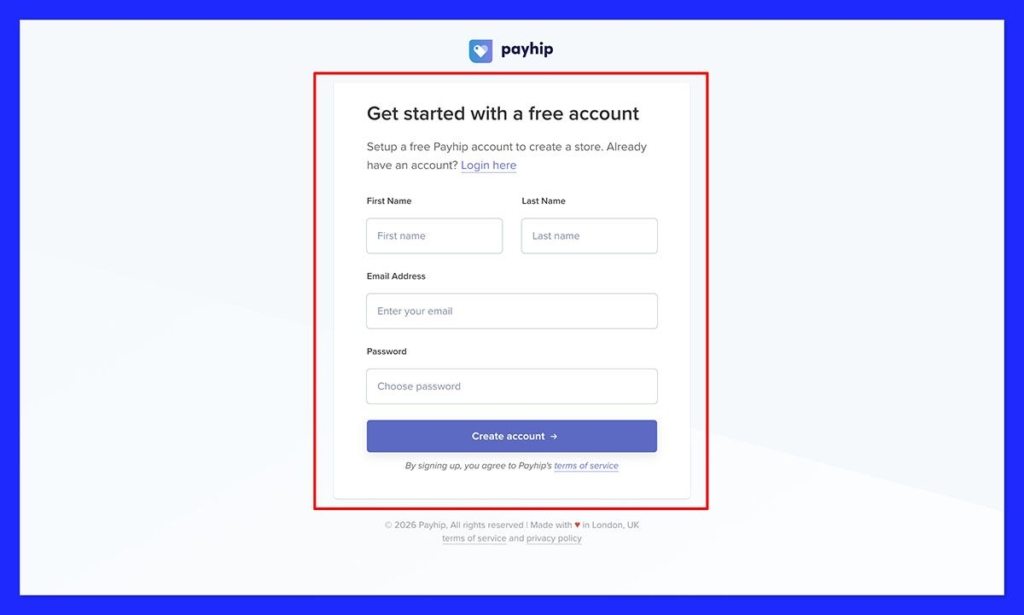
Creating your account literally takes seconds, so you don’t need a big walk-through. Just go to Payhip.com, and click “get started for free”. Quick note, Payhip does take 5% per sale on the free plan, which is still more affordable than most other platforms out there.
Enter the details Payhip asks for, (email address, password, etc), set your store name, add a logo, and choose an initial color palette. You can come back and edit later. Don’t worry too much about creating the most impressive site out there at this point, use one of the themes Payhip gives you.
If you’re going to focus on any other website pages before the actual product page, I’d say choose the “About” page first, then the contact page, then any FAQs, policies, or disclaimers. It’s also worth making sure you have a custom domain, too.
Step 2: Upload Your File
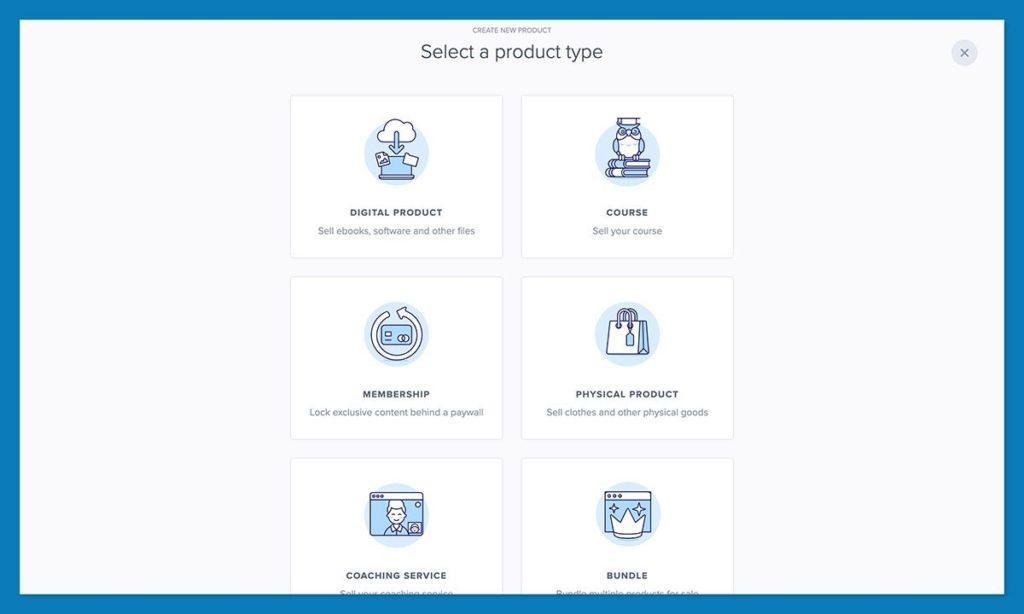
In the products section of the dashboard, choose “Digital Product”
Then upload the file. Like I said, I’d use PDF for anything visual or workbook-like, and EPUB for the more traditional text-heavy books.
This is also where you’ll be able to add some valuable extras like checklists, printables, or spreadsheets that add to whatever you’re offering. You can upload multiple files under one product with Payhip, so it’s worth taking advantage.
Add the title for your book (make sure it’s compelling), and your description. I like descriptions that cover the value of the book, and also give an insight into who you are as an author.
Step 3: Connect To Your Preferred Payment Gateway
In your Payhip dashboard, go to Settings → Payment Details and connect your preferred payment gateways. You can connect more than one gateway which gives your customers more ways to pay.
Payhip supports more than 10 payment gateways, including Stripe, PayPal, Square, Mollie, Paystack, Flutterwave, Mercado Pago, Razorpay, PayU, PayTabs, Iyzico, Xendit, Midtrans, and more.
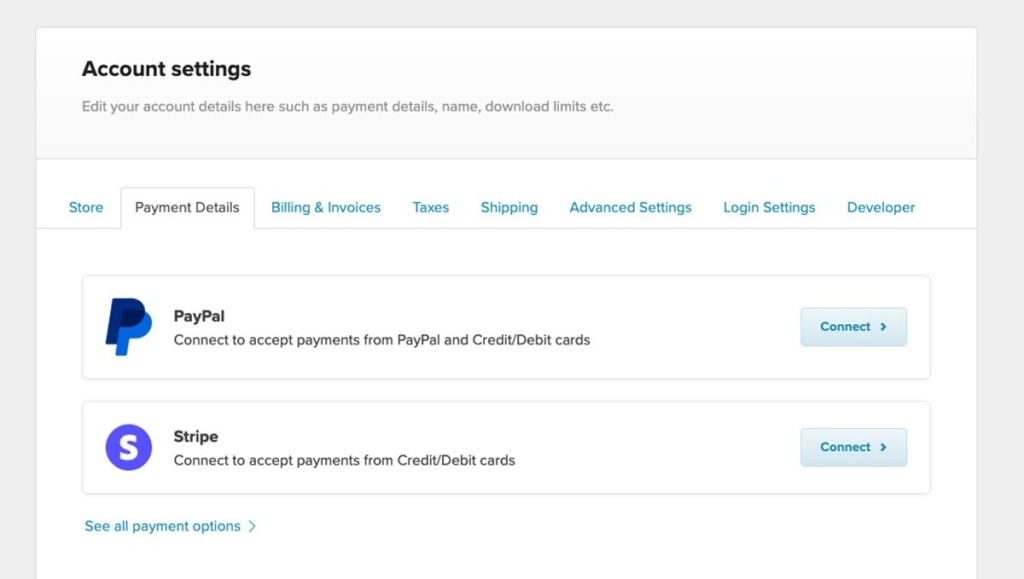
Take advantage of this feature. Each payment gateway supports different countries and payment methods. When you connect multiple gateways, you can offer payment options that your customers already know and trust, such as Apple Pay, Google Pay, local bank transfers, digital wallets, and other regional payment methods. More payment options reduce friction at checkout and can help you increase your conversion rate and generate more sales.
Don’t worry, your customers won’t actually need a Stripe account to make a payment, they’ll just be able to enter their debit or credit card details and get the product delivered directly.
You can start thinking about pricing here, but we’ll come back to it later, the main thing is making sure you can actually get that “Buy” button on your product page.
Step 4: Customize the Sales Page
You’ve probably already added a title and description for your product at this point, now it’s time to make the page look really trustworthy. A sales page shouldn’t be just a “book blurb”.
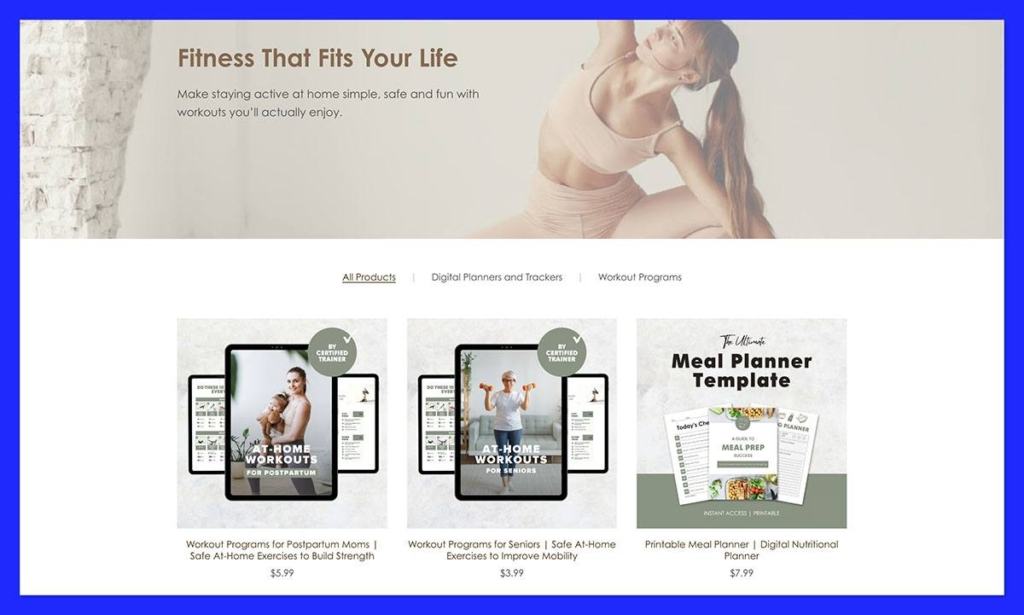
Above the fold (the top of the page) needs to work the hardest, showing your eBook title, the clear promise behind the book, the price, buy button, and of course, your cover or mock-up. Also worth adding a trust signal if you have one, like a review from a well-known expert.
Then go deeper. Show readers what’s inside, list the formats, and add screenshots or sample pages. Give people the whole table of contents if it helps. If there’s an extra workbook, printable, or other bonus files, show those too.
The goal with your sales page is to grab attention, and also answer questions at the same time, like:
- Will this work for my situation?
- Is it beginner-friendly?
- What format do I get?
- Can I read it on Kindle?
- Do I get updates?
- What happens after I pay?
- Is there a refund policy?
Personally, I’d always add a preview. Even a few sample pages can do more for your sales than a fantastic description.
Step 5: Set Discounts and Affiliates
Discounts and affiliates are brilliant for boosting initial sales. I’d start with a launch coupon, or a discount for people who pre-order your book in the early stages. Maybe offer a discount to anyone who signs up for your mailing list, too.
Then use Payhip’s affiliate tools to start building out your mini sales team. Reach out to people who might help promote your book, like a YouTuber, coach you know, or a podcast host that can send buyers from your audience direct to your site. Give them a fair cut of the sales, and make their life easier with promotional templates and images they can use.
Step 6: Publish and Understand the Fees
Payhip has a pretty simple fee structure. If you’re using the free plan, there’s a 5% fee on all sales. The Plus plan costs you $29 per month and takes the fee down to 2%, and the Pro plan has no Payhip transaction fee, but costs $99 per month.
With all of those options, the PayPal and Stripe fees still apply.
I’d say start free if you’re brand-new to all this. If you’re making about $1,000 in sales per month, you’re paying about $50 to Payhip on the free plan. Once you start making more money, you can upgrade to a premium plan to cut your fee costs.
Another quick tip, before you announce anything, buy your own eBook, download every file, check the receipt email, click the links, and make sure everything actually works.
Pricing Your eBook: My Advice
It’s easy to get timid at this stage. I know a lot of eBooks on Amazon go for around $2.99, but that doesn’t mean you have to sell yours for pennies. I’d match the price to the genre and value. For instance, $2.99 to $4.99 usually makes sense for fiction, unless you already have a loyal audience, or you’re selling a set with a lot of extras.
For nonfiction, you can go for anything from $0.99 to $39 and above, depending on what you’re offering. For instance, if you’ve got a comprehensive guide to getting freelance work that comes with a complete toolkit, access to an online community, or exclusive videos, it makes sense to charge more.
For launch, like I said before, you might want to offer a better deal, Payhip lets you run discounts, set a smaller “early bird” price, or create a bundle that saves buyers money on getting a few of your resources at once. You can also offer pay-what-you-want pricing.
Build Your Email Funnel and Earn Traffic
Hopefully you already have a small audience, but even if you do, you still need to work on constantly pulling people towards your book. My preferred way to do that is with a lead magnet and an email funnel. Make something small that you can offer your audience for free. That might be a mini workbook, or a free chapter. Anyone who gives you their email address can download it. You can easily distribute your lead magnet with Payhip. Just upload it like any other product and set the price to $0. Visitors can then download it for free, and Payhip will automatically collect their email addresses.
Then build a funnel for the people who subscribe:
- Welcome email: who you are, why the ebook exists, and who it helps
- Useful email: one real tip from the book, no vague pep talk
- Proof email: sample page, reader quote, case study, or before and after
- Launch email: price, bonus, deadline, buy link
- Reminder email: one clean nudge before the offer ends
- Post-purchase email: download help, where to start, review request, related offer
The great thing about email marketing is that once people sign up, you can keep them updated with new books you’re working on, community experiences, or anything else. You own that audience.
Outside of email, use social media to show off the ebook, share reviews, and answer questions readers might have. Working with an influencer or two on an interview can help here too.
Get your affiliates up and running. Payhip helps with that, the built-in affiliate tools mean you can get a bunch of great people promoting and selling your ebook for a commission, without you having to manage everything yourself.
Beyond that, experiment. Create a blog and use SEO strategies to pull organic traffic to your website, or use a news section to share your experiences. Reach out to PR teams and podcast owners with exclusive quotes they can share with their audience.
Get More Revenue Per Buyer
Now we’re getting to the really strategic stuff. Once you have an audience, even a small one, your focus should be on earning more from every sale. The easiest option here is to add more “extras” into whatever you’re selling. Think about the things a reader might want when they’re done reading the book, like a workbook, checklist, printable planner, template pack, or an audio summary.
You could even use QR codes to send someone straight to a membership page or an exclusive video.
Package the pricing in tiers, if you can. A basic buyer might get the eBook only. Then you can add a Standard plan with the eBook plus a workbook, and a Premium plan with an eBook plus workbook and templates. Maybe even create a special “exclusive” plan that includes a coaching call with you.
Honestly, this is where direct selling through something like Payhip really beats a marketplace listing. On Amazon, the eBook is really just an eBook. With Payhip, the eBook can become a whole package.
Think past the first sale too. Your eBook might turn into an advanced guide, a multi-stage series, a workshop or selection of courses, or a membership community.
What You Can Actually Earn
I’ll be candid here and say that people usually don’t become millionaires just by selling an eBook, the money tends to come from the combination of the book itself, and what builds around it.
Use this basic calculation to help:
Revenue from the eBook = traffic x conversion rate x average order value
Say you get 1,000 visitors a month and 2% buy.
That’s 20 buyers.
If you’re selling your book at $19, you’ve made $380 before fees, which is a good start.
Then you can start thinking about improving the offer:
- Add a $9 workbook and 25% of buyers take it: +$45
- Lift conversion to 3%: $570 before add-ons
- Sell half your buyers a $39 bundle instead of the $19 ebook: 30 buyers gets you around $870
From there, you can branch into paid memberships, coaching sessions, or online courses that add new streams of revenue to your strategy.
How to Sell eBooks: Running it as a Business
One last mistake a lot of authors make is thinking that selling eBooks isn’t the same as running a traditional business. In some ways, that’s true, since you’re not dealing with production and fulfillment like a standard ecommerce merchant.
You still need to do the more boring part. Write your refund policy before launch and decide what happens if someone downloads the eBook, reads a bit, and asks for their money back.
Keep records too: order receipts, customer emails, refund requests, chargeback notes, affiliate payouts, coupon use, and update history.
Also, be prepared for the threat of piracy. On Payhip, authors can choose how many times buyers are allowed to download a book, which can help to prevent people from distributing your book without paying for it again. Still, it’s worth using PDF stamping too.
Also, remember the tax side of things. Payhip automatically calculates, collects, and remits sales taxes where applicable. That means you can stay tax compliant without having to worry about registrations, calculations, filing, or other administrative work.
A few things to setup before launch:
- Support email
- Refund policy
- Download limit
- PDF stamping for PDFs
- Simple sales tracker
- Update plan for future file versions
- Folder for receipts, tax notes, and affiliate records
Should You Also List On Marketplaces?
I’ll answer this question up front with a “Yes, probably.”
Amazon, Apple Books, Google Play Books, Kobo, and the like can all help with reach, as most readers will already have accounts there. Still, don’t treat the marketplace as your whole strategy unless you want to give up control.
You still need a website if you want to build a brand and earn an email list. You also need to consider direct selling if you want to avoid the massive fees that marketplaces charge. For instance, Amazon KDP gives eBook authors between 35% and 70% royalty options, with pricing rules, territory rules, VAT, and delivery costs all affecting what you actually earn.
Marketplaces help with discovery and distribution, but direct selling is better for customer email collection, higher margins, bonuses, bundles, affiliate strategies, flexible pricing, coupons, and future product growth.
If you sell your ebooks on Payhip, you can also list them on the Payhip Marketplace for free. It’s a nice bonus because your books can get discovered by people who are already browsing for digital products, while you still sell through your own store.
Start Selling eBooks Online Today
Personally, if I’d spent months writing an amazing eBook I wouldn’t want to hand the whole thing over to one marketplace and hope it paid me fairly. I’d sell it directly first.
That doesn’t mean ignoring marketplaces, but don’t confuse reach with control. The direct store with something like Payhip is where you start building a real business. That’s where you can sell the eBook with the bundled extras, start developing real marketing strategies, collect customer emails, and turn one book into a whole business.
Sell the ebook like a product. Treat the buyer like someone you want to hear from again. That’s the bit marketplaces won’t usually give you.


