
 By Bogdan Rancea

Best overall

Shopify
See pricing Visit Shopify →From $29/month billed yearly
Free Shopify Subscriptions app
- Free subscription app on every plan
- Subscribers can skip and pause
- Saved cards stay if you switch apps
Products + memberships

Wix
See pricing Visit Wix →From $29/month billed yearly
No subscription app needed
- Subscriptions built into Wix Stores
- Memberships through Pricing Plans
- Up to six options per product
Best for control

WooCommerce
See pricing Visit WooCommerce →$279/year for Subscriptions
Plus hosting
- Full design and data control
- 25+ gateways for auto renewals
- Trials, sign-up fees and synced renewals
I rank Shopify first among the best ecommerce platforms for subscriptions: its free subscription app supports customer skip and pause, while saved payment details stay in Shopify when you change apps. Basic starts at $29/month billed yearly. We compared published pricing, subscriber tools, documentation and merchant reviews for 10 platforms, as of November 2026.
In this guide, I’ll walk you through the subscription features, pricing and drawbacks of each platform, whether you sell physical boxes, replenishment products, digital products or memberships. Every cost is modeled at 100 subscribers paying $30/month. Wix suits products plus memberships, and WooCommerce gives you full design and data control.
See Our Top 7 Platforms for Selling Subscriptions
Choose by subscription model, not just the lowest advertised price.
- Shopify: Best overall, 4.7/5. Free subscription app; Basic starts at $29/month billed yearly.
- Wix: Best for products plus memberships, 4.5/5. Both models from $29/month billed yearly.
- WooCommerce: Best for design and data control, 4.3/5. Subscription extension: $279/year, plus hosting.
- Subbly: Best for subscription boxes, 4.2/5. Skip, pause and swap from $79/month, plus fees.
- Squarespace: Best for design-led brands, 4.0/5. Core removes store fees at $29/month billed yearly.
- Payhip: Best for budget digital memberships, 3.9/5. Start free with a 5% fee.
- Square Online: Best for existing Square businesses, 3.8/5. Square Subscriptions adds $0 in monthly subscription fees.
Subscription Ecommerce Platform Comparison Table
Only three include customer-controlled skipping in these setups: Shopify, Wix and Subbly. Prices are USD, as of November 2026.
| Platform | Rating | Best for | Starting price | Subscription setup | Extra platform fee | Subscriber self-service | What you can sell |
|---|---|---|---|---|---|---|---|
| Shopify | 4.7 | Overall | $29/month yearly; $39 monthly | Free Shopify Subscriptions app | None with Shopify Payments; 2% on Basic with third-party gateways | Skip, pause, cancel, update card | Physical products, replenishment |
| Wix | 4.5 | Products plus memberships | $29/month yearly | Wix Stores; Pricing Plans for memberships | None documented for products; tiered membership fee | Cancel, update card, skip if enabled | Physical products, gated content |
| WooCommerce | 4.3 | Full control | $279/year + hosting | Paid Subscriptions extension | None | Suspend, upgrade, downgrade, cancel | Physical, virtual, downloadable |
| Subbly | 4.2 | Subscription boxes | $79/month; $711/year | Built in | 1% + $0.19 on Stripe; 1.25% otherwise | Skip, pause, swap, cancel | Boxes, replenishment, memberships |
| Squarespace | 4.0 | Design-led brands | $19/month yearly | Built in | 2% Basic; 0% Core upward | Update card; seller handles skips and pauses | Physical and service products |
| Payhip | 3.9 | Digital memberships | $0 | Built in; Stripe required | 5% Free; 2% Plus; 0% Pro | Cancel; no documented skip/pause | Memberships, courses, coaching, bundles |
| Square Online | 3.8 | Local businesses | $0; confirm item-subscription eligibility | Square Subscriptions | None; Free processing 3.3% + $0.30 | Pause if enabled, update card | Library items; no pickup |
Compare plan, app and per-order fees in the 100-subscriber calculation below.
1. Shopify: Best Overall for Subscriptions
- Pricing: Basic from $29/month billed yearly, or $39 monthly.
- Trial: Three days free, then $1/month for three months on most plans.
- Subscriptions: Free first-party app; paid alternatives available.
- Overall rating: 4.7/5.
- Further reading: Our Shopify review.
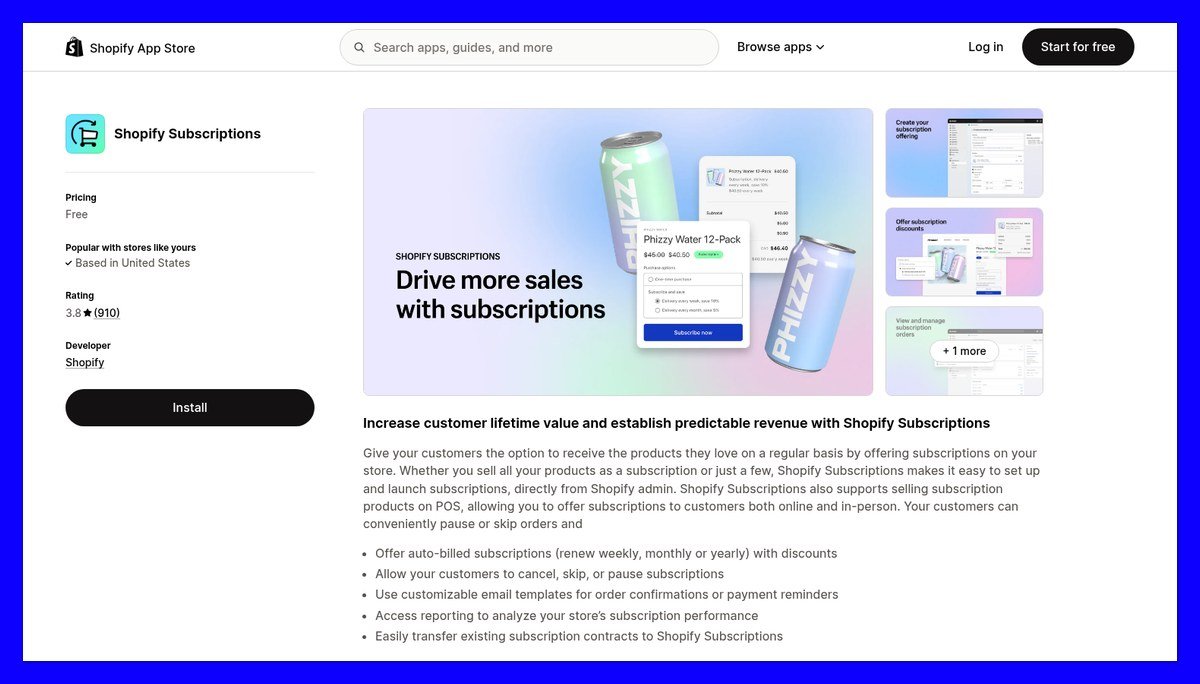
Shopify is my best all-round choice for selling subscriptions because its free app includes useful customer controls without an upgrade. Subscribers sign in using a six-digit email code and receive a reminder three days before charging. Shopify stores contracts and payment methods, not the app.
The free app scores 3.8/5 from 910 Shopify App Store reviews. A wine-box merchant complained there was “no optionality to change the date” customers were billed.
Pros
- Free on every plan: No subscription-app charge or required upgrade.
- Configurable recovery: Set retry counts, intervals and the action after failure.
- App choice: Recharge, Loop, Appstle and Seal support more demanding businesses.
- Payment portability: Contracts and saved payment methods remain when switching apps.
Cons
- Limited self-service: Customers cannot change frequency or swap products in the free app.
- No bundles: The free app isn’t compatible with bundles, and gift cards and automatic discounts apply only to the first payment by default.
- Gateway surcharge: Basic adds 2% for third-party payment gateways.
- Expensive upgrades: Recharge Starter costs $149/month + 1.50% + $0.20 per transaction.
How Subscriptions Work on Shopify
- Billing: Offer weekly, monthly or yearly renewals with discounts.
- Channels: Sell through the Online Store, POS, Shop or custom storefronts.
- Customer controls: Subscribers can skip, pause, resume or cancel.
Design control: Place the subscription widget within your product-page theme. Checkout and account customization depend on your setup; Recharge Scale adds an SDK and Storefront API for deeper portal work.
Follow our step-by-step guide to selling subscriptions on Shopify. Compare apps in our best subscription apps for Shopify guide.
How Much Does Shopify Cost?
| Plan | Monthly billing | Yearly billing, per month | Online card rate | Third-party gateway fee |
|---|---|---|---|---|
| Basic | $39 | $29 | 2.9% + $0.30 | 2% |
| Grow | $105 | $79 | 2.7% + $0.30 | 1% |
| Advanced | $399 | $299 | 2.5% + $0.30 | 0.6% |
| Plus | From $2,300 | One price shown | 2.25% + $0.30 | 0.2% |
The free app adds $0, making Basic sufficient for most starting subscription stores. See our Shopify pricing guide for wider plan differences.
Best for: Replenishment sellers with one-off products too. Skip it if: You need built-in swaps and box curation without another app; consider Subbly.
2. Wix: Best for Product Subscriptions Plus Memberships
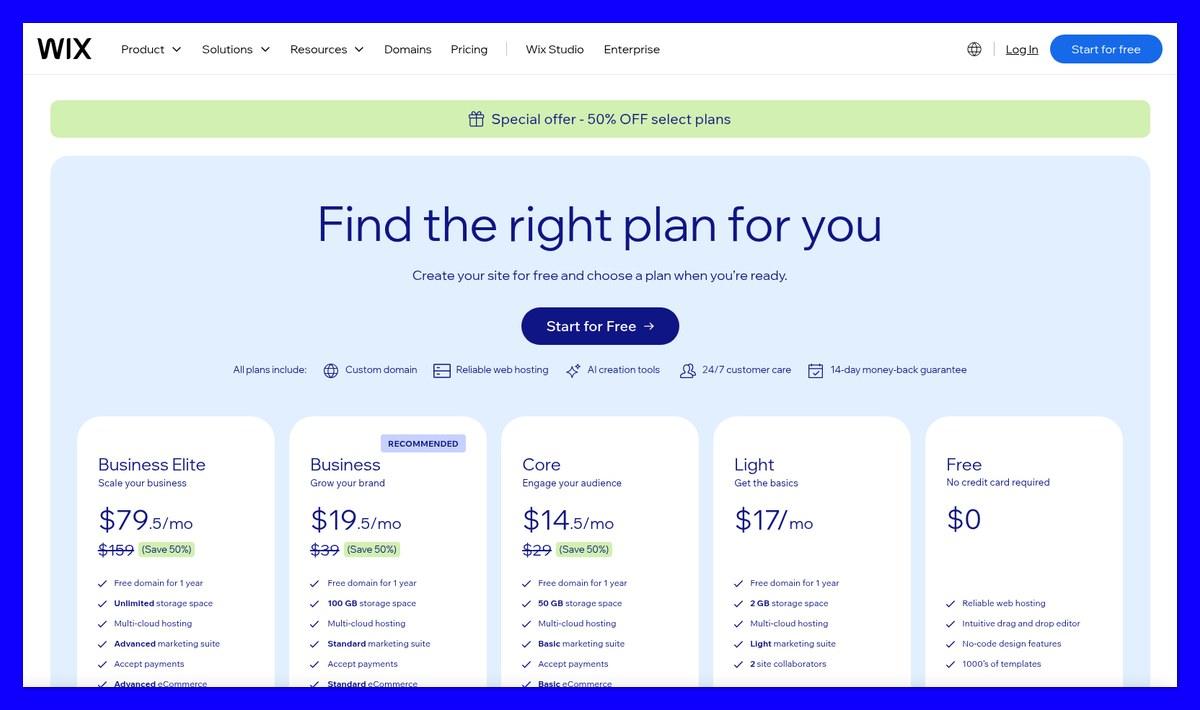
- Pricing: $17-$159/month billed yearly; payments start on Core at $29.
- Subscriptions: Wix Stores for products; Pricing Plans for memberships.
- Options: Up to six subscription choices per product.
- Overall rating: 4.5/5.
Want to sell coffee deliveries alongside members-only brewing guides? Wix is my pick for combining product subscriptions and memberships, because you can design both within one visual editor.
Subscribers can cancel, update payment details or skip if enabled. Customer frequency changes and product swaps aren’t documented.
Pros
- Native product subscriptions: Each billing cycle creates a normal Wix Stores order.
- Subscribe-and-save: Offer discounts and expiry terms alongside one-time purchasing.
- Merchant controls: Skip up to 10 billing cycles or reschedule orders.
- Membership flexibility: Offer recurring, one-time, free or trial access plans.
Cons
- Restricted self-service: No documented customer-controlled swaps or frequency changes.
- Membership service fees: Independent trackers report 4% Core, 2% Business and 0% Business Elite. Confirm in your dashboard.
- Annual-price emphasis: Independent trackers put month-to-month Core at approximately $36, not $29.
How Subscriptions Work on Wix
- Product setup: Create a subscription on a physical product; add its name and tagline.
- Billing options: Set frequency, expiry and discount; add up to six alternatives.
- Member access: Use Pricing Plans to gate pages or blog content.
- Other access options: Cover video, bookings, programs, file sharing and Groups.
Design control: Style product and plans pages in Wix’s editor. Equivalent styling freedom for My Subscriptions isn’t documented; inspect that account tab separately.
How Much Does Wix Cost?
| Plan | Yearly billing, per month | Accepts payments | Ecommerce level |
|---|---|---|---|
| Light | $17 | No | None |
| Core | $29 | Yes | Basic |
| Business | $39 | Yes | Standard |
| Business Elite | $159 | Yes | Advanced, plus developer platform |
These are Wix’s regular yearly prices as of November 2026. Wix was advertising 50% off Core, Business and Business Elite when I checked ($14.50, $19.50 and $79.50/month), so confirm the current offer before paying.
I’d choose Business for membership-led revenue if the reported service fees match your dashboard. At $3,000/month in membership sales, Business totals $99 before processing, versus $149 on Core.
3. WooCommerce: Best for Full Design and Data Control
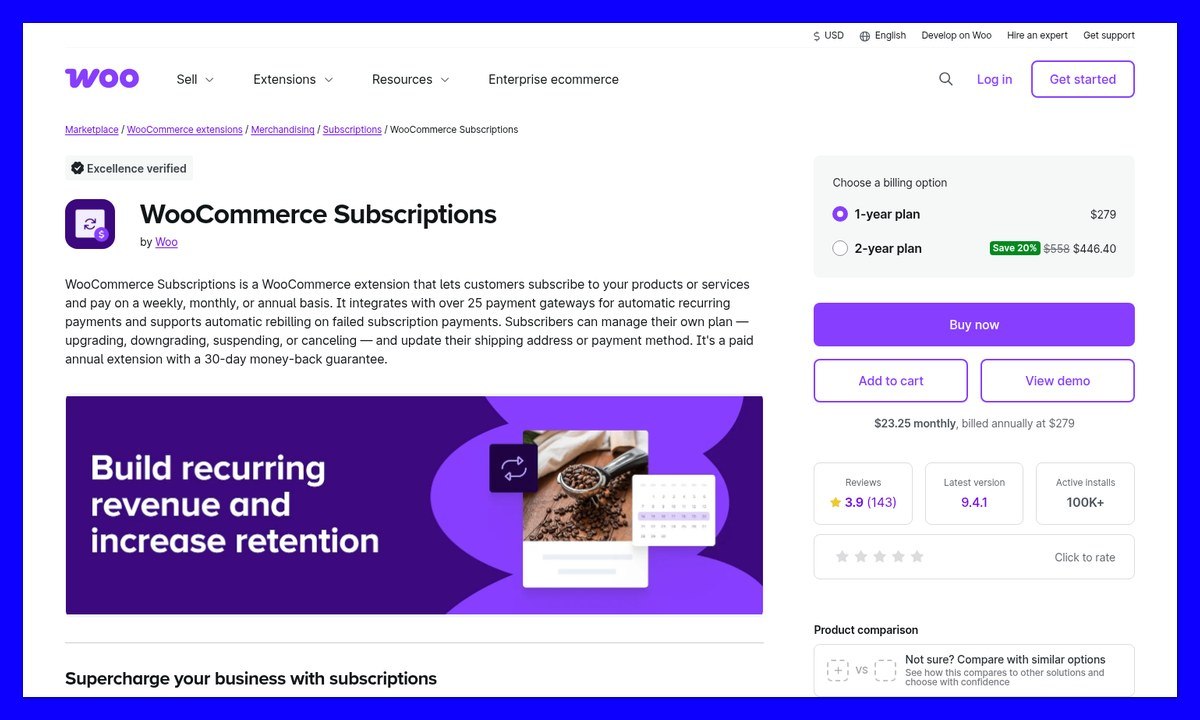
- Pricing: Free core plugin; $279/year for WooCommerce Subscriptions, plus hosting.
- Gateways: 25+ support automatic renewals.
- Guarantee: 30 days on the extension.
- Overall rating: 4.3/5.
If hosted subscription portals limit your design, WooCommerce gives you control over appearance and behavior. Edit your theme and templates; subscription schedules live in your WordPress database.
The trade-off: you manage hosting, updates and security. The paid extension also lacks a customer skip-next-renewal button.
Pros
- Code-level control: Customize product pages, plan pickers and customer-account templates.
- Flexible billing: Offer trials, sign-up fees and synchronized renewals with prorated first payments.
- Payment recovery: Enable automatic retries; choose among 25+ renewal gateways.
- Data ownership: Subscription records and billing schedules remain on your site.
Cons
- Additional costs: Hosting, domains and paid themes cost extra.
- Self-service extras: Skipping and richer dashboards require additional extensions.
- Technical upkeep: Manage plugin compatibility and security.
How Subscriptions Work on WooCommerce
- Product types: Sell physical, virtual or downloadable subscriptions, including mixed checkouts.
- Subscriber controls: Customers can upgrade, downgrade, suspend or cancel.
- Account updates: Subscribers can change shipping addresses and payment methods.
- Merchant editing: Adjust trials, recurring totals, items, fees or taxes.
Design control: Full template access comes from self-hosting, not a styling feature within the subscription extension.
How Much Does WooCommerce Cost?
| Cost item | Price | Notes |
|---|---|---|
| WooCommerce core | $0 | Free plugin |
| Subscriptions, one year | $279 | $23.25/month equivalent |
| Subscriptions, two years | $446.40 | Discounted from $558 |
| WooPayments, US cards | 2.9% + $0.30 | No setup or monthly fee |
| Hosting, domain, theme | Varies | Separate costs |
Independent pricing guides report the WooPayments rate above; confirm your applicable rate before launch.
Skip WooCommerce if you don’t want to maintain WordPress. Our WooCommerce alternatives guide covers hosted options with less upkeep.
4. Subbly: Best for Subscription Boxes
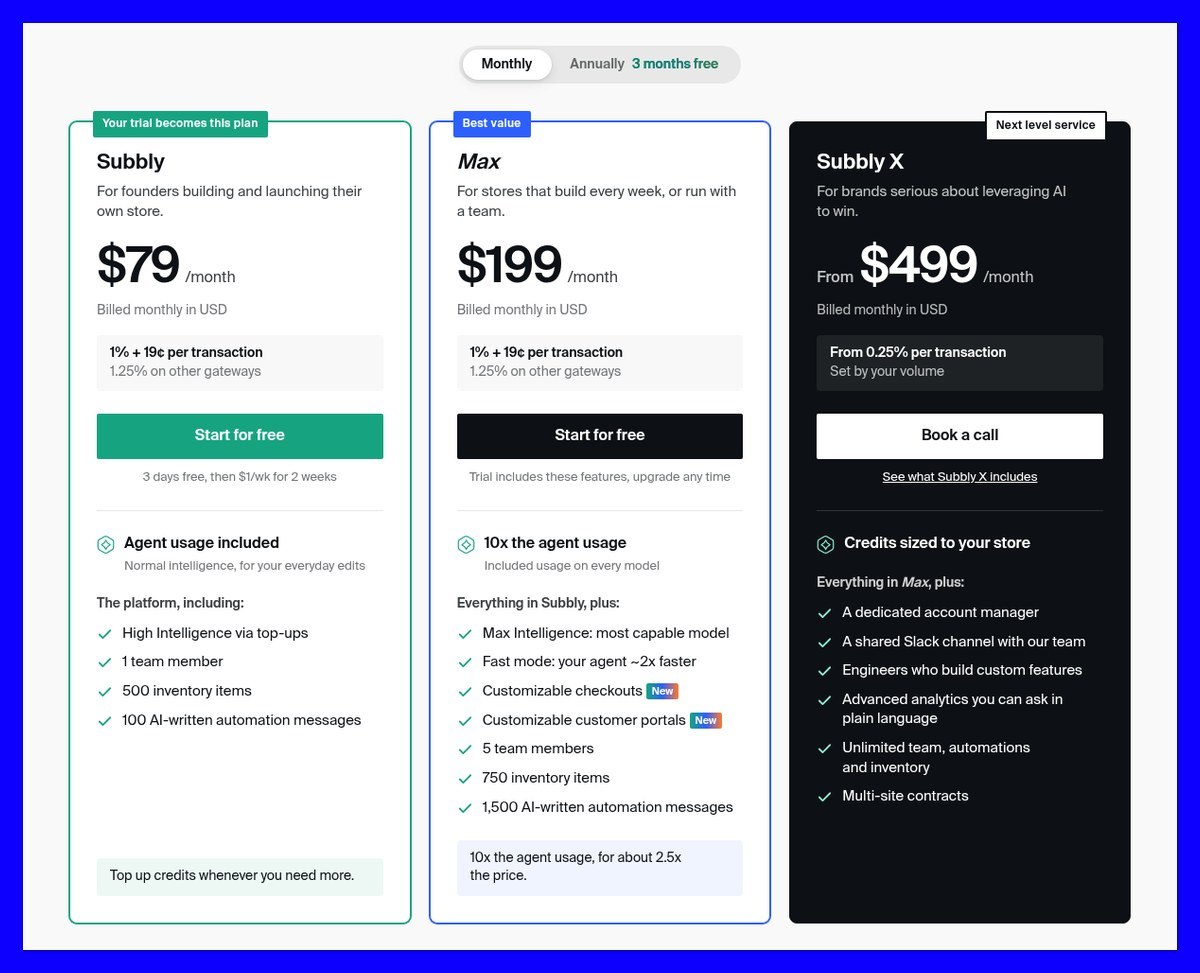
- Pricing: $79/month, or $711/year.
- Platform fee: 1% + $0.19 per Stripe order; 1.25% on other gateways.
- Trial: Three days without a card, then $1/week for two weeks.
- Overall rating: 4.2/5.
Subbly is my recommendation for subscription boxes because swaps and retention tools are built into the platform.
Subbly’s 3.8/5 Trustpilot score includes a box merchant’s complaint about pricing differences at launch, limited analytics and difficulty adding one-time extras.
Pros
- Customer portal: Subscribers can skip, pause, resume and swap.
- Flexible schedules: Custom intervals, trials of any length and billing-date shifting.
- Retention tools: Configurable payment retries, cancellation save offers and churn/MRR analytics.
- Free migration: Eligible Stripe or PayPal cards carry over; others receive a card-update link.
Cons
- Portal customization costs more: Custom checkout and portals require Max at $199/month.
- AI credits: Small edits cost $0.10-$1; a first full store can cost $100-$250.
- Cancellation complaints: A Trustpilot reviewer reported continued emails after requesting cancellation.
- Subscription-first focus: I’d favor Shopify for a large mixed catalog of one-off products.
How Subscriptions Work on Subbly
- Business models: Run boxes, replenishment or memberships.
- Billing: Offer weekly through annual schedules, or custom intervals.
- Payment support: Stripe, PayPal, Braintree and Authorize.net.
- Additional methods: Apple Pay, Google Pay, SEPA and ACH, depending on setup.
Design control: Subbly’s AI agent builds the storefront. Max unlocks customizable checkout and customer portals, with HTML, CSS and JavaScript options for checkout development.
How Much Does Subbly Cost?
| Plan | Monthly billing | Yearly billing | Platform fee | Main additions |
|---|---|---|---|---|
| Subbly | $79 | $711/year | 1% + $0.19 Stripe; 1.25% otherwise | Subscriptions, bundles, retention tools |
| Max | $199 | $1,791/year | Same | Custom portals, five team members, 10x agent usage |
| Subbly X | From $499 | Not listed | From 0.25% | Lower transaction-fee tier |
Refer-a-friend sales carry a separate 1% fee.
At 100 subscribers paying $30, Subbly costs $128/month before processing on monthly billing. Shopify Basic costs $39 with its free app, or $253 with Recharge Starter. Subbly costs more than the free setup but includes swaps and retention tools.
5. Squarespace: Best for Design-Led Brands
- Pricing: $19-$99/month yearly, or $25-$139 monthly.
- Store fee: 2% Basic; 0% Core upward.
- Trial: 14 days, with no free plan.
- Overall rating: 4.0/5.
- Further reading: Shopify vs Squarespace.
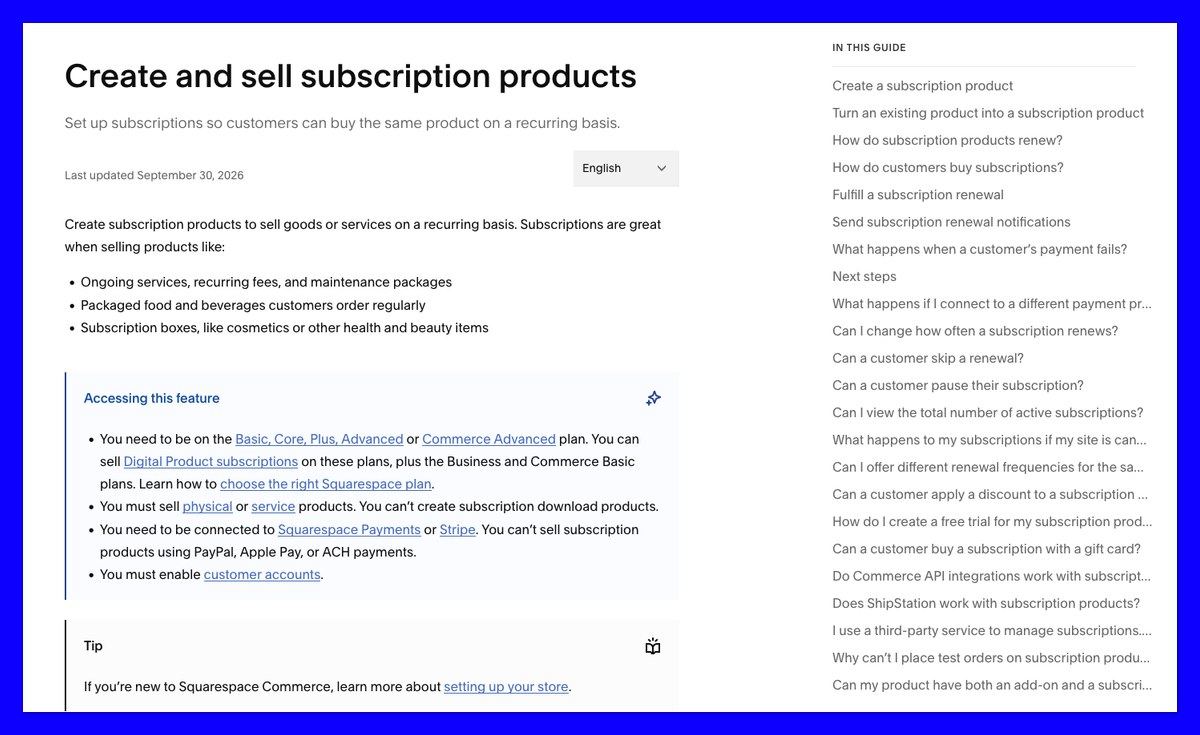
Squarespace subscribers cannot skip or pause deliveries themselves. You must delay their renewal or cancel the pending order.
Still, Squarespace is my pick for a simple subscription with a design-led storefront. Subscriptions are native on every current plan. Squarespace forum users highlight missing subscriber counts and price-editing restrictions.
Pros
- Native subscriptions: No app needed for physical or service products.
- No store fee: Available from Core.
- Styleable elements: Customize the frequency selector and subscription emails.
- Flexible offers: Combine one-time and subscription purchasing, frequency discounts and renewal limits.
Cons
- No customer skip or pause: Those requests become manual work.
- Restricted checkout: One subscription product per checkout; no subscription products with add-ons.
- Limited processors: Renewals require Squarespace Payments or Stripe.
- Short recovery window: Retries occur after five and 10 days; the third failure cancels.
How Subscriptions Work on Squarespace
- Cadence: Renew weekly through every 12 months.
- Product types: Physical and service subscriptions; digital access uses separate Digital Products.
- Trials: Apply a 100% first-payment discount.
- Reminders: Send renewal emails 15 days ahead for eligible longer-term subscriptions.
Design control: Style the frequency section and renewal or failed-payment emails. Account-panel styling isn’t publicly documented; preview it before committing.
How Much Does Squarespace Cost?
| Plan | Monthly billing | Yearly billing, per month | Store fee | Card rate |
|---|---|---|---|---|
| Basic | $25 | $19 | 2% | 2.9% + $0.30 |
| Core | $39 | $29 | 0% | 2.9% + $0.30 |
| Plus | $65 | $49 | 0% | 2.7% + $0.30 |
| Advanced | $139 | $99 | 0% | 2.5% + $0.30 |
Advanced also removes digital-content and membership transaction fees. At $3,000/month, Basic’s store fee adds $60, making Core cheaper.
Pick Squarespace for a fixed flower delivery or print club where presentation matters more than subscriber flexibility.
6. Payhip: Best for Digital Memberships on a Budget
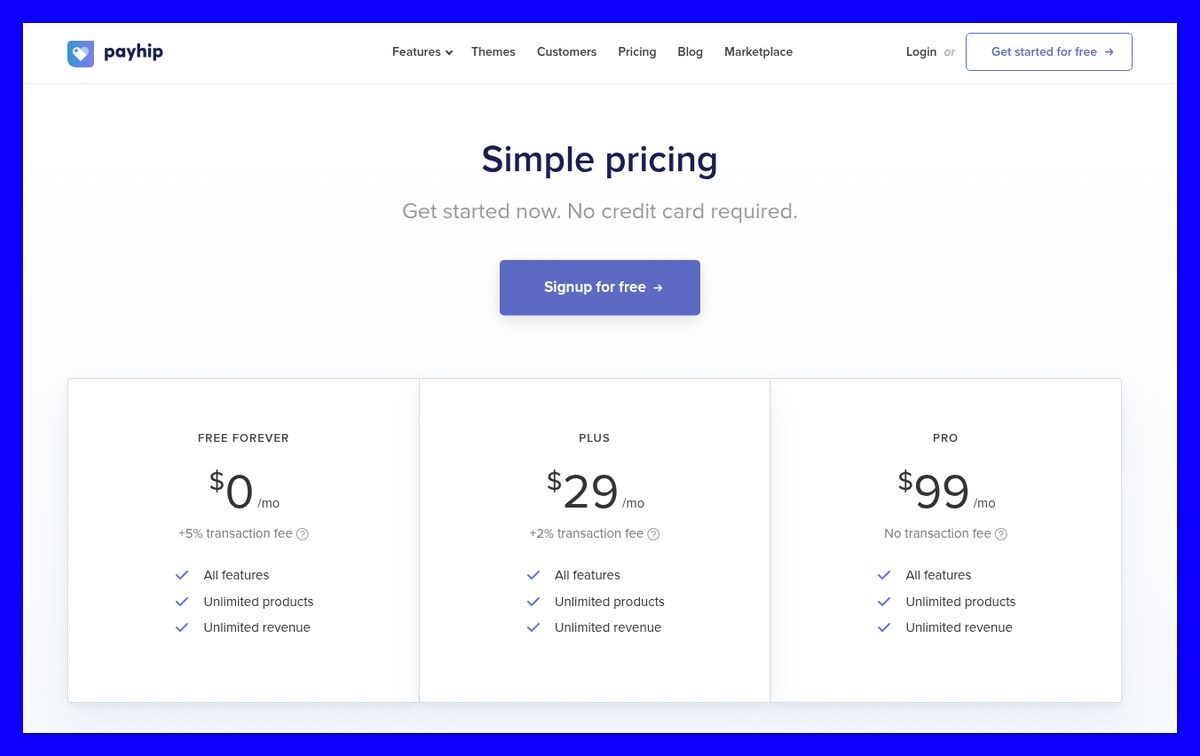
- Pricing: Free + 5%, Plus $29/month + 2%, Pro $99/month + 0%.
- Recurring payments: Digital products, through Stripe only.
- Overall rating: 3.9/5.
- Further reading: Our Payhip review.
You can launch a paid membership for $0/month without losing features. Payhip is my budget choice for digital subscriptions, combining tiered access with automatic digital EU/UK VAT and US/Canadian sales-tax handling.
However, physical subscriptions aren’t supported. Trustpilot reviewers flag membership-area limitations and a checkout that isn’t fully translatable.
Pros
- All features included: Unlimited products on every plan.
- Tiered memberships: Scheduled posts, comments, notifications and 2 GB attachments.
- Flexible billing: Weekly, monthly, quarterly or annual intervals, with free trials.
- Recovery and price protection: Existing prices stay; three failed-payment emails over 20 days precede cancellation.
Cons
- No physical subscriptions: Physical goods are one-time purchases.
- Stripe dependency: Other integrations don’t support recurring billing.
- Limited branding: Banners, colors, fonts and headlines.
- Video hosting extra: $5/month for 16 hours, or $10 for 32; external embeds are free.
How Subscriptions Work on Payhip
- Memberships: Publish content inside a tiered portal.
- Bundles: Sell recurring product access; additions reach buyers within an hour.
- Cancellation: Members lose access immediately, with no proration.
Design control: Expect template-based branding, not WooCommerce-level freedom. Customer skip or pause isn’t documented; check before promising either.
How Much Does Payhip Cost?
| Plan | Monthly price | Fee | Cheapest monthly sales range |
|---|---|---|---|
| Free Forever | $0 | 5% | Below about $967 |
| Plus | $29 | 2% | About $967-$3,500 |
| Pro | $99 | 0% | Above $3,500 |
Billing is monthly only, with Stripe processing extra.
If you also ship physical boxes, compare Payhip vs Shopify.
7. Square Online: Best for Local Businesses on Square
- Pricing: Free $0, Plus $49, Premium $149/month per location.
- Subscriptions: No separate monthly subscription fee.
- Overall rating: 3.8/5.
- Further reading: Shopify vs Square Online.
Square Online is the simplest starting point if your business already uses Square. Attach recurring plans to library items; sell through your website, QR codes or payment links.
Before building on Free, confirm online item-subscription eligibility. Square’s documentation doesn’t clearly establish that plan boundary.

Pros
- No subscription-app fee: Square Subscriptions has no monthly fixed cost.
- Flexible offers: Weekly to annual billing, trials, frequency discounts and optional end dates.
- Optional pause: Cap its duration; customers can also update payment details.
Cons
- No swaps or price edits: You cannot swap active subscription items or change created plan prices.
- No commitments or entitlements: It won’t manage a “five classes monthly” allowance.
- No pickup: Item subscriptions don’t support pickup fulfillment.
- Android limitation: Manage subscriptions on iOS, not Android.
How Subscriptions Work on Square Online
- Create: Open Items and services > Subscription plans in the Dashboard.
- Configure: Assign items, frequencies, discounts and an end condition.
- Enable pause: Set a duration limit.
- Publish: Optionally make the online item subscription-only.
Design control: Selector and management-page styling aren’t publicly documented. Preview both before committing.
How Much Does Square Online Cost?
| Plan | Monthly price per location | Online card rate | Subscription fee |
|---|---|---|---|
| Free | $0 | 3.3% + $0.30 | None |
| Plus | $49 | 2.9% + $0.30 | None |
| Premium | $149 | 2.9% + $0.30 | None |
Square announced these unified plans on October 6, 2025. Independent pricing guides report the Plus/Premium online rates; confirm before subscribing.
Square suits straightforward recurring orders, without pickup. For a design-led alternative, see Square vs Squarespace.
How Do I Choose the Right Ecommerce Platform for Subscriptions?
At 100 subscribers paying $30/month, adding Recharge Starter turns Shopify Basic’s $39 bill into $253 before processing. Compare the full workflow and fees.
- Match your products: Payhip handles digital recurring access, not physical shipments. Compare our ecommerce platforms for creators for content-led businesses.
- Check subscriber controls: Recharge’s own merchant data attributes approximately 61% of voluntary cancellations to the first two renewals. Skip and pause offer alternatives to cancelling.
- Compare payment recovery: Squarespace retries over 10 days; Payhip sends three emails over 20 days. Shopify and Subbly offer configurable schedules; enable WooCommerce’s retry system separately.
- Confirm your gateway: Payhip requires Stripe; Squarespace supports Stripe or Squarespace Payments. Shopify Basic can add 2% for third-party gateways.
- Inspect design limits: WooCommerce offers full template control. Subbly reserves custom portals for Max; Squarespace styles its frequency selector, while Payhip focuses on membership branding.
What Does It Cost to Run 100 Subscribers at $30 a Month?
100 subscribers × $30 = $3,000/month across 100 orders. Totals include plan, app and platform fees as of November 2026. Processing is excluded except for Square.
| Setup | Monthly equivalent with yearly platform billing | With monthly platform billing | Included costs |
|---|---|---|---|
| Shopify Basic + free app | $29 | $39 | No app fee |
| Shopify Basic + Appstle | $39 | $49 | $10 app tier; $5,000 revenue allowance |
| Shopify Basic + Recharge Starter | $243 | $253 | $149 app + $45 percentage fee + $20 order fees |
| Subbly on Stripe | $108.25 | $128 | $30 percentage fee + $19 order fees |
| Wix Core, products | $29 | About $36 | No documented product-subscription fee; monthly price from trackers |
| WooCommerce Subscriptions | $23.25 + hosting | Sold yearly | Extension only |
| Squarespace Core | $29 | $39 | No store fee |
| Squarespace Basic | $79 | $85 | Includes $60 store fee |
| Payhip Plus | Monthly only | $89 | $29 plan + $60 fee |
| Square, processing included | Monthly only | $129 Free; $166 Plus | Card processing; confirm Free eligibility |
For comparison, 2.9% + $0.30 processing adds $117/month to non-Square rows; actual rates vary. Appstle uses its monthly app price with either Shopify billing term.
Shopify’s free setup, Wix Core and Squarespace Core tie at $29/month billed yearly for physical subscriptions. Recharge makes monthly-billed Shopify over six times costlier; Subbly falls between them. For Wix memberships, reported fees make Business $99 versus Core’s $149 before processing.
Can I Switch Subscription Platforms Without Losing Subscribers?
Moving products doesn’t guarantee you can move saved payment methods. Token compatibility and the destination’s migration process determine whether customers must enter cards again.
- Shopify: Contracts and payment methods stay when changing apps. Other app-held data may disappear 48 hours after uninstalling, unless backed up. Migrate before removing the old app.
- Subbly: Migration is free. Eligible Stripe and PayPal cards carry over; other subscribers receive a Subscription Switch link to add payment details.
- Squarespace: Changing processor accounts requires customers to resubscribe. Cancelling the site, or letting it expire, immediately cancels active subscriptions.
- WooCommerce: Records and schedules live in your WordPress database. Owning them doesn’t guarantee gateway payment-token portability.
- Payhip: Members retain their joining price; deleting a plan hides it without cancelling subscribers. Neither guarantees cross-platform card migration.
I’d confirm the payment-token migration route before choosing a platform, particularly if you already have subscribers. Use a payment account you control where possible. Ask the destination provider to confirm compatibility before cancelling your existing service.
How We Test and Rank Ecommerce Platforms for Subscriptions
We compared 10 platforms and four Shopify subscription apps through published pricing, documentation and merchant reviews, as of November 2026. Our cost model uses 100 subscribers paying $30/month; this is document comparison, not hands-on testing.
- Subscription features, 30%: Billing flexibility, subscriber controls and recovery.
- Total cost, 20%: Platform, app and transaction fees.
- Design control, 20%: Widgets, checkout and portals.
- Ease of setup, 15%: Apps, extensions and qualifying plans.
- Payments and portability, 10%: Gateways, saved cards and migration.
- Reputation, 5%: Shopify App Store, Trustpilot and Squarespace forum feedback.
Platforms That Missed the Cut
- BigCommerce: Requires an app. Growth plus ChargePilot reaches approximately $210/month before processing at our modeled volume. See BigCommerce pricing.
- Podia: Overlaps Payhip and lacks a free plan. Mover costs $49/month plus a 5% fee. Compare Podia vs Stan Store.
- Sellfy: Subscriptions deliver one product containing up to 50 files, manually replaced each cycle, not a full membership. Read our Sellfy review.
Final Verdict: Which Subscription Platform Do I Recommend?
Shopify is the subscription platform I recommend for most sellers. Start with Basic and the free app at $29-$39/month before processing. Pay for another app only when you need swaps, bundles or a richer portal.
- Subbly: Choose it for subscription-first boxes.
- Wix: Combine product subscriptions with memberships.
- WooCommerce: Take design and data control, alongside hosting responsibilities.
- Payhip: Launch digital memberships with $0 in fixed monthly platform costs.
If Shopify’s app-based approach doesn’t suit you, see our best Shopify alternatives.
Otherwise, check Shopify’s free trial, then Try Shopify with one subscription product before committing to paid apps.
FAQs
Can I sell subscriptions on Shopify for free?
The Shopify Subscriptions app is free, but your store plan isn’t. Basic costs $29/month billed yearly or $39 monthly, plus processing. Optional apps add costs: Seal starts at $5.95/month for up to 100 subscriptions; Recharge Starter costs $149/month plus transaction fees.
What is the cheapest way to sell subscriptions online?
Payhip starts at $0 plus 5% for digital memberships. Shopify Basic, Wix Core and Squarespace Core cost $29/month billed yearly for physical subscriptions. Square has a free plan; confirm item-subscription eligibility. Compare our best free ecommerce platforms for other options.
What is the best ecommerce platform for a subscription box?
Subbly is my subscription-box pick because skip, pause, swap and failed-payment recovery are built in. It costs $79/month plus 1% + $0.19 per Stripe order, before processing. For a substantial one-off catalog too, Shopify with an appropriate subscription app is the stronger general store.
Can I sell physical subscriptions and digital memberships on the same platform?
Yes: Wix, WooCommerce and Subbly support both models. Wix combines Stores with Pricing Plans; WooCommerce supports physical, virtual and downloadable subscriptions. Squarespace separates physical subscriptions from Digital Products. Payhip sells physical products once, but recurring billing supports digital products only.
Do I need Stripe to sell subscriptions?
No, Stripe isn’t required everywhere. Shopify subscription apps support Shopify Payments and other eligible gateways, depending on region and integration. WooCommerce offers 25+ automatic-renewal gateways. Squarespace requires Squarespace Payments or Stripe; Payhip requires Stripe for recurring payments. Confirm compatibility before choosing an app.


